

Key takeaways
- Top-tier cooling for the price tier, even on 250 W-class Intel chips.
- The VRM fan lowers motherboard power-stage temperatures, which helps in cases with weak airflow.
- Six-year warranty is the longest in this group.
- Fans hold strong airflow at moderate noise levels.
The best CPU water cooler in 2026 is the Arctic Liquid Freezer III Pro 360, because it combines a thick 38 mm radiator, strong fans, a built-in fan for the motherboard’s power stages and a six-year warranty. If your case cannot take a thick radiator, the Thermalright Frozen Warframe 360 SE is the slimmer value pick, and if you want a screen on the pump the NZXT Kraken Elite 360 is the stylish choice. This guide compares six all-in-one liquid coolers and one air-cooling alternative, then shows how to size a radiator to your processor, check case fit and avoid the mistakes that make AIOs noisy or short-lived.
Our top picks



As an Amazon Associate we earn from qualifying purchases at no extra cost to you.
Quick comparison of the best CPU water coolers
| Pick | Best for | Radiator | Fans | Pump / extras | Warranty | Price tier |
|---|---|---|---|---|---|---|
| Arctic Liquid Freezer III Pro 360 | Best overall | 360 mm, 38 mm thick | 3 x P12 Pro, 600-3000 rpm, 77 CFM | Pump 800-2800 rpm, VRM fan | 6 years | Mid-range |
| Thermalright Frozen Warframe 360 SE | Slim, value | 360 mm, 27 mm thick | 3 x 120 mm, about 2000 rpm | ARGB, daisy-chained fans | 5 years | Budget |
| Corsair Nautilus 360 RS | Easy, dependable | 360 mm aluminum | 3 x 120 mm, up to 1700 rpm, 72.8 CFM | Pump 300-2100 rpm | Manufacturer warranty | Mid-range |
| NZXT Kraken Elite 360 (2024) | Display on the pump | 360 mm, 27 mm thick | 3 x 120 mm, up to 2400 rpm | 2.72 in LCD, 640 x 640 | 6 years | Premium |
| Lian Li Galahad II Trinity Performance 360 | High airflow | 360 mm, 32 mm thick | 3 x 120 mm, up to 3000 rpm | Pump up to 4200 rpm | Manufacturer warranty | Mid-range to premium |
| Arctic Liquid Freezer III Pro 240 | Compact builds | 240 mm, 38 mm thick | 2 x P12 Pro | VRM fan | 6 years | Budget to mid-range |
| Noctua NH-D15 G2 (air alternative) | Quiet, no pump | Dual-tower heatsink | Two 140 mm fans | No liquid, no leak risk | Manufacturer warranty | Premium |
Specifications come from the manufacturers’ product pages and published reviews at Tom’s Hardware, TechPowerUp and PC Gamer. Radiator thickness and fan speed are the two numbers that most change real-world results, so they are listed first.
Best overall: Arctic Liquid Freezer III Pro 360
Arctic’s Liquid Freezer III Pro 360 is the cooler that most 2026 roundups place first. Its aluminum radiator measures about 398 x 120 x 38 mm, which is noticeably thicker than the 27 mm standard and holds more coolant and fin area. It ships with three P12 Pro fans that spin from 600 to 3000 rpm and move up to 77 CFM with fluid dynamic bearings, a pump that runs 800 to 2800 rpm, and a small extra fan on the pump block that blows across the motherboard’s voltage regulator area. It supports AM5, AM4, LGA 1851 and LGA 1700, comes with pre-applied MX-6 paste, and has 450 mm tubes and a six-year warranty. Tom’s Hardware called it the best AIO for the Ryzen 9 9950X3D and Intel chips alike.
Who it is for: anyone with a 360 mm radiator mount and a case that can handle a combined radiator and fan thickness of about 63 mm, from midrange gaming builds through to flagship processors.
Pros
- Top-tier cooling for the price tier, even on 250 W-class Intel chips.
- The VRM fan lowers motherboard power-stage temperatures, which helps in cases with weak airflow.
- Six-year warranty is the longest in this group.
- Fans hold strong airflow at moderate noise levels.
Cons
- The thick radiator can collide with memory, top-mount clearance or small cases.
- Installation is slightly fiddlier than with simple screw-on kits, especially the pre-attached fan cable layout.
- Standard versions have limited lighting; the A-RGB version is a separate model.
Best slim value: Thermalright Frozen Warframe 360 SE
The Thermalright Frozen Warframe 360 SE is the choice when you want good cooling at a low price and your case has limited top clearance. It uses a 27 mm thick 360 mm radiator, three TL-M12Q style 120 mm fans that top out around 2000 rpm, ARGB lighting and daisy-chained fan cables, plus a pump that reaches about 3000 rpm. It carries a five-year warranty. Several roundups name it the best budget 360 mm AIO, and variants with a small LCD in the pump cap exist at a slightly higher tier.
Who it is for: value-focused builders, mid-size cases, and anyone who wants a 360 mm radiator without the thickness of the Arctic.
Pros
- Slimmer radiator fits more cases and leaves more room for tall memory.
- Lower price tier than most competitors.
- Daisy-chained ARGB fans keep cable clutter down.
Cons
- Slightly higher temperatures than the thick-radiator Arctic under sustained load.
- Shorter warranty than Arctic and NZXT.
- Software and fan-curve control rely on the motherboard rather than a polished app.
Best for simplicity: Corsair Nautilus 360 RS
The Corsair Nautilus 360 RS is built for people who want a standard, well-supported cooler that is easy to mount. It has a 360 mm aluminum radiator, three 120 mm PWM fans with magnetic dome bearings that run up to 1700 rpm and deliver between about 13 and 73 CFM, a pump that varies from 300 to 2100 rpm, and 17.7 inch sleeved tubes. It supports AM5, AM4, LGA 1851 and LGA 1700. Corsair offers non-RGB, ARGB and LCD variants; the LCD version adds a 2.1 inch 480 x 480 screen.
Who it is for: first-time AIO owners who value straightforward installation and a widely sold product with clear support.
Pros
- Quiet at low and medium fan speeds thanks to wide RPM range.
- Choice of lighting and display variants in the same family.
- Simple mounting hardware and clear instructions.
Cons
- Cooling is good rather than class-leading at the same price tier as the Arctic.
- Display and lighting variants add cost without improving temperatures.
Best with a display: NZXT Kraken Elite 360 (2024)
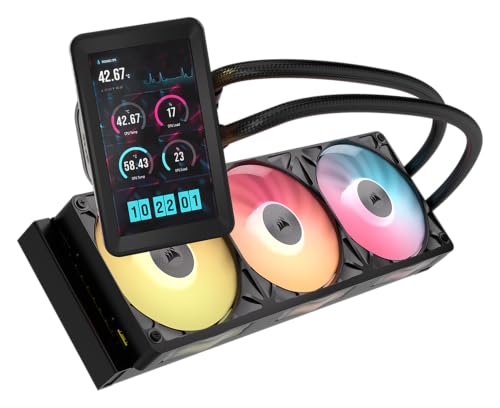
The Kraken Elite 360 from NZXT is the cooler for builders who want a showpiece. The pump cap holds a 2.72 inch IPS display with a 640 x 640 resolution that can show temperatures, GIFs and system information. The radiator is 360 mm and about 27 mm thick, the pump runs from about 1200 to 2800 rpm, and the RGB version uses F360 RGB Core fans reaching 2400 rpm. It supports AM5, AM4, LGA 1851, LGA 1700 and older Intel sockets, and has a six-year warranty.
Who it is for: showcase builds with a glass side panel, and people who like a sleek, software-controlled setup.
Pros
- Large, sharp display adds useful temperature readouts or a custom look.
- Strong pump and fan range for its slim radiator.
- Six-year warranty.
Cons
- Premium price tier, much of it paid for the display rather than cooling.
- Requires NZXT software for full control of the screen.
Best airflow-focused: Lian Li Galahad II Trinity Performance 360
The Galahad II Trinity Performance 360 is aimed at people who want to maximize cooling capacity without paying for a display. The radiator measures about 396 x 130 x 32 mm, the fans run up to 3000 rpm and move more than 100 CFM at their peak, and the pump spins up to 4200 rpm. It supports the same sockets as the others, and the pump caps are interchangeable. Fans at full speed are loud, so the real value lies in using lower speeds with a high ceiling in reserve.
Who it is for: overclockers and owners of hot 16-core or 24-core processors who want headroom.
Pros
- High airflow and pump speed give headroom for heavy workloads.
- Mid-thickness radiator fits many cases.
- Replaceable pump covers allow some styling.
Cons
- Peak fan noise is the loudest of this group.
- Different variants in the family share the name, so double-check the exact model you buy.
Best compact: Arctic Liquid Freezer III Pro 240
If your case supports only a 240 mm radiator, the 240 mm version of Arctic’s Pro model keeps the 38 mm radiator, the P12 Pro fans and the VRM fan in a smaller package. It is sufficient for eight-core processors such as the Ryzen 7 9800X3D and Core Ultra 5 chips and sits at a lower price tier than the 360 mm model. For 16-core chips the extra radiator area of a 360 mm size is worth having.
Who it is for: compact and mid-tower builds, quiet gaming PCs, and CPUs rated up to roughly 150 W of sustained draw.
Pros
- Same technology and warranty as the larger model.
- Lower price tier than the 360 mm version.
Cons
- Less cooling margin for 16-core and 24-core processors under all-core loads.
- Thick radiator still needs checking for case clearance.
The air-cooled alternative: Noctua NH-D15 G2
An AIO is not automatically better. The Noctua NH-D15 G2 is a large dual-tower air cooler with two 140 mm fans, and independent testing by Club386 on a Ryzen 7 9800X3D showed it holding temperatures in the same range as 360 mm liquid coolers, around the mid-seventies Celsius in a heavy Cinebench run. It has no pump to fail, no coolant to degrade and no leak risk, and it is easier to keep quiet. The downside is size and weight: it covers part of the memory area on some boards and needs a case with wide clearance.
Radiator size guide: match it to your processor
| CPU class | Example chips | Minimum radiator | Comfortable choice |
|---|---|---|---|
| 65 W six-core | Ryzen 5 9600X | Air cooler | 240 mm if you want it quiet |
| 120 W eight-core X3D | Ryzen 7 9800X3D, 9850X3D | 240 mm | 280 mm or 360 mm |
| 170 W sixteen-core | Ryzen 9 9950X3D | 280 mm | 360 mm |
| 250 W turbo, 24 cores | Core Ultra 7 270K Plus | 280 mm | 360 mm |
As a rule of thumb, aim for a radiator that can dissipate at least 1.3 times the sustained wattage you expect from the processor. A 360 mm radiator with good fans handles well above 250 W, so the choice between 240 mm and 360 mm is really about noise: a larger radiator lets the fans run slower for the same temperature.
How to choose a CPU water cooler
Check the case before anything else
Measure the radiator mount width and the combined thickness of radiator plus fans. A 38 mm radiator with 25 mm fans needs about 63 mm of room, and a top-mounted radiator also has to clear tall memory modules and the motherboard’s heatsinks. Front-mounted radiators avoid the clearance problem but may put the tubes in a visible spot. Look up your case manual for supported sizes and any top-clearance limits.
Check socket support
All the coolers above support AM5, AM4, LGA 1851 and LGA 1700. Confirm any mounting bracket requirements in the manual, and look for contact-frame options for Intel chips, since a flexing socket can leave a gap that raises temperatures.
Decide how much you care about noise
The largest source of noise in an AIO is the fans, followed by the pump. Wide RPM ranges and PWM control let you build a curve in which fans stay near silent at idle and ramp up gradually. Set the pump to a constant moderate speed instead of letting it hunt up and down, which causes an irritating pulsing sound.
Think about the lifespan
AIOs are sealed, and coolant slowly permeates through tubing over years. Most last five to seven years before cooling falls off noticeably, which is why the warranty length of six years from Arctic and NZXT is meaningful. Air coolers can outlast several PC builds.
Worked cost example
Say a 360 mm AIO draws 6 W from the pump and 12 W from three fans on average, so 18 W continuous across 3000 hours of use a year, which equals 54 kWh. At 0.15 per kWh that is about 8 a year. Electricity is a tiny factor, so the decision should rest on temperature, noise, fit and warranty rather than power.
Installation steps and why each matters
- Fit the backplate and mounting hardware first. Doing it before the board goes into the case avoids awkward angles. Use the bracket that matches your socket exactly.
- Mount the radiator with the tubes lower than or level with the pump where possible. This keeps air bubbles at the top of the radiator rather than inside the pump, which reduces gurgling and wear.
- Attach the fans in the intended airflow direction. Front or top radiators usually pull cool air through the radiator toward the inside of the case or exhaust it, depending on your overall airflow plan.
- Apply pre-applied paste or a pea-sized dot on the center of the CPU. Most AIOs come with paste already on the cold plate, so do not add more.
- Tighten the pump screws in a cross pattern, a little at a time. Uneven pressure leaves part of the heat spreader uncovered.
- Connect the pump to the CPU header or a dedicated pump header, and the fans to the fan headers. Set the pump to full speed or a fixed moderate speed in the BIOS.
- Run a stress test and watch temperature and noise. If temperatures jump instantly after load starts, reseat the cooler.
Common mistakes with AIO coolers
- Buying a 360 mm radiator without checking that the case supports its length, thickness and top clearance.
- Plugging the pump into a fan header that slows it down when temperatures are low.
- Leaving the plastic film on the cold plate. Read the manual for any protective film that must come off.
- Mounting the radiator as the highest point in the loop with the pump uphill, which traps air in the pump.
- Expecting liquid cooling to make a CPU run cold at idle. Temperatures at idle are similar to a good air cooler.
- Not cleaning dust from radiator fins. A dusty radiator quietly loses several degrees of cooling.
Maintenance and ownership realities
AIO coolers are sealed and need no coolant refills. What does wear out is the pump bearing, the fan bearings and the coolant itself over time. Keep the radiator clean with compressed air every few months, check the pump noise after a year or two, and keep the receipt for warranty claims. If you hear a rattle or the CPU temperature suddenly rises, check that the pump is spinning before blaming the paste. Replace the unit when idle temperatures rise by more than ten degrees without a clear cause.
Frequently Asked Questions
Is a water cooler better than an air cooler for a CPU?
Not always. A 360 mm AIO usually keeps a processor a few degrees cooler and fits cases that have little room for a tall heatsink. A top air cooler like the Noctua NH-D15 G2 can match it for eight-core chips and avoids pump failure, so choose liquid for the hottest processors and air for simple, quiet builds.
Which radiator size should I buy?
For an eight-core processor, a 240 mm or 280 mm radiator is enough. For a 16-core chip such as the Ryzen 9 9950X3D or a 250 W-class Intel chip, a 360 mm radiator gives quieter operation at the same temperature. Always confirm that your case supports the size you pick.
Will an AIO leak and ruin my PC?
Leaks are rare in current sealed coolers from established brands. Buying a recognized model with a long warranty and mounting the radiator properly keep the risk low. Avoid unbranded units with unclear warranties, and check the tubes for kinks during installation.
How long does an AIO last?
Most last between five and seven years before pump wear or coolant loss reduces performance. Models with six-year warranties, like Arctic’s and NZXT’s, indicate that the maker expects the cooler to reach that range, but it is not a guarantee.
Is an LCD screen on the pump worth it?
The screen does not improve cooling. It adds a monitoring display and a custom look. If you have a glass panel and enjoy the style, it can be worth it, but if you care only about temperature and noise, spend the money on a thicker radiator or better fans instead.
Do I need to replace the thermal paste on a new AIO?
No. Most AIOs ship with paste pre-applied to the cold plate and are designed for a single mounting. If you remove the cooler later, clean both surfaces with isopropyl alcohol and apply fresh paste.





Write Your Review
No reviews yet. Be the first to share your experience!