

Key takeaways
- Thermal paste: reapply every few years or any time you remove the cooler. A pea-sized dot is enough.
- Air coolers have fans as their only wear item; they are cheap to replace.
- AIO pumps and coolant have a finite life, so check the warranty length and note that tubes can limit placement.
- Heavy towers should be supported in transit. Remove them before shipping a built PC.
- Dust builds up on fins; clean them with compressed air every six months.
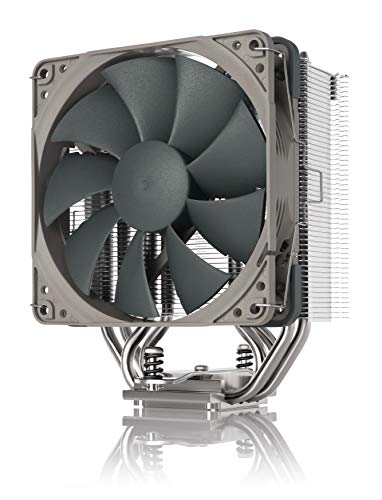
The best CPU cooler for most builds in 2026 is the Thermalright Peerless Assassin 120 SE, a dual-tower air cooler that handles mid-range chips for a small fraction of premium prices. For hot flagship processors or the quietest operation, the Noctua NH-D15 G2 is the air-cooling benchmark, and the Arctic Liquid Freezer III 360 is the strongest all-round liquid option. Choose by your processor’s power draw, your case’s clearance and your noise tolerance.
Our top picks

As an Amazon Associate we earn from qualifying purchases at no extra cost to you.
Quick Comparison of the Best CPU Coolers
| Pick | Type | Best for | Key dimension | Price tier |
|---|---|---|---|---|
| Thermalright Peerless Assassin 120 SE | Dual-tower air | Value for most CPUs | 155 mm tall | Budget |
| Noctua NH-D15 G2 | Dual-tower air | Quiet, high-power air | 168 mm tall | Premium |
| Arctic Liquid Freezer III 360 | 360 mm AIO | 200 W+ and overclocking | 360 mm radiator | Mid-range |
| DeepCool AK400 | Single-tower air | Entry-level builds | 155 mm tall | Budget |
| Noctua NH-L9x65 | Low-profile air | Small cases | 65 mm tall | Mid-range |
Best Overall Value: Thermalright Peerless Assassin 120 SE
Two heatsink towers, multiple heatpipes and two 120 mm fans give this cooler performance that reviewers frequently compare with far costlier models. It suits midrange Ryzen 5 and 7 processors and Core i5 or i7 chips comfortably. The trade-off is size: at roughly 155 mm tall it needs a wide enough case, and the front tower can crowd tall memory modules on some motherboards.
Best Premium Air Cooler: Noctua NH-D15 G2
This is the choice if you want air cooling that stays quiet under load. It uses a revised heatsink with eight heatpipes and two 140 mm fans, and Noctua backs it with a long warranty and complete mounting hardware for current Intel and AMD sockets. At around 168 mm tall it needs a large case, and memory clearance depends on the layout you choose. It costs several times more than a budget tower, so the gain is lower noise and headroom, not a dramatic temperature gap for average chips.
Best Liquid Cooler: Arctic Liquid Freezer III 360
A 360 mm all-in-one gives a large radiator surface, which suits processors drawing 200 W or more and sustained workloads like rendering. Arctic’s design includes a pump with an integrated fan for the motherboard’s voltage regulators, which helps in tight layouts. You need a case that supports a 360 mm radiator in the top or front, and you should plan on a pump that eventually wears out, typically after several years.
Best Budget Pick: DeepCool AK400
A single-tower design with one 120 mm fan covers a stock-power Core i5 or Ryzen 5 without excess noise. It is easy to fit around memory and weighs little. It will run hotter and louder than the dual-tower coolers when you push high-power chips.
Best for Small Cases: Noctua NH-L9x65
When the case only allows around 70 mm of cooler height, a low-profile model is the answer. Expect lower thermal capacity, so pair it with efficient processors and set a power limit in the BIOS if needed.
How to Choose a CPU Cooler
Match cooler capacity to processor power
| Processor power under load | Suitable cooler class |
|---|---|
| Up to 65 W | Stock or single-tower air |
| 65 to 125 W | Single-tower or entry dual-tower air |
| 125 to 200 W | Dual-tower air or 240 mm AIO |
| 200 W and up | High-end dual-tower air or 360 mm AIO |
Check clearance with simple arithmetic
Case makers list a maximum CPU cooler height. If a case allows 160 mm and the cooler is 155 mm, you have 5 mm to spare, which is fine. If the cooler is 168 mm, it will not close the side panel. For radiators, also account for fans: a 360 mm radiator about 27 mm thick plus fans about 25 mm thick needs close to 52 mm of vertical space at the top of the case, before accounting for motherboard components.
Confirm socket support
Current Intel desktop chips use LGA 1700 or LGA 1851 mounts and AMD uses AM5. Many coolers fit both, but older kits may need extra brackets. Check the manufacturer’s compatibility list for your exact socket.
Ownership Realities
- Thermal paste: reapply every few years or any time you remove the cooler. A pea-sized dot is enough.
- Air coolers have fans as their only wear item; they are cheap to replace.
- AIO pumps and coolant have a finite life, so check the warranty length and note that tubes can limit placement.
- Heavy towers should be supported in transit. Remove them before shipping a built PC.
- Dust builds up on fins; clean them with compressed air every six months.
Choosing a CPU Cooler Step by Step
Cooler shopping looks like a contest between brands, but most good decisions come from a few measurements and one honest question about noise. The order below avoids buying a cooler that will not fit or one that is far more than the processor needs.
- Find your processor’s sustained power. The advertised base power is often lower than what the chip draws under all-core loads. Look up the maximum sustained figure for your model, and decide whether you plan to overclock or raise power limits.
- Measure the case. Find the maximum cooler height in the case manual and measure from the CPU socket to the side panel if the manual is vague. For liquid coolers, check which radiator sizes the case supports and where they mount.
- Check memory and motherboard clearance. Large towers can overhang the nearest memory slot and the top graphics card slot. Tall memory modules may need a raised fan or low-profile kits.
- Confirm the socket. Make sure the mounting hardware fits your socket, and read about any extra brackets or backplate quirks for your motherboard.
- Decide your noise target. A quiet desk in a bedroom has different needs from a tower under a desk in a noisy office. Larger fans at lower speed are quieter at the same airflow.
- Weigh the maintenance appetite. Air coolers need little attention. Liquid coolers add a pump and coolant that will eventually reach end of life.
These six steps usually settle the air-versus-liquid question and the size class. After that, the Peerless Assassin 120 SE, NH-D15 G2, Liquid Freezer III 360, AK400 and NH-L9x65 each map cleanly to a situation.
Who Should Skip an Aftermarket Cooler
- You run a low-power processor on stock settings. Many efficient chips are happy with the cooler in the box, and a small upgrade changes noise more than temperature.
- Your case is extremely cramped. If height and radiator space are both scarce, a low-profile cooler or a chip with lower power is the only workable path, and forcing a large cooler in leads to problems.
- You never push the system. Web browsing and office work rarely load the processor for long. The extra headroom from a premium cooler would sit unused.
- You dislike the idea of liquid in your PC. The risk of leaks is low with a sealed unit, but if the idea bothers you, a top air cooler is an excellent alternative.
- Your problem is case airflow. If the case traps heat, a better cooler only moves heat to a hot interior. Fixing fans and cable clutter can drop temperatures more cheaply.
An honest look at the actual workload prevents spending on cooling that never gets used, and the money saved can go towards fans, a better case or faster memory.
Installation and Compatibility Checks
Prepare before mounting
Lay out the parts and read the manual. Remove the old cooler gently, twist it slightly to break the paste seal and clean old paste from the processor with isopropyl alcohol and a lint-free cloth. Check that the mounting kit matches your socket and that the backplate is oriented as the manual shows.
Fit memory and cables first when possible
Install memory and any tight cabling before a large tower goes on. Reaching around a big heatsink with screwdrivers is frustrating and can scratch the board.
Apply paste and tighten evenly
Use a pea-sized dot unless the cooler arrives with pre-applied compound. Tighten screws in a cross pattern a little at a time, so pressure spreads evenly. Stop when the screws bottom out, as overtightening can bend the board.
Orient the fans for the case airflow
Air should move from the front of the case toward the rear. On a tower, that means the fans push or pull air toward the rear exhaust. For a radiator, the top mount normally exhausts, while a front mount draws cool air in. Check the temperatures, because the right orientation depends on the case.
Set fan curves in the BIOS
Connect the cooler’s fan to the CPU fan header, then set a curve that ramps gently. A quiet idle with a measured ramp-up under load is more pleasant than sudden bursts of noise.
Scenario-Based Picks From the Coolers Above
The mid-range gaming build
The Thermalright Peerless Assassin 120 SE handles mid-range chips easily and keeps the budget focused on graphics. Check memory height before you buy.
The quiet workstation
The Noctua NH-D15 G2 suits a build where low noise matters during long sessions of rendering or compiling. Its size means a spacious case is a requirement.
The overclocker or high-power processor
The Arctic Liquid Freezer III 360 offers a large radiator surface for sustained loads. Confirm your case can take a 360 mm radiator and think about where tubes will route.
The entry-level build
The DeepCool AK400 is a tidy, easy-to-fit tower that handles a stock-power processor. It also leaves memory clearance in most cases.
The compact living-room PC
The Noctua NH-L9x65 fits where height is limited. Pair it with an efficient processor and use power limits to stay in a comfortable temperature range.
Maintenance, Lifespan and Upgrade Planning
- Watch idle and load temperatures. A slow upward drift across months signals dust, dried paste or a weakening fan.
- Clean fins and fans. Hold the fan blades still while using compressed air so they do not spin up beyond their speed rating.
- Replace paste when it dries. Several years of heat cycles can degrade the compound, and fresh paste often restores lost performance.
- Listen for bearing noise. A rattling or grinding fan should be replaced right away, as a stalled fan can cause the processor to throttle.
- Check an all-in-one pump periodically. Pump noise, rising temperatures or a drop in liquid temperature difference between hoses suggest decline.
- Keep mounting hardware. You may need it when you upgrade to a new socket generation.
A reasonable plan is to treat fans as consumables, to treat the heatsink as long-lived and to treat a liquid unit as something to review once its warranty is close to ending.
Troubleshooting Common Cooling Problems
| Symptom | Likely cause | What to try |
|---|---|---|
| Temperatures spike right after boot | Poor contact or protective film left on | Remove the cooler, check for film, reapply paste and remount |
| CPU fan runs loud at idle | Aggressive fan curve or high background load | Adjust the fan curve and check for background processes |
| Temperatures rise slowly over months | Dust or dried paste | Clean the heatsink and replace the paste |
| System shuts down under load | Overheating protection | Check mounting pressure, fan operation and pump function |
| Rattling from the cooler | Loose fan clips or worn bearings | Reseat the fan, secure the clips or replace the fan |
| Uneven temperatures between cores | Uneven mounting pressure | Remount, tightening screws in small steps in a cross pattern |
When symptoms appear suddenly, check whether a fan header got unplugged during other work in the case. It is a common and easily fixed cause.
Noise, Fan Curves and Case Airflow in Practice
Perceived noise depends on pitch and consistency as much as on volume. A steady low hum fades into the background, while a fan that constantly speeds up and slows down with every small load change draws attention. Smoothing the fan curve, so that speed responds to temperature over a few seconds instead of instantly, removes most of that irritation. Many motherboards offer a step-up delay or a response-time option for exactly this reason.
Case fans matter just as much as the cooler. Even the best tower struggles if warm air has nowhere to go. A balanced layout with a couple of intake fans at the front and one exhaust at the rear keeps pressure stable and dust manageable. Dust filters on intakes are worth cleaning monthly in a dusty home.
Finally, remember that the processor itself can be tuned. Lowering the power limit slightly, or enabling an efficiency mode, often cuts heat and noise noticeably with a small effect on everyday speed. For builders with compact cases or quiet goals, this is the cheapest cooling upgrade available.
More Questions Buyers Ask
Does a bigger cooler always mean lower temperatures?
Not always. Contact quality, fan design and case airflow all matter. A well-mounted mid-size cooler can beat a poorly mounted large one.
Should the cooler fan push or pull air through the fins?
Either arrangement works if the airflow follows the case direction. Adding a second fan in a push-pull layout can help slightly, but it also raises noise and may collide with memory.
Can I reuse the old thermal paste?
No. Once a cooler is removed, clean off the old compound and apply fresh paste. Old paste has air gaps that reduce heat transfer.
Is liquid cooling quieter than air?
Not necessarily. The pump adds its own noise, and radiator fans must still move air. A large air cooler with slow fans can be quieter in everyday use.
Do I need to power down before cleaning the cooler?
Yes. Turn off the computer, unplug it from the wall and wait a moment. Clean with the fans held still, and avoid vacuum cleaners, which can create static electricity.
Frequently Asked Questions
Is an AIO better than air cooling?
Not automatically. A high-end dual-tower air cooler can match or beat a smaller 240 mm AIO, with fewer failure points. A 360 mm AIO generally has more thermal headroom for processors above 200 W.
Do I need to replace the stock cooler?
Many mid-range processors ship with a cooler that is enough for stock settings but loud under load. An aftermarket tower usually lowers noise more than temperature for low-power chips.
How much thermal paste should I use?
A pea-sized amount at the center is the standard guidance. Too much can spill over the socket, and too little can leave edges uncovered.
Will a big air cooler block my RAM?
It can. Dual-tower coolers often overhang the first memory slot, so check the cooler’s stated memory clearance and the height of your modules, or choose low-profile RAM.
How long do CPU coolers last?
Air coolers can last a decade with fan replacements. AIOs typically come with warranties of three to six years, and pump or coolant issues are the most common end-of-life reason.
More from Amazon
Programs that pair well with the guide above. Offers and eligibility are set by Amazon and may change.
Free shipping on eligible items, Prime Video and more. Eligible new members can start with a free trial.
Start a Prime free trialAd-free music streaming. Eligible new subscribers can start with a free trial.
Try Music Unlimited freeA Prime membership for ages 18-24 with a trial period. Eligibility is set by Amazon.
See Prime for Young AdultsAudiobooks and podcasts to listen to on the go. Eligible new members can start with a free trial.
Try Audible freeAs an Amazon Associate we earn from qualifying purchases.





Write Your Review
No reviews yet. Be the first to share your experience!