

Key takeaways
- Buying by wattage claims alone. Rated capacities such as 280 W or 350 W come from different test methods; compare radiator thickness, fan airflow and independent noise-normalised reviews instead.
- Ignoring pump header placement. A pump on a motherboard header that follows a CPU fan curve can stall at idle; use a pump or always-on header.
- Forgetting radiator orientation. Tubes should leave the radiator at its lowest point or at the side when it is top-mounted, so air does not gather at the pump.
- Overlooking memory clearance. Tall RAM heatsinks can collide with a thick radiator and fan stack, especially in the 63 mm class.
- Paying for lighting you do not see. Solid side panels hide infinity mirrors and ARGB fans, so a plain-fan model delivers the same cooling for less.
The best AIO CPU cooler is the one whose radiator size matches your processor’s real power draw: a 240mm loop such as the ARCTIC Liquid Freezer III Pro 240 for chips up to roughly 150 W, a 280mm like the Liquid Freezer III Pro 280 for 150-220 W, and a 360mm like the Corsair Nautilus 360 RS or DeepCool LT720 above that. Choosing by wattage rather than by brand avoids both overspending and the thermal throttling that comes from an undersized radiator.
Our top picks


As an Amazon Associate we earn from qualifying purchases at no extra cost to you.
Quick picks by radiator size and CPU power
| Pick | Radiator | Best for | Key specs | Price tier |
|---|---|---|---|---|
| ARCTIC Liquid Freezer III Pro 240 | 240mm, 38 mm thick | Best 240mm overall | Fans 600-3000 rpm, VRM fan, 68 mm fan height | Budget to mid-range |
| Lian Li Galahad II Trinity 240 | 240mm | Looks and easy install | Pump around 3200 rpm, daisy-chained ARGB fans | Mid-range |
| ARCTIC Liquid Freezer III Pro 280 | 280mm, 38 mm thick | Best 280mm | 2x 140 mm fans, 400-2500 rpm, VRM fan | Mid-range |
| Corsair Nautilus 360 RS | 360mm, 27 mm thick | Simple mainstream 360mm | 3x RS120, 420-2100 rpm, 5-year warranty | Mid-range |
| MSI MAG CoreLiquid I360 | 360mm, 27 mm thick | Fast pump on a mid budget | Pump 3400 rpm, fans 500-2200 rpm | Mid-range |
| DeepCool LT720 | 360mm, 27 mm thick | High airflow, lower cost | 3x FK120, 500-2250 rpm, 85.85 cfm | Mid-range |
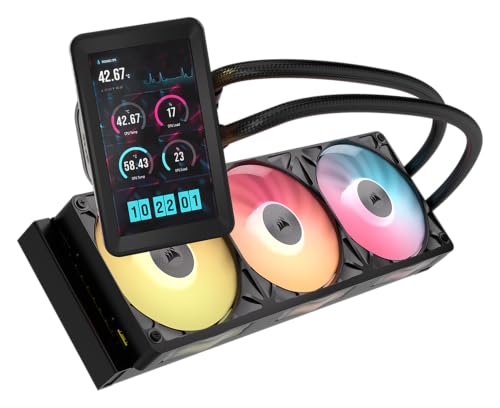
| NZXT Kraken Elite 360 | 360mm, 27 mm thick | Display and long warranty | 2.72-inch LCD, 6-year warranty | Premium |
Step 1: find your CPU’s real heat output
Manufacturers list a base power and a maximum turbo power for each processor, and the second number decides which AIO you need. Gaming-focused chips with big cache, such as most Ryzen X3D models, usually stay well under 150 W while gaming, so a 240mm loop is plenty. Mainstream Core i5 and Ryzen 5 parts typically peak between 120 and 180 W in all-core loads. Flagship Core Ultra 9, Core i9 and Ryzen 9 chips can pull 200 to 250 W or more in rendering, compiling or heavy multi-threaded workloads, which is where a 360mm radiator earns its place.
A practical rule used by many builders: a radiator should be able to shed roughly 1.3 times your sustained load without the fans exceeding about 60 percent speed. For a 125 W processor that means a 240mm AIO, for 200 W a 280mm or 360mm, and for 250 W a 360mm with good fans.
Worked example: sizing for a 170 W processor
Take a CPU with a 170 W maximum turbo power that you use for gaming and occasional video exports. Multiplying by 1.3 gives a 221 W target. A 240mm radiator with two 120mm fans typically has a comfortable ceiling in the 200 W region, so it works but runs its fans harder during exports. A 280mm or 360mm gives headroom at lower rpm. If your case supports 360mm and your budget allows, the larger radiator buys quieter operation for the same temperature; if not, the 280mm is the efficient middle step.
Best 240mm AIO: ARCTIC Liquid Freezer III Pro 240
ARCTIC’s Pro 240 uses a 38 mm thick aluminium radiator, fans that cover 600-3000 rpm and a pump-mounted VRM fan, with Intel LGA1851 and LGA1700 and AMD AM5 and AM4 support. Listed fan assembly height is about 68 mm, and the model number ACFRE00178A is useful for matching reviews. At the 240mm size it frequently outperforms rival 280mm loops with thinner radiators, according to roundups that normalise for noise.
Who it is for: mainstream builders with 65-150 W processors, and small cases that only take a 240mm radiator. Pros: low price for the cooling delivered, VRM fan, long warranty. Cons: thick radiator needs clearance, and fans are loud at maximum speed.
Best-looking 240mm: Lian Li Galahad II Trinity 240
The Galahad II Trinity 240 is a design-first loop with daisy-chained fans, a rotatable pump cap and a simple install. The pump is listed at about 3200 rpm, the block at roughly 74 x 74 x 69 mm, and it comes in black and white with ARGB or SL-INF fan options (model numbers GA2T24B, GA2T24W and GA2T24INB). It supports AM4, AM5, and Intel LGA1150 to LGA1700 and, in the SL-INF version, LGA1851. Radiator thickness differs by variant, so check the exact listing for your case.
Who it is for: white or themed builds where cable tidiness matters. Pros: attractive, easy cable routing, wide fan options. Cons: cooling is solid but not class-leading, and fan noise rises above roughly 1,800 rpm.
Best 280mm AIO: ARCTIC Liquid Freezer III Pro 280
The 280mm size is underrated: two large 140mm fans move more air at lower rpm than two 120mm fans, and many cases that cannot hold a 360mm radiator accept a 280mm. ARCTIC’s Pro 280 (ACFRE00179A for the non-RGB version and ACFRE00183A for A-RGB) uses a 38 mm radiator, 400-2500 rpm fans, a PWM pump, a VRM fan and a listed height of about 68 mm. It is compatible with AM4, AM5, LGA1700 and LGA1851.
Who it is for: 150-220 W processors in cases with 280mm mounts. Pros: large quiet fans, strong cooling per decibel. Cons: fewer cases support 280mm than 240mm or 360mm, and ARGB lighting is optional extra cost.
Best simple mainstream 360mm: Corsair Nautilus 360 RS
Corsair’s Nautilus 360 RS comes in plain and ARGB versions and is the easiest recommendation for builders who want a 360mm loop without iCUE complexity. The radiator is 27 mm thick, the tubing is 450 mm, the pump is Corsair’s FlowDrive 2S with a convex cold plate tuned for AMD processors, and three RS120 fans run 420-2100 rpm with up to roughly 72.8 cfm and 4.15 mmH2O. Corsair’s official pages list a five-year warranty, though some retailers print different terms. Check the box contents on the exact model for the newest Intel socket brackets.
Who it is for: mid-range gaming and productivity builds. Pros: widely available, sturdy fans, traditional PWM control without software. Cons: not the coolest or quietest at its price.
Best mid-range value 360mm with a fast pump: MSI MAG CoreLiquid I360
MSI’s CoreLiquid I360 is built around a 3400 rpm pump with a copper cold plate and dual-sided infinity mirror. The radiator is 394 x 120 x 27 mm, the three ARGB fans are 25 mm thick with a speed range of roughly 500-2200 rpm (retailers differ slightly) and about 70.7 cfm, and the warranty is three years. It supports AM4, AM5, LGA115X, LGA1200, LGA1700 and LGA1851.
Who it is for: MSI-themed builds and anyone who wants a quick pump response. Pros: low pump noise (around 20 dBA average per MSI), tidy styling. Cons: shortest warranty in this guide.
Best airflow for the money: DeepCool LT720
The DeepCool LT720 pairs a 402 x 120 x 27 mm radiator with three FK120 fluid-dynamic-bearing fans that reach 85.85 cfm and 3.27 mmH2O at up to 2250 rpm, with noise up to 32.9 dB(A). The pump spins at about 3100 rpm, tubes are 410 mm, the weight is roughly 1.86 kg and DeepCool offers a five-year warranty. Retailers list support for AM5, AM4, LGA1700, LGA1200 and, on some listings, LGA1851, so confirm the bracket before purchase.
Who it is for: airflow-minded builders with a mid-range budget. Pros: high fan airflow, simple infinity cap, five years of cover. Cons: fans are audible at peak, and branding is less prominent than larger rivals.
Best premium display loop: NZXT Kraken Elite 360
NZXT’s Kraken Elite 360 has a 2.72-inch 640 x 640 IPS screen, a Turbine pump rated 1,200-2,800 rpm, a 401 x 120 x 27 mm radiator and 420 mm braided tubing. The six-year warranty is the longest on this list, shared with the ARCTIC. CAM software handles the display, so plan on installing it.
Who it is for: builders who treat the PC as a display piece. Pros: bright screen, premium finish, long warranty. Cons: you are paying for the screen rather than for additional cooling.
240 vs 280 vs 360: what the numbers mean
| Size | Surface area vs 240mm | Typical sustained CPU load | Case requirement | Noise trend |
|---|---|---|---|---|
| 240mm | Baseline | Up to about 150 W | Two 120mm fan mounts | Louder on heavy loads |
| 280mm | Around 1.3x | About 150-220 W | Two 140mm mounts, less common | Quiet for the cooling |
| 360mm | Around 1.5x | 200-300 W | Three 120mm mounts | Lowest rpm at high loads |
These ranges are rules of thumb that depend on the fans, the radiator thickness and the case airflow. A 38 mm radiator with strong fans can stretch a smaller size by 20-30 W.
How to choose an AIO beyond radiator size
Check case support in this order
First confirm where the radiator will mount (top, front or side) and what radiator sizes that location accepts. Second, subtract fan thickness from the stated clearance. Third, verify that the top-mounted stack clears your RAM and motherboard heatsinks. Most compatibility lists on case manufacturers’ pages state the maximum radiator length and thickness separately.
Pump and tubing details
Tubing length matters when the radiator is far from the CPU. Short tubes, like 400 mm, restrict front-mount installations in full towers. Pump block size matters too, because wide blocks can interfere with tall RAM on some boards.
Software or no software
Plain PWM models like the Nautilus 360 RS, the Pro series from ARCTIC and the LT720 work through the motherboard’s fan headers. Display coolers rely on companion software, so a cooler that lives on a work PC with strict software policies may be better as a plain-PWM model.
Warranty as a proxy for confidence
Six-year coverage from ARCTIC, NZXT and Lian Li suggests the maker expects the pump to last; three-year terms, like those on MSI’s CoreLiquid I360, are common on budget lines. Warranty length matters for AIOs because pumps and coolant eventually degrade.
When an AIO is the wrong choice
If your CPU stays below 125 W and your case has room for a large air cooler, a quality tower cooler gives similar temperatures with no pump to fail. AIOs shine in small cases with limited cooler height, high-power CPUs, and builds where clearing RAM and the motherboard area is helpful. They are less attractive when you move a PC often, since a heavy radiator can stress hose connections, or when you want the lowest possible idle noise.
Installation and care checklist
- Install the CPU and RAM before the cooler, and test boot with the stock mounting plate fitted.
- Mount the radiator first, then the block, so tubing does not drag on the socket.
- Apply a pea-sized dot of paste if the cooler has no pre-applied compound, and tighten the screws in a cross pattern.
- Plug the pump into a dedicated pump header, or a fan header set to 100 percent.
- Set the fan curve in BIOS so fans stay low below 60 C and ramp gently above it.
- Inspect fans and fin stack for dust every six months, and watch for rising idle temperatures, which hint at pump or coolant problems.
Socket and platform compatibility notes
Intel’s LGA1851 platform for Core Ultra processors and the older LGA1700 platform share similar hole spacing, so most current AIOs cover both with the same bracket, and AMD’s AM5 reuses AM4 mounting dimensions. The detail that catches people out is the contact surface: AM5 processors have a thick heat spreader with a recessed area, so a cold plate with a convex profile, such as the one Corsair describes for the Nautilus RS family, can improve contact on some builds. Older sockets matter if you are upgrading: ARCTIC and Corsair focus on LGA1700 and newer, while the Lian Li Galahad II Trinity lists LGA115X and LGA1200 support in its mounting kit. If your board is a Threadripper or an enthusiast workstation board, read the compatibility list line by line, since large sockets need a bigger cold plate than the standard desktop block.
Noise versus temperature: a simple way to decide
Most buyers care about two numbers, the CPU temperature under load and how audible the cooler is at that load. A useful way to compare is to pick a target of around 35 dB(A), roughly the level of a quiet room with a PC running, and ask which cooler can hold the CPU below 80 C at that noise. Large 140mm fans on a 280mm radiator and thick 38 mm 360mm radiators usually meet that target at 200 W, while a 240mm loop with 120mm fans reaches the noise limit sooner and starts to throttle boost clocks.
The reverse calculation helps budget buyers. If your CPU rarely goes beyond 100 W, almost any 240mm loop stays below 60 percent fan speed in games, so spending extra for a 360mm gives little audible benefit. The money is better spent on case airflow or a faster SSD. If the same CPU is also used for long exports at 180 W, a 280mm or 360mm radiator keeps the fans inaudible in the background at the cost of a larger case and a higher price.
Five common AIO buying mistakes
- Buying by wattage claims alone. Rated capacities such as 280 W or 350 W come from different test methods; compare radiator thickness, fan airflow and independent noise-normalised reviews instead.
- Ignoring pump header placement. A pump on a motherboard header that follows a CPU fan curve can stall at idle; use a pump or always-on header.
- Forgetting radiator orientation. Tubes should leave the radiator at its lowest point or at the side when it is top-mounted, so air does not gather at the pump.
- Overlooking memory clearance. Tall RAM heatsinks can collide with a thick radiator and fan stack, especially in the 63 mm class.
- Paying for lighting you do not see. Solid side panels hide infinity mirrors and ARGB fans, so a plain-fan model delivers the same cooling for less.
Ownership: what wears first
On an AIO the first components to show age are fans, followed by the pump and the coolant itself. Fans with fluid-dynamic or magnetic-dome bearings keep quiet longer than sleeve bearings, which is why many premium models list those designs. Pumps run constantly, so a rising whine or a pump rpm reading that stutters is the signal to contact the manufacturer while the warranty is valid. Coolant loss is gradual and shows up as higher temperatures at the same fan speed over several years. Cleaning the radiator fins of dust with a soft brush or compressed air at low pressure every few months slows down all three problems.
Frequently Asked Questions
What size AIO do I need for my CPU?
Match radiator size to sustained CPU power: 240mm up to about 150 W, 280mm between 150 and 220 W, and 360mm above that. Add headroom if you overclock or use a small, poorly ventilated case.
Is an AIO better than an air cooler?
Not automatically. A premium dual-tower air cooler can match a 240mm AIO at much lower complexity, while 360mm AIOs hold an advantage on 250 W-class chips and fit awkward cases better.
Do AIO coolers need maintenance?
Sealed AIOs need little maintenance beyond cleaning dust from the radiator. Refillable models like the be quiet! Silent Loop 3 can be topped up, but most AIOs are replaced after the warranty ends.
How long do AIO coolers last?
Many last five to seven years. Pump wear, coolant permeation and fan wear are the usual causes of decline, so choose a longer warranty if you plan to keep the PC for years.
Which AIO is quietest?
Quietness depends on fan curves and radiator size. Larger radiators with 140mm fans, like the 280mm ARCTIC, can run slower for the same temperature, and a gentle fan curve matters more than the brand.
Can I mount an AIO radiator at the front of my case?
Yes, but the CPU loop then feeds warm air into the case and onto the graphics card. Top mounting as exhaust is usually better for GPU temperatures, while front mounting suits CPU-first builds.




Write Your Review
No reviews yet. Be the first to share your experience!