

Key takeaways
- 48 kHz mono: 48,000 x 3 = 144,000 bytes per second, about 8.6 MB per minute.
- 96 kHz mono: double that, about 17.3 MB per minute.
- An 8-track session for one hour at 48 kHz: 8 x 8.6 MB x 60 is about 4.1 GB.
- The same session at 96 kHz: about 8.3 GB, plus roughly twice the plug-in processing load.
For music production in 2026, the best sound card is a USB audio interface, and the strongest all-round picks are the Focusrite Scarlett 2i2 (4th Gen) for most home producers, the Audient iD14 MkII for the best preamps and monitoring in a bus-powered box, and the Universal Audio Volt 276 for producers who want built-in compression on vocals and guitars. If you track a full drum kit or a band, step up to the Focusrite Scarlett 18i20 (4th Gen). If you just need MIDI plus two inputs on a tight budget, look at the PreSonus Studio 24c or the Behringer UMC202HD.
A gaming-style sound card is the wrong tool for production work. Producers need low-noise microphone preamps, instrument inputs, balanced monitor outputs, stable drivers and low round-trip latency. This guide explains which specifications matter for those jobs, gives thresholds for choosing channel counts, and names eight interfaces with the buyer each one suits and the buyer who should skip it.
Quick answer: match the interface to your session
| What you record | Inputs you need | Good fit |
|---|---|---|
| Beats, synths, occasional vocal | 1 to 2 mic/line | Scarlett 2i2 (4th Gen), Behringer UMC202HD |
| Vocals plus guitar or keys at once | 2 mic/instrument | Audient iD14 MkII, Universal Audio Volt 276 |
| Hardware synths and drum machines with MIDI | 2 to 4 line plus MIDI | Scarlett 4i4 (4th Gen), PreSonus Studio 24c, Arturia MiniFuse 2 |
| Full drum kit or live band | 8 or more mic inputs | Scarlett 18i20 (4th Gen), Audient iD14 MkII plus ADAT preamp |
How we chose
This list is research-based. We compared manufacturer specification sheets with the shortlists that appear most often in 2026 buyer guides, then kept products that are current, widely supported, and distinct in role. We did not run bench measurements and do not claim to. Where two sources disagreed on a figure, such as the bit depth of larger interfaces in one brand family, we either used the manufacturer’s value or described the class instead of the number.
The criteria that decided placement:
- Preamp quality and gain. A clean preamp with at least 55 dB of gain handles most condenser and dynamic microphones. Low-output dynamic and ribbon microphones need more.
- Input and output count for your actual sessions. Count simultaneous sources, not total gear owned.
- Converter performance. Dynamic range figures of 110 dB or more on inputs are normal now. Differences between current interfaces are small compared to room, microphone and performance.
- Sample rate and bit depth. 24-bit is the production standard. 44.1 or 48 kHz is the practical session rate. 96 kHz helps with some plug-in processing and sound design. Higher rates mostly cost drive space and CPU.
- Latency tools. Direct monitoring, driver stability and loopback matter more than any marketing number.
- Expansion. MIDI ports, ADAT optical input and a USB hub add value only if you will use them.
Spec comparison table
| Model | I/O | Max rate | Preamps | Notable features |
|---|---|---|---|---|
| Focusrite Scarlett 2i2 (4th Gen) | 2 in / 2 out | 24-bit/192 kHz | 2, up to 69 dB gain | Auto Gain, Clip Safe, Air mode; 116 dB input and 120 dB output dynamic range |
| Audient iD14 MkII | 10 in / 6 out | 24-bit/96 kHz | 2 console-style, 58 dB analog plus 10 dB digital | ADAT optical input, dual headphone outputs, JFET instrument input; 121 dB input and 126 dB output dynamic range |
| Universal Audio Volt 276 | 2 in / 2 out | 24-bit/192 kHz | 2 with Hi-Z | Analog 76-style compressor, vintage preamp mode |
| Focusrite Scarlett 4i4 (4th Gen) | 4 in / 4 out | 24-bit/192 kHz | 2 | MIDI in and out, loopback-friendly routing |
| Focusrite Scarlett 18i20 (4th Gen) | 8 in / 10 out per maker listing | 24-bit/192 kHz | Multiple, with expansion | For larger sessions |
| PreSonus Studio 24c | 2 in / 2 out | 24-bit/192 kHz | 2 mic/instrument/line | MIDI, front-panel metering |
| Arturia MiniFuse 2 | 2 in / 2 out | 24-bit/192 kHz class | 2 combo XLR/TRS, 56 dB gain | MIDI in/out, USB hub port, 48 V phantom, 5-year warranty |
| Behringer UMC202HD | 2 in / 2 out | 24-bit/192 kHz | 2 Midas-designed | Metal chassis, direct monitoring |
Information-gain element 1: size the interface with a channel plan
Do not buy by the biggest input count. Write down the largest session you will record in the next year, then count simultaneous sources.
| Session | Mic inputs | Line or instrument inputs | Total |
|---|---|---|---|
| Singer-songwriter: vocal mic, acoustic guitar mic | 2 | 0 | 2 |
| Producer: vocal mic, guitar DI, stereo synth | 1 | 3 | 4 |
| Small drum kit: kick, snare, two overheads | 4 | 0 | 4 |
| Full kit: kick, snare, three toms, hi-hat, two overheads, room | 9 or more | 0 | 9 or more |
The rule: choose an interface with at least your plan, plus one spare. A two-input interface is correct for the first two rows. The producer row fits a 4-input unit such as the Scarlett 4i4. The full kit exceeds what any two-preamp box can do, and you need either a unit with many preamps or an ADAT expansion path. The Audient iD14 MkII has an optical ADAT input, which can add eight more channels from an external preamp unit, and that is its main advantage over most two-input boxes.
Information-gain element 2: how much disk and CPU your sample rate costs
Uncompressed audio size is easy to calculate: sample rate times bytes per sample times channels. At 24-bit, each sample is 3 bytes.
- 48 kHz mono: 48,000 x 3 = 144,000 bytes per second, about 8.6 MB per minute.
- 96 kHz mono: double that, about 17.3 MB per minute.
- An 8-track session for one hour at 48 kHz: 8 x 8.6 MB x 60 is about 4.1 GB.
- The same session at 96 kHz: about 8.3 GB, plus roughly twice the plug-in processing load.
That is why a 24-bit/96 kHz maximum, as on the Audient iD14 MkII, is no real limitation for typical production. Most sessions run at 44.1 or 48 kHz, and the extra 192 kHz ceiling on other interfaces is an option you will rarely use.
Best sound cards for music production: the shortlist
Best all-rounder: Focusrite Scarlett 2i2 (4th Gen)
Spec line: 2 in / 2 out · 24-bit/192 kHz · USB-C · up to 69 dB preamp gain · 116 dB input and 120 dB output dynamic range · Auto Gain · Clip Safe · Air mode.
The 2i2 is the default recommendation in most 2026 guides. Two combo inputs cover a vocal mic plus a guitar, or a stereo synth. Auto Gain sets a level for you from a short test performance. Clip Safe lowers the gain in real time when peaks approach distortion. Air mode adds a presence lift that suits vocals and acoustic guitar. These features speed up a session for beginners and help experienced producers work quickly.
Best for: bedroom producers who record vocals, guitar and synths one or two sources at a time.
Skip if: you need MIDI ports or more than two inputs. Look at the 4i4 instead.
- Pros: broad software support; generous gain; helpful level-setting tools.
- Cons: no MIDI; only two inputs; the 192 kHz ceiling is rarely useful.
As an Amazon Associate we earn from qualifying purchases at no extra cost to you.

Best preamps and monitoring: Audient iD14 MkII
Spec line: 10 in / 6 out · 24-bit/96 kHz · USB-C bus power · 2 Audient console-style preamps, 58 dB analog gain plus 10 dB digital gain · JFET instrument input · ADAT optical input · dual headphone outputs · 121 dB input and 126 dB output dynamic range · no MIDI I/O.
The iD14 MkII is a step up in build quality and monitoring. Dual headphone outputs make two-person tracking easy, and the ADAT optical input is the cheapest route to eight additional preamps through an outboard unit. The 96 kHz ceiling is lower than some competitors, but as the file-size calculation above shows, that rarely matters.
Best for: producers who want a clean sound, two monitoring paths and a future expansion path.
Skip if: you need MIDI ports for hardware synths. You will need a separate MIDI interface.
- Pros: strong preamps; ADAT expansion; dual headphone outputs; very high published dynamic range.
- Cons: no MIDI; premium-leaning price tier; 96 kHz maximum.

Best for vocals and guitar with character: Universal Audio Volt 276
Spec line: 2 in / 2 out · 24-bit/192 kHz · USB-C · 2 preamps with Hi-Z · analog 76-style compressor · vintage preamp mode.
The Volt 276 adds hardware compression modeled on a classic design before the signal reaches the converters. That is useful when recording dynamic vocals or bass, because it evens out peaks at the source. The vintage preamp mode adds a warmer tone on demand. It is more opinionated than the Scarlett, which is precisely why some producers prefer it.
Best for: singers, rappers and guitarists who want a finished, compressed tone while tracking.
Skip if: you prefer an entirely neutral signal and compress later in the mix. The Scarlett or the Audient is a better fit.
- Pros: onboard compression; vintage mode; Hi-Z instrument input.
- Cons: only two inputs; no MIDI; tone coloration is a choice you cannot always undo.

Best for hardware synths with MIDI: Focusrite Scarlett 4i4 (4th Gen)
Spec line: 4 in / 4 out · 24-bit/192 kHz · 2 mic preamps · MIDI in and out · USB-C.
The 4i4 is the sensible step up from the 2i2 when you have a drum machine, a synthesizer or a sound module. The extra line inputs and outputs allow a stereo hardware source plus a mic, and the MIDI ports remove the need for a separate adapter. The extra outputs also allow you to send signals to an outboard processor.
Best for: electronic producers with hardware gear and one or two microphones.
Skip if: you only use software instruments and one microphone. The 2i2 has the same preamps for less.
- Pros: MIDI; extra I/O; same preamp family as the 2i2.
- Cons: only two mic preamps; larger desk footprint.

Best for band and drum recording: Focusrite Scarlett 18i20 (4th Gen)
Spec line: 8 in / 10 out according to the maker’s listing · 24-bit/192 kHz · rack-style, multi-channel design for larger sessions.
The 18i20 is the pick when the channel plan above reaches six or more simultaneous sources. It lets you record a drum kit and a bass line in a single pass, and it gives you multiple outputs for headphone mixes or outboard gear. It is more than most solo producers need.
Best for: small studios, rehearsal-room recording and drum tracking.
Skip if: you record mostly alone. The extra channels cost desk space and money you will not use.
- Pros: many inputs and outputs; flexible routing; same family software.
- Cons: larger and more expensive tier; needs more setup; overkill for solo work.

Best budget with MIDI and clear metering: PreSonus Studio 24c
Spec line: 2 in / 2 out · 24-bit/192 kHz · 2 mic/instrument/line inputs · MIDI in and out · front-panel metering · USB-C.
The Studio 24c is a lower-cost way to get two inputs, MIDI and straightforward meters. It does not offer the automatic level tools of the newest Scarlett or the console-style preamps of the Audient, but it covers the basics and includes a software bundle with a recording application.
Best for: beginners with a synth or keyboard who need MIDI without paying for a bigger interface.
Skip if: you need the cleanest preamps or the most gain for low-output microphones.
- Pros: MIDI ports; clear meters; lower entry tier.
- Cons: fewer smart features; preamps are good rather than class-leading.

Best for MIDI gear and a USB hub: Arturia MiniFuse 2
Spec line: 2 in / 2 out · 2 combo XLR/TRS inputs · 56 dB gain · 48 V phantom power · 5-pin MIDI in and out · USB hub port · 5-year warranty.
The MiniFuse 2 is small and adds two practical extras: MIDI connections and a USB hub port that lets you plug in a controller or drive without using a second computer port. The five-year warranty is longer than many rivals.
Best for: compact desks with a MIDI keyboard and a laptop with few ports.
Skip if: you need more than 56 dB of gain for a quiet dynamic microphone.
- Pros: MIDI; USB hub port; long warranty; compact.
- Cons: moderate gain ceiling; less brand ecosystem than Focusrite.
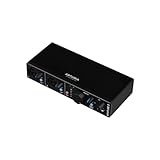
Best low-cost starter: Behringer UMC202HD
Spec line: 2 in / 2 out · 24-bit/192 kHz · 2 Midas-designed preamps · metal chassis · direct monitoring.
The UMC202HD is the cheapest tier that still delivers two XLR-capable preamps and a rugged body. It will not match the Audient on noise or features, but it covers vocal and instrument recording for a very low outlay.
Best for: students, first-time producers and backup interfaces.
Skip if: you record very quiet sources such as ribbon microphones, or you want automatic level tools.
- Pros: lowest cost tier; rugged; two preamps.
- Cons: fewer extras; no MIDI; basic software bundle.

Features that matter for production, and those that do not
Latency: the practical numbers
Round-trip latency depends mostly on your buffer size. At 48 kHz, a buffer of 128 samples lasts 128 divided by 48,000, about 2.7 milliseconds in each direction. Round trip, including conversion overhead, usually lands a few milliseconds above double that. A buffer of 64 samples halves the buffer delay but raises the load on your CPU. For virtual instruments played from a keyboard, aim for 128 samples or below. For mixing, raise the buffer to 512 or 1,024 to save CPU.
Direct monitoring
Direct monitoring sends your input signal straight to your headphones without passing through your computer. It removes the delay entirely when tracking vocals or guitar. All eight interfaces above provide a way to do this, but the controls differ. Check how the interface handles stereo direct monitoring if you want to hear a mono mic centered in both ears.
Phantom power safety
Condenser microphones need 48 V phantom power. Turn it off before connecting or disconnecting a microphone, and turn the monitor volume down. Many ribbon microphones can be damaged by phantom power in the wrong circumstances, such as a faulty cable. Read the microphone’s manual before engaging it.
Features to ignore
- 192 kHz marketing. You will almost never need it.
- Software bundles as the deciding factor. Bundled plug-ins and DAW editions are nice, but you can replace them later.
- Loopback, unless you stream. It is useful for streaming and podcasting, rarely for music tracking.
How to decide in four questions
- How many sources at once? Two or fewer: 2i2, iD14 MkII, Volt 276, Studio 24c, MiniFuse 2 or UMC202HD. Three to four: 4i4. Six or more: 18i20.
- Do you need MIDI ports? Yes: 4i4, Studio 24c or MiniFuse 2. No: all others.
- Do you want built-in tone shaping? Yes: Volt 276. No: the Scarlett or Audient.
- Do you plan to expand? Yes: iD14 MkII with ADAT, or the 18i20.
Best for converter quality and clear metering: MOTU M2
Spec line: 2 in / 2 out · ESS Sabre32 Ultra DAC · 120 dB output dynamic range as quoted by the maker · USB-C · 5-pin MIDI in and out · color level meters · loopback driver.
The M2 is a compact desktop box that spends its budget on conversion and on a bright level display. The meter screen shows input and output levels at a glance, which makes gain setting quick when you track alone. Its software loopback routes playback into the inputs, and the maker lists very low round-trip latency at small buffer sizes. Sound is neutral, so any color comes from your microphone and plug-ins.
Best for: producers who want a clean, transparent two-input interface with MIDI and a readable display. Skip if: you need a second headphone output or more than two inputs. Look at the iD14 MkII or the M4.
Pros: neutral conversion; useful meters; MIDI ports; loopback. Cons: one headphone output; no onboard tone shaping; software mixer needs a short learning curve.

Best for four-input routing: MOTU M4
Spec line: 4 in / 4 out · 2 mic/instrument combo inputs plus 2 line inputs · 4 balanced outputs · ESS Sabre32 Ultra DAC · MIDI in and out · one headphone output · USB-C.
The M4 doubles the M2 layout: two mic preamps plus two line inputs on the rear, and four balanced outputs for monitors or an outboard processor. It keeps the same converters and the same bright meter display, so it suits a producer who has outgrown two inputs but does not want the bulk of an 8-preamp rack unit. The extra line inputs fit a stereo synth or a drum machine.
Best for: electronic producers with a stereo hardware source, a microphone and a MIDI keyboard. Skip if: you need more than two microphone preamps. Tracking a drum kit takes a larger box.
Pros: four inputs and outputs; MIDI; neutral sound; compact. Cons: only two mic preamps; single headphone output; no ADAT expansion.
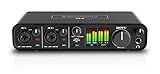
Best four-input value with two headphone outputs: Audient EVO 8
Spec line: 4 in / 4 out · 4 XLR/line combo inputs plus a front instrument input · up to 58 dB gain · 24-bit/96 kHz · two headphone outputs · Smartgain · loopback · no MIDI.
The EVO 8 brings the EVO family idea, fast setup through Smartgain, to a four-input body. The rear combos accept microphones or line sources, and a front instrument input handles guitar or bass without a separate DI. Two headphone outputs let a performer and an engineer listen at the same time. Maker figures put dynamic range near 113 dB, which is fine for home tracking.
Best for: small bands, podcasters with two guests, and producers who record more than two sources at once on a mid-range budget. Skip if: you need MIDI ports or sample rates above 96 kHz.
Pros: four inputs; two headphone outputs; quick level setting; loopback. Cons: no MIDI; 96 kHz ceiling; fewer tone options than Universal Audio units.

Best entry-level vintage color: Universal Audio Volt 2
Spec line: 2 in / 2 out · 24-bit/192 kHz · USB-C · vintage preamp mode modeled on a classic tube design · MIDI in and out.
The Volt 2 is the plainer sibling of the Volt 276: it keeps the switchable vintage preamp mode but drops the compressor. Turn the mode on and the preamp adds a warmer, slightly denser tone to vocals, guitar and bass. Leave it off for a flat signal. The MIDI ports mean a keyboard or drum machine plugs in without an adapter.
Best for: beginners who want a little analog-style color and MIDI at an entry-level tier. Skip if: you want built-in compression at the source. Step up to the Volt 276.
Pros: vintage mode; MIDI; compact; entry-level tier. Cons: two inputs only; no compressor; color is a taste choice.
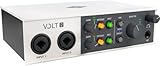
Best for compression on four channels: Universal Audio Volt 476
Spec line: 4 in / 4 out · 24-bit/192 kHz · USB-C · analog 76-style compressor · vintage preamp mode.
The Volt 476 extends the Volt 276 idea to a four-channel body. The analog 76-style compressor sits before the converters, so peaks are evened out while you record, and the vintage mode can be switched on per session. That makes it a practical choice for a producer who tracks vocals and bass together and wants a finished tone with less mix work.
Best for: vocalists, bass players and rappers who want hardware-style compression while tracking two to four sources. Skip if: you prefer a neutral signal and compress later in the mix. Choose the M4 or a Scarlett.
Pros: onboard compressor; four channels; vintage mode. Cons: color and compression are baked into the recording; check the maker sheet for exact gain and MIDI details; mid-range tier.

Best low-cost four-input box with MIDI: Behringer UMC404HD
Spec line: 4 in / 4 out · 4 Midas-designed preamps · 24-bit/192 kHz · MIDI in and out · metal chassis · direct monitoring.
The UMC404HD is the lowest-cost way to get four mic preamps and MIDI in one unit. It records a small band or a stereo drum setup without much fuss, and a rugged body suits a rehearsal room. The preamps are fine for typical condenser and dynamic microphones, but noise rises on very quiet sources, so use close miking and keep gain moderate.
Best for: students, rehearsal-room recordists and bedroom producers who need four microphone inputs at an entry-level tier. Skip if: you use a quiet ribbon or low-output dynamic microphone or want automatic level tools.
Pros: four mic preamps; MIDI; sturdy; low cost tier. Cons: basic software bundle; no loopback or auto gain; noisier than premium units on quiet sources.

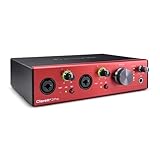
Best premium bus-powered upgrade: Focusrite Clarett+ 2Pre
Spec line: 10 in / 4 out · USB-C bus power · 2 Clarett mic preamps with Air mode · 24-bit/192 kHz class · digital inputs for external preamp expansion.
The Clarett+ 2Pre is the step up from the Scarlett line, built around two Clarett preamps with a selectable Air mode that adds presence. Ten inputs include digital connections that let you add an external preamp unit later, and the bus-powered design keeps the setup laptop-friendly. It is more than most beginners need but gives a long upgrade path.
Best for: producers who want better preamps and conversion than a Scarlett and a path to more channels later. Skip if: you are on an entry-level budget. The 2i2 or the UMC202HD cover simple sessions.
Pros: strong preamps; Air mode; expansion path; bus power. Cons: premium tier; two mic preamps; features exceed beginner needs.
All 15 interfaces side by side
Use this table to filter by input count and tier before reading the individual sections. Tiers are relative: entry-level, mid-range or premium within current audio interfaces.
| Model | I/O | Max rate | Tier | Main strength |
|---|---|---|---|---|
| Focusrite Scarlett 2i2 (4th Gen) | 2 in / 2 out | 24-bit/192 kHz | Mid-range | All-round, up to 69 dB gain |
| Audient iD14 MkII | 10 in / 6 out | 24-bit/96 kHz | Mid-range | Monitoring, ADAT expansion |
| Universal Audio Volt 276 | 2 in / 2 out | 24-bit/192 kHz | Mid-range | Compressor and vintage mode |
| Focusrite Scarlett 4i4 (4th Gen) | 4 in / 4 out | 24-bit/192 kHz | Mid-range | MIDI and extra line I/O |
| Focusrite Scarlett 18i20 (4th Gen) | 18 in / 20 out by model name | 24-bit/192 kHz | Premium | Drums and band sessions |
| PreSonus Studio 24c | 2 in / 2 out | 24-bit/192 kHz | Entry-level | MIDI and meters |
| Arturia MiniFuse 2 | 2 in / 2 out | 24-bit/192 kHz class | Entry-level to mid-range | MIDI, USB hub port |
| Behringer UMC202HD | 2 in / 2 out | 24-bit/192 kHz | Entry-level | Lowest-cost XLR input |
| MOTU M2 | 2 in / 2 out | Up to 192 kHz | Mid-range | Neutral sound, meters, MIDI |
| MOTU M4 | 4 in / 4 out | Up to 192 kHz | Mid-range | Four-input routing, MIDI |
| Audient EVO 8 | 4 in / 4 out | 24-bit/96 kHz | Mid-range | Two headphone outputs |
| Universal Audio Volt 2 | 2 in / 2 out | 24-bit/192 kHz | Entry-level | Vintage mode, MIDI |
| Universal Audio Volt 476 | 4 in / 4 out | 24-bit/192 kHz | Mid-range | Compression on four channels |
| Behringer UMC404HD | 4 in / 4 out | 24-bit/192 kHz | Entry-level | Four preamps with MIDI |
| Focusrite Clarett+ 2Pre | 10 in / 4 out | 24-bit/192 kHz class | Premium | Better preamps, expansion |
Thresholds that separate the interface classes
Most buying mistakes come from crossing a threshold without noticing. These numbers turn the shortlist into a decision.
- One to two simultaneous sources: a two-input unit is enough. This covers the 2i2, Volt 2, Volt 276, M2, MiniFuse 2, Studio 24c, UMC202HD and iD14 MkII.
- Three to four sources at once: choose a four-input unit such as the 4i4, M4, EVO 8, Volt 476 or UMC404HD. Count microphones separately from line sources, because only two of the four inputs on the 4i4 and M4 are microphone preamps.
- Five or more microphones: you need eight preamps or an ADAT path. The 18i20 provides them in one box, and the iD14 MkII or Clarett+ 2Pre can grow through an external preamp unit.
- Preamp gain: 55 dB or more suits most microphones. Aim for at least 60 dB if you use a low-output dynamic or ribbon microphone, and keep a 10 dB margin.
- Two people listening while tracking: pick a model with two headphone outputs, such as the iD14 MkII or EVO 8.
- Hardware synths and drum machines with 5-pin ports: pick an interface with MIDI in and out, such as the 4i4, M2, M4, Volt 2, MiniFuse 2, Studio 24c or UMC404HD.
- Sample rate: 48 kHz is the practical default. Pay for 192 kHz only if you work in sound design or film post work that requires it.
If two models both pass these thresholds, choose by workflow: neutral converters and meters point to the MOTU units, quick setup points to Audient, and tone shaping points to Universal Audio.
Frequently asked questions
Do I need an audio interface for music production?
If you only program software instruments and use headphones, a basic sound card can work. An interface becomes essential when you record a microphone or instrument, or need low-latency monitoring.
Is a gaming sound card good for recording music?
Not really. Gaming cards offer a 3.5 mm mic input and surround features. Music production needs XLR preamps, phantom power, instrument inputs and balanced outputs, which interfaces provide.
How many inputs do I need?
Count the most sources you will record at the same moment, then add one. Two inputs cover singer-songwriters. Drum kits need eight or more.
Is 24-bit/192 kHz better than 24-bit/96 kHz?
Not in any way you will hear on a typical session. The 192 kHz rate doubles file size and CPU load. Most producers work at 44.1 or 48 kHz.
What is ADAT and do I need it?
ADAT is an optical connection that carries up to eight digital audio channels. You need it only if you plan to add an external preamp unit to expand the interface.
Do I need MIDI ports on my interface?
Only if you use hardware synths, drum machines or sound modules that have 5-pin MIDI. USB keyboards and controllers connect directly to the computer and do not need them.
Should I buy a bus-powered interface?
Yes, for a laptop-based setup. USB bus power is enough for two-input interfaces. Larger interfaces such as the 18i20 class usually need external power.
How much preamp gain is enough?
About 55 dB covers most condenser and dynamic microphones. Quiet dynamic microphones used for soft vocals may need more, so check the microphone’s sensitivity before buying a model with a lower gain ceiling.
Bottom line
For most producers, the Focusrite Scarlett 2i2 (4th Gen) is the safe, flexible choice. The Audient iD14 MkII is the better buy if monitoring and expansion matter. The Universal Audio Volt 276 suits those who want compression at the source. The 4i4, Studio 24c and MiniFuse 2 add MIDI for hardware setups, the 18i20 handles full-band sessions, and the UMC202HD is the lowest-cost route to a usable studio input. Count your simultaneous sources first, then buy for that number.
More from Amazon
Programs that pair well with the guide above. Offers and eligibility are set by Amazon and may change.
Free shipping on eligible items, Prime Video and more. Eligible new members can start with a free trial.
Start a Prime free trialAd-free music streaming. Eligible new subscribers can start with a free trial.
Try Music Unlimited freeA Prime membership for ages 18-24 with a trial period. Eligibility is set by Amazon.
See Prime for Young AdultsAudiobooks and podcasts to listen to on the go. Eligible new members can start with a free trial.
Try Audible freeAs an Amazon Associate we earn from qualifying purchases.






Write Your Review
No reviews yet. Be the first to share your experience!