

Key takeaways
- Pros: Wide impedance range, front-of-desk control module, strong noise floor, drivers that are mature by Creative’s standards.
- Cons: Full-height card, the control software is bulky, and the benefit is small with efficient headphones.
For most desktop buyers who want a real upgrade over motherboard audio, the Creative Sound Blaster AE-7 is the best all-around internal sound card, the Creative Sound Blaster AE-9 is the pick for high-impedance headphones and creator work, the Creative Sound BlasterX AE-5 Plus suits RGB builds, and the Creative Sound Blaster Audigy FX Pro or ASUS Xonar SE are the sensible entry-level choices. Before you spend anything, though, know this: a modern motherboard codec is already good enough for speakers and most headphones, so a card only pays off in a few specific situations.
Do you actually need an internal sound card in 2026?
Many current motherboards ship with a Realtek codec in the ALC1220 to ALC4080 class, and the audible difference between those and a mid-range card is small with efficient, low-impedance headphones. A card earns its slot in four situations: you own headphones rated at 150 ohms or higher, you hear electrical noise (hiss, GPU whine, or buzz) from the front-panel jack, you need discrete analog surround or optical output to a receiver, or you want a dedicated control module with a microphone input and physical volume control.
If none of those apply, a better pair of headphones will improve your sound more than any card. If one or more do, the guide below shows which class of card matches, with concrete thresholds rather than vague promises.
How we chose
This guide is built from research, not from bench work. We compared manufacturer specification sheets, driver and operating-system support notes, and the criteria that recur in 2026 buyer roundups. Each card was judged on seven things: interface and slot fit, signal-to-noise or dynamic range rating, DAC class, headphone amplifier impedance range, input and output set, bracket size, and driver maturity. Where a spec could not be confirmed from a manufacturer source, the card is described by class and the figure is marked as listed in roundups. Decibel ratings are manufacturer claims, so we treated gaps of two or three decibels as ties and ranked mainly on amplifier range, outputs, fit, and software maturity.
The criteria that matter, with thresholds
Signal-to-noise and dynamic range
Manufacturers quote SNR or DNR in decibels. A figure under about 110 dB is roughly motherboard-codec territory. Between 116 and 122 dB is a clear step up in noise floor. At 127 dB and above you are paying for headroom that matters mainly with sensitive in-ear monitors, studio work, or very quiet listening rooms. Because these are manufacturer figures measured under their own conditions, treat differences of 2 to 3 dB as noise, not as a ranking.
Headphone amplifier range
The rated impedance range tells you what the amp is designed to drive. Up to 300 ohms covers nearly all gaming and consumer headphones. A 600-ohm rated amp is the threshold for planar-magnetic and studio-grade dynamic headphones that need more voltage swing. A card whose amp is rated lower than your headphones will still play, but it can run out of volume or sound thin and strained on dynamic peaks.
Interface and bracket
Every card in this guide uses a PCI Express slot, and an x1 slot is sufficient. If you are building into a small-form-factor case, confirm that the card ships with, or is available with, a low-profile bracket. The Audigy FX Pro and Xonar SE are listed as half-height compatible; the larger AE-series cards are designed as full-height cards.
Outputs and inputs
Count what you will really plug in. Optical output lets you feed a soundbar or receiver. Discrete 5.1 or 7.1 analog outputs matter only if you have a surround speaker set with separate analog inputs. A desktop control module is useful for fast volume and mic control, and the AE-9 and AE-7 include one.
Drivers and operating system
Creative cards ship with a control application for Windows; support on Linux is limited and generally community-driven, so Linux users should treat any internal card as a gamble. ASUS Xonar drivers date to older Windows releases, which means a clean install of the current Windows version may need a legacy package. Check this before you buy, because a card with no working driver is just a heat sink.
Quick comparison table
| Card | Rated SNR/DNR | Headphone amp | Outputs | Best fit |
|---|---|---|---|---|
| Creative Sound Blaster AE-9 | 129 dB | Bi-amped Xamp, to 600 ohms | External Audio Control Module with headphone jacks and mic input | High-impedance headphones, creators |
| Creative Sound Blaster AE-7 | 127 dB | Xamp, to 600 ohms | 5.1 analog, optical, control module | Best overall |
| Creative Sound Blaster AE-X | 130 dB (as listed) | Xamp, to 600 ohms (as listed) | Optical in and out | Newest-generation buyers |
| Creative Sound BlasterX AE-5 Plus | 122 dB | Xamp, to 600 ohms | 5.1 analog, optical, RGB lighting | RGB builds |
| Creative Sound Blaster Audigy FX Pro | 120 dB (as listed) | Mainstream-range amp | Discrete 7.1, half-height | Low-profile upgrade |
| Creative Sound Blaster Audigy FX | 106 dB | Mainstream-range amp | 5.1 analog | Cheapest Creative card |
| ASUS Xonar SE | 116 dB | Up to 300 ohms | 5.1 analog, optical S/PDIF, half-height | Value, small cases |
Best internal sound cards by buyer need
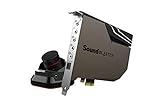
1. Creative Sound Blaster AE-7: best overall
Spec line: PCIe x1 · ESS Sabre-class DAC · 127 dB DNR · up to 32-bit/384 kHz playback · Xamp headphone amp to 600 ohms · optical output · desktop control module.
Best for: Desktop gamers and music listeners with headphones at or above 150 ohms who want a strong amp, a physical volume knob, and a mature control app.
Skip if: You use only efficient headphones under 50 ohms, or you run Linux as your main system.
- Pros: Wide impedance range, front-of-desk control module, strong noise floor, drivers that are mature by Creative’s standards.
- Cons: Full-height card, the control software is bulky, and the benefit is small with efficient headphones.
As an Amazon Associate we earn from qualifying purchases at no extra cost to you.
2. Creative Sound Blaster AE-9: best for high-impedance headphones and creators
Spec line: PCIe x1 · ESS Sabre-class DAC · 129 dB DNR · discrete bi-amped Xamp headphone amp to 600 ohms · external Audio Control Module with headphone jacks and mic input.
Best for: Listeners with studio or planar headphones, and anyone who wants the control module’s mic input and monitoring.
Skip if: Your headphones are rated under 100 ohms; the AE-7 gives almost the same everyday result for less.
- Pros: The most headroom in the established Creative lineup, strong amplification, flexible control module.
- Cons: Premium tier, and the extra performance is mostly inaudible with ordinary headphones.
3. Creative Sound Blaster AE-X: newest Creative option
Spec line: PCIe · dual ESS ES9039Q2M DACs (as listed in 2026 roundups) · 130 dB DNR (as listed) · native DSD256 (as listed) · Xamp to 600 ohms (as listed) · optical in and out.
Best for: Buyers who want the most recent hardware generation and high-resolution file playback.
Skip if: You want proven long-term driver behavior. A card this new has less field history, and not every figure could be confirmed from a manufacturer page.
- Pros: Newest DAC generation, optical input and output, high-resolution format support.
- Cons: Limited track record, and specs vary between sources.

4. Creative Sound BlasterX AE-5 Plus: best for RGB builds
Spec line: PCIe x1 · ESS Sabre-class DAC · 122 dB DNR · Xamp to 600 ohms · RGB lighting · 5.1 analog and optical output.
Best for: Windowed builds where lighting matters and the owner wants a strong headphone amp at a lower tier than the AE-7.
Skip if: Your case has no side window; the lighting is a large part of what you are paying for.
- Pros: Same Xamp-family amplifier, addressable lighting, solid surround output set.
- Cons: Lower noise-floor rating than the AE-7, and the lighting software adds overhead.

5. Creative Sound Blaster Audigy FX Pro: best low-profile upgrade
Spec line: PCIe half-height · 120 dB rating (as listed) · up to 32-bit/384 kHz (as listed) · discrete 7.1 analog output · low-profile bracket.
Best for: Small-form-factor and office PCs that need cleaner line and headphone output plus surround.
Skip if: You own 250 to 600 ohm headphones; step up to the AE-7.
- Pros: Fits compact cases, with 7.1 outputs at an entry tier.
- Cons: Not designed for demanding headphones, and some figures could not be confirmed from a manufacturer page.

6. Creative Sound Blaster Audigy FX: cheapest Creative card
Spec line: PCIe x1 · 106 dB DNR · 5.1 analog output · headphone amp aimed at mainstream headphones.
Best for: Escaping front-panel noise or adding 5.1 analog outputs on a tight budget.
Skip if: You want a measurable noise-floor gain over the motherboard codec; at 106 dB you may not get one.
- Pros: Entry-level and simple to set up.
- Cons: Little headroom over good onboard audio, and a modest amp.
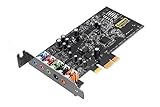
7. ASUS Xonar SE: best value for small cases
Spec line: PCIe x1 · 116 dB SNR · 24-bit/192 kHz playback · 5.1 channels · headphone amp up to 300 ohms · optical S/PDIF output · low-profile bracket.
Best for: Budget builders with headphones under 300 ohms who want a clean analog stage and a low-profile bracket.
Skip if: You want a current driver package or a rich software suite; ASUS’s internal card lineup is small and has not been refreshed recently.
- Pros: Low entry cost, low-profile bracket, and a 116 dB rating that is a real step up from basic codecs.
- Cons: Aging drivers, limited extras, and counterfeit listings exist, so buy from an authorized seller.
8. Creative Sound Blaster Z SE: best entry-level card with a 600-ohm amp
Spec line: PCIe · Sound Core3D processor · 24-bit/192 kHz playback · 116 dB SNR rating · headphone amp rated up to 600 ohms · discrete 5.1 and virtual 7.1 · optical in and out · ASIO support.
The Z SE is one of the cheapest ways to get a headphone amplifier rated for 600 ohms, which is the threshold the criteria section uses for studio-grade and planar headphones. It adds optical input and output and a microphone path with EQ in the control app. The noise-floor rating sits below the AE-series cards, so the gain is in drive strength and outputs rather than in headroom.
Best for: listeners with 250 ohm headphones who want a strong amp at an entry-level tier, plus optical output to a receiver. Skip if: you want a physical control module or the highest noise-floor rating. Step up to the AE-7.
Pros: 600-ohm amp rating; optical in and out; low entry tier; ASIO. Cons: no control module; lower rated SNR than the AE line; full-height bracket.

9. ASUS Strix SOAR: best ESS DAC card outside the Creative line
Spec line: PCIe · ESS SABRE DAC · 116 dB SNR rating at the front output · TI headphone amplifier rated up to 600 ohms · 7.1 analog outputs · S/PDIF out · 24-bit/192 kHz playback.
The Strix SOAR is the ASUS alternative for buyers who want a named DAC and a headphone amp stage rated to 600 ohms. It has a full set of analog outputs for 7.1 speakers. Headphone-output noise figures are lower than the front-output rating, which is normal for this class. Like other ASUS cards, driver packages date from earlier Windows releases, so confirm support before you buy.
Best for: desktop users with a 7.1 analog speaker set or 250 ohm headphones who prefer an ASUS design. Skip if: you need current driver updates or a fresh warranty. Stock is limited and aging, so buy from an authorized seller.
Pros: named DAC and amp; 7.1 analog outputs; 600-ohm amp rating. Cons: aging driver support; limited availability; no control module.

10. Creative Sound BlasterX AE-5 Plus Pure Edition: best for builds without the RGB look
Spec line: PCIe x1 · SABRE32 Ultra-class DAC listed · 32-bit/384 kHz playback · headphone amp for high-impedance headphones · Dolby Digital Live and DTS support · Pure Edition styling.
The Pure Edition is the AE-5 Plus family in a different finish, aimed at white or minimal builds. Check the seller listing against the standard AE-5 Plus, because the DAC naming and lighting details differ between the two product pages. If you like the AE-5 Plus feature set and your case theme is light colored, this variant fits, and the same slot and driver rules apply.
Best for: builders who want the AE-5 Plus audio chain in a lighter color scheme. Skip if: you want the control module of the AE-7 or the highest rated noise floor.
Pros: strong amp for the tier; surround encoding; high sample-rate playback. Cons: listing details vary by seller; software overhead; no control module.

11. Creative Sound Blaster Audigy FX V2: best for basic surround and clean line output
Spec line: PCIe · 24-bit/192 kHz playback · 120 dB dynamic-range rating on the listing · DAC with headphone output · discrete surround outputs.
The Audigy FX V2 is a refreshed entry-level card: it keeps the simple PCIe form and lifts the listed dynamic range above the original Audigy FX. It targets people who want to leave a noisy motherboard jack behind and add speaker outputs, not people who own demanding headphones. The control app is lighter than the AE-series suite, which helps on older PCs.
Best for: office and home PCs that need cleaner line output and surround at an entry-level tier. Skip if: you own 250 ohm or higher headphones or want a control module.
Pros: simple setup; entry-level tier; improved listed dynamic range. Cons: modest headphone amp; limited extras; check the bracket for small cases.

12. Creative Sound Blaster ZxR: best older flagship for speaker setups
Spec line: PCIe · full-height card with a separate daughterboard design · external desktop control module · discrete headphone amplifier for high-impedance headphones · multichannel analog outputs.
The ZxR was Creative’s flagship before the AE series and is still sold in limited stock at a premium tier. It targets users with speaker systems and demanding headphones who want a bigger connector set than a basic card. It is older hardware: the AE-7 matches or exceeds much of what it does for less, so treat it as a niche pick for owners who need its outputs and accept legacy drivers.
Best for: buyers who specifically want the daughterboard output set and a control module on an older platform. Skip if: you simply want the best value. Choose the AE-7 or Z SE.
Pros: large connector set; control module; strong amp stage. Cons: premium tier for older hardware; large footprint; stock and driver support vary.

All 12 internal cards in one table
Decibel figures are manufacturer claims, so treat differences of 2 to 3 dB as ties. Use amp range, outputs and bracket size to separate cards.
| Card | Rated SNR/DNR | Headphone amp | Outputs and extras | Tier |
|---|---|---|---|---|
| Creative Sound Blaster AE-9 | 129 dB (listed) | To 600 ohms | Control module with mic input | Premium |
| Creative Sound Blaster AE-7 | 127 dB | To 600 ohms | Control module, optical | Mid-range |
| Creative Sound Blaster AE-X | 130 dB (as listed) | To 600 ohms (as listed) | Optical in and out | Mid-range to premium |
| Creative Sound BlasterX AE-5 Plus | 122 dB | To 600 ohms | RGB, 5.1 analog | Mid-range |
| Creative Sound Blaster Audigy FX Pro | 120 dB (as listed) | Mainstream range | 7.1, half-height | Entry-level |
| Creative Sound Blaster Audigy FX | 106 dB | Mainstream range | 5.1 analog | Entry-level |
| ASUS Xonar SE | 116 dB | To 300 ohms | 5.1, optical, half-height | Entry-level |
| Creative Sound Blaster Z SE | 116 dB | To 600 ohms | Optical in and out, 5.1 | Entry-level |
| ASUS Strix SOAR | 116 dB (front output) | To 600 ohms | 7.1 analog, S/PDIF out | Mid-range |
| Creative Sound BlasterX AE-5 Plus Pure Edition | Check listing | High-impedance capable | Surround encoding | Mid-range |
| Creative Sound Blaster Audigy FX V2 | 120 dB (listing) | Mainstream range | Surround outputs | Entry-level |
| Creative Sound Blaster ZxR | Check maker sheet | High-impedance capable | Control module, daughterboard | Premium |
Decision matrix: which class fits your setup
| Your situation | Threshold | Card class to shop |
|---|---|---|
| Gaming headset, efficient, under 50 ohms | Clean output is enough | Skip the card, or choose Xonar SE or Audigy FX |
| Headphones 80 to 150 ohms | Amp rated up to 300 ohms | Xonar SE or AE-5 Plus |
| Headphones 250 to 600 ohms | Amp rated to 600 ohms | AE-7 or AE-9 |
| Small-form-factor case | Low-profile bracket | Audigy FX Pro or Xonar SE |
| Streaming or recording with a mic | Control module with mic input | AE-7 or AE-9 |
| Analog surround speakers | 5.1 or 7.1 discrete outputs | Audigy FX Pro, AE-5 Plus, AE-7 |
| Newest hardware, optical in and out | Optical input | AE-X |
Worked example: will your headphones get enough volume?
Sensitivity and impedance tell you the voltage a headphone needs. Take a 300-ohm headphone rated 97 dB per milliwatt. You want peaks around 105 dB, which is 8 dB above the 1 milliwatt reference.
- Convert 8 dB to power: 10 raised to the power of 0.8 is about 6.3, so you need about 6.3 milliwatts.
- Find the voltage: the square root of (0.0063 watts multiplied by 300 ohms) is the square root of 1.89, or about 1.4 volts RMS.
- Compare to the source: a 600-ohm-rated card amp is built to deliver this and more. Many onboard codec outputs are designed around lower voltage swings, so into 300 ohms they may distort or run out of volume on dynamic peaks.
Now run the same math for a 32-ohm headset rated 100 dB per milliwatt. Peaks at 105 dB are 5 dB above reference, about 3.2 milliwatts, so the voltage is the square root of (0.0032 multiplied by 32), about 0.32 volts RMS. Any onboard codec supplies that easily, which is why efficient headsets rarely need a card. Do this calculation with your own headphone’s two spec numbers. If the result lands above roughly 1 volt RMS, shop the 600-ohm tier; if it lands under 0.5 volts, a card will not change your volume headroom.
What a sound card will not fix
- Poor recordings or low-bitrate streams: a better DAC cannot restore detail that is not in the file.
- Headset microphone quality: the capsule in the headset sets the ceiling, though a card with a clean mic preamp can reduce hiss.
- Room acoustics: speaker placement and room reflections change what you hear far more than a card.
- Digital audio over HDMI or USB headsets: if your headset is USB, the DAC is inside the headset and a card is bypassed entirely.
Common mistakes when shopping
The first mistake is buying on the decibel number alone. A 129 dB card and a 127 dB card are effectively tied; what separates them is the control module, the outputs and the amplifier design. The second is ignoring slot clearance. A full-height card in a slot directly under a three-fan graphics card can run warm and may not physically fit. The third is forgetting the driver step: leave onboard audio enabled during installation, install the vendor package, then switch the default device, instead of disabling everything at once. The fourth is paying for surround outputs you will never cable. If you play through a headset, virtual surround is software and works on any output.
Installation checklist
- Power the PC off, unplug it, and touch bare metal on the case to discharge static.
- Pick an x1 or larger PCIe slot that is not covered by the graphics card cooler, and leave breathing room for the GPU.
- Connect any supplemental power cable the card calls for; skipping it can mute outputs or reduce headphone drive.
- Install the current driver and control app from the manufacturer, then disable the onboard audio device in firmware or Device Manager so Windows does not switch outputs.
- Set the card as the default playback device, and set the headphone gain to the lowest level that reaches your listening volume; high gain with efficient headphones raises noise.
Frequently asked questions
Is an internal sound card worth it in 2026?
It is worth it only for high-impedance headphones, noisy onboard audio, or analog and optical surround needs. For efficient headphones on a decent motherboard, the improvement is small.
If you are unsure, plug your headphones into the rear jack of your motherboard first. If you hear hiss or the volume runs out, that is the signal a card will help.
Internal sound card or external USB DAC: which is better?
An external USB DAC is easier to move between machines and avoids electrical noise inside the PC, while an internal card keeps the desk tidy and adds surround outputs.
Choose internal if you want a control module and speaker outputs in a fixed desktop. Choose USB if you also use a laptop.
Which sound card is best for gaming?
The Creative Sound Blaster AE-7 is the best all-around gaming pick, and the AE-5 Plus is the lower-tier option with RGB. Gaming benefits more from a good headset than from the highest decibel rating.
For competitive play, positional accuracy depends on the headset and game audio settings far more than on the card.
Do sound cards improve frame rates?
No. A sound card can offload audio processing from the CPU, but on modern processors that load is negligible, so frame rates do not meaningfully change.
Will a sound card fit my PCIe slots?
Yes, any card in this guide works in a PCIe x1 slot, and larger slots also work. Confirm the slot is free and not blocked by a large graphics card cooler.
Half-height cards need the low-profile bracket for small cases; the full-height cards do not fit those chassis.
Do I need a sound card for 7.1 surround?
Only if you have separate analog 7.1 speakers or want hardware-level surround processing. For headphones, virtual surround in Windows or a headset’s own software is usually enough.
Do these cards work on Linux or Mac?
Support is limited. Creative’s control apps target Windows, so on Linux you may get basic stereo output but not the full feature set, and Macs generally cannot use these PCIe cards.
Are the ASUS Xonar cards still a good buy?
The Xonar SE is still a decent value on hardware, but it relies on older drivers. Buy only from an authorized seller and confirm driver support for your Windows version first.
Final recommendation
If you drive headphones of 150 ohms or more, buy the Creative Sound Blaster AE-7 and move up to the AE-9 only for studio or planar models. If your build is small or your headphones are efficient, the Audigy FX Pro or Xonar SE gives a real but modest upgrade. If your headphones sound fine from the motherboard jack, keep your money and spend it on better headphones.
More from Amazon
Programs that pair well with the guide above. Offers and eligibility are set by Amazon and may change.
Free shipping on eligible items, Prime Video and more. Eligible new members can start with a free trial.
Start a Prime free trialAd-free music streaming. Eligible new subscribers can start with a free trial.
Try Music Unlimited freeA Prime membership for ages 18-24 with a trial period. Eligibility is set by Amazon.
See Prime for Young AdultsAudiobooks and podcasts to listen to on the go. Eligible new members can start with a free trial.
Try Audible freeAs an Amazon Associate we earn from qualifying purchases.






Write Your Review
No reviews yet. Be the first to share your experience!