

Key takeaways
- Mounting the radiator with the pump at the highest point. Air collects there and the pump grinds.
- Plugging the pump into a fan header that follows the temperature curve. The pump then slows when it should not.
- Ignoring RAM height. Top-mounted radiators can touch tall heat spreaders.
- Leaving plastic film on the cold plate. It is easy to miss and raises temperatures sharply.
- Reusing old paste. If you remove the block, clean both surfaces and apply fresh paste.
- Buying by LCD alone. The display adds cost, but cooling depends on the radiator, pump and fans.
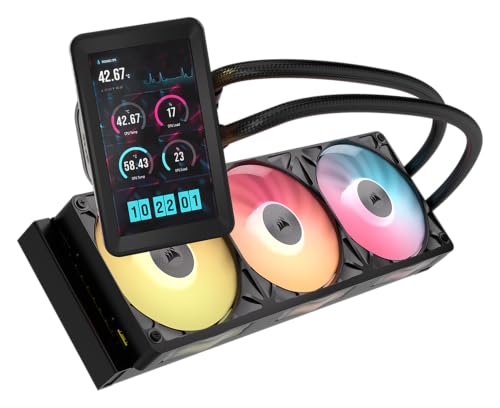
The best AIO cooler for most builds in 2026 is the Arctic Liquid Freezer III Pro 360, which pairs a 38mm thick radiator and a dedicated VRM fan with a six-year warranty and one of the strongest cooling results in published reviews. If you want a cheaper 360mm cooler, the Thermalright Frozen Notte 360 ARGB and Corsair Nautilus 360 RS ARGB cover the budget end, while the Lian Li Galahad II LCD 280 and NZXT Kraken Elite 360 add a display for builds that show off the inside of the case.
An all-in-one liquid cooler moves heat from the processor through a sealed loop to a radiator, where fans push it out of the case. A good one lets a high-end Ryzen or Core Ultra chip hold boost clocks under long loads and often runs quieter than an air cooler of similar capacity. A bad choice, on the other hand, can wear out a pump, fail to fit your case or add noise for no gain. This guide covers seven AIOs that come up repeatedly in 2026 coverage, compares their radiator sizes and specifications, and explains how to match one to your case, CPU and noise tolerance. All specs are drawn from manufacturer pages and retailer listings, so confirm the exact variant before ordering.
Our top picks


As an Amazon Associate we earn from qualifying purchases at no extra cost to you.
Quick Comparison of the Best AIO Coolers
| Pick | Best for | Radiator | Radiator thickness | Warranty | Market tier |
|---|---|---|---|---|---|
| Arctic Liquid Freezer III Pro 360 | Best overall | 360mm | 38mm | 6 years | Mid |
| Thermalright Frozen Notte 360 ARGB | Best budget 360mm | 360mm | 27mm | 5 years | Budget |
| Corsair Nautilus 360 RS ARGB | Best easy-install all-rounder | 360mm | 27mm | 5 years | Budget to mid |
| Lian Li Galahad II Trinity Performance 360 | Best airflow and looks | 360mm | 32mm | 5 years | Mid |
| Lian Li Galahad II LCD 280 | Best LCD for smaller cases | 280mm | 30mm | 6 years | Mid-premium |
| NZXT Kraken Elite 360 (2024) | Best premium display | 360mm | 27mm | 6 years (per NZXT) | Premium |
| Thermalright Aqua Elite 240 V3 | Best budget 240mm | 240mm | Standard | Check listing | Budget |
How These AIO Coolers Were Chosen
This list is based on manufacturer specifications and independent review coverage, not personal benchmarks. Each cooler needed support for current sockets (AM5 and Intel LGA 1700 or 1851), PWM control for both pump and fans, a published warranty and a track record of consistent results in outlets that measure temperatures and noise. Where reviewers disagreed on a spec, such as fan speed on the Lian Li LCD 280 or warranty length on certain Corsair pages, the maker’s own spec sheet was treated as the authority.
Best Overall: Arctic Liquid Freezer III Pro 360
The Liquid Freezer III Pro 360 is the AIO most 2026 roundups name first. According to Arctic’s specification sheet, the aluminum radiator measures 398 by 120 by 38 millimeters, noticeably thicker than the 27mm standard, and the cooler uses a copper cold plate with micro skived fins, 450mm tubes and an 800 to 2800 RPM PWM pump. The three P12 Pro fans run from 600 to 3000 RPM and are rated at 77 cubic feet per minute and 6.9 mmH2O of static pressure. A separate 400 to 2500 RPM fan cools the motherboard VRM area, which many AIOs ignore. It supports AM5, AM4, LGA 1851 and LGA 1700, ships with MX-6 thermal paste and carries a six-year warranty.
Who it suits
Builders with a Ryzen X3D or Core Ultra K chip who want the best cooling per unit of cost, and anyone who wants the VRM fan to keep the area around the socket cooler. The A-RGB version adds lighting, and white and black options exist.
Trade-offs
The thick radiator needs extra clearance, so check the case’s radiator and fan stack limit, particularly in top mounts that also need memory clearance. Fans can be loud at full speed, and Intel mounting is more involved than on some competitors.
Best Budget 360mm: Thermalright Frozen Notte 360 ARGB
The Frozen Notte 360 has a 397 by 120 by 27 millimeter aluminum radiator, a copper cold plate, a pump rated at 5300 RPM and 40,000 hours, and three TL-E12B-S fans (120 by 25 millimeters, 2000 RPM, up to about 72 CFM, up to 27.7 dBA, with S-FDB bearings). Thermalright lists a five-year warranty, and Tom’s Hardware found it strong for a cooler priced at a fraction of the premium options.
Who it suits
Budget builders who want a large radiator and do not need a display or software. It is a good match for mid-range Ryzen 7 and Core Ultra 7 chips.
Trade-offs
The pump is audible at full speed, there is no software control beyond motherboard headers, and reviewers disagree on whether thermal paste is included, so keep a tube of your own on hand.
Best Easy-Install All-Rounder: Corsair Nautilus 360 RS ARGB
Corsair’s Nautilus 360 RS ARGB uses standard 4-pin PWM connections rather than the iCUE LINK system. It has an aluminum radiator of about 396 by 120 by 27 millimeters, a FlowDrive 2S pump with a convex cold plate tuned for AMD processors, and three RS120 ARGB fans spinning from 420 to 2100 RPM with up to 72.8 CFM and 36 dBA at maximum. It supports AM5, AM4 and Intel LGA 1851 and 1700, and Corsair lists a five-year warranty. An LCD version adds a 2.1 inch IPS screen.
Who it suits
Builders who want a recognizable brand, simple mounting hardware and a cooler that works well with any motherboard.
Trade-offs
The cooling gap to Arctic’s cooler is real under heavy load, and fan noise rises sharply above mid speeds.
Best Airflow and Looks: Lian Li Galahad II Trinity Performance 360
The Galahad II Trinity Performance 360 has a 396 by 130 by 32 millimeter aluminum radiator, a copper base block with swappable cap designs, and three 120mm fans that run up to 2300 RPM in low-noise mode and 3000 RPM in full-performance mode. Retail listings put airflow at around 108 CFM and static pressure near 7 mmH2O, with fluid dynamic bearings and a five-year warranty. Pump speed is listed at 4200 RPM. The fans carry no lighting of their own, and a separate strip adds ARGB.
Who it suits
Builders who want strong airflow, a tidy front-facing look and the cooling headroom for a Core Ultra 9 or Ryzen 9 chip.
Trade-offs
Noise figures vary between retailers, so rely on manufacturer data. The 130mm radiator width can interfere with tall memory in some top-mount cases, and the cooler costs more than the Thermalright.
Best LCD for Smaller Cases: Lian Li Galahad II LCD 280
The Galahad II LCD 280 combines a 2.88 inch, 480 by 480 IPS display rated at about 500 nits with a 319.5 by 140 by 30 millimeter aluminum radiator and two 140mm fans. The pump is an eighth-generation Asetek unit with a three-phase motor reaching 3600 RPM. Lian Li lists a six-year warranty. Tom’s Hardware reported that it ran cooler and quieter than many 360mm coolers, which makes it a strong choice for cases that can fit a 280mm radiator but not a 360mm one.
Who it suits
Builders who want a display and a quieter cooler in a mid tower, especially where front radiator space is limited.
Trade-offs
Fan speed figures differ across retailers, so check the exact SKU. The 280mm radiator needs two 140mm mounting positions, which not every case offers.
Best Premium Display: NZXT Kraken Elite 360 (2024)
NZXT’s Kraken Elite 360 uses a 2.72 inch, 640 by 640 IPS screen at 60Hz with brightness around 690 nits, a 401 by 120 by 27 millimeter radiator, a Turbine pump running from 1200 to 2800 RPM over a copper cold plate, and three F120P fans on the non-RGB version. It supports AM5, AM4 and Intel LGA 1851 and 1700, and NZXT lists a six-year warranty even though some retailer pages show shorter terms.
Who it suits
People who want the sharpest display, software customization through NZXT CAM and a premium finish.
Trade-offs
It costs far more than similar-performing coolers, and cooling is not meaningfully better than Arctic’s less expensive model. Reliance on CAM software is a downside if you prefer a lightweight setup.
Best Budget 240mm: Thermalright Aqua Elite 240 V3
The Aqua Elite 240 V3 uses a 240mm aluminum radiator, a fourth-generation pump head running up to 3300 RPM with a rated life of 40,000 hours, 400mm tubes and two TL-C12B-S V2 fans (120 by 25 millimeters, up to 1500 RPM and about 66 CFM). It supports AM4, AM5 and Intel LGA 1700 and 1851, and typical street prices sit around the budget tier.
Who it suits
Small and mid-size cases that only fit a 240mm radiator, and mainstream CPUs such as a Ryzen 5 or Core Ultra 5 that do not need a large radiator.
Trade-offs
Peak cooling trails 360mm models, so avoid pairing it with the hottest high-core chips. Warranty terms vary by seller, so confirm before purchase.
Radiator Size Guide: 240, 280 or 360?
Radiator size sets the ceiling for how much heat the cooler can move at a given noise level. A larger radiator lets the fans spin slower for the same heat load, which lowers noise. Use the table as a rough guide, and remember that CPU power limits in your BIOS change the real heat load.
| CPU class | Typical sustained power | Radiator that fits well |
|---|---|---|
| Ryzen 5 / Core Ultra 5 | 65 to 125W | 240mm |
| Ryzen 7 X3D / Core Ultra 7 | 90 to 160W | 240mm or 280mm |
| Ryzen 9 / Core Ultra 9 | 160 to 250W | 280mm or 360mm |
| Overclocked or uncapped flagship | 250W and higher | 360mm with thick radiator |
Will It Fit? A Worked Clearance Calculation
Fit problems are the most common AIO mistake. Suppose your case lists a maximum top radiator thickness of 60mm including fans and the cooler uses a 38mm radiator with 25mm fans. The stack is 63mm, which exceeds the limit by 3mm, so you would need to use a different mount or choose a thinner radiator. A 27mm radiator with 25mm fans totals 52mm and fits. Also check memory height: top-mounted radiators sit above the motherboard, and tall RAM modules can collide with the stack. Front mounting avoids this but may block GPU airflow. Always check three numbers: radiator length, stack thickness and tube reach from the pump block to the radiator location.
Decision Matrix by Situation
| Your situation | Best match | Reason |
|---|---|---|
| Hot flagship CPU, quiet goal | Arctic Liquid Freezer III Pro 360 | Thick radiator and strong fans |
| Tight budget, 360mm wanted | Thermalright Frozen Notte 360 | Large radiator at low cost |
| Simple install, AMD build | Corsair Nautilus 360 RS | Standard connectors, AMD-tuned plate |
| Wants LCD, case fits only 280mm | Lian Li Galahad II LCD 280 | Strong cooling in a smaller radiator |
| Premium look, software control | NZXT Kraken Elite 360 | High-resolution display |
| Compact case, mainstream CPU | Thermalright Aqua Elite 240 V3 | Low cost, 240mm fit |
AIO vs Air Cooler
A top air cooler matches many 240mm AIOs for noise and temperature and has no pump to fail. Liquid cooling pulls ahead on high-power chips, in small cases where a tall heatsink will not fit and for appearance. Air coolers are cheaper to own for a decade, while AIOs usually last five to seven years before the pump or coolant becomes a concern. If your CPU stays under about 125W and you do not care about looks, a quality air cooler is the lower-risk choice.
Installation Steps and the Reasons for Each
- Mount the radiator first with fans attached. It is easier to route tubes before the pump block is on the CPU.
- Place the radiator above the pump if possible. This keeps air bubbles in the radiator rather than the pump, reducing noise.
- Apply paste in a small pea-sized dot unless the cooler has pre-applied compound. Too much spreads into the socket.
- Tighten the block screws in a cross pattern. Even pressure improves contact.
- Connect the pump to the pump header at full speed. Pumps are designed to run steadily, and fan curves should control only the fans.
- Set fan curves by coolant or CPU temperature. Slow, gradual ramps stop distracting noise bursts.
Ownership Realities
AIO pumps are the part that most often fails, followed by fans. Warranties of five or six years offer solid cover, but replacement still requires removing the cooler. Keep the original mounting hardware and register the product. Dust blocks radiator fins, so clean them with compressed air every six months. A faint gurgle after installation is normal and usually fades as air moves to the radiator. A persistent buzz can indicate a pump header set to a fan curve instead of steady power.
Noise: Fans, Pump and Fan Curves Explained
Most AIO noise comes from the fans, not the pump, and fan noise rises steeply with speed. A fan running at 1200 RPM is usually a soft whoosh, while the same fan at 2400 RPM is clearly audible. This is why a thicker, larger radiator helps: it lets the fans stay near the quiet end of the curve. High-static-pressure fans like the Arctic P12 Pro and Lian Li LCP fans push more air through dense fins, but they also reach higher peak speeds, so the fan curve matters. A good starting curve keeps fans at 40 to 50 percent below 60 degrees Celsius, ramps gently up to about 75 percent at 80 degrees, and only reaches full speed near the thermal limit. Use a short delay or smoothing setting in your BIOS so brief boost spikes during game loading do not trigger sudden bursts of noise.
Pump noise is a steady hum or whine. Manufacturers such as Thermalright list the pump at around 23 dBA, which is quiet in a closed case. Running the pump at a fixed speed, often 100 percent, is normally quieter in practice than a variable pump that constantly changes pitch.
Power Limits: A Worked Example
Suppose a Core Ultra 9 chip is allowed to draw 250W in the BIOS. A 360mm AIO may hold it in the low 80s Celsius under an all-core render, but the fans will be loud. Lowering the sustained power limit to 190W often trims 8 to 12 degrees and lowers fan speed noticeably, while costing only a small percentage of performance in games, which rarely draw that much. For a Ryzen X3D chip, the stock limit is far lower, and a 240mm model is usually enough. Setting power limits before blaming the cooler saves money, and it is the main reason that two builders with the same AIO report different temperatures.
Common Mistakes to Avoid
- Mounting the radiator with the pump at the highest point. Air collects there and the pump grinds.
- Plugging the pump into a fan header that follows the temperature curve. The pump then slows when it should not.
- Ignoring RAM height. Top-mounted radiators can touch tall heat spreaders.
- Leaving plastic film on the cold plate. It is easy to miss and raises temperatures sharply.
- Reusing old paste. If you remove the block, clean both surfaces and apply fresh paste.
- Buying by LCD alone. The display adds cost, but cooling depends on the radiator, pump and fans.
Price Tiers and Value
AIOs fall into three groups. Budget models from Thermalright and similar brands give strong cooling for the money and are good enough for most processors. Mid-range options such as Arctic, Corsair and Lian Li add better fans, finish or warranty terms. Premium models with displays, from NZXT and Lian Li, add visual features and software, and their cooling is often similar to cheaper models. If your goal is temperatures per unit of cost, spend on the radiator and fans, not the screen.
Frequently Asked Questions
Is a 360mm AIO always better than a 240mm?
Not always. A 360mm model handles more heat at lower fan speeds, but a good 240mm cooler is plenty for mainstream chips and fits more cases.
How long do AIO coolers last?
Many last five to seven years, and warranties from five to six years reflect that. Pumps and fans wear first, and permeation of coolant slowly reduces performance.
Are LCD AIOs worth the extra cost?
They add looks and system monitoring but not much extra cooling, so they only make sense in builds with a visible side panel.
Do AIOs work with AM5 and Intel LGA 1851?
Yes. The coolers listed here support AM5 and LGA 1700, and most list LGA 1851 as well, but confirm your socket in the maker’s compatibility list.
Where should the radiator be mounted?
Front mounting gives cooler air but can raise graphics card temperatures. Top mounting exhausts heat directly, and many builders prefer it for 360mm models if the case supports it.





Write Your Review
No reviews yet. Be the first to share your experience!