

Key takeaways
- Radiator thickness: A 38 mm radiator, as on the Arctic, has more fin area than a 27 mm one, so it removes more heat at the same fan speed. It also needs more space, so confirm clearance for memory and the top panel.
- Fan static pressure: Radiators resist airflow, so fans with higher static pressure (above 3 mmH2O) cool better than fans rated only by CFM.
- Pump speed: A higher pump speed raises coolant flow with only a small cooling benefit but more noise. A PWM-controlled pump lets you slow it at idle.
- Cold plate: Copper cold plates with fine microchannels (as on most of these models) give better contact on small processor dies.
The best 240mm AIO cooler in 2026 for most builders is the Arctic Liquid Freezer III Pro 240: a 38 mm thick radiator, two P12 Pro fans, a dedicated VRM fan and a six-year warranty at a mid-range cost. If you want the strongest raw cooling and a premium look, the Lian Li Galahad II Trinity Performance 240 is the top performer, and the Thermalright Aqua Elite 240 V3 is the budget pick. A 240mm radiator suits chips up to about 200 W of sustained load, which covers most gaming processors.
A 240mm all-in-one liquid cooler uses a radiator that holds two 120 mm fans. It is the size that fits most mid-tower cases, leaves room for memory and a front intake, and costs less than a 360 mm unit. This guide ranks seven current 240mm models by who should buy them. Specifications come from manufacturer spec sheets and reputable review outlets; where two sources disagree, the guide avoids the disputed number. Prices are given only as tiers because they shift frequently.
Our top picks


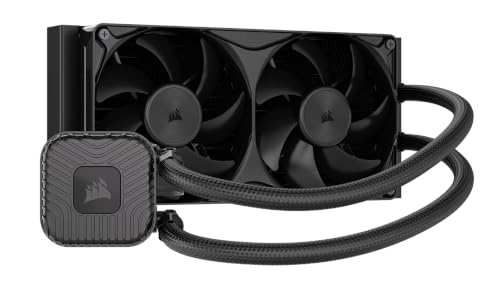

As an Amazon Associate we earn from qualifying purchases at no extra cost to you.
Quick comparison of the best 240mm AIO coolers
| Cooler | Best for | Radiator | Fans | Warranty | Price tier |
|---|---|---|---|---|---|
| Arctic Liquid Freezer III Pro 240 | Best overall | 277 x 120 x 38 mm | 2x P12 Pro, 600 to 3000 rpm, plus VRM fan | 6 years | Mid-range |
| Lian Li Galahad II Trinity Performance 240 | Best performance and looks | Aluminum, 240 mm | 2x 120 mm ARGB, daisy-chained | Per Lian Li | Upper mid |
| Thermalright Aqua Elite 240 V3 | Best budget | 240 mm aluminum | 2x TL-C12B-S V2, 1500 rpm | Per Thermalright | Entry |
| Cooler Master MasterLiquid 240 Atmos | Best quiet pump design | 277 x 119.6 x 27.2 mm | 2x SickleFlow Edge, up to 2500 rpm | 5 years | Mid to upper |
| DeepCool LE520 | Best simple value | 282 x 120 x 27 mm | 2x 120 mm, 500 to 2250 rpm | Per DeepCool | Entry to mid |
| Corsair Nautilus 240 RS | Best with software-free fans | Aluminum, 240 mm | 2x RS120, 420 to 2100 rpm | Per Corsair | Mid-range |
| NZXT Kraken 240 (2023) | Best screen on the pump | 275 x 123 x 30 mm | 2x F120P, 500 to 1800 rpm | 6 years | Upper mid |
How much cooling does a 240mm AIO give you?
Radiator size sets how much heat the cooler can move at a given fan speed. A 240 mm radiator has two 120 mm fan positions, roughly 60 percent of the surface of a 360 mm radiator. As a working rule, a 240 mm AIO comfortably handles processors that draw up to about 180 to 200 W under sustained load, such as a Ryzen 7 9700X, Ryzen 7 9800X3D, Core i5-14600K or Core Ultra 5 245K. For chips that spike to 250 W or more for extended rendering, such as a Core i9-14900K, a 360 mm radiator gives better headroom, though a 240 mm cooler can still manage with a power limit.
Worked example: matching cooler to chip
Suppose you choose a Ryzen 7 9800X3D, which has a 120 W TDP and pulls about 120 to 160 W in all-core loads. A 240 mm AIO that dissipates around 200 W at moderate fan speed leaves about 40 W of headroom, so fans can run at roughly 1,000 to 1,400 rpm and stay quiet. A Core i7-14700K, drawing up to 253 W, would exceed that comfortable range, so the same cooler would run its fans near maximum or the CPU would reduce its clocks. The simple check: compare your CPU’s sustained power with the cooler’s rated capacity and keep at least 20 percent spare.
Best overall: Arctic Liquid Freezer III Pro 240
The Liquid Freezer III Pro 240 uses an aluminum radiator measuring 277 x 120 x 38 mm, which is thicker than the usual 27 mm. It includes two P12 Pro fans (600 to 3000 rpm, rated 77 CFM and 6.9 mmH2O static pressure), a pump that runs from 800 to 2800 rpm, a copper cold plate with micro-skived fins and a small VRM fan that cools the voltage regulators around the socket. It supports AM4, AM5, LGA 1700 and LGA 1851, ships with MX-6 thermal paste and carries a six-year warranty.
Who it suits: Nearly any gaming or mixed-use build on a mid-tower case. Roundups in 2026 consistently name it best overall, with reviewers reporting temperatures a few degrees below the next 240 mm model at matched fan speed.
Pros: Excellent cooling per cost, thick radiator, included VRM fan, long warranty, tidy cable design. Cons: Total thickness with fans is around 63 to 68 mm, so check clearance against memory and the case, and the standard version has no lighting (an addressable RGB version is also sold).
Best performance: Lian Li Galahad II Trinity Performance 240
The Galahad II Trinity Performance 240 has been named the best 240 mm AIO by Tom’s Hardware, which reported cooling that came close to, and sometimes beat, 360 mm AIOs once considered among the best. It uses daisy-chained ARGB fans with a clean single-cable design, a rotatable pump cap and a quiet profile under most loads.
Who it suits: Enthusiasts who want the lowest temperatures from a 240 mm radiator and a polished appearance in a glass-panel case. Pros: Top-tier cooling, minimal cable clutter, strong build. Cons: It costs more than the Arctic, the radiator is thinner than Arctic’s, and the Arctic holds the edge on warranty length and value.
Best budget: Thermalright Aqua Elite 240 V3
The Aqua Elite 240 V3 pairs a 240 mm aluminum radiator with a fourth-generation pump head running up to 3,300 rpm and two 120 x 25 mm TL-C12B-S V2 ARGB fans at 1,500 rpm. The fans are rated up to 25.6 dBA and 66.17 CFM, and the pump is rated at 23 dBA. It supports AMD AM4 and AM5 and Intel sockets from LGA 115X through LGA 1700 and LGA 1851.
Who it suits: Builders who want liquid cooling for a mid-range CPU at the lowest cost. Pros: Very low cost, quiet, wide socket support, good performance for the money. Cons: Lower airflow than premium fans, basic lighting control and a less comprehensive warranty and support network than larger brands.
Best quiet pump: Cooler Master MasterLiquid 240 Atmos
The MasterLiquid 240 Atmos uses a dual-chamber pump with a copper base, a 277 x 119.6 x 27.2 mm aluminum radiator and two SickleFlow Edge 120 mm fans rated up to 2,500 rpm, 70.7 CFM and 27.2 dBA. The pump runs up to 3,200 rpm with a rated mean time to failure above 210,000 hours and the product carries a five-year warranty. It supports AM4, AM5, LGA 1150 through 1156, LGA 1200, LGA 1700 and LGA 1851.
Who it suits: Buyers who value a quiet pump, a slim radiator that clears tall memory and a proven design. Tom’s Hardware found it cools slightly below the Lian Li model. Pros: Quiet, reliable, good compatibility. Cons: Costs more than the Arctic for slightly weaker cooling.
Best simple value: DeepCool LE520
The DeepCool LE520 has a 282 x 120 x 27 mm aluminum radiator, a micro-channel water block with a thickened copper cold plate rated for 220 W, and a 91 x 80 x 52 mm pump running at 2,400 rpm and 17.8 dBA. Its two fans run from 500 to 2,250 rpm and are rated at up to 85.85 CFM, 3.27 mmAq and 32.9 dBA. DeepCool highlights an anti-leak design.
Who it suits: Mid-range builds that want a no-fuss, low-noise AIO with strong airflow. Pros: High airflow, low pump noise, wide socket support. Cons: Fans can be noticeable at full speed, and the hydro bearings are less durable than fluid dynamic types.
Best software-light option: Corsair Nautilus 240 RS
The Nautilus 240 RS (released November 2024) has a copper cold plate, an aluminum radiator and two RS120 fans with AirGuide technology and magnetic dome bearings, running 420 to 2,100 rpm with airflow up to 72.8 CFM, noise between 10 and 36 dBA and static pressure up to 4.15 mmH2O. The fans daisy-chain to a single 4-pin PWM header, and it supports AM4, AM5, LGA 1700 and LGA 1851. It is sold in base, ARGB and LCD versions.
Who it suits: Builders who want a reliable, quiet cooler that needs no software and a simple install. Pros: Low noise at idle, tidy wiring, flexible models. Cons: The base version has no lighting and the LCD model costs a good deal more.
Best display: NZXT Kraken 240 (2023)
The Kraken 240 has a 275 x 123 x 30 mm aluminum radiator, a pump head with a 1.54-inch 240 x 240 LCD (up to 300 cd/m2), a pump speed of 800 to 2,800 rpm and two F120P fluid dynamic bearing fans from 500 to 1,800 rpm. NZXT quotes up to 78.02 CFM, noise of 17.9 to 30.6 dBA, 2.7 mmH2O static pressure and a six-year warranty.
Who it suits: Builders who want a monitoring display and custom images on the pump head. Pros: Attractive screen, quiet, long warranty. Cons: Relies on NZXT’s CAM software for display features, and cooling per cost trails the Arctic and Thermalright.
Radiator thickness, fan type and pump speed: what actually matters
- Radiator thickness: A 38 mm radiator, as on the Arctic, has more fin area than a 27 mm one, so it removes more heat at the same fan speed. It also needs more space, so confirm clearance for memory and the top panel.
- Fan static pressure: Radiators resist airflow, so fans with higher static pressure (above 3 mmH2O) cool better than fans rated only by CFM.
- Pump speed: A higher pump speed raises coolant flow with only a small cooling benefit but more noise. A PWM-controlled pump lets you slow it at idle.
- Cold plate: Copper cold plates with fine microchannels (as on most of these models) give better contact on small processor dies.
Installation: top, front or rear?
- Front mount: Gives the coolest air, but warm coolant air goes into the case and can raise graphics card temperatures slightly. It suits cases with large mesh fronts.
- Top mount: Exhausts heat directly out of the case, which helps GPU temperatures. Place the tubes at the side so air does not collect at the pump. This is the most common choice.
- Pump height: Keep the pump below the highest point of the radiator, so any trapped air collects in the radiator rather than the pump. With the radiator on top, the fittings should point toward the side or bottom.
- Thermal paste: Apply a pea-sized dot or use the pre-applied paste, tighten the mounting screws in a cross pattern, and check that the fan cables do not touch the radiator fins.
Decision matrix
| Your situation | Choose |
|---|---|
| Best cooling per unit of cost | Arctic Liquid Freezer III Pro 240 |
| Strongest 240 mm cooling and looks | Lian Li Galahad II Trinity Performance 240 |
| Tightest budget | Thermalright Aqua Elite 240 V3 |
| Quiet pump, slim radiator | Cooler Master MasterLiquid 240 Atmos |
| High airflow, simple design | DeepCool LE520 |
| Software-free, tidy wiring | Corsair Nautilus 240 RS |
| Display on pump head | NZXT Kraken 240 (2023) |
Ownership realities: what wears and what to do
An AIO is a sealed loop, so there is no coolant to refill, but the pump is the part that eventually wears, usually after five to seven years. Coolant slowly permeates through the tubing, which is why warranty length is a useful signal; Arctic and NZXT offer six years. Watch for rising temperatures at idle and a pump whine or rattle, which can mean trapped air or a failing pump. Dust the radiator fins every six months with compressed air, keep the pump header connected to a dedicated pump port or an always-on header, and check mounting pressure if temperatures jump after moving the case. Some units run the pump at a fixed speed from the header, which is normal.
Also consider clearance with the case. Measure the radiator plus fan depth against the available space, and check the tube length of about 400 to 450 mm against the distance between the pump and the mounting point. Confirm that your socket is listed, including LGA 1851 for Core Ultra 200S and AM5 for Ryzen 7000 and 9000.
240mm AIO or a 360mm AIO or air: when each wins
| Option | Sustained heat it handles well | Strength | Weakness |
|---|---|---|---|
| Dual-tower air cooler | about 150 to 200 W | No pump to fail, simple install | Blocks memory and the top of the board in tight cases |
| 240 mm AIO | about 180 to 220 W | Clean look, fits most mid-towers, frees board space | Pump and tubing are wear items |
| 360 mm AIO | about 250 W and above | Most headroom, lowest fan noise at load | Needs a case with three fan mounts |
These ranges are working estimates drawn from the radiator areas and fan specifications above, not manufacturer guarantees, and they shift with fan speed, case airflow and room temperature. The takeaway is that a 240 mm AIO is not automatically better than a strong air cooler; it wins when case clearance, appearance or a fixed budget favor it.
Noise: how to keep a 240mm AIO quiet
Two fans on a 240 mm radiator have to move enough air at low rpm to keep noise down, so fan curve matters more than peak rating. Set the fans to hold around 800 to 1,100 rpm at idle and ramp up gradually above 60 degrees Celsius, rather than reacting to every short spike. A short boost to full speed for a few seconds when a game loads is more annoying than a slightly warmer CPU. Choose a curve based on coolant or a smoothed CPU temperature if your motherboard allows it. Set the pump to a steady mid-speed profile, usually around 60 to 70 percent, since pumps are loudest when their speed changes constantly. If a gurgling sound appears after the first week, air bubbles may be moving through the pump; tilting the case gently or briefly raising the pump speed normally moves the air to the radiator.
Compatibility checks before you order
- Socket: Confirm the cooler lists your socket (AM5, LGA 1700 or LGA 1851). Intel LGA 1700 boards can bend under mounting pressure, so some owners fit a contact frame; the Arctic ships with one for this purpose.
- Case radiator support: Check that the case lists 240 mm support at the position you plan to use, and note any limit on radiator thickness plus fan depth. A thick radiator with fans can reach roughly 65 mm.
- Memory clearance: With a top-mounted radiator, tall memory heatsinks can collide with the radiator and fans. Measure the gap between the board and the top panel.
- Fan headers: Fans that daisy-chain to one header need that header to supply enough current; use a dedicated fan header rather than a splitter shared with other devices.
- RGB headers: ARGB models need a 5 V 3-pin addressable header, and connecting them to a 12 V RGB header will damage the lights.
Frequently Asked Questions
Is a 240mm AIO enough for a modern gaming CPU?
Yes for most gaming processors, including Ryzen 7 9800X3D and Core i5 chips, because they stay under about 150 W in games. For power-hungry chips such as a Core i9, a 360 mm cooler or a power limit gives better results.
Is a 240mm AIO better than a good air cooler?
Not always. A high-end dual-tower air cooler can match a 240 mm AIO on temperature and offers fewer failure points. An AIO helps with clearance around memory, and often looks cleaner in a glass-panel case.
How long does a 240mm AIO last?
A typical unit lasts five to seven years. Warranty length of five or six years suggests the manufacturer expects the pump to last at least that long.
Where should I mount a 240mm radiator?
Top mounting is the most common and exhausts heat from the case. Front mounting gives cooler air to the radiator but warms the case interior slightly.
Do I need an extra fan for the VRM?
Not for most processors, but boards with small power delivery heatsinks benefit from some airflow. The Arctic Pro model includes a VRM fan for that purpose, and a case fan pointed at the area helps with other coolers.




Write Your Review
No reviews yet. Be the first to share your experience!