

Key takeaways
- Who it suits: almost every mainstream build with a Ryzen 5, Ryzen 7 or Core i5 or i7 class chip.
- Pros: excellent value, compact for a dual-tower, wide socket support, low noise.
- Cons: can interfere with tall memory modules, limited headroom for 250 W processors.
The best cooler for most CPUs in 2026 is a dual-tower air cooler such as the Thermalright Peerless Assassin 120 SE, which handles anything up to a Ryzen 7 or Core i5 and i7 class chip quietly and cheaply. Step up to a 360 mm AIO like the Arctic Liquid Freezer III Pro 360 only when the processor draws well over 150 W for long periods, and choose a premium air cooler such as the Noctua NH-D15 G2 when you want near-AIO cooling with no pump to fail.
Choosing a CPU cooler comes down to three numbers: how many watts your processor sustains, how much space your case and memory leave, and how much noise you will accept. This guide turns those into a clear rule, compares seven real coolers, and walks through a worked clearance and wattage check you can repeat for your own build. The picks cover air, liquid and fanless options so that you can match the cooler to the chip instead of buying the biggest model by default.
Our top picks


As an Amazon Associate we earn from qualifying purchases at no extra cost to you.
Quick Comparison of the Best CPU Coolers
| Pick | Best for | Type | Key specs | Price tier |
|---|---|---|---|---|
| Thermalright Peerless Assassin 120 SE | Best value air | Dual-tower air | 6 heatpipes, two 120 mm PWM fans at 1550 RPM, 155 mm tall | Budget |
| Scythe Mugen 6 | Best for RAM clearance | Single-tower air | One 120 mm fan, mid-size tower | Mid-range |
| Noctua NH-D15 G2 | Best premium air | Dual-tower air | Two NF-A14x25r G2 fans, 168 mm tall, six-year warranty | Premium |
| Noctua NH-P1 | Best silent, low-power | Passive air | No fans, for low-to-moderate-power CPUs only | Premium |
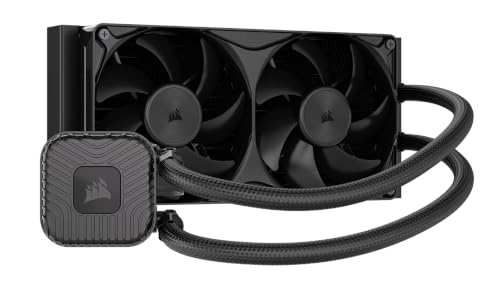
| Lian Li Galahad II Trinity Performance 240 | Best compact AIO | 240 mm AIO | 277 mm radiator, two 120 mm fans, five-year warranty | Mid-range |
| Arctic Liquid Freezer III Pro 360 | Best high-power AIO | 360 mm AIO | Three P12 Pro fans, VRM fan, AM5 and LGA1851 support | Mid-range to premium |
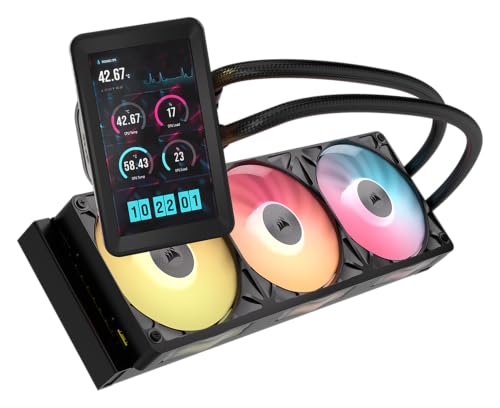
| Thermalright Wonder Vision 360 UB ARGB | Best display AIO | 360 mm AIO | 6.7-inch curved screen, handles 255 W and more | Mid-range to premium |
Dimensions and fan specifications above come from manufacturer pages and independent roundups. Heights, radiator thickness and socket lists vary by revision, so confirm them against the maker’s compatibility page for your exact model before ordering.
Air or AIO: Which Should You Buy
An air cooler moves heat from the CPU into a metal fin stack through heatpipes, then a fan blows it away. An all-in-one liquid cooler (AIO) moves heat through a sealed loop to a radiator mounted on the case. Neither is automatically better. The right choice depends on wattage, case layout and how much you value simplicity.
When air is the right answer
Air coolers have no pump, no coolant and no leak risk. A good dual-tower model matches a 240 mm AIO on many mid-range processors and runs quieter at idle. The Peerless Assassin 120 SE is the standard budget choice because it combines six heatpipes and two 120 mm fans at an entry price, and it is widely recommended as the value pick for chips up to the Ryzen 7 and Core i5 or i7 class. The trade-off is physical size: it stands 155 mm tall and can crowd tall memory modules.
When an AIO is the right answer
Liquid cooling shines for hot processors, such as a Core Ultra 7 270K Plus with a 250 W maximum turbo power or a Ryzen 9 9950X3D at 170 W. A 360 mm radiator spreads the heat across a large fin area and lets fans run slowly. It also frees the area around the socket, which helps with memory clearance and makes small cases less cramped. The cost is a pump that can wear out, a thicker radiator that must fit the case, and more cables.
When fanless makes sense
The Noctua NH-P1 is a passive heatsink with no fans or pump. It is silent, but it is limited to low or moderate-power CPUs and is unsuitable for many modern high-power processors. It is best for a media PC or a low-power workstation in a case with good airflow.
Match the Cooler to Your CPU Wattage
A cooler’s rating is only useful when compared with how much heat your processor actually produces under sustained load. The table gives practical guidance based on the processors discussed in current reviews. These are general mappings, not guarantees, because case airflow and ambient temperature change the result.
| CPU class | Typical sustained power | Suggested cooler |
|---|---|---|
| Ryzen 5 9600X, Ryzen 7 9700X (65 W TDP) | Under 100 W | Single-tower or budget dual-tower air |
| Ryzen 7 9800X3D, 9850X3D (120 W TDP) | Around 120 to 160 W under heavy load | Dual-tower air or 240 mm AIO |
| Ryzen 9 9950X3D (170 W TDP) | Above 170 W peaks | Premium air or 280 to 360 mm AIO |
| Intel Core Ultra 5 250K Plus (159 W max turbo) | Up to 159 W | Dual-tower air or 240 mm AIO |
| Intel Core Ultra 7 270K Plus (250 W max turbo) | Up to 250 W | 360 mm AIO or premium dual-tower air |
As a worked example, take a Ryzen 7 9800X3D rated at 120 W TDP with a package power limit of about 162 W. A cooler with a 150 W or lower capability will let the chip throttle under sustained load, while a dual-tower such as the NH-D15 G2 or a 240 mm AIO has headroom. For gaming alone, the chip often draws well below its limit, so even a moderate cooler stays quiet. For rendering, the full limit applies and the cooler becomes the bottleneck.
Best Value Air: Thermalright Peerless Assassin 120 SE
The Peerless Assassin 120 SE is a dual-tower cooler measuring about 125 by 110 by 155 mm. It has six heatpipes with direct-touch technology and two 120 mm PWM fans at 1550 RPM, producing roughly 33 to 34.5 dBA. It supports Intel LGA115x, LGA1200, LGA1700 and LGA1851 and AMD AM4 and AM5.
- Who it suits: almost every mainstream build with a Ryzen 5, Ryzen 7 or Core i5 or i7 class chip.
- Pros: excellent value, compact for a dual-tower, wide socket support, low noise.
- Cons: can interfere with tall memory modules, limited headroom for 250 W processors.
Best for RAM Clearance: Scythe Mugen 6
The Scythe Mugen 6 is a mid-size tower with a single 120 mm fan and a lighter weight of around 1,040 g. Its support list includes AM4, AM5, LGA1200 and LGA1700, plus several workstation sockets, so confirm LGA1851 compatibility in the mounting kit for your revision. It avoids memory conflicts because of its compact design.
- Who it suits: builders using tall RGB memory or small cases with limited side clearance.
- Pros: compact, light, avoids RAM interference, quiet at low load.
- Cons: limited headroom under sustained high-power workloads, so avoid pairing it with a 250 W processor.
Best Premium Air: Noctua NH-D15 G2
The NH-D15 G2 is a dual-tower cooler measuring about 168 by 150 by 152 mm with both fans fitted, with two NF-A14x25r G2 fans and a weight near 1,525 g. It supports AM4, AM5, LGA1200, LGA1700, LGA1851 and LGA115x, offers about 32 mm of RAM clearance in dual-fan mode, and carries a six-year warranty.
- Who it suits: builders who want the best air cooling for a high-end chip and will not accept pump failure risk.
- Pros: excellent cooling, very quiet, long warranty, no pump.
- Cons: large and heavy, premium cost, needs a wide case and careful memory choice.
Best Silent Option: Noctua NH-P1
The NH-P1 is a fanless design. It has no fans and no pump, so it makes no noise of its own, but it relies on case airflow and is limited to low and moderate-power processors.
- Who it suits: media centres, silent workstations and low-power chips in cases with good airflow.
- Pros: completely silent, no moving parts.
- Cons: unsuitable for many modern high-power CPUs, large footprint, premium cost.
Best Compact AIO: Lian Li Galahad II Trinity Performance 240
The Galahad II Trinity Performance 240 has a 277 by 119 by 52 mm radiator with two 120 mm fans and a five-year warranty. It delivers strong performance in a compact format and fits most mid-tower cases that accept a 240 mm radiator.
- Who it suits: mid-range gaming builds with a 120 W class processor.
- Pros: compact, strong for its size, five-year warranty.
- Cons: verify socket compatibility for your revision; a 240 mm radiator caps headroom for the hottest chips.
Best High-Power AIO: Arctic Liquid Freezer III Pro 360
The Liquid Freezer III Pro 360 has a 398 by 120 by 38 mm radiator, three P12 Pro fans, an assembly thickness of about 63 mm with fans, a pump range of 800 to 2,800 RPM and a six-year warranty. Its integrated VRM fan cools the motherboard power section, which helps in builds without much case airflow. It supports AM4, AM5, LGA1700 and LGA1851.
- Who it suits: owners of 250 W class processors and anyone who wants quiet operation under heavy loads.
- Pros: excellent cooling per cost, VRM fan, long warranty.
- Cons: thick radiator and fan stack require careful case fitting.
Best Display AIO: Thermalright Wonder Vision 360 UB ARGB
The Wonder Vision 360 pairs a 360 mm radiator with a 6.7-inch curved screen at 2,400 by 1,080 on the pump head, and reviewers say it handles 255 W and more. Noise reaches about 47 dBA at maximum load, and it carries a six-year warranty.
- Who it suits: showcase builds that want a custom display and strong cooling.
- Pros: display for temperatures and artwork, strong cooling, long warranty.
- Cons: louder at full load, extra cabling and software to manage.
Noise, Fan Curves and What to Expect
Cooling performance and noise trade against each other through fan speed. A cooler with a large fin area or a big radiator can hold the same temperature at a lower fan speed, which is why a 360 mm AIO or a dual-tower with 140 mm fans often sounds quieter than a small cooler working hard. The Peerless Assassin 120 SE is rated around 33 to 34.5 dBA at full speed, which is audible but not harsh. The Wonder Vision 360, at about 47 dBA at maximum load, is clearly louder when pushed.
You control most of this in the BIOS or fan software. Set a gentle fan curve that keeps fans slow below about 60 degrees Celsius and ramps up above it. Gaming loads tend to hold a processor in the 60s and 70s, so a smooth curve avoids constant speed changes. Letting the fans spin up for a one-second spike is the most common source of annoying noise, so add a few seconds of delay or ramp smoothing if your motherboard offers it.
Know the temperature limits as well. Modern Ryzen and Core Ultra processors are designed to boost until they reach a thermal limit, often in the range of 90 degrees Celsius or higher, so a high reading under a rendering load is not automatically a fault. What matters is whether the processor holds its boost clocks. A better cooler lets the chip stay at higher clocks for longer, which is the measurable benefit, rather than only a lower number on a monitoring chart.
Check Clearance Before You Buy
Most cooler returns happen because the cooler does not physically fit. Run through this short check.
- Cooler height versus case. Find the maximum CPU cooler height in your case’s specification, and compare it to the cooler height. A 168 mm NH-D15 G2 needs a case that allows at least that, and usually a little more for the side panel.
- Memory clearance. Dual-tower coolers can overlap the first memory slot. Pick low-profile memory or use a cooler with raised fan clearance, such as the NH-D15 G2 with about 32 mm of clearance in dual-fan mode.
- Radiator fit. For AIOs, confirm the case supports the radiator size at the front, top or rear, and account for the added thickness of the fans, which makes a 38 mm radiator closer to 63 mm in total.
- Socket support. AM5 shares AM4 mounting holes on most coolers, and LGA1851 is compatible with LGA1700 mounting, so coolers listing those sockets normally work, but check the maker list.
- Motherboard components. Large VRM heatsinks and PCIe slots close to the socket can conflict with big coolers.
Decision Matrix by Situation
| Your situation | Choose | Why |
|---|---|---|
| Ryzen 5 or Core i5 on a budget | Peerless Assassin 120 SE | Best air cooling per cost |
| Tall RGB memory, small case | Scythe Mugen 6 | Compact tower avoids memory clashes |
| X3D chip, quiet gaming PC | Noctua NH-D15 G2 | Premium air with no pump |
| 250 W Intel chip or 16-core Ryzen | Arctic Liquid Freezer III Pro 360 | Large radiator and VRM fan |
| Mid-tower case, 120 W chip | Galahad II Trinity Performance 240 | Compact AIO with long warranty |
| Silent media PC | Noctua NH-P1 | No fans at all |
| Showcase build with a screen | Wonder Vision 360 | Display on the pump head |
Installation and Ownership Tips
- Apply paste correctly. A pea-sized dot in the centre is enough for most processors. Pre-applied paste on AIOs is fine for most users, but remove protective film before mounting.
- Mount fans for airflow direction. Air should flow front to back and bottom to top. On a tower cooler, the fan should push air toward the rear exhaust.
- Tighten evenly. Screws should be tightened in a cross pattern, a little at a time, to avoid tilting the cooler.
- Mount the AIO pump below the radiator top. Keep the radiator higher than the pump when possible so trapped air collects in the radiator and not the pump.
- Clean dust regularly. Dust on fins and radiators raises temperatures over months. A can of compressed air or a soft brush every few months helps.
- Know the lifespan. Fans are the usual wear item. Air coolers often outlast the CPU, while AIO pumps are covered by warranties between five and six years on the models above.
Frequently Asked Questions
Is air or liquid cooling better for a CPU?
Neither is better in every case. Air is simpler, quieter at idle and has no pump to fail, and a good dual-tower can match a 240 mm AIO. Liquid cooling is better for very hot processors and for builds where tower coolers would block memory or fit poorly.
Do I need a 360 mm AIO for gaming?
Usually not. Many gaming processors draw far less than their rated limits in games, so a dual-tower air cooler or a 240 mm AIO is enough. A 360 mm radiator makes sense for 250 W class chips or long rendering sessions.
Will my AM4 cooler fit an AM5 board?
Often yes, because AM5 uses the same mounting hole spacing as AM4 on most coolers. Check the cooler maker’s compatibility list, since some designs need a different bracket.
Does LGA1851 need a new cooler?
Not normally. LGA1851 is compatible with LGA1700 mounting, so coolers that support LGA1700 generally work. Verify that the specific model lists LGA1851 or says it fits LGA1700 hardware.
How tall a cooler can my case handle?
Look for the maximum CPU cooler height in the case specifications. Tall dual-tower coolers such as the NH-D15 G2 at about 168 mm need a wide case, while compact options like the 155 mm Peerless Assassin 120 SE fit more cases.
How often should I replace thermal paste?
Every few years, or when you remove the cooler. Paste does not need regular replacement if temperatures stay stable. If idle or load temperatures climb over time, clean dust first, then consider fresh paste.




Write Your Review
No reviews yet. Be the first to share your experience!