

Key takeaways
- Best for: mid-range and high-end processors on a budget.
- Pros: excellent cooling per unit of cost, light weight, wide socket support.
- Cons: fans get loud near maximum, 155 mm height can clash with tall memory or narrow cases.
The best CPU fan for gaming in 2026 is a dual-tower air cooler: the Thermalright Peerless Assassin 120 SE is the value leader, the Noctua NH-D15 G2 is the premium quiet choice, and a 360 mm liquid cooler such as the Arctic Liquid Freezer III 360 suits the hottest processors. Match the cooler to your processor’s heat output and your case clearance before you pick on brand.
A “CPU fan” can mean the fan on a stock cooler, a replacement tower cooler with its own fans, or the radiator fans of a liquid cooler. Gaming loads are bursty rather than constant, so the winning cooler is the one that absorbs short heat spikes quietly, fits your case and keeps boost clocks steady. This guide ranks seven real coolers, explains the specifications that decide gaming results, and shows how to calculate whether a cooler has enough capacity for your chip. Specifications come from manufacturer pages and reputable review roundups, and thermal comparisons are attributed to the outlets that measured them.
Our top picks


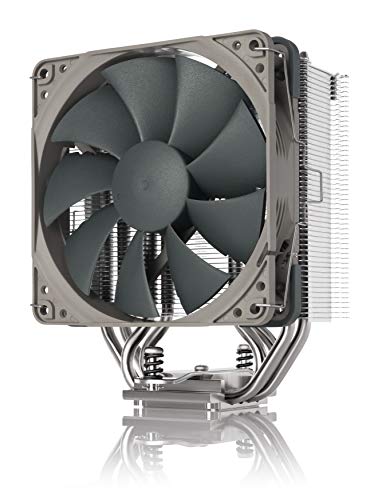
As an Amazon Associate we earn from qualifying purchases at no extra cost to you.
Quick Comparison of the Seven Picks
| Pick | Best for | Type and fans | Height or size | Rated capacity | Price range |
|---|---|---|---|---|---|
| Thermalright Peerless Assassin 120 SE | Best value overall | Dual tower, 2 x 120 mm, 6 heatpipes | About 155 mm tall | 245-265 W quoted | Budget |
| Thermalright Phantom Spirit 120 SE | Best upgrade over value tower | Dual tower, 2 x 120 mm, 7 heatpipes | About 154 mm tall | High-end class | Budget to mid-range |
| DeepCool AK620 | Best mid-range all-rounder | Dual tower, 2 x 120 mm, 6 heatpipes | About 160 mm tall | 250-260 W quoted | Mid-range |
| Arctic Freezer 36 | Best single tower | Single tower, 2 x 120 mm, 4 heatpipes | About 158 mm tall | About 200 W | Budget to mid-range |
| Scythe Fuma 3 | Best for compact clearance | Asymmetric dual tower, 6 heatpipes | About 154 mm tall | High-end class | Mid-range |
| Noctua NH-D15 G2 | Best premium air cooler | Dual tower, 2 x 140 mm, 8 heatpipes | 168 mm tall | 250-300 W quoted | Premium |
| Arctic Liquid Freezer III 360 | Best liquid cooler | 360 mm AIO, 3 x 120 mm fans | 398 x 120 x 38 mm radiator | Highest in list | Mid-range to premium |
What Makes a Good CPU Fan for Gaming
Gaming heat arrives in bursts. A processor may idle at 35 degrees, jump to 75 degrees as a level loads, and settle at 65 degrees during play. That pattern rewards coolers with large metal mass, which soaks up a spike while the fans catch up, and rewards fans that stay quiet at medium speed. Peak wattage ratings tell you the ceiling, but the noise at typical load is what you hear for hours.
Four specifications decide the outcome. The first is rated capacity in watts, which should exceed your processor’s power draw by a safe margin. The second is height, which must fit under your case side panel. The third is memory clearance, since large towers can sit over the first memory slot. The fourth is fan design, including size, maximum speed and noise rating. Larger fans move the same air at lower speed, which is why 140 mm fans are the quietest.
Decision matrix by processor tier
| Processor class | Typical power under gaming | Cooler to choose |
|---|---|---|
| 6-core efficient chip (65 W class) | 50-90 W | Single tower such as Arctic Freezer 36 |
| 8-core X3D chip (120 W class) | 60-110 W | Value dual tower such as Peerless Assassin 120 SE |
| Midrange hybrid Intel chip (125-180 W class) | 90-160 W | Dual tower such as AK620 or Phantom Spirit 120 SE |
| High-end 16-core or overclocked chip | 150-250 W | NH-D15 G2 or a 360 mm liquid cooler |
A worked example: is the cooler big enough?
Take a processor with a 125 W base rating that turbos to 250 W under heavy load. A cooler quoted at 250 W has no spare capacity at that peak, but a gaming session rarely holds the maximum, so the real draw may sit near 120 W. In that case a 250 W cooler runs at about half its rated capacity, which keeps fans slow and quiet. If the same chip also renders video for an hour, the load sits near the peak and you want a cooler rated at least 20 to 30 percent above it. The rule of thumb is to choose a rating about 1.5 times your typical heavy load and at least equal to your peak.
Best Value Overall: Thermalright Peerless Assassin 120 SE
The Peerless Assassin 120 SE is a dual-tower cooler with six copper heatpipes and two 120 mm PWM fans, measuring roughly 125 by 110 by 155 mm and weighing about 730 g. Roundups name it the best value air cooler of 2026, and sources quote its rating between 245 and 265 W. Tom’s Hardware recorded about 34.5 dBA at maximum fan speed, so keep the fans below full speed for quiet gaming.
- Best for: mid-range and high-end processors on a budget.
- Pros: excellent cooling per unit of cost, light weight, wide socket support.
- Cons: fans get loud near maximum, 155 mm height can clash with tall memory or narrow cases.
Best Upgrade Over the Value Tower: Thermalright Phantom Spirit 120 SE
The Phantom Spirit 120 SE adds a seventh heatpipe, giving seven in total, and uses two TL-C12B V2 120 mm PWM fans. Pangoly lists it at 154 mm tall, and a comparison notes that it costs about 20 percent less than the Arctic Freezer 36. It targets buyers who want a bit more thermal headroom than the Peerless Assassin without moving into premium pricing.
- Best for: hot-running gaming chips where a few extra degrees matter.
- Pros: seven heatpipes, strong cooling for its cost, similar height to the value pick.
- Cons: a similar tall dual-tower footprint, and some variants add lighting you may not want.
Best Mid-Range All-Rounder: DeepCool AK620
The AK620 pairs a dual-tower heatsink with six copper heatpipes and two 120 mm FK120 fans, with dimensions of about 129 by 138 by 160 mm and a weight near 1.2 kg. Fan speed runs 500 to 1850 RPM, and noise is about 28 dB(A) at maximum. In one source’s test on a Ryzen 9 9950X at 230 W, it reached 75 degrees, one degree behind the Peerless Assassin at 74 degrees and four behind the NH-D15 G2 at 71 degrees.
- Best for: builders who want a quieter step up with a dependable brand.
- Pros: low noise at full speed for its class, simple installation, solid build.
- Cons: heavier than rivals, thermal results are similar to cheaper options.
Best Single Tower: Arctic Freezer 36
The Freezer 36 is a single-tower cooler with four heatpipes and two 120 mm P-series fans running 200 to 1800 RPM. One review lists a 200 W rating and a height of 158 mm, with airflow of roughly 56 CFM. The wide speed range lets it idle almost silently, and a single tower leaves more room around memory slots than a dual tower does.
- Best for: 65 W to 125 W processors and tight memory clearance.
- Pros: quiet at low speed, easy memory access, good value.
- Cons: less thermal headroom for hot or overclocked chips.
Best for Clearance: Scythe Fuma 3
The Fuma 3 uses an asymmetric dual-tower design with six 6 mm copper heatpipes and a 25 mm plus a 15 mm PWM fan arrangement. Pangoly lists it at 154 mm tall. The offset layout is designed to ease access to memory slots and avoid collisions with tall modules, which matters in compact gaming builds.
- Best for: compact cases and tall memory modules.
- Pros: clever clearance design, compact height, stable performance.
- Cons: fewer fan swap options and a less common brand in some regions.
Best Premium Air Cooler: Noctua NH-D15 G2
The NH-D15 G2 carries eight heatpipes and two 140 mm NF-A14x25r G2 fans, standing 168 mm tall at 150 mm wide and 152 mm deep, and weighs about 1,525 g. It supports AM4, AM5, LGA1200, LGA1700 and LGA1851, includes a six-year warranty and produces about 24.6 to 24.8 dB(A). Sources quote a rating of roughly 250 to 300 W. It posted the lowest temperature in the 9950X comparison, 71 degrees, and was the quietest of the three coolers measured.
- Best for: high-power gaming and creator builds that need low noise.
- Pros: top air-cooling performance, very quiet, long warranty, wide socket support.
- Cons: expensive, large, and heavy, so confirm case and memory clearance first.
Best Liquid Cooler: Arctic Liquid Freezer III 360
This 360 mm all-in-one pairs a radiator measuring 398 by 120 by 38 mm with a PWM pump that has an integrated fan for the voltage regulators nearby. The standard model’s fans run 200 to 1800 RPM, and it supports AM4, AM5, LGA1700 and LGA1851. The radiator is thicker than the 27 mm typical of rivals, so it needs case clearance of roughly 63 mm with fans fitted.
- Best for: overclocked or 16-core processors and cases with top or front radiator mounts.
- Pros: large cooling capacity, tidy look around the socket, fans spread across a large radiator.
- Cons: pump noise and failure risk absent from air coolers, and a thick radiator limits compatibility.
Air vs Liquid for Gaming
For most gaming PCs, air wins on simplicity and reliability. A fan and heatsink has few failure points and works for many years, while a liquid cooler adds a pump and sealed tubes whose lifespan is usually shorter. Liquid cooling pays off when the processor draws well above 200 W, when case airflow is poor and you want heat exhausted at the radiator, or when height limits rule out a tall tower. A 240 mm or 280 mm liquid cooler suits mid-range builds, while a 360 mm unit belongs with flagship processors.
| Factor | Dual-tower air | 360 mm liquid |
|---|---|---|
| Typical lifespan | Many years, fan replacement only | Several years, pump is the limit |
| Noise profile | Fan noise only | Fan noise plus pump hum |
| Installation | Simple, clearance checks | More steps, radiator mounting |
| Best processor class | Up to about 250 W | 250 W and above |
| Maintenance | Dust cleaning | Dust cleaning, occasional check of pump |
How to Choose in Five Steps
- Find your processor’s power. Look up the base and maximum turbo power on the manufacturer’s page, and note your typical gaming draw.
- Measure case clearance. Check the maximum cooler height in your case manual, usually 155 to 170 mm for mid-tower cases.
- Check memory clearance. If you use tall memory modules, pick a cooler that offers a fan position or offset design that clears them.
- Confirm the socket. Most listed coolers support AM4, AM5, LGA1700 and LGA1851, but check the exact bracket included.
- Choose by noise target. If you want a quiet system, pick larger fans and a cooler rated well above your load.
Ownership Realities: Mounting, Paste and Maintenance
Installation quality matters as much as the model. Uneven mounting pressure or too much thermal paste can add several degrees. Use a pea-sized amount of paste, tighten the mounting screws in a cross pattern, and make sure the protective film is removed from the cold plate. Dust gathers on fin stacks and filters over months, so clean them every three to six months, using compressed air while holding the fan still to avoid spinning it too fast. Replace thermal paste every few years, or sooner if temperatures climb at the same fan speed. Heavy towers can stress the motherboard during transport, so remove or support them when shipping a system.
Fan bearings are the part that wears first. Quality fans last for many years, but a rattling or ticking sound signals a failing bearing. Most coolers use standard 120 mm or 140 mm fans, so replacing them is straightforward and cheaper than replacing the cooler.
Reading Fan Specifications Without Being Misled
Fan listings throw several numbers at you, and each means something different. Maximum RPM shows how fast the fan can spin, not how fast it will spin in your system. Airflow in cubic feet per minute (CFM) measures how much air moves through an open frame, while static pressure measures how well the fan pushes air through dense fins, which matters more for a heatsink than raw CFM. Noise ratings in dB(A) are measured under lab conditions, often at maximum speed, and a difference of 3 dB(A) is clearly audible. A cooler that reports 25 dB(A) at full speed will be quieter in practice than one that reports 34 dB(A), even if both sit at half speed in your case.
Fan bearing type also affects lifespan and sound. Fluid dynamic bearings and similar designs give smooth, quiet operation for years, while cheaper sleeve designs can develop a rattle sooner. Check the manufacturer’s warranty length as a rough signal of confidence, since Noctua’s six-year coverage on the NH-D15 G2 is much longer than the standard period on budget towers.
Best Cooler by Gaming Build Scenario
| Build scenario | Recommended cooler | Reason |
|---|---|---|
| Budget 1080p build with a 6-core chip | Arctic Freezer 36 | Enough capacity, quiet at idle, easy memory access |
| Mid-range 1440p build with an 8-core X3D chip | Thermalright Peerless Assassin 120 SE | Large headroom for a chip that runs cool |
| Small case with tall memory | Scythe Fuma 3 | Offset design clears memory slots |
| Silent living-room gaming PC | Noctua NH-D15 G2 | Large, slow fans keep noise low |
| Hot flagship chip or overclock | Arctic Liquid Freezer III 360 | Large radiator spreads the heat |
| Balanced mid-range Intel build | DeepCool AK620 | Strong capacity and calm fan behavior |
Common Mistakes When Buying a Gaming CPU Cooler
- Buying on peak rating alone. A cooler rated for 250 W may be loud at 200 W, so prefer extra headroom over a tight match.
- Skipping clearance checks. Height, radiator thickness and memory clearance cause more returns than thermal performance.
- Ignoring case airflow. The best cooler cannot work well if the case traps hot air, so make sure at least one intake and one exhaust fan are fitted.
- Overpaying for lighting. Addressable lighting adds cost and cables without improving cooling.
- Forgetting the mounting bracket. Confirm that the box includes hardware for your socket, especially for AM5 or LGA 1851 boards.
Frequently Asked Questions
What is the best CPU fan for gaming?
For most builders the Thermalright Peerless Assassin 120 SE offers the best balance of cooling and cost. If you want lower noise and have room, the Noctua NH-D15 G2 is the premium choice, and a 360 mm liquid cooler suits the hottest processors.
Is an air cooler good enough for gaming?
Yes. A quality dual-tower air cooler handles nearly every gaming processor, including eight-core X3D chips, with room to spare. Liquid cooling becomes worthwhile mainly for processors that draw more than about 200 W.
Do I need a better cooler than the stock fan?
A stock cooler works for efficient processors at stock settings, but it is often loud under load. An aftermarket tower lowers temperatures and noise, and it allows the chip to hold boost clocks longer.
Will a big cooler fit my case?
Check the maximum cooler height listed in your case specifications. Towers such as the NH-D15 G2 stand 168 mm tall, while most value dual towers stand about 155 to 160 mm, so a narrower case may need a single tower.
How often should I replace my CPU cooler?
Air coolers can last many years with only dust cleaning and occasional fan replacement. Liquid coolers usually need replacement sooner because the pump is the limiting part.
Does fan size matter for noise?
Yes. A 140 mm fan moves the same air as a 120 mm fan at a lower speed, which reduces noise. That is one reason premium coolers use larger fans.




Write Your Review
No reviews yet. Be the first to share your experience!