

Key takeaways
- Install the cooler before the graphics card so you have room for the screwdriver.
- Apply a pea-sized dot of thermal paste in the centre, or use a thin line for rectangular heat spreaders.
- Tighten the mounting screws in a cross pattern until they stop; do not force them past the hard stop.
- Connect the fan to the CPU fan header, and the second fan to the same header through a splitter if the cooler includes one.
- Orient the airflow so the front fan pulls air from the case intake and the rear fan exhausts toward the rear or top vent.
The Thermalright Phantom Spirit 120 SE is the best air cooler for most CPUs in 2026, delivering dual-tower performance for a budget price, while the Noctua NH-D15 G2 is the best if you want the lowest temperatures and noise and are willing to pay for it. Air coolers can handle processors up to roughly 250 W, so unless you run a flagship chip with heavy overclocking, a good tower cooler is a simpler and longer-lasting choice than a liquid loop.
Our top picks

As an Amazon Associate we earn from qualifying purchases at no extra cost to you.
Quick comparison of the best air CPU coolers
| Pick | Best for | Heatpipes | Height (mm) | Rated capacity | Price tier |
|---|---|---|---|---|---|
| Thermalright Phantom Spirit 120 SE | Best overall value | 7 x 6 mm | 154 | About 280 W (retailer figure) | Budget |
| Noctua NH-D15 G2 | Best performance and noise | 8 x 6 mm | 168 | Not published | Premium |
| Thermalright Peerless Assassin 120 SE | Cheapest dual tower | 6 x 6 mm | 155 | About 265 W (retailer figure) | Budget |
| DeepCool AK620 | Fit and finish at a modest cost | 6 x 6 mm | 160 | 260 W | Budget to mid-range |
| be quiet! Dark Rock Pro 5 | Quiet dual tower | 7 x 6 mm | 168 | 270 W | Upper mid-range |
| Noctua NH-U12A | Single tower, high-end | 7 heatpipes | 158 | Not published | Premium |
| DeepCool AK400 Digital | Compact with status display | 4 x 6 mm | 156 | 220 W | Budget |
Specifications come from manufacturer pages and retailer spec listings. Thermal capacity ratings are not standardised, so treat them as a rough indicator and compare heatpipe count, fin area and fan quality too.
Best overall value: Thermalright Phantom Spirit 120 SE
The Phantom Spirit 120 SE is a dual-tower cooler with seven 6 mm heatpipes, a nickel-plated copper base and a body that measures about 110 x 125 x 154 mm and weighs roughly 765 g without fans. It ships with two TL-C12B V2 fans running up to 1500 rpm, with about 66 cfm of airflow and 25.6 dB(A) of noise, according to retailer spec listings. It supports Intel LGA115X, LGA1200, LGA1700 and LGA1851 and AMD AM4 and AM5, and retailers quote a 105-280 W range. Roundups in 2026 report that, on gaming workloads with a Ryzen 7 9800X3D, the SE variant lands within a couple of degrees of the Noctua NH-D15 G2 at a fraction of the price.
Who it is for: gamers, mainstream creators and anyone who wants the best cooling per unit of spending. Pros: excellent cooling, easy installation, very low price. Cons: fans get audible at full speed, and the finish is plainer than premium brands.
Best performance and low noise: Noctua NH-D15 G2
Noctua’s NH-D15 G2 is the cooler most reviews use as the air-cooling ceiling. It uses eight 6 mm heatpipes, 58 fins and two 140mm NF-A14x25r G2 PWM fans at up to 1500 rpm, with 91.58 cfm and up to 24.8 dB(A). Dimensions are 168 mm tall, 150 mm wide and 152 mm deep with fans, with a weight of 1525 g. In single-fan mode it provides 59 mm of memory clearance, and with both fans fitted it handles standard RAM up to 32 mm. It supports AM5, AM4, LGA1700, LGA1851, LGA1954 and older Intel sockets.
The design is offset toward the top of the motherboard to leave room for the first PCIe slot, and one review reports it coming within a few degrees of a 360mm AIO on a Core Ultra 9 285K at noise-normalised speeds. Its list price puts it firmly in the premium class.
Who it is for: workstation builders and noise-sensitive users with large cases. Pros: top-tier cooling at low noise, strong mounting kit, long support life. Cons: price, size, and heavy weight for the motherboard.
Best budget dual tower: Thermalright Peerless Assassin 120 SE
The Peerless Assassin 120 SE has six 6 mm heatpipes, a nickel-plated copper base, dual TL-C12C fans at up to 1550 rpm, 66 cfm and 25.6 dB(A), and a 125 x 110 x 155 mm body weighing about 730 g. Retailers list a 265 W rating, though Thermalright publishes no hard ceiling and only says it targets CPUs above 200 W. Its launch price made it one of the lowest-cost dual-tower coolers ever released.
Who it is for: budget builds with Ryzen 5, Ryzen 7 and Core i5 or i7 processors. Pros: price, performance, easy installation. Cons: lower fin density than the Phantom Spirit, and ARGB variants have thinner fan blades.
Best for fit and finish: DeepCool AK620
DeepCool’s AK620 is a dual-tower design with six 6 mm heatpipes and two 120mm PWM fans spinning 500-1850 rpm, delivering up to 68.99 cfm at up to 28 dB(A). DeepCool rates it for 260 W. It stands 160 mm tall, 129 mm wide and 138 mm deep, weighs about 1456 g with fans and clips, and supports up to 43 mm RAM height under its fan. It comes in black, white and Digital variants.
Who it is for: mainstream gaming and productivity builds that want an understated look. Pros: sturdy build, flexible fan placement, color options. Cons: a bit taller and heavier than the Thermalright coolers it competes with, and less cooling per dollar.
Best quiet dual tower: be quiet! Dark Rock Pro 5
The Dark Rock Pro 5 is be quiet!’s flagship air cooler, with seven 6 mm heatpipes, two Silent Wings fans (a 135mm and a 120mm), a 270 W rating and dimensions of 145 x 136 x 168 mm. It weighs about 1.29 kg, supports Intel LGA1851, 1700, 1200, 1150, 1151 and 1155 and AMD AM5 and AM4, and reviewers measured around 23 dB(A) at full PWM. Street prices usually sit below the official list price.
Who it is for: silent-PC builders who want a premium look without the Noctua price. Pros: very low noise, solid mounting system. Cons: large footprint, and it is overkill for processors below 150 W.
Best single tower: Noctua NH-U12A
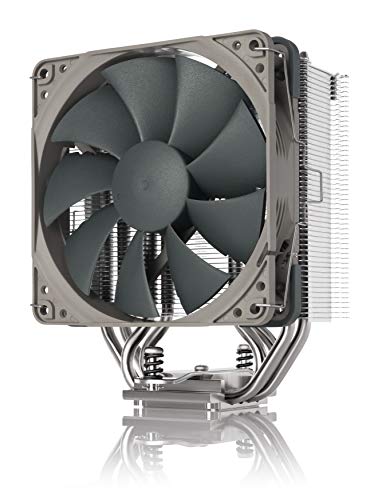
The NH-U12A uses seven heatpipes and two NF-A12x25 PWM fans (450-2000 rpm, 18.8-22.6 dB), with a 158 mm height, 125 mm width and 112 mm depth with fans. Its asymmetric design keeps clear of RAM slots on LGA115x and AM4 boards. Noctua does not publish a wattage rating, and the cooler carries a six-year warranty at a premium price.
Who it is for: compact cases that cannot take a 168 mm cooler but still demand performance. Pros: excellent cooling for a single tower, low noise, wide compatibility. Cons: price per watt of cooling is high compared with dual-tower value picks.
Best compact budget: DeepCool AK400 Digital
The AK400 Digital is a single-tower cooler with four 6 mm heatpipes, a 120mm fluid-dynamic-bearing fan at 500-1850 rpm (68.99 cfm, up to 28 dB), a 220 W rating, and dimensions of 126 x 97 x 156 mm weighing about 695 g. A top-mounted display shows CPU temperature and usage with a warning for high heat. Neither the heatsink nor the fan overhangs the memory slots, so tall RAM kits fit. It supports AM4, AM5 and Intel LGA115X to LGA1851.
Who it is for: small and mid-size cases, and budget systems with 65-150 W processors. Pros: low price, RAM clearance, built-in telemetry. Cons: limited headroom beyond 180 W.
Which air cooler to choose by processor
| CPU class | Typical sustained power | Good fit | Why |
|---|---|---|---|
| Ryzen 5 or Core i5 | 65-125 W | DeepCool AK400 Digital or Peerless Assassin 120 SE | Single tower is enough; save the money |
| Ryzen 7 X3D or Core i7 | 90-180 W | Phantom Spirit 120 SE or DeepCool AK620 | Dual tower keeps fans slow while gaming |
| Ryzen 9 or Core Ultra 9, gaming only | 120-200 W | Noctua NH-D15 G2 or Dark Rock Pro 5 | High-end tower for sustained boost |
| Ryzen 9 or Core Ultra 9, heavy rendering | 220-280 W | 360mm AIO instead | Air coolers saturate near this range |
How to choose an air cooler
Height and case clearance
Measure the distance from the CPU socket to the side panel, or look up your case’s published cooler clearance. Most mid-towers allow 160 to 175 mm, but compact cases may allow only 150 mm. The NH-D15 G2 and Dark Rock Pro 5 stand 168 mm tall, the AK620 160 mm, and the Thermalright pair 154-155 mm.
RAM and PCIe clearance
A dual-tower cooler with a front fan can overlap the first memory slot. Noctua’s NH-D15 G2 allows 32 mm RAM with both fans mounted and 59 mm in single-fan mode, and the AK400 Digital avoids overhanging the DIMMs altogether. If you use tall RGB memory, verify the manufacturer’s clearance figure, not only cooler height.
Fan quality and noise
Premium fans use better bearings and tighter blade tolerances, which lowers noise at the same airflow. Budget coolers can approach premium performance if you accept higher fan speeds during heavy loads. For a quiet desktop, choose a cooler whose fan stays below about 1000 rpm at your normal load.
Worked example: when air and AIO swap places
Suppose your processor draws 150 W in games. A dual-tower cooler such as the Phantom Spirit 120 SE or the Peerless Assassin 120 SE will hold it comfortably at roughly 1000 to 1200 rpm. A 240mm AIO would give similar temperatures at similar noise and cost two to three times more. Move the load to 250 W in a long render and the picture changes: the air cooler’s fans climb to full speed and the AIO’s larger surface area lets it stay cooler and quieter.
Spec comparison: size, weight and fans
| Cooler | Fans | Fan speed | Weight (with fans) | Memory notes |
|---|---|---|---|---|
| Phantom Spirit 120 SE | 2 x 120 mm TL-C12B V2 | Up to 1500 rpm | About 765 g heatsink only | Check front-fan height with tall RAM |
| Noctua NH-D15 G2 | 2 x 140 mm NF-A14x25r G2 | Up to 1500 rpm | 1525 g | 59 mm in single-fan mode, 32 mm with both fans |
| Peerless Assassin 120 SE | 2 x 120 mm TL-C12C | Up to 1550 rpm | About 730 g heatsink only | Raise or lower the front fan as needed |
| DeepCool AK620 | 2 x 120 mm PWM | 500-1850 rpm | 1456 g | 43 mm maximum RAM height under the fan |
| Dark Rock Pro 5 | 135 mm + 120 mm Silent Wings | PWM controlled | 1.29 kg | Verify clearance on your motherboard |
| Noctua NH-U12A | 2 x 120 mm NF-A12x25 | 450-2000 rpm | See Noctua spec sheet | Asymmetric layout clears RAM on LGA115x and AM4 |
| DeepCool AK400 Digital | 1 x 120 mm FDB | 500-1850 rpm | About 695 g | No DIMM overhang |
Setting a fan curve that keeps an air cooler quiet
A tower cooler is quietest when the fans change speed slowly. In the BIOS, set the CPU fan to hold a low speed, around 30 to 40 percent, until the CPU reaches roughly 60 C, then increase it gradually to full speed by about 85 C. Many motherboards also have a response-time or step-up setting; raise it so brief load spikes, such as opening an application, do not trigger a fan burst you can hear. If the cooler has two fans, run both from the same curve, because mismatched speeds create a beating sound. After you adjust the curve, run a ten-minute load and check that temperatures settle, rather than climbing steadily.
Paste and mounting still matter. A thin, even layer of thermal paste beats a thick one, and a cooler that is slightly off-level can leave part of the heat spreader uncovered. If one core consistently reads 10 C or more above the others, remove the cooler, clean both surfaces with isopropyl alcohol and re-seat it with even screw pressure.
Ownership: what wears first on an air cooler
An air cooler has one mechanical wear part, the fan. Quality fans with fluid dynamic bearings last many years, and replacement 120mm or 140mm PWM fans are inexpensive. The heatsink itself rarely degrades, but dust clogs the fin stack, which shows up as higher temperatures. Clean fins every few months with a brush and low-pressure air. Thermal paste usually lasts several years; replace it when you re-mount the cooler. Moving a PC with a heavy tower cooler fitted can stress the motherboard socket, so remove or support large coolers before shipping a system.
Installation tips
- Install the cooler before the graphics card so you have room for the screwdriver.
- Apply a pea-sized dot of thermal paste in the centre, or use a thin line for rectangular heat spreaders.
- Tighten the mounting screws in a cross pattern until they stop; do not force them past the hard stop.
- Connect the fan to the CPU fan header, and the second fan to the same header through a splitter if the cooler includes one.
- Orient the airflow so the front fan pulls air from the case intake and the rear fan exhausts toward the rear or top vent.
Air cooler myths worth ignoring
Three beliefs still shape many purchases. The first is that liquid always beats air; in practice a good dual tower matches a 240mm AIO on most gaming loads. The second is that a heavier cooler always cools better, when fin spacing, heatpipe layout and fan pressure matter at least as much as mass. The third is that rated wattage predicts temperature. Ratings come from each brand’s own method, and two coolers with the same number can differ by several degrees on the same processor, so compare independent noise-normalised reviews as well as the box.
Mounting and motherboard care
Large coolers put leverage on the CPU socket whenever the case is moved or tilted. Fit the cooler with the board’s backplate properly seated, avoid over-tightening and, if you ship the PC, remove the cooler or support it. On boards with weak PCIe slot reinforcement, check that a tall cooler does not block the first graphics card slot’s latch, since removing a GPU without clearance is a common source of damage.
One last practical point: buy for the case you own today and the processor you expect to own in two years. Sockets change, but most modern air coolers include brackets for several generations, so a good tower can move with you to the next platform at no extra cost.
Frequently Asked Questions
Is an air cooler good enough for a modern CPU?
Yes for most processors. Premium air coolers handle roughly 200 to 250 W, covering nearly all gaming CPUs. Only flagship chips with heavy sustained loads benefit clearly from a 360mm AIO.
Are air coolers quieter than AIOs?
Often yes at idle and light load, because there is no pump. Under heavy loads, large AIOs can run their fans slower, so the comparison depends on the workload.
Do I need an expensive cooler for a Ryzen 7 X3D?
No. X3D processors use less power than many competitors in games, so a mid-priced dual tower like the Phantom Spirit 120 SE or Peerless Assassin 120 SE is usually enough.
How long do air coolers last?
Heatsinks last the life of the PC, and fans typically run five to ten years. Replacing a fan is cheaper than replacing an AIO.
Will a big air cooler fit my case?
Check the case’s maximum CPU cooler height. Most mid-towers accept 160 to 175 mm coolers, but small-form-factor cases may require a low-profile or single-tower model.
Can I use thermal paste from another brand?
Yes. Any quality non-conductive paste works, and the paste included with the cooler is usually adequate for a first installation.




Write Your Review
No reviews yet. Be the first to share your experience!