

Key takeaways
- Memory: Single-channel only, supporting DDR4-3200, DDR5-4800 or LPDDR5-4800 depending on the board. Intel’s official maximum is 16 GB, though some mini PCs run larger modules successfully.
- PCIe: Nine PCIe 3.0 lanes, which is enough for one NVMe drive, a network chip and a few peripherals, but not for a graphics card.
- Instructions: AVX2 is supported, but there is no Hyper-Threading.
- Video: The Xe graphics decode H.264, HEVC and AV1 in hardware, which is the reason these chips shine in media players.
- Displays: Many mini PCs drive two or three monitors using HDMI and USB-C outputs.
Intel’s N-series processors are low-power, efficiency-core-only chips built for mini PCs, budget laptops, Chromebooks, thin clients and small home servers. The family runs from the four-core Alder Lake-N chips (N100 and N200) through the refreshed Twin Lake parts (N150 and N250) to eight-core models such as the Core 3 N355, and all of them trade peak speed for very low power draw and silent or near-silent operation. If you want a cheap always-on machine for media, networking or light office work, an N100 or N150 mini PC is usually enough; if you need more multitasking headroom, step up to an eight-core part.
Our top picks


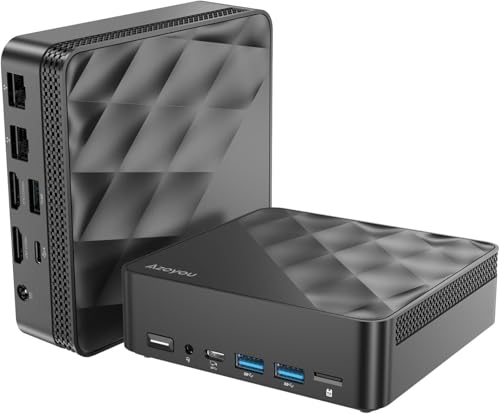

As an Amazon Associate we earn from qualifying purchases at no extra cost to you.
What the N-Series Is and Why It Exists
Most Intel processors mix large Performance cores with smaller Efficient cores. The N-series drops the Performance cores entirely. Every core is a Gracemont-style Efficient core built on the Intel 7 process, packed into a small package with a modest integrated GPU and a single-channel memory controller. That design keeps costs and power down, so manufacturers can build fanless boxes, compact desktops and entry laptops at low price tiers.
The naming looks confusing because Intel has used several brands. Early chips were called Intel Processor N100 or N200, later parts appear as Intel Processor N150 and N250, and the higher-core versions carry Core branding, such as Core i3-N305 and Core 3 N355. Under the labels they share the same basic idea: small cores, small power budgets and integrated Xe graphics.
Specifications of the Four-Core Chips
All four of the common entry chips have four cores and four threads, a 6W base power rating and 6 MB of L3 cache, according to Intel’s data as summarized by multiple hardware databases. Twin Lake keeps the same cores, process and package as Alder Lake-N, with higher clock ceilings.
| Chip | Generation | Max turbo | Integrated GPU | GPU execution units |
|---|---|---|---|---|
| Intel Processor N100 | Alder Lake-N, 2023 | 3.4 GHz | Intel UHD, Xe-based | 24 |
| Intel Processor N200 | Alder Lake-N, 2023 | 3.7 GHz | Intel UHD, Xe-based | 32 |
| Intel Processor N150 | Twin Lake, 2025 | 3.6 GHz | Intel UHD, Xe-based | 24 |
| Intel Processor N250 | Twin Lake, 2025 | 3.8 GHz | Intel UHD, Xe-based | 32 |
Early leaks listed the N150 at about 2.9 GHz base and the N250 at about 3.2 GHz base, with graphics clocks near 1.0 GHz and 1.25 GHz respectively. Treat those numbers as preliminary. Independent benchmarks show the difference in processor speed between the N100 and N150 is small, with PassMark putting it at under one percent and other estimates suggesting a 5 to 10 percent CPU gain and a larger graphics gain of roughly a third.
Memory, I/O and Features Shared by the Family
- Memory: Single-channel only, supporting DDR4-3200, DDR5-4800 or LPDDR5-4800 depending on the board. Intel’s official maximum is 16 GB, though some mini PCs run larger modules successfully.
- PCIe: Nine PCIe 3.0 lanes, which is enough for one NVMe drive, a network chip and a few peripherals, but not for a graphics card.
- Instructions: AVX2 is supported, but there is no Hyper-Threading.
- Video: The Xe graphics decode H.264, HEVC and AV1 in hardware, which is the reason these chips shine in media players.
- Displays: Many mini PCs drive two or three monitors using HDMI and USB-C outputs.
Single-channel memory is the main performance limiter. With half the bandwidth of a typical dual-channel desktop, graphics performance and memory-heavy tasks hit a ceiling quickly. It is also why memory speed matters more than you might expect on a chip this small.
The Eight-Core Step Up: N305, N350 and N355
For buyers who find four cores too limiting, Intel offers eight-core options. The Core i3-N305 has eight efficiency cores with a higher clock ceiling and a 15W class rating. The Twin Lake generation brings the Core 3 N355, an eight-core part reaching 3.9 GHz with a 15W rating, and the N350, a 7W part aimed at passively cooled designs. These chips still use single-channel memory, so they do not behave like desktop processors, but eight cores helps with multitasking, light virtual machines, home server duties and software that spreads across threads.
| Chip | Cores | Class | Good for |
|---|---|---|---|
| N100 / N150 | 4 | 6W base | Media box, router, light office, thin client |
| N200 / N250 | 4 | 6W base, stronger graphics | Better video and light gaming |
| Core i3-N305 | 8 | 15W class | Home server, multitasking |
| Core 3 N350 | 8 | 7W class | Silent, fanless designs |
| Core 3 N355 | 8 | 15W class, up to 3.9 GHz | Fastest in the family for small boxes |
What You Can and Cannot Do With an N-Series Chip
Things they do well
- Web browsing and office apps: A handful of tabs, documents and spreadsheets run smoothly with 8 GB of memory or more.
- Video streaming and playback: Hardware decoding for modern codecs keeps 4K playback fluid and cool.
- Home servers: Small file servers, Home Assistant hubs, DNS filters, network-attached storage controllers and light container workloads suit the efficient design.
- Software routers and firewalls: Multi-port mini PCs based on N-series chips are popular for this role because of low power draw.
- Retro and older games: Emulators and classic titles run acceptably, especially on the 32-EU variants.
Things they struggle with
- Modern 3D games: The integrated graphics are limited, and single-channel memory worsens the problem.
- Heavy video editing and rendering: Four cores are slow for export jobs.
- Large compile jobs and virtual machine farms: Even the eight-core chips are modest by desktop standards.
- Many simultaneous browser tabs plus apps: Four-core chips can feel sluggish when pushed.
N100 vs N150: Is the Upgrade Worth It?
The N150 is the direct successor to the N100, with a slightly higher turbo of 3.6 GHz against 3.4 GHz, and a higher graphics clock in its Twin Lake form. Real-world differences are small. For most buyers, the choice depends on what the specific mini PC offers: memory type, storage slots, ports, cooling and the manufacturer’s support, not the processor alone. If an N100 system is meaningfully cheaper than an N150 system with the same memory and storage, the N100 is the better value. If prices are similar, choose the N150 for its modest graphics and clock improvements. The N200 and N250, with 32 graphics execution units, make sense only when the graphics gain matters, such as for light games or heavy video output across several screens.
Decision Matrix: Matching a Chip to Your Use
| Your situation | Best fit | Why |
|---|---|---|
| Living-room media player | N100 or N150 | Hardware AV1 decode and low heat |
| Home Assistant or DNS server | N100 or N150 | Very low idle power |
| Software router or firewall | N100, N150 or N305 mini PC | Multiple Ethernet ports and low power |
| Home office, many tabs | Core i3-N305 or Core 3 N355 | Eight cores aid multitasking |
| Light gaming and emulation | N200, N250 or N355 | More graphics execution units |
| Silent fanless device | N350-class or fanless N100 designs | Lower power fits passive cooling |
| Docker and small VMs | Core i3-N305 or Core 3 N355 | More cores and 16 GB+ memory |
Running Cost: Why N-Series Boxes Make Good Servers
An N-series mini PC often idles in the single-digit watt range and draws somewhat more under load, depending on the drives and peripherals attached. Consider a box that averages 10W around the clock. That is 0.24 kWh a day, or about 7.2 kWh in a 30-day month. Compare that with a typical desktop tower averaging 60W, which consumes 43.2 kWh over the same month. Multiplying the difference of 36 kWh by your electricity rate shows the yearly saving, which grows quickly in regions with high rates. For an always-on service, that efficiency is often the main reason to choose this family.
Worked Example: Sizing a Home Server on an N-Series Chip
Suppose you want one box to run a media server, a DNS ad blocker, a smart-home hub and a file share. Start by estimating memory: a media server needs roughly 1 to 2 GB, the DNS filter under 0.5 GB, the home-automation hub 1 to 2 GB, and the operating system and file sharing about 2 GB. The total is around 6 GB, so 8 GB would work but 16 GB leaves room for containers and caching, which is why 16 GB is the safer purchase. Next, consider processing: these services are mostly idle with short bursts, which four efficiency cores handle without effort. The exception is video transcoding. If clients need transcoded streams, rely on the integrated GPU’s hardware encoder, which can handle a stream or two while using little CPU, and avoid software transcoding on this class of chip.
Finally, plan storage and network. A 500 GB to 1 TB NVMe drive is enough for the system and caches, and one or two external or internal drives cover media. A 2.5 Gigabit Ethernet port prevents the network from becoming the bottleneck when several devices stream. With those choices, an N100 or N150 box covers the whole list with a power draw low enough to leave on permanently.
Thermals, Throttling and Placement
N-series chips run cool by design, but small cases with little airflow can still heat up during long workloads. When temperature reaches the chip’s limit, clocks drop and the system feels slower. A few habits keep performance steady:
- Place the mini PC where air can pass around it, not inside a closed cabinet.
- Clean dust from vents every few months, since tiny fans clog quickly.
- Replace dried thermal paste if the system is several years old and temperatures climb.
- Prefer designs with a metal chassis that doubles as a heatsink for fanless operation.
- Monitor temperatures during the first week of use to confirm the design holds up under your workload.
Durability and Ownership Realities
Because these machines run around the clock in many homes, the parts that wear are predictable. Small fans are the first mechanical failure point, so a model with an easily replaceable fan or a fanless chassis lasts longer. Cheap SSDs bundled with budget mini PCs can have low endurance ratings, which matters if you run databases or write logs constantly; consider replacing the stock drive with a better one if you plan heavy writes. Power adapters are another weak spot, since a failing brick can cause random reboots. Keep a spare compatible adapter, check its voltage and connector size, and avoid using a different adapter just because the plug fits.
Finally, remember that the processor is usually soldered. If the box fails outside warranty, the repair path is often replacing the whole unit, so buying from a seller with a clear return and warranty policy is worth more than a small saving.
Operating System Notes
Windows 11 runs on these chips, though a fresh install benefits from 8 GB of memory and an SSD. Light Linux distributions are particularly pleasant on N-series hardware, using less memory and offering quick boot times. For server tasks, many users install Debian, Ubuntu Server or a virtualization platform and run services in containers. Check that drivers for the network chip and Wi-Fi card are supported in your chosen distribution before buying, because a few mini PC makers use less common network chips. Keeping the BIOS up to date also improves stability and power management on this class of hardware.
Buying Checklist for an N-Series Mini PC
- Check the memory type and capacity. Prefer 16 GB over 8 GB if you plan to run containers or many browser tabs, and see whether the memory is soldered or upgradable.
- Confirm the storage. NVMe is faster than SATA, and an extra M.2 or 2.5-inch bay helps if you plan to expand.
- Inspect the ports. Look for HDMI 2.0 or newer for 4K at 60 Hz, 2.5 Gigabit Ethernet if you need fast networking, and USB-C with video output if you want a clean setup.
- Look at the cooling. A small fan keeps clocks steady under load, while fanless designs are silent but throttle sooner. Read about sustained performance, not just peak.
- Check Wi-Fi and Bluetooth. Wi-Fi 6 or newer is preferable, and a wired connection is better for servers.
- Review the BIOS and operating system options. Linux and Windows both run well on these chips, but look for a clear warranty and BIOS update path.
- Verify the exact processor name. Product pages may use N100, N150 or N95 labels loosely, so confirm what is in the box.
Common Mistakes to Avoid
- Expecting desktop performance. These chips are efficient, not fast. They are meant for modest workloads.
- Running a single memory stick and expecting speed. Since the controller is single-channel, a second module will not add bandwidth, so choose one higher-speed module.
- Ignoring thermals in tiny cases. Dust, tight enclosures and sealed shelves can raise temperatures and reduce sustained speeds.
- Buying on processor name alone. Memory, storage, network ports and build quality affect the experience as much as the chip.
- Assuming upgrade paths. Most N-series devices have soldered processors, so the chip cannot be swapped later.
How the N-Series Compares With Other Small Chips
Compared with older Celeron and Pentium Silver processors, N-series chips offer a clear step up in efficiency and graphics features, including hardware AV1 decoding. Against Raspberry Pi style single-board computers, they run standard x86 software, use faster storage and generally deliver more performance per box, though at a higher power draw and cost. Against Ryzen mobile mini PCs and Core Ultra mini PCs, they are slower but considerably cooler and cheaper. The natural order is simple: pick an N-series chip for always-on, light workloads; step up to a Ryzen or Core Ultra mini PC for creative work or gaming; choose a full desktop for heavy tasks.
Final Recommendation
Treat the N-series as a specialist family. If your goal is a quiet, frugal machine that stays on all day, the four-core N100 and N150 deliver exactly that, and the choice between them should follow system price and features. If you expect to multitask, host several services or edit lightweight media, spend a little more on an eight-core Core i3-N305 or Core 3 N355 system with 16 GB of memory and NVMe storage. And if you catch yourself wanting to game or render, skip the family entirely and look at a Ryzen or Core Ultra mini PC instead.
Frequently Asked Questions
What are Intel N-series processors?
They are low-power, efficiency-core-only Intel chips used in mini PCs, entry laptops and small servers. Examples include the N100, N150, N200, N250 and the eight-core Core i3-N305 and Core 3 N355.
Is the N150 much faster than the N100?
No. It has slightly higher clocks and improved graphics, but PassMark-style results show only a small processor gain. Choose based on the system’s overall price and features.
How much memory can an N100 or N150 use?
Intel’s official maximum is 16 GB, in a single-channel configuration. Some mini PCs report working with 32 GB modules, but that is outside the official specification.
Can N-series chips play 4K video?
Yes. The integrated graphics decode H.264, HEVC and AV1 in hardware, so 4K playback is typically smooth when the player supports hardware acceleration.
Are N-series mini PCs good for gaming?
They suit older and lightweight games, emulation and cloud streaming. Modern 3D titles run poorly because of limited graphics power and single-channel memory.
Which N-series chip should I buy for a home server?
The N100 or N150 handles light server roles and keeps power use very low. For containers and multiple services, a Core i3-N305 or Core 3 N355 gives eight cores of headroom.


Write Your Review
No reviews yet. Be the first to share your experience!