

Key takeaways
- Local AI inference: a quantized 30-billion-parameter language model can fit in 32 GB but not in 16 GB. Image models such as Stable Diffusion XL and Flux run on both, but larger batch sizes and higher resolutions favor the 5090.
- 3D rendering: scenes with large textures and geometry must fit entirely in VRAM for GPU renderers such as Blender Cycles, OctaneRender and V-Ray. Running out forces a slow fallback to system memory or a failed render.
- Video editing and color work: 8K timelines with multiple effects layers in DaVinci Resolve use VRAM aggressively.
- Game development: editors such as Unreal Engine 5 with large open scenes benefit from the headroom.
The RTX 5090 is the faster card in every measurable way: it has roughly twice the CUDA cores, twice the video memory and about 1.9 times the memory bandwidth of the RTX 5080, but it also draws 575 W against the 5080’s 360 W. For most gamers at 1440p or 4K the RTX 5080 is the sensible high-end choice, while the RTX 5090 makes sense for 4K at maximum settings, large AI models, 3D rendering and anyone who needs 32 GB of VRAM.
Both cards use NVIDIA’s Blackwell architecture, GDDR7 memory, PCIe 5.0 and the 12V-2×6 power connector, so the feature set is nearly identical. What separates them is scale. This guide walks through the specification sheet line by line, explains what each number means in practice, and ends with a decision matrix so you can map your own monitor, workload and power supply to the right card.
Our top picks
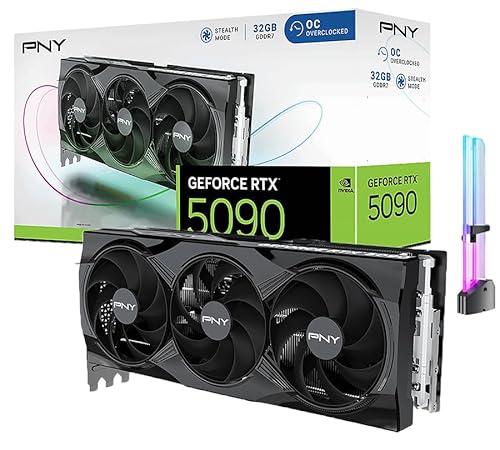

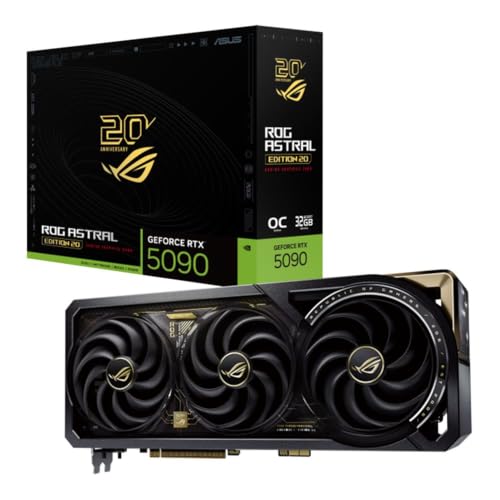

As an Amazon Associate we earn from qualifying purchases at no extra cost to you.
RTX 5090 vs RTX 5080 specs at a glance
The figures below come from NVIDIA’s published specifications for the GeForce RTX 50 series. Board partner models may run slightly higher boost clocks and power limits.
| Specification | GeForce RTX 5090 | GeForce RTX 5080 | 5090 advantage |
|---|---|---|---|
| GPU | GB202 | GB203 | Larger die |
| CUDA cores | 21,760 | 10,752 | About 2.0x |
| Streaming multiprocessors | 170 | 84 | About 2.0x |
| Tensor cores (5th gen) | 680 | 336 | About 2.0x |
| RT cores (4th gen) | 170 | 84 | About 2.0x |
| Boost clock | 2.41 GHz | 2.62 GHz | 5080 is clocked higher |
| VRAM | 32 GB GDDR7 | 16 GB GDDR7 | 2.0x |
| Memory bus | 512-bit | 256-bit | 2.0x |
| Memory bandwidth | 1,792 GB/s | 960 GB/s | About 1.87x |
| L2 cache | 96 MB | 64 MB | 1.5x |
| FP32 throughput | about 105 TFLOPS | about 56 TFLOPS | About 1.9x |
| Total graphics power | 575 W | 360 W | 215 W more |
| Recommended PSU | 1000 W | 850 W | 150 W more |
| Power connector | 12V-2×6 | 12V-2×6 | Same |
| PCIe interface | 5.0 x16 | 5.0 x16 | Same |
| Founders Edition cooler | Two-slot, dual flow-through | Two-slot, dual flow-through | Same format |
Notice the boost clock row. The RTX 5080 actually clocks higher than the RTX 5090. The 5090’s advantage is entirely about width: more cores working in parallel and a much wider memory bus feeding them. That width is why the card needs so much power.
What the core count difference means
A raw doubling of CUDA cores does not translate into a doubling of frame rate. Games rarely scale perfectly with core count, because some work is serial, some is limited by the CPU, and some is limited by memory. In published 4K comparisons the RTX 5090 usually lands somewhere between 30 and 50 percent ahead of the RTX 5080 in rasterized games, with the gap widening in path-traced titles and shrinking in older or CPU-limited games.
The reason is simple. Scaling depends on how well a game can keep thousands of shaders busy at the same time. At 1080p and 1440p, most engines run out of parallel work before a 21,760-core GPU is fully loaded, so the extra silicon sits partly idle. At 4K with ray tracing and high-resolution textures, there is far more work per frame and the larger chip pulls ahead more convincingly.
Tensor and RT cores
The tensor core and RT core counts scale at the same ratio as the shaders. Tensor cores run DLSS 4 upscaling and multi frame generation, while the RT cores accelerate ray and path tracing. Because both cards share the same fifth-generation tensor design, the feature list is the same: DLSS 4 with multi frame generation, Reflex 2 and neural shaders are available on both. The 5090 simply has twice as much hardware to execute them, so it holds higher frame rates when you enable the heaviest ray tracing modes at native 4K.
Media engines
For video work, the RTX 5090 carries three hardware encoders while the RTX 5080 carries two, per NVIDIA’s specification sheets. Both support 4:2:2 hardware decoding and AV1 encoding. Streamers and editors who export a lot of footage will see faster exports on the 5090, but for live streaming a single encoder is more than enough on either card.
VRAM: the difference that matters most
If one line on this page should drive your decision, it is memory capacity. The RTX 5080 has 16 GB and the RTX 5090 has 32 GB, both of the latest GDDR7 type. Sixteen gigabytes is comfortable for nearly every game at 4K today, but a handful of titles with ultra texture packs, heavy ray tracing and frame generation enabled can push past it. The 32 GB on the 5090 removes that worry entirely.
The gap is much more dramatic outside gaming:
- Local AI inference: a quantized 30-billion-parameter language model can fit in 32 GB but not in 16 GB. Image models such as Stable Diffusion XL and Flux run on both, but larger batch sizes and higher resolutions favor the 5090.
- 3D rendering: scenes with large textures and geometry must fit entirely in VRAM for GPU renderers such as Blender Cycles, OctaneRender and V-Ray. Running out forces a slow fallback to system memory or a failed render.
- Video editing and color work: 8K timelines with multiple effects layers in DaVinci Resolve use VRAM aggressively.
- Game development: editors such as Unreal Engine 5 with large open scenes benefit from the headroom.
The wider memory bus matters too. At 1,792 GB/s, the 5090 moves data nearly twice as fast as the 5080’s 960 GB/s. Bandwidth-hungry workloads such as AI inference, where the GPU spends most of its time reading model weights, scale almost directly with this number.
Power, heat and case requirements
Power is where the two cards behave like different classes of product.
Power supply
NVIDIA recommends a 1000 W power supply for the RTX 5090 and an 850 W unit for the RTX 5080. These are guidance figures for a typical system with a modern gaming CPU, and quality matters more than the label: pick a unit certified to the ATX 3.0 or 3.1 standard with a native 12V-2×6 cable. Avoid daisy-chaining adapters from older eight-pin cables when a native cable is available, and make sure the connector clicks fully into place. A partially seated high-power connector is the most common cause of melted-connector reports.
Cooling and size
The Founders Edition versions of both cards are two-slot designs, which is a notable engineering achievement for a 575 W card. Board partner models tell a different story: many RTX 5090 designs are three to four slots thick and over 330 mm long, while typical RTX 5080 models are closer to three slots. Check three measurements before buying: card length, card thickness, and the clearance between the graphics card and your front radiator or fans.
Running cost
Here is a worked example. Suppose you game three hours per day at full load. The difference in board power is about 215 W, or 0.215 kW.
- Extra energy per day: 0.215 kW x 3 h = 0.645 kWh
- Extra energy per year: 0.645 x 365 = about 235 kWh
- At an electricity rate of 0.15 per kWh, that is roughly 35 extra per year in your local currency units
The running cost difference is modest. The real cost of the 5090 is the purchase price, the larger power supply and a case with enough airflow, not the monthly electric bill. You will also feel the heat: a 575 W card dumps a lot of warmth into a room during long sessions.
Gaming performance by resolution
The following table summarizes where each card makes sense. The percentages are general ranges reported in published reviews, not guarantees, and they vary by game, CPU and settings.
| Scenario | RTX 5080 | RTX 5090 | Verdict |
|---|---|---|---|
| 1080p high refresh | Often CPU-limited | Same CPU limit | Neither is needed; a cheaper card suffices |
| 1440p at 165 to 240 Hz | Excellent in nearly all games | Slight gain, often CPU-limited | 5080 is the better value |
| Ultrawide 3440×1440 | Strong | Noticeably smoother in heavy titles | 5080 unless you want maximum ray tracing |
| 4K at 60 to 120 Hz | Very good with DLSS | Roughly 30 to 50 percent faster | 5090 for native 4K without upscaling |
| 4K path tracing | Needs DLSS and frame generation | Comfortable with DLSS and frame generation | 5090 clearly ahead |
| VR with high resolution headsets | Good | Better headroom for supersampling | 5090 for enthusiasts |
The CPU question
Pairing matters. A flagship GPU wants a flagship CPU. If you pair an RTX 5090 with a mid-range processor and play at 1440p, you may find the CPU limits frame rate and the extra GPU cost buys almost nothing. A chip in the class of the Ryzen 7 9800X3D or the Intel Core Ultra 9 285K keeps both cards fed. If your budget is fixed, spending part of the difference between the two GPUs on a better processor, faster memory or a higher-quality monitor can improve the experience more than the GPU upgrade itself.
Cost, value and availability
At launch NVIDIA positioned the RTX 5090 at roughly double the RTX 5080 in cost, which tracks the doubling of silicon but not the doubling of frame rate. That means the 5080 offers far more performance per unit of spending. The 5090 is a luxury and workload tool: you pay a large premium for the last 30 to 50 percent of performance and for 32 GB of memory.
Market prices for both cards have moved well away from the manufacturer’s suggested level at various times since launch, depending on stock, memory costs and demand. Always compare current listings from reputable retailers, and treat offers far above the suggested level with caution. Where possible, buy from a seller with a clear return policy, because a card this expensive deserves a proper return window.
Which card should you buy? A decision matrix
| Your situation | Better choice | Why |
|---|---|---|
| 1440p gaming, any refresh rate | RTX 5080 | The extra cores sit idle behind CPU limits |
| 4K gaming with DLSS enabled | RTX 5080 | DLSS 4 closes much of the gap; 16 GB is enough |
| 4K native, maximum ray tracing | RTX 5090 | Needs the shader and RT throughput |
| Local large language models | RTX 5090 | 32 GB fits much larger models |
| Stable Diffusion hobbyist | RTX 5080 | 16 GB handles common image models |
| Professional 3D rendering | RTX 5090 | VRAM and speed save billable hours |
| 750 W or smaller power supply | RTX 5080 or lower | The 5090 needs a much larger supply |
| Small form factor case | RTX 5080 | Easier to fit and cool |
| Streaming plus gaming | RTX 5080 | Encoders on both are more than adequate |
Upgrading from an older card
Many buyers reading a specification page like this one already own a GeForce RTX 30 or RTX 40 series card, so the upgrade math deserves its own section.
Coming from an RTX 3080 or RTX 3090
Either Blackwell flagship is a large step up. The RTX 5080 roughly doubles the ray tracing throughput of an RTX 3080 and adds DLSS 4 multi frame generation, which older cards cannot run. If your current card has only 10 or 12 GB of memory, the jump to 16 GB alone will help in modern games. Owners of an RTX 3090 with 24 GB are the one group who might notice the 5080’s smaller memory pool, which is a reason to look at the 5090 or to wait.
Coming from an RTX 4080 or RTX 4090
The generational gain is smaller. The RTX 5080 is an incremental step over the RTX 4080 Super in raw rasterization, and its main selling point is the new feature set rather than raw speed. An RTX 4090 owner will find the RTX 5090 a meaningful but expensive step, mostly in memory capacity and ray tracing. Unless you are hitting the 24 GB limit or need more speed in a specific workload, skipping a generation is a reasonable choice.
Resale and timing
Flagship cards hold their value better than mid-range models when they are sold in good condition with the original box and receipt. If you plan to upgrade, selling your old card before the new one arrives can offset part of the cost, but only do so when you have a backup display option.
Board partner models versus Founders Edition
Both GPUs are sold as NVIDIA’s own Founders Edition and as custom designs from partners such as ASUS, MSI, Gigabyte, Zotac, Palit and PNY. The Founders Edition is attractive because of its compact two-slot size and consistent build quality, but availability is limited in many regions. Partner cards usually offer larger coolers, quieter fan curves, higher power limits and extras such as dual BIOS switches and added lighting. For a 575 W card, a larger cooler can make a real difference in noise, so a three-fan partner model is often the quieter choice if your case has the space. For the RTX 5080, a modest model with a good cooler is generally enough, and paying extra for a factory overclock rarely changes the experience.
Common mistakes when choosing between them
- Ignoring the power supply: a 750 W unit that ran a previous card fine may trip under the transient spikes of a 575 W GPU.
- Forgetting case clearance: several partner RTX 5090 cards will not fit in compact mid-tower cases without removing a front radiator.
- Buying for a CPU-limited setup: at 1080p neither card shows its strengths.
- Overpaying for factory overclocks: partner models with a small boost clock increase deliver differences of a few percent at most.
- Assuming more VRAM always means faster games: capacity only helps when a game would otherwise exceed it.
Final recommendation
Buy the RTX 5080 if you game at 1440p or at 4K with upscaling, if you own a power supply near 850 W, or if you want the strongest value in the high-end tier. Buy the RTX 5090 if you need 32 GB of memory for AI or rendering, if you insist on native 4K with the heaviest ray tracing, or if you want the fastest consumer GPU available and have the power supply, case and CPU to match. The specifications show that the difference is real, but only specific users can turn the extra hardware into a benefit they can notice.
Frequently Asked Questions
How much faster is the RTX 5090 than the RTX 5080?
In published 4K benchmarks the RTX 5090 is typically 30 to 50 percent faster in games, depending on the title and settings. In VRAM-limited workloads such as large AI models and heavy 3D scenes the gap can be far greater, because the 5080 may not run the workload at all.
Is 16 GB of VRAM enough for the RTX 5080 in 2026?
For nearly all games at 1440p and 4K, yes. A small number of titles with maximum textures, path tracing and frame generation can approach the limit at 4K. Lowering texture quality one notch typically resolves it with little visible difference.
What power supply do I need for each card?
NVIDIA recommends 850 W for the RTX 5080 and 1000 W for the RTX 5090. Choose an ATX 3.0 or newer unit with a native 12V-2×6 cable, and go higher if you have a power-hungry CPU or plan to overclock.
Do both cards support DLSS 4 and multi frame generation?
Yes. Both are Blackwell GPUs with fifth-generation tensor cores, so DLSS 4, multi frame generation and Reflex 2 are available on each. The 5090 simply has more hardware to run them at higher resolutions.
Will an RTX 5090 fit in my case?
Not necessarily. Many partner designs are over 330 mm long and three to four slots thick. Measure the space inside your case, including clearance for the 12V-2×6 cable bend, and check the manufacturer’s listed dimensions before buying.
Does the RTX 5090 make sense for 1440p gaming?
Rarely. At 1440p most games are limited by the CPU or the engine rather than the GPU, so the extra cost brings small gains. The exception is a very high refresh rate ultrawide monitor running demanding ray traced games.





Write Your Review
No reviews yet. Be the first to share your experience!