

Key takeaways
- Power supply: NVIDIA’s guidance for the RTX 5090 is a 1000W unit, and the 5090 D follows the same recommendation. A high-quality ATX 3.1 supply with a native 12V-2×6 cable is the cleanest option.
- Connector care: Seat the 12V-2×6 plug fully until the latch clicks, avoid sharp bends within the first few centimeters of the connector, and do not use stacked adapters if a native cable is available.
- Case clearance: Partner boards are large, often three to four slots thick and over 330mm long. Check your case’s maximum GPU length and the slot count before you buy.
- Cooling: Expect over 500W of heat dumped into the case. Front-to-back airflow with at least three intake fans keeps the CPU and memory from heat soaking.
- PCIe slot: The card is PCIe 5.0 but works in a 4.0 slot with a very small performance loss in most games.
- Motherboard support: Heavy cards sag. Use the included support bracket or a dedicated anti-sag stand, especially if you move the PC.
The GeForce RTX 5090 D is a China-market version of the RTX 5090 that keeps the same GB202 core count, 32GB of GDDR7 and 575W board power, but cuts AI throughput by roughly 29 percent (from about 3,352 to about 2,375 AI TOPS) to comply with export rules. For gaming it behaves like a normal RTX 5090; the differences show up in AI, multi-GPU and mining workloads, and a later reported “D V2” variant goes further by trimming the memory bus to 384-bit and the capacity to 24GB.
Our top picks

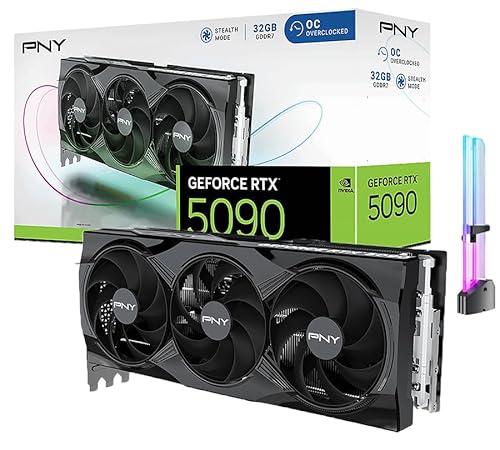

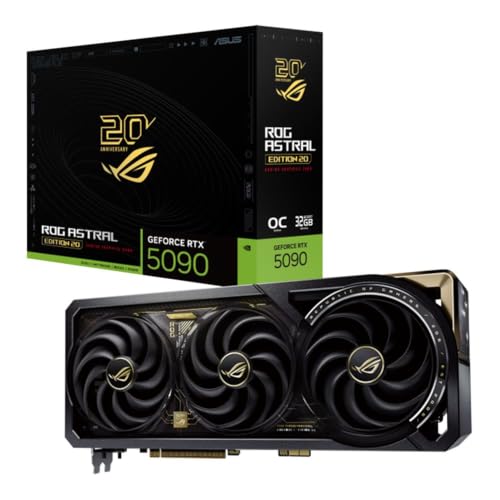
As an Amazon Associate we earn from qualifying purchases at no extra cost to you.
RTX 5090 D at a Glance
NVIDIA introduced the RTX 5090 D in January 2025 as a market-specific model, and it reached retail in China at the end of that month. Its purpose is regulatory rather than technical: the company wanted a flagship consumer card that could be sold in China without crossing the performance thresholds that apply to AI accelerators. The card uses the same Blackwell architecture as the standard RTX 5090, the same 21,760 CUDA cores, the same 32GB of GDDR7 on a 512-bit bus and the same 575W total board power target.
What changes is firmware and driver-level behavior. According to NVIDIA’s China announcement as reported by several hardware outlets, the 5090 D delivers about 2,375 AI TOPS compared with about 3,352 for the global RTX 5090. Ray-tracing throughput and rasterization performance are described as unchanged. Reports also say that multi-GPU configurations are blocked by the driver and that cryptocurrency-mining performance is deliberately limited.
That framing matters for buyers. If you only play games, edit video in consumer applications or run a single GPU in a workstation, the 5090 D is functionally the same product as the RTX 5090. If you plan to train or fine-tune large language models, run several cards in one chassis or lean on tensor throughput, the cut is real and measurable.
Why NVIDIA Makes a “D” Model at All
Export rules in the United States restrict shipments of chips above certain compute and interconnect thresholds to China. Datacenter accelerators were the original target, but a card like the RTX 5090 is powerful enough that its tensor throughput approaches those thresholds. Rather than withdraw the flagship from the market, NVIDIA created a variant whose AI capability is capped below the line while leaving the graphics pipeline alone. The same approach was used a generation earlier with the RTX 4090 D, which is why the naming will look familiar to anyone who followed that launch.
The practical consequence is that the 5090 D is a product of policy. Its specifications can change when the policy changes, which is exactly what industry reporting says happened with the second revision. Treat any spec sheet for this family as a snapshot rather than a permanent definition, and check the date of the article you are reading.
Full Specification Comparison
The table below puts the 5090 D beside the standard RTX 5090 and the reported second revision. Figures for the original 5090 D come from NVIDIA’s China launch material as relayed by VideoCardz and TechNode. The V2 figures originate from industry leaks and reporting by Tom’s Hardware and should be treated as unconfirmed by NVIDIA.
| Specification | RTX 5090 | RTX 5090 D | RTX 5090 D V2 (reported) |
|---|---|---|---|
| GPU die | GB202-300 | GB202-250 | GB202-240 |
| CUDA cores | 21,760 | 21,760 | 21,760 |
| Memory | 32GB GDDR7 | 32GB GDDR7 | 24GB GDDR7 |
| Memory bus | 512-bit | 512-bit | 384-bit |
| Memory bandwidth | 1,792 GB/s | 1,792 GB/s | about 1,344 GB/s |
| AI performance | about 3,352 TOPS | about 2,375 TOPS | lower again (not published) |
| Total board power | 575W | 575W | 575W |
| Interface | PCIe 5.0 x16 | PCIe 5.0 x16 | PCIe 5.0 x16 |
| Power connector | 12V-2×6 | 12V-2×6 | 12V-2×6 |
| Sold in | Global markets | China | China (reported) |
The memory arithmetic is easy to verify yourself: bandwidth equals bus width in bytes multiplied by the per-pin data rate. A 512-bit bus is 64 bytes wide, and at 28 Gbps that gives 64 x 28 = 1,792 GB/s. A 384-bit bus is 48 bytes wide, so the same 28 Gbps memory yields 48 x 28 = 1,344 GB/s, exactly 25 percent lower. This is why the reported V2 loses a quarter of its bandwidth even though the GPU core count is untouched.
The AI figure works similarly as a ratio. Dividing 2,375 by 3,352 gives 0.709, so the 5090 D retains about 71 percent of the tensor ceiling and gives up about 29 percent. That is a peak number, and real programs rarely sit at the peak.
What the AI Cut Actually Means
An AI TOPS figure is a peak theoretical rate for low-precision tensor math, the kind used by neural network inference and training. A 29 percent reduction on paper does not translate into a 29 percent slowdown in every program, because most applications are limited by memory bandwidth, software overhead or other stages of the pipeline long before they reach the tensor-core ceiling.
Gaming and DLSS
Games use tensor cores for DLSS upscaling, frame generation and ray reconstruction. These workloads are small and bursty compared with a training job, so they are far from saturating the card. Reviews that compared the original 5090 D against the 5090 describe gaming results as effectively identical, with differences inside normal run-to-run variation. For a player, the practical answer is that nothing important is lost. A frame-generation pass that takes a fraction of a millisecond does not become noticeably slower when the ceiling falls from 3,352 to 2,375 TOPS.
Local AI and Large Models
Running a language model locally depends on three things: VRAM capacity, memory bandwidth and tensor throughput. With 32GB, the original 5090 D can hold larger quantized models than any 24GB card, and its 1,792 GB/s bandwidth keeps token generation fast. Token generation is mostly bandwidth-bound, so a model producing text one token at a time sees almost no change. Prompt processing, which is compute-heavy, is where the reduced tensor rate can appear, especially with long documents. Users who train or fine-tune models will notice the cut more than users who only chat with a model.
Creative Workloads
Video encoders, 3D renderers and photo tools rely mostly on CUDA cores, RT cores and the dedicated video engines. Those are not part of the AI limit. A 5090 D render in a path-tracing application should land very close to a 5090 render, which is why creative professionals who do not depend on tensor workloads can treat the two as equivalent. AI-assisted features such as denoising, generative fill or neural upscaling in creative suites are the exception, and they may run slightly slower.
Multi-GPU and Mining
Press reports on the launch state that the driver disables multi-card setups on the 5090 D, even under Linux, and constrains mining performance. If your build plan involves two or four cards sharing a workload, this is the single most important difference to understand before choosing the card. Mining is a minor consideration for most buyers today, but the limit confirms that the card is designed as a consumer gaming and creator product rather than a compute node.
The Reported D V2 Revision
After export rules tightened further, industry reporting described a second China-only version, nicknamed 5090 DD or D V2. The reported changes are a GB202-240 die, a 384-bit memory interface and 24GB of GDDR7. Gaming differences are reported to be small, in the range of one to two percent, because the CUDA core count and clocks stay the same and many games are not bandwidth-bound at 4K. Large-model inference and training are measurably slower because both VRAM capacity and bandwidth fall.
Because NVIDIA has not published a full specification sheet for this card, shoppers should verify the memory capacity printed on the retail box and shown in GPU-Z before assuming they are getting the 32GB model. Buying from an authorized retailer and confirming the exact model name, including any “D” suffix, avoids surprises.
How to Verify Which Card You Have
- Read the box and listing. The model name should state “RTX 5090 D” and the memory size. A listing that only says “RTX 5090” while the board is marked with a D is a red flag.
- Open GPU-Z. Check the GPU name, the memory size and the bus width. 32GB on 512-bit matches the original D; 24GB on 384-bit matches the reported V2.
- Check the driver. The NVIDIA control panel or app reports the exact product name, which confirms the driver recognizes the card as intended.
- Run a short memory test. A synthetic bandwidth tool that reports roughly 1,700 GB/s of effective throughput is consistent with the 512-bit configuration, while roughly 1,300 GB/s points to the narrower bus.
Power, Cooling and Compatibility
Because total board power is unchanged at 575W, every practical requirement of the standard RTX 5090 carries over. Plan for the following before you install one.
- Power supply: NVIDIA’s guidance for the RTX 5090 is a 1000W unit, and the 5090 D follows the same recommendation. A high-quality ATX 3.1 supply with a native 12V-2×6 cable is the cleanest option.
- Connector care: Seat the 12V-2×6 plug fully until the latch clicks, avoid sharp bends within the first few centimeters of the connector, and do not use stacked adapters if a native cable is available.
- Case clearance: Partner boards are large, often three to four slots thick and over 330mm long. Check your case’s maximum GPU length and the slot count before you buy.
- Cooling: Expect over 500W of heat dumped into the case. Front-to-back airflow with at least three intake fans keeps the CPU and memory from heat soaking.
- PCIe slot: The card is PCIe 5.0 but works in a 4.0 slot with a very small performance loss in most games.
- Motherboard support: Heavy cards sag. Use the included support bracket or a dedicated anti-sag stand, especially if you move the PC.
Worked Example: Electricity Cost
A card drawing 575W at full load uses 0.575 kWh per hour. At 3 hours of gaming a day, that is about 1.7 kWh per day, or roughly 630 kWh per year. At an electricity rate of 0.15 per kWh, the yearly cost of the GPU alone is about 95. Many games do not hold the card at its limit, so real figures are usually lower, and undervolting can trim 10 to 20 percent from the draw with little performance loss. A 15 percent reduction on this example saves roughly 14 per year, and also lowers noise and temperatures.
Worked Example: Power Supply Headroom
Add up a realistic build. The GPU at 575W, a high-end CPU at 200W under gaming load, and about 100W for the motherboard, memory, storage and fans total roughly 875W. A 1000W supply leaves about 13 percent headroom, which is the minimum most builders want because power supplies run quietest and most efficiently between 40 and 80 percent load, and short GPU spikes can exceed the average. A 1200W unit adds margin for overclocking and future upgrades.
How the RTX 5090 D Compares With Other High-End Cards
If you cannot buy a 5090 D, or you are deciding whether it is the right class of card, these are the real alternatives. The table lists published specifications from the manufacturers.
| Card | Memory | Bus | Bandwidth | Board power | Best for |
|---|---|---|---|---|---|
| GeForce RTX 5090 | 32GB GDDR7 | 512-bit | 1,792 GB/s | 575W | 4K maxed, local AI, rendering |
| GeForce RTX 5090 D | 32GB GDDR7 | 512-bit | 1,792 GB/s | 575W | China-market flagship gaming |
| GeForce RTX 5080 | 16GB GDDR7 | 256-bit | 960 GB/s | 360W | High-refresh 4K, balanced builds |
| GeForce RTX 5070 Ti | 16GB GDDR7 | 256-bit | 896 GB/s | 300W | 1440p and entry 4K |
| GeForce RTX 4090 | 24GB GDDR6X | 384-bit | 1,008 GB/s | 450W | Previous-generation flagship |
| Radeon RX 9070 XT | 16GB GDDR6 | 256-bit | 640 GB/s | 304W | Raster-focused 1440p and 4K |
GeForce RTX 5090 D
Best for buyers inside the China market who want the fastest consumer GPU available there. It is the right choice for gaming, video work and single-card AI experiments. Its main trade-off is the reduced AI throughput and the multi-GPU restriction. Pros: full 32GB of fast memory, flagship rasterization and ray tracing, official local support. Cons: capped tensor performance, high power draw, limited availability elsewhere.
GeForce RTX 5090
The reference point for everything above. It is best for buyers who need maximum tensor throughput, plan to run more than one card or want the full 32GB with no driver limits. Pros: the fastest consumer card, no AI cap, large memory pool. Cons: size, power draw and a flagship tier of pricing.
GeForce RTX 5080
The sensible step down for most enthusiasts. With 16GB of GDDR7 and a 360W limit it fits in far more cases and runs on an 850W supply. Pros: modern feature set, manageable heat, wide partner choice. Cons: half the memory of the flagship, which matters for the largest AI models and for very high texture settings at 4K.
GeForce RTX 5070 Ti
Aimed at people who play at 1440p with high refresh rates or at 4K with upscaling. At 300W it is simple to cool and power. Pros: efficient, 16GB of memory, strong ray-tracing for its tier. Cons: it will not keep pace with the flagship in demanding path-traced titles and has less headroom for future games.
GeForce RTX 4090
Still capable, and 24GB of VRAM remains useful for creative work. Pros: mature drivers, strong rasterization, enough memory for many AI models. Cons: it lacks Blackwell features such as multi frame generation, and supply of new units has dried up in most regions, so buyers usually find it only through the used market.
Radeon RX 9070 XT
The best option here for gamers who prefer AMD or care mainly about rasterization per watt. At 304W it is easy to cool. Pros: efficient, 16GB of memory, strong 1440p and 4K performance for its class. Cons: no equivalent to NVIDIA’s AI software ecosystem and lower ray-tracing throughput in the heaviest titles.
Decision Matrix: Who Should Pick Which Card
| Your situation | Best match | Reason |
|---|---|---|
| Gamer in China wanting the fastest card | RTX 5090 D | Same gaming speed as the 5090, officially sold locally |
| Local AI fine-tuning, outside China | RTX 5090 | Full tensor throughput and no multi-GPU limit |
| Two or more GPUs in one machine | RTX 5090 or workstation cards | The 5090 D driver blocks multi-GPU |
| 4K gaming with an 850W power supply | RTX 5080 | 360W draw, fits smaller cases |
| 1440p high refresh | RTX 5070 Ti or RX 9070 XT | Strong performance at 300W-class power |
| Video editor on a used-market budget | RTX 4090 | 24GB VRAM and mature drivers |
Ownership Realities
Noise and Thermals
A 575W card needs a large cooler, and the fans spin up under sustained load. Partner models with three fans and thick heatsinks keep the GPU core below 75 degrees Celsius in a well-ventilated case, but memory and hot-spot temperatures run higher. Setting a modest power limit, for example 90 percent, often cuts noise noticeably while giving up only a few percent of performance.
Driver and Software Notes
Region-specific cards use the standard GeForce driver package, but the driver identifies the model and applies the limits that go with it. Install drivers from the official NVIDIA site for your region, avoid third-party modified drivers, and keep a clean-install option in mind when switching between a regional card and a global one.
Resale and Warranty
Warranty on region-specific cards is normally honored only in the region of sale. A buyer who plans to move the card abroad, or who purchases an imported unit, should confirm in writing whether the manufacturer will service it locally. Resale value tends to be lower for region-specific variants when sold outside their home market.
Common Mistakes
- Assuming the “D” is a performance upgrade. The suffix marks the China-market model, not a faster one.
- Gray-market imports. A 5090 D bought outside its intended region may lack regional warranty support. Check the seller’s return and warranty terms.
- Ignoring the PSU. A card that peaks above 500W can trip an undersized supply. Transient spikes matter, not just average draw.
- Skipping verification. After installation, open GPU-Z and confirm the memory size, bus width and driver version match the listing.
- Forgetting the CPU. At 1080p and 1440p, even a flagship GPU can be limited by a mid-range processor. Pair it with a current high-end CPU if you want the card to stretch its legs.
- Buying on specs alone. Case fit, cable quality and cooling matter as much as the headline numbers on a card this large.
Frequently Asked Questions
Is the RTX 5090 D slower than the RTX 5090 in games?
No meaningful difference has been reported in gaming. The CUDA core count, memory and board power match the standard card, and the reduction applies to AI throughput. Expect results within normal run-to-run variation.
Can I buy an RTX 5090 D outside China?
It is designed for the China market and is not part of NVIDIA’s global lineup. Some units may appear through resellers, but warranty coverage can be limited. Most buyers outside China are better served by the standard RTX 5090.
Does the 5090 D support multi-GPU setups?
Press reports on the launch say the driver blocks multi-GPU configurations on this card. If you need several GPUs sharing a workload, choose a card that does not carry that restriction.
How much VRAM does the RTX 5090 D have?
The original 5090 D has 32GB of GDDR7 on a 512-bit bus. The reported second revision is said to drop to 24GB on a 384-bit bus, so confirm the exact variant before buying.
What power supply does the RTX 5090 D need?
Because it has the same 575W board power as the RTX 5090, a quality 1000W power supply with a native 12V-2×6 cable is the safe recommendation. Make sure the cable is seated fully and not sharply bent.
Is the RTX 5090 D good for running local AI models?
It is capable for inference thanks to 32GB of memory and high bandwidth. Training and fine-tuning are where the reduced tensor throughput matters most, so heavy AI users should prefer the unrestricted RTX 5090.





Write Your Review
No reviews yet. Be the first to share your experience!