

Key takeaways
- Assuming a family name means no connector. The GTX 1650 and RTX 3050 families both include cabled variants. Always read the exact SKU.
- Ignoring PCIe lanes. A x4 card in a PCIe 3.0 board loses a large share of its performance in memory-heavy games.
- Skipping Resizable BAR on Arc. Without it, frame times worsen. Enable Above 4G Decoding and Resizable BAR in firmware before installing the card.
- Expecting flagship feature sets. Slot-powered cards rarely handle ray tracing well, and 4GB models struggle with current texture settings.
- Dust in tiny coolers. Small single-fan heatsinks clog faster. Blow out the fins every few months to prevent thermal throttling and fan wear, which is the first thing to fail on these cards.
- Cheap fans on very low-cost boards. A noisy fan is easier to replace on a standard shroud than on a custom low-profile one, so check the warranty terms.
The best graphics card without external power in 2026 is the GeForce RTX 3050 6GB, a 70-watt board that draws everything from the PCIe slot and still plays modern games at 1080p with sensible settings. If you need a smaller or cooler card, the Radeon RX 6400 and Intel Arc A380 are the main alternatives, and workstation options such as the Intel Arc Pro B50 and NVIDIA RTX 2000 Ada cover compact professional builds. The catch is that “no external power” is a property of the exact board, not the chip family, so you must confirm the connector list on the specific model before buying.
A graphics card without a 6-pin or 8-pin cable is limited by the PCI Express specification, which allows a x16 slot to deliver up to 75 watts. That ceiling explains the whole category: it is a power budget problem, and every card below is engineered to land at or under it. For old office desktops with a 250 to 300 watt power supply, small-form-factor cases with no spare cable, and quiet media PCs, a slot-powered GPU is the only upgrade that works without replacing the power supply.
Our top picks



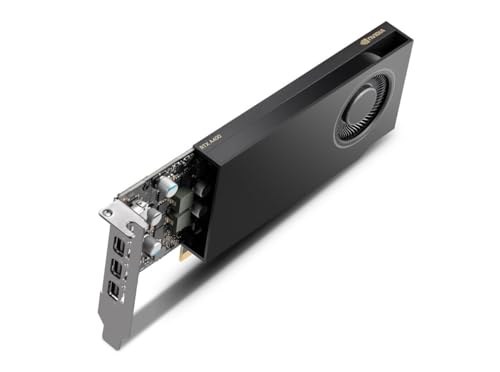
As an Amazon Associate we earn from qualifying purchases at no extra cost to you.
Quick Comparison of the Slot-Powered Picks
| Pick | Best for | Memory | Rated board power | Interface | Price tier |
|---|---|---|---|---|---|
| GeForce RTX 3050 6GB | Best overall gaming | 6GB GDDR6, 96-bit | 70W | PCIe 4.0 x8 | Budget to mid-range |
| Intel Arc Pro B50 | Compact creator and AI work | 16GB GDDR6, 128-bit | 70W | PCIe 5.0 x8 | Mid-range |
| Radeon RX 6400 | Lowest power, low-profile builds | 4GB GDDR6, 64-bit | about 53W | PCIe 4.0 x4 | Budget |
| Intel Arc A380 | AV1 media and light gaming | 6GB GDDR6, 96-bit | 75W target | PCIe 4.0 x8 | Budget |
| GeForce GTX 1650 (GDDR6) | Old PCs on PCIe 3.0 | 4GB GDDR6, 128-bit | about 75W | PCIe 3.0 x16 | Budget |
| NVIDIA RTX 2000 Ada | Professional SFF workstations | 16GB GDDR6, 128-bit | 70W | PCIe 4.0 x8 | Premium |
| Intel Arc A310 | Displays and media playback | 4GB GDDR6, 64-bit | 75W target | PCIe 4.0 x8 | Budget |
Specifications above follow the manufacturers’ published product pages; board partners can change clocks, coolers, and connectors, so treat the table as the reference design.
Best Overall: GeForce RTX 3050 6GB
The RTX 3050 6GB is the card most people should buy when they need a gaming GPU that runs from the slot alone. It uses the Ampere architecture with 2,304 CUDA cores, 6GB of GDDR6 on a 96-bit bus, and a 70-watt rating from NVIDIA. It supports DLSS upscaling, which lets a 1080p game render at a lower internal resolution and still look reasonably sharp, and it has a media block with H.264 and HEVC encoding for streaming and recording. It does not encode AV1, which matters if that is your goal.
Who it is for: owners of a prebuilt desktop with a small power supply who want to play esports titles and recent games at 1080p. NVIDIA lists a 300-watt minimum system supply for the card, which many office towers meet. Low-profile and single-fan versions exist from several board partners, so it also suits compact cases.
Pros: the fastest gaming performance available without an auxiliary connector; DLSS upscaling support; wide driver and software compatibility; fits PCIe 3.0 boards without the severe penalty that x4 cards suffer.
Cons: 6GB of memory is tight for the highest texture settings in newer games; ray tracing is only practical in lighter titles; no AV1 encode; a few reviewers have measured short spikes slightly above 75 watts, so use a quality power supply and a motherboard with a solid slot design.
Buying caution: the RTX 3050 8GB is a different product rated around 130 watts that requires an 8-pin connector. Check that the box and the product page say 6GB and list no power input.
Best for Compact Creators and AI: Intel Arc Pro B50
The Intel Arc Pro B50 is a low-profile workstation card with 16GB of GDDR6 on a 128-bit bus, a 70-watt board power, and no power cable. According to Intel’s data sheet it has 16 Xe-cores, 128 XMX matrix engines, and a PCIe 5.0 x8 interface, and it measures roughly 168 mm by 69 mm in a dual-slot, half-height design. It encodes and decodes AV1, HEVC, H.264, and VP9 in hardware.
Who it is for: people building a small workstation for CAD, video editing, local AI experiments, or multi-display work who value memory capacity more than gaming frame rates. Sixteen gigabytes is far more than any other card in this roundup except the RTX 2000 Ada, and ECC memory is supported.
Pros: large memory pool; full AV1 encode; certified professional drivers; fits half-height cases; draws roughly 55 to 57 watts in many load scenarios according to published reviews.
Cons: it is positioned as a workstation product, so gaming drivers and value are not its strength; the reference design uses mini-DisplayPort outputs, so check adapters; partner variants differ in outputs.
Best for Low Power and Low Profile: Radeon RX 6400
The Radeon RX 6400 is AMD’s entry RDNA 2 card with 12 compute units, 4GB of GDDR6 on a 64-bit bus, and a board power of about 53 watts. That low draw gives it the most headroom of any gaming-capable card here, so it works in the weakest office power supplies and tiny cases where a 75-watt card would be marginal. Low-profile versions are common and often run quiet.
Who it is for: someone upgrading an integrated-graphics PC for 1080p esports titles, older games, and general use, in a case that only fits a half-height card.
Pros: very low power consumption; widely available in low-profile form; good driver support for older and lighter games; simple, quiet cooling.
Cons: only four PCIe lanes. On a PCIe 4.0 board that is fine, but on a PCIe 3.0 motherboard the link bandwidth halves to roughly 3.9 GB/s, which can cut frame rates sharply when the 4GB memory fills and data spills over the bus. It also lacks a hardware video encoder, so streaming and recording rely on the CPU, and it is not an AV1 card.
Best for AV1 on a Budget: Intel Arc A380
The Arc A380 carries 8 Xe-cores, 6GB of GDDR6 on a 96-bit bus, and a 75-watt target with no connector on the reference design. Its main appeal is the media engine: hardware AV1 encoding and decoding in a card that fits almost any case. Intel recommends Resizable BAR and a UEFI boot mode, and performance is noticeably worse without them.
Who it is for: home-server and Plex builds, streamers who want a secondary encoding card, and light 1080p gamers on modern platforms.
Pros: AV1 encode and decode; 6GB of memory at a budget tier; strong video transcoding value.
Cons: gaming performance and older-game driver consistency trail the RTX 3050 6GB; idle power can be higher than expected unless you enable the right power-saving settings; older motherboards without Resizable BAR are a poor match.
Best for Older PCs: GeForce GTX 1650 (GDDR6)
The GTX 1650 with GDDR6 memory uses the Turing architecture with 896 CUDA cores and 4GB on a 128-bit bus, and many board partners built versions rated near 75 watts that need no cable. It is not the fastest, but it is mature, well supported, and runs on PCIe 3.0 x16 without a bandwidth penalty, which makes it a safe fit for older Intel and AMD systems that predate Resizable BAR.
Who it is for: owners of a 2016 to 2020 era office desktop who want a dependable drop-in card for 1080p esports and general use. Low-profile models exist.
Pros: full x16 link; no BIOS requirements; reliable drivers; widely stocked on the used market.
Cons: only 4GB of memory; no ray tracing or DLSS; many GTX 1650 models do use a 6-pin connector, so you must confirm the exact board; no AV1 hardware support.
Best Premium Compact Workstation Card: NVIDIA RTX 2000 Ada
The RTX 2000 Ada Generation is a 70-watt, low-profile professional card with 16GB of GDDR6, built on the Ada Lovelace architecture with 2,816 CUDA cores. It supports AV1 encoding, CUDA, and NVIDIA’s professional driver branch, and it is designed for small-form-factor workstations from the major OEMs.
Who it is for: engineers and designers who need NVIDIA CUDA software support, certified drivers, and 16GB of memory in a chassis with no room for power cables. If you want a slot-powered card for gaming, this is the wrong tool.
Pros: large memory; CUDA ecosystem; modern media engine; strong efficiency.
Cons: premium tier; availability is mostly through workstation channels; gaming value is poor compared with the RTX 3050 6GB.
Best for Displays and Media Playback: Intel Arc A310
The Arc A310 is Intel’s smallest desktop Arc card, with 6 Xe-cores and 4GB of GDDR6 on a 64-bit bus. It targets multi-monitor desks, digital signage, and media PCs, and it supports hardware AV1 decode and encode. Many versions are single-slot and low-profile, some with passive cooling.
Who it is for: someone replacing a failing graphics output, adding extra displays, or building a quiet home-theater PC with 4K HDR playback. It is not a gaming recommendation.
Pros: tiny size; AV1 hardware; multiple display outputs; low noise.
Cons: modest gaming speed; the same Resizable BAR requirement as other Arc cards; limited memory.
How to Choose a Card With No Power Connector
Step 1: Confirm the board has no connector
Look at the top or rear edge of the physical card in photos. A 6-pin or 8-pin socket means it needs a cable. Product titles are unreliable; the manufacturer’s specification page for the exact SKU is the authority. Make sure the listing names the memory size, because the RTX 3050 6GB and 8GB behave differently on power.
Step 2: Check the power supply and slot
The 75-watt slot limit covers only the graphics card. Add the CPU, drives, and fans. A 65-watt CPU plus a 70-watt GPU plus about 30 watts for the rest comes to roughly 165 watts at full load, which a 300-watt supply handles with margin. Also confirm the supply has a healthy 12-volt rail; a very old unit with degraded capacitors can still cause instability.
Step 3: Measure the case
Measure length, height, and slot width. A low-profile card needs a half-height bracket, and full-height cards need a standard bracket. Most low-profile cards ship with both brackets, but dual-slot coolers can still collide with a neighbouring expansion card.
Step 4: Match the PCIe generation
Four-lane and eight-lane cards run well only on boards that provide the speed they expect. This is the largest hidden cost with the RX 6400 on an older board. Use the table below to compare link bandwidth.
| Link | Approximate one-way bandwidth | Matters most for |
|---|---|---|
| PCIe 3.0 x4 | 3.9 GB/s | RX 6400 on older boards |
| PCIe 3.0 x8 | 7.9 GB/s | RTX 3050 6GB and Arc cards on older boards |
| PCIe 4.0 x4 | 7.9 GB/s | RX 6400 on recent boards |
| PCIe 4.0 x8 | 15.8 GB/s | RTX 3050 6GB, Arc A380, RTX 2000 Ada |
| PCIe 3.0 x16 | 15.8 GB/s | GTX 1650 |
Step 5: Decide what you will do with it
| Your situation | Best choice | Why |
|---|---|---|
| Office PC, 300W supply, wants to game at 1080p | RTX 3050 6GB | Best frame rates within 70W |
| Half-height case, minimal power | RX 6400 | About 53W, low-profile versions are common |
| Plex or AV1 recording | Arc A380 | Hardware AV1 encode at a budget tier |
| PCIe 3.0 system from 2017 to 2019 | GTX 1650 GDDR6 | Full x16 link, no BIOS requirements |
| Small CAD or AI workstation | Arc Pro B50 or RTX 2000 Ada | 16GB of memory in a half-height form |
| Just more monitors | Arc A310 | Tiny, quiet, multiple outputs |
Worked Example: Power and Running Cost
Suppose you add an RTX 3050 6GB to a prebuilt PC with a 65-watt Ryzen CPU and a 300-watt supply. Peak CPU draw is 65 watts, the GPU 70 watts, and the motherboard, memory, SSD, and fans another 30 to 40 watts. That totals about 165 to 175 watts, which uses roughly 55 to 60 percent of the supply. This is comfortable. Add a 130-watt card and the same machine would sit near 235 watts, leaving little room as the supply ages.
Running cost also favours these cards. If the GPU averages 60 watts during four hours of gaming a day, it uses 0.24 kWh per day, or about 88 kWh per year. At 15 cents per kWh that is under 14 US dollars of electricity annually. An RX 6400 at 45 watts average would use roughly a quarter less. Idle draw matters more for a PC that stays on all day, so look at the idle figures for Arc cards, which can be higher than Nvidia and AMD equivalents.
Ownership Realities and Common Mistakes
- Assuming a family name means no connector. The GTX 1650 and RTX 3050 families both include cabled variants. Always read the exact SKU.
- Ignoring PCIe lanes. A x4 card in a PCIe 3.0 board loses a large share of its performance in memory-heavy games.
- Skipping Resizable BAR on Arc. Without it, frame times worsen. Enable Above 4G Decoding and Resizable BAR in firmware before installing the card.
- Expecting flagship feature sets. Slot-powered cards rarely handle ray tracing well, and 4GB models struggle with current texture settings.
- Dust in tiny coolers. Small single-fan heatsinks clog faster. Blow out the fins every few months to prevent thermal throttling and fan wear, which is the first thing to fail on these cards.
- Cheap fans on very low-cost boards. A noisy fan is easier to replace on a standard shroud than on a custom low-profile one, so check the warranty terms.
What Settings to Expect at 1080p
A 70-watt card should be treated as a 1080p, medium-settings device in recent titles. Esports games such as Counter-Strike 2, Valorant, League of Legends, and Fortnite on lower settings run at comfortable frame rates on the RTX 3050 6GB. More demanding single-player games usually need a mix of medium settings and DLSS upscaling. The Radeon RX 6400 and Arc A380 are better matched to older games and esports titles. Low-profile, 4GB cards are happiest when you keep textures at medium and avoid ultra shadow settings.
If you find that you need more than 6GB of memory or higher frame rates, the fix is a larger card plus a power supply upgrade. That is a different budget and a different case, and it should be a deliberate step rather than a compromise.
Frequently Asked Questions
What is the best graphics card that does not need a power cable?
The GeForce RTX 3050 6GB is the strongest gaming card that runs entirely from the PCIe slot, with a 70-watt rating from NVIDIA. For low-profile builds the Radeon RX 6400 is the lower-power alternative, and for AV1 media work the Intel Arc A380 is the budget choice.
Can I use a slot-powered GPU with a 250-watt power supply?
Often yes, provided the CPU is a 65-watt part and the rest of the system is modest. Add up the CPU, GPU, storage, and fan draw, and keep the total under about 80 percent of the supply’s rated output. The power supply must also be in good condition, since older units lose capacity over time.
Is the RTX 3050 8GB the same as the 6GB?
No. The 8GB version uses a different, higher-power design rated around 130 watts and requires an 8-pin connector. Only the 6GB version is the slot-powered card, so check the memory size on the box.
Does a no-power-connector card work in a PCIe 3.0 motherboard?
Yes, PCIe is backward compatible, but cards with fewer lanes lose more performance. The Radeon RX 6400 uses only four lanes and is the most affected, while x8 and x16 cards lose little in typical 1080p use.
Can these cards handle video editing?
For 1080p editing and proxies, yes. The RTX 3050 6GB works well with NVENC for exports, and the Arc cards speed up AV1 workflows. For 4K timelines with effects, the 16GB Arc Pro B50 or RTX 2000 Ada offer far more headroom.
Are used slot-powered cards a good idea?
They can be, especially older GTX 1650 and workstation cards, but inspect the fan, verify the model does not require a cable, and ask about the return policy. Avoid cards that have been used for mining or exposed to high humidity if the seller cannot show their history.





Write Your Review
No reviews yet. Be the first to share your experience!