

Key takeaways
- Noise. Single-slot coolers use small fans that spin fast. Expect an audible whine under sustained load.
- Thermals. There is little heatsink area, so cards throttle in cramped cases without airflow.
- Warranty and support. Workstation cards often have longer warranties than consumer cards, while niche marketplace cards have shorter or less certain coverage.
- Driver certification. Workstation drivers are updated less often than gaming drivers but are tested for stability with professional applications.
- Display adapters. Cards with Mini DisplayPort outputs usually need adapters if your monitors use HDMI or full-size DisplayPort. Check what is in the box.
The best single-slot low-profile graphics card for gaming in 2026 is the Yeston GeForce RTX 3050 6GB low-profile model, because it is the only card in this category with genuine RTX-class gaming performance in a one-slot, half-height body that draws all its power from the motherboard slot. For office, CAD and multi-monitor work, the NVIDIA RTX A1000 with 8 GB of memory is the strongest single-slot choice, and Intel’s Arc Pro A40 and Sparkle’s Arc A310 ECO are the best value options for media and AV1 work.
Single-slot, low-profile cards solve a specific problem: a slim desktop, a small form factor case, a mini-ITX build or an office PC with a weak power supply and almost no room. Every card in this guide takes up one expansion slot, fits a half-height bracket and runs without an extra power cable. Because so few manufacturers still build them, the list is short, and almost all the strong options are workstation cards that were never aimed at gamers. This guide sorts the seven realistic choices by the job they do best, compares their numbers, and explains the limits you need to know before buying. Specifications come from manufacturer datasheets and from reviews at outlets including Tom’s Hardware, ServeTheHome and AEC Magazine. Prices are described with tier words only because stock and pricing for these niche cards vary widely.
Our top picks


As an Amazon Associate we earn from qualifying purchases at no extra cost to you.
Quick comparison of the seven picks
| Pick | Best for | Memory | Power | Outputs | Length | Price tier |
|---|---|---|---|---|---|---|
| Yeston RTX 3050 6GB LP | Light gaming in small builds | 6 GB GDDR6, 96-bit | 70 W, slot-powered | HDMI 2.1, DisplayPort 1.4a | 160 mm | Mid-range (limited supply) |
| NVIDIA RTX A1000 | CAD, visualisation, multi-monitor | 8 GB GDDR6, 128-bit | 50 W | 4x Mini DisplayPort 1.4a | Half-length | Upper mid-range |
| NVIDIA RTX A400 | Office and light 3D | 4 GB GDDR6, 64-bit | 50 W | 4x Mini DisplayPort | Half-length | Budget to mid-range |
| NVIDIA T1000 | Proven professional multi-display card | 4 or 8 GB GDDR6, 128-bit | 50 W | 4x Mini DisplayPort 1.4 | About 156 mm | Mid-range |
| Intel Arc Pro A40 | Media, AV1, 4 displays | 6 GB GDDR6, 96-bit | 50 W | 4x Mini DisplayPort 2.0 | 168 mm | Budget to mid-range |
| Sparkle Arc A310 ECO | Cheapest modern encode card | 4 GB GDDR6, 64-bit | 50 W | HDMI 2.0b, 2x Mini DisplayPort 1.4 | 156 mm | Budget |
| AMD Radeon Pro W6400 | AMD drivers, light 3D | 4 GB GDDR6, 64-bit | 50 W | 2x DisplayPort 1.4a | 168 mm | Mid-range |
What “single slot, low profile” really means
These two phrases describe different dimensions, and mixing them up causes most wrong purchases. A low-profile card has a short bracket and a board height of roughly 69 mm, so it fits slim cases and small form factor machines. A single-slot card is thin enough to occupy only one expansion slot, so it leaves its neighbour free. Many low-profile cards are still dual slot, because their cooler is thick. The NVIDIA RTX 4000 SFF Ada, the RTX 2000 Ada and the newer RTX PRO 2000 and RTX PRO 4000 Blackwell SFF cards are all half-height but occupy two slots, according to the manufacturer’s specifications. If your case has only one slot of clearance, those do not fit, however small they look.
Also check whether the card ships with the bracket you need. Several workstation cards include both full-height and half-height brackets, and some require you to request the low-profile bracket. Always confirm that the bracket in the box matches your case.
Best for gaming: Yeston GeForce RTX 3050 6GB low-profile
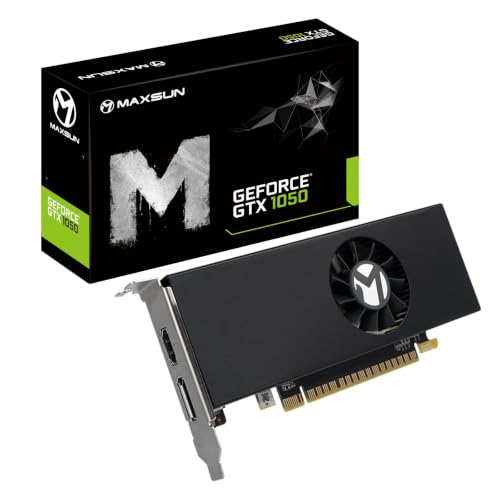
Among all the cards in this guide, the Yeston RTX 3050 6GB is the only one built with gaming in mind. It carries 2,304 CUDA cores, a boost clock of about 1470 MHz, 6 GB of GDDR6 memory on a 96-bit bus and a PCIe 4.0 x8 interface. Its power limit is around 70 W, which means it runs entirely from the slot with no power cable, although a power supply above roughly 400 W is recommended. It is a single-slot, low-profile design about 160 mm long, with one HDMI 2.1 output and one DisplayPort 1.4a output. Forum reports describe it as the only low-profile, single-slot card in the RTX 30 family on the market.
Performance is equivalent to a mainstream entry-level desktop RTX 3050 6GB, which is good enough for esports titles at 1080p and for many modern games at reduced settings. It supports DLSS upscaling, which helps in supported games, and NVIDIA’s hardware video encoder.
Who it suits: owners of slim office PCs and small form factor cases who want to turn them into capable light gaming machines. Main trade-offs: a 6 GB frame buffer limits high texture settings in the newest titles, only two display outputs are available, and supply is limited. It is sold mainly through a few online marketplaces and the manufacturer’s own store, so warranty and returns are less predictable than with mainstream brands.
Best for CAD and multi-monitor work: NVIDIA RTX A1000
NVIDIA introduced the RTX A1000 and A400 as lower-cost single-slot workstation cards based on the Ampere architecture. The A1000 has 2,304 CUDA cores, 72 third-generation Tensor cores, 18 second-generation RT cores, 8 GB of GDDR6 memory on a 128-bit bus with 192 GB/s of bandwidth, and about 6.7 TFLOPS of single-precision performance, per NVIDIA’s datasheet. Total board power is 50 W from the slot, and four Mini DisplayPort 1.4a outputs let you drive four displays. It uses a PCIe 4.0 x8 connection and a single-slot active cooler, and an optional bracket lets it fit standard desktops.
It is certified for professional applications, so drivers are tuned for stability in CAD, architecture and visualisation software. It supports AV1 decoding but not AV1 encoding, as Tom’s Hardware notes. AEC Magazine’s review points out that the 8 GB frame buffer limits very large visualisation models and heavy AI image generation.
Who it suits: engineers, architects and designers working in slim office desktops, and anyone who needs four monitors from a tiny card. Main trade-off: it is built for stability and display count rather than gaming, and it costs more than consumer cards with similar raw throughput.
Best entry workstation card: NVIDIA RTX A400
The RTX A400 shares the A1000’s single-slot, low-profile, 50 W design and its four Mini DisplayPort outputs, but with a much smaller GPU. It has 768 CUDA cores, 24 Tensor cores, 6 RT cores, 4 GB of GDDR6 on a 64-bit bus giving 96 GB/s of bandwidth, and about 2.7 TFLOPS of single-precision performance. It is the lowest tier of NVIDIA’s current professional line, and it brings ray tracing hardware and the modern driver stack to the cheapest tier.
Who it suits: offices that need reliable multi-monitor output, light 3D viewing, video conferencing and general acceleration in a slim case. Main trade-off: 4 GB of memory and a narrow memory bus make it unsuitable for demanding 3D work or modern gaming.
Best proven multi-display card: NVIDIA T1000
The NVIDIA T1000, originally sold under the Quadro brand, is an older Turing-based card with 896 CUDA cores, 4 GB or 8 GB of GDDR6 memory on a 128-bit bus with up to 160 GB/s of bandwidth, about 2.5 TFLOPS of single-precision performance and a 50 W maximum power. According to NVIDIA’s datasheet it is a single-slot card that measures about 6.1 inches (roughly 156 mm) long, uses a PCIe 3.0 x16 interface, and has four Mini DisplayPort 1.4 outputs that can drive four 4K displays at 120 Hz. A full-height bracket is attached and a low-profile bracket is included.
It is useful when you need a PCIe 3.0 slot-friendly card with a long driver history. Its performance per watt is surpassed by the A1000, but the card remains widely supported in older workstations. The 8 GB model has been less widely available, and some listings mark it as withdrawn, so verify stock before planning a purchase.
Who it suits: owners of older slim workstations that need a drop-in multi-display card. Main trade-off: it is older Turing technology with no modern ray tracing features, so the A1000 is a better buy if you can find one.
Best for media and AV1: Intel Arc Pro A40
The Intel Arc Pro A40 is a single-slot, low-profile workstation card with 8 Xe-cores, 128 XMX matrix engines, 6 GB of GDDR6 on a 96-bit bus giving 192 GB/s, and four Mini DisplayPort 2.0 outputs. It runs at a 50 W peak board power with no power connector, and measures 168 mm by 69 mm. Intel quotes peak single-precision throughput near 5 TFLOPS, although independent sources list lower figures depending on the measurement basis.
Its main appeal is the media engine. Arc cards include hardware AV1 encode and decode, which makes the A40 attractive for video capture, streaming and transcoding in a small machine, and it includes workstation driver certification. Arc cards also work best with Resizable BAR enabled in the BIOS, so check that your motherboard supports it before buying.
Who it suits: media PCs, small servers that transcode video, and office desktops that need four display outputs and AV1 hardware. Main trade-off: older systems without Resizable BAR support can see reduced performance, and the card is less common in retail channels than NVIDIA workstation cards.
Best budget encode card: Sparkle Intel Arc A310 ECO
Sparkle trimmed the Arc A310’s board power from 75 W to 50 W in the A310 ECO so it could use a low-profile, single-slot, single-fan design, with a body about 156 mm long, 15 mm wide and 69 mm tall. It has 6 Xe-cores, 4 GB of GDDR6 on a 64-bit bus, a PCIe 4.0 x8 interface, one HDMI 2.0b output and two Mini DisplayPort 1.4 outputs. It draws power only from the slot and includes a short bracket. Because it is based on the same architecture as the Arc Pro A40, it also offers hardware AV1 encode and decode.
It is not a gaming card. It handles light esports titles at low settings, and its real job is to add modern video encoding and extra display outputs to a small PC. Retailer listings show two part numbers (SA310C-4G and SA310L-4G), so check which variant you are buying, and some retailers no longer stock it.
Who it suits: small media servers, home theatre PCs and older systems that need AV1 and multiple outputs for the lowest cost. Main trade-off: the 4 GB, 64-bit memory subsystem limits performance, and availability varies.
Best AMD option: Radeon Pro W6400
The AMD Radeon Pro W6400 uses the Navi 24 chip from the RDNA 2 generation, with 768 stream processors and 4 GB of GDDR6 on a 64-bit bus. Bandwidth is listed between 112 and 128 GB/s depending on the source. Single-precision throughput is about 3.5 TFLOPS. It is a single-slot, 50 W card about 167.6 mm long with two DisplayPort 1.4a outputs and a half-height bracket included, and it draws all its power from the slot.
It suits users who prefer AMD drivers or who run Linux workflows in which AMD’s open-source driver stack is an advantage. Gaming performance is similar to the consumer Radeon RX 6400, so it is useful for light esports and general desktop use. Official retail pricing for this workstation card is high relative to its performance, but used and refurbished units frequently sell at a much lower tier.
Who it suits: small workstations running AMD-friendly software and Linux desktops. Main trade-off: only two outputs, limited video memory, and weak value at full retail pricing.
If you can spare a second slot
If your case allows two slots of thickness but only a half-height bracket, a wider range of cards opens up. The NVIDIA RTX 4000 SFF Ada has 6,144 CUDA cores, 20 GB of ECC GDDR6 and a 70 W power draw from the slot, with four Mini DisplayPort 1.4a outputs. The RTX 2000 Ada offers 2,816 CUDA cores and 16 GB, and newer Blackwell-based RTX PRO 2000 (16 GB) and RTX PRO 4000 SFF (24 GB) cards are also 70 W low-profile designs. These are far faster for AI, rendering and CAD than any single-slot card, but all are dual slot and sit in a premium price tier, so they suit compact workstations rather than budget builds.
Decision matrix: which card fits your situation
| Your situation | Recommended card | Why |
|---|---|---|
| Slim office PC you want to game on | Yeston RTX 3050 6GB LP | Only true gaming-class single-slot card |
| CAD or visualisation, four monitors | NVIDIA RTX A1000 | 8 GB memory and certified drivers |
| Office PC, two or more monitors, tight budget | NVIDIA RTX A400 | Cheapest modern professional card with four outputs |
| Older PCIe 3.0 workstation | NVIDIA T1000 | Stable, widely supported |
| Video transcoding or streaming PC | Intel Arc Pro A40 | AV1 encode and four outputs |
| Lowest cost AV1 encode | Sparkle Arc A310 ECO | Cheapest modern media engine |
| Linux desktop on AMD | Radeon Pro W6400 | Mature open-source drivers |
Worked example: will your power supply cope?
Many slim office desktops ship with a power supply between 180 W and 300 W and no spare PCIe power connectors. That is why slot-powered cards matter. A PCIe x16 slot can supply up to 75 W, which is why 50 W and 70 W cards need no cable. To check whether your supply can cope, add up the load. Suppose the processor draws 65 W under load, the drive and board draw 30 W, and the graphics card draws 70 W. The total is 165 W, which fits comfortably inside a 240 W supply, leaving headroom for spikes. With a 50 W card the total falls to 145 W. Always check the rating on the supply’s label and confirm that the +12 V rail can deliver the card’s draw, since many cheap supplies are stronger on the 5 V and 3.3 V rails than on 12 V.
How to choose and install
- Confirm the slot width. Measure the open slots behind the bracket area, and verify the card is actually one slot thick.
- Check the bracket. Make sure a low-profile bracket is included or available, and check whether your case needs a short or standard height.
- Check the interface. Most of these cards use PCIe x8 or x16 and work in any x16 slot. PCIe 4.0 cards run on 3.0 slots with reduced bandwidth, which rarely matters at this performance level.
- Update the BIOS. Arc cards need Resizable BAR enabled for best performance, and older boards may need a firmware update.
- Install drivers cleanly. Remove old graphics drivers before switching vendors.
- Keep airflow in mind. A small single-slot cooler has a tiny fan that can become loud under load, so clean dust and keep the case vents clear.
Ownership realities
- Noise. Single-slot coolers use small fans that spin fast. Expect an audible whine under sustained load.
- Thermals. There is little heatsink area, so cards throttle in cramped cases without airflow.
- Warranty and support. Workstation cards often have longer warranties than consumer cards, while niche marketplace cards have shorter or less certain coverage.
- Driver certification. Workstation drivers are updated less often than gaming drivers but are tested for stability with professional applications.
- Display adapters. Cards with Mini DisplayPort outputs usually need adapters if your monitors use HDMI or full-size DisplayPort. Check what is in the box.
Frequently Asked Questions
Is there a single-slot low-profile card that can really play modern games?
The Yeston RTX 3050 6GB low-profile card is the practical answer. It plays esports titles well at 1080p and many newer games at reduced settings. Workstation cards such as the RTX A1000 are far less suited to gaming despite strong specifications.
Do these cards need extra power cables?
No. Every card in this guide draws power only from the PCIe slot, at 50 W or 70 W. That is why they work in slim office desktops with basic power supplies. The Yeston card suggests a power supply above about 400 W, so check your unit.
Can I use a low-profile card in a full-size case?
Yes. Most cards ship with a full-height bracket or offer one as an option. If the bracket is not included, you can often buy one from the manufacturer or use a bracket adapter designed for that model.
Is the RTX A1000 good for gaming?
It can run games, but it is not designed for them. Its 50 W limit and workstation driver focus mean consumer cards with similar core counts, such as the RTX 3050 variants, deliver better game performance for the money. Choose the A1000 for CAD, visualisation and multi-monitor use.
Which low-profile card is best for video encoding?
The Intel Arc Pro A40 and the Sparkle Arc A310 ECO are the best single-slot choices because they include hardware AV1 encoding. The NVIDIA RTX A1000 supports AV1 decode but, per Tom’s Hardware, lacks AV1 encode.
Why are there so few single-slot low-profile cards?
Fitting a capable GPU and cooler into a one-slot, half-height space limits power to around 50 to 75 W, which restricts performance. Consumer demand is small, so most manufacturers focus on either larger gaming cards or dual-slot workstation cards, leaving the single-slot niche to a few makers.


Write Your Review
No reviews yet. Be the first to share your experience!