

Key takeaways
- 12GB of VRAM is the most generous allocation at this tier
- Strong raster performance for its cost class
- Hardware AV1 encode and decode, plus XeSS upscaling and frame generation
- Good ray tracing performance relative to its cost
The best low-cost gaming graphics card in 2026 is the Intel Arc B580 if you want the most VRAM for the money, the Radeon RX 9060 XT 16GB if you want the longest runway at 1080p and 1440p, and the GeForce RTX 5050 if you want the simplest, coolest and lowest-power Nvidia option. Everything below that tier is a compromise on memory, and memory is now the spec that decides whether a cheap card feels fine or falls apart in new games.
This guide is organized around what you actually want to play, not around a ranked list of model numbers. Each pick gets its core specs, the kind of player it suits, and its main trade-off. Pricing is described in tiers only, because street prices for entry-level cards have swung widely through 2026 and any number printed today would be stale within weeks.
Our top picks


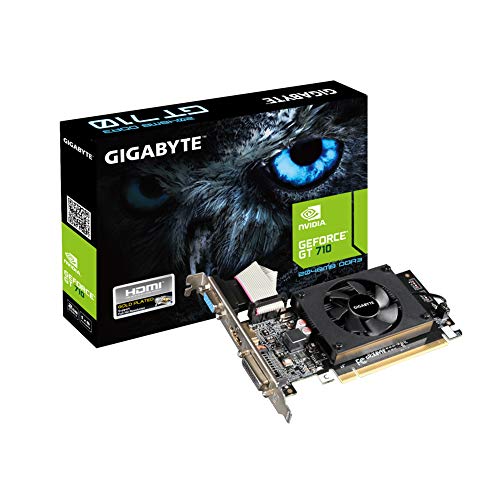

As an Amazon Associate we earn from qualifying purchases at no extra cost to you.
Quick comparison of the seven picks
| Card | Memory | Bus width | Board power (approx.) | Best for | Cost tier |
|---|---|---|---|---|---|
| Intel Arc B580 | 12GB GDDR6 | 192-bit | about 190W | Best VRAM per dollar at 1080p | Budget |
| Intel Arc B570 | 10GB GDDR6 | 160-bit | about 150W | Cheapest modern card with 10GB | Budget |
| GeForce RTX 5050 | 8GB GDDR6 | 128-bit | about 130W | Esports, low power, small cases | Budget |
| Radeon RX 9060 XT 8GB | 8GB GDDR6 | 128-bit | about 150W | 1080p high refresh, FSR 4 users | Budget to mid-range |
| GeForce RTX 5060 | 8GB GDDR7 | 128-bit | about 145W | DLSS 4 and frame generation at 1080p | Mid-range |
| Radeon RX 9060 XT 16GB | 16GB GDDR6 | 128-bit | about 160W | 1440p and long-term value | Mid-range |
| GeForce RTX 3060 12GB (leftover or used) | 12GB GDDR6 | 192-bit | about 170W | Used-market 1080p on a tight limit | Budget (used) |
Memory sizes, bus widths and board power figures come from the manufacturers’ published specification sheets and from spec databases such as TechSpot’s GPU spec pages. Partner cards with factory overclocks can draw somewhat more than the reference figure.
How to decide in under a minute
Start with one question: what resolution and which games? A card that is excellent for a competitive shooter at 1080p can be a poor choice for a modern open-world title with maximum textures. The matrix below maps common situations to a pick.
| Your situation | Pick | Why |
|---|---|---|
| 1080p, mostly esports (Valorant, CS2, Fortnite, Apex) | RTX 5050 or RX 9060 XT 8GB | These games are limited by GPU speed, not by memory |
| 1080p, mixed AAA games at high settings | Arc B580 | 12GB avoids texture swapping in memory-hungry titles |
| 1440p at medium to high settings | RX 9060 XT 16GB | Enough memory and bandwidth to keep 1440p smooth |
| Small case or weak power supply (400W to 450W) | RTX 5050 | Lowest board power of the group |
| You want DLSS and Nvidia features | RTX 5060 | Faster than the 5050 with better upscaling support |
| Older PC with a PCIe 3.0 slot | RX 9060 XT (x16 interface) | Cards limited to eight lanes lose more performance on old slots |
| Tightest limit, used market accepted | RTX 3060 12GB or Arc B570 | Cheapest way to get 10GB or 12GB |
Best overall low-cost pick: Intel Arc B580
The Arc B580 is built on Intel’s Battlemage architecture with 20 Xe cores, 12GB of GDDR6 on a 192-bit bus and 456 GB/s of memory bandwidth, according to Intel’s specification sheet. Those memory numbers are the headline. Most competitors in this tier ship with 8GB on a 128-bit bus, so the B580 has 50 percent more capacity and roughly 40 percent more bandwidth than an 8GB card using a similar GDDR6 speed grade.
In practical terms, that means modern games that load large texture pools, such as recent open-world and remake releases, keep their high texture settings without stuttering. TechSpot’s review found it comfortably ahead of the B570 and competitive with cards from the next tier up in raster performance, and VerdictBits names it the best budget card in its 2026 roundup.
Who it is for: 1080p players who want high or ultra textures, and 1440p players who accept medium settings in demanding games. It also suits anyone who streams or records, because Intel’s hardware AV1 encoder is mature and efficient.
Pros:
- 12GB of VRAM is the most generous allocation at this tier
- Strong raster performance for its cost class
- Hardware AV1 encode and decode, plus XeSS upscaling and frame generation
- Good ray tracing performance relative to its cost
Cons:
- Driver maturity on day-one releases still trails Nvidia and AMD
- Higher board power than the RTX 5050 and 5060, and idle power can be higher on some setups
- Uses a PCIe 4.0 x8 interface, so very old PCIe 3.0 boards lose some performance
- Works best with Resizable BAR enabled, which older platforms may not support
Main trade-off: you gain memory and raw value, and you give up the polish of the most mature driver ecosystems. If your motherboard predates Resizable BAR support, check your BIOS before buying.
Best for the longest runway: Radeon RX 9060 XT 16GB
The RX 9060 XT is AMD’s RDNA 4 entry card, with 2,048 shaders, 32 ray tracing units, a boost clock around 3.1 GHz, a 128-bit bus and a full PCIe 5.0 x16 interface, based on AMD’s published specs and database summaries. The 16GB version has double the memory of the 8GB model and draws only slightly more power.
PC Gamer’s current guide names this card its best-value pick, and TechSpot also puts the 16GB version at the top of its range for the price step above the entry tier. The reasoning is straightforward. At 1080p it will run nearly anything at high or ultra settings, and at 1440p it has enough memory to avoid the texture compromises that 8GB cards need to make. FSR 4 upscaling, which is hardware-accelerated on RDNA 4, closes much of the quality gap that older FSR versions had against DLSS.
Who it is for: buyers who plan to keep the card for four or five years, 1440p gamers on a limit, and anyone who dislikes tweaking texture settings to fit a small memory pool.
Pros:
- 16GB gives real headroom for the next generation of games
- Full x16 PCIe interface suits older boards better than x8 cards
- FSR 4 upscaling quality is a large step up from earlier FSR versions
- Efficient for its performance, with modest cooling needs
Cons:
- Sits a clear tier above the true entry cards
- Ray tracing and path tracing still favor Nvidia
- Streaming encode quality is good but Nvidia NVENC remains the benchmark for some workflows
- Street pricing has sometimes run well above list because of memory supply pressure
Main trade-off: it is not the cheapest card in this guide, and it should not be, because the extra memory is the whole point. If your limit forces a choice between this and a card with half the VRAM, the memory usually wins over the long term.
Best for low power and small cases: GeForce RTX 5050
The RTX 5050 is Nvidia’s entry Blackwell card, with 2,560 CUDA cores, 8GB of GDDR6 on a 128-bit bus and a board power around 130W, according to Nvidia’s product page. PC Gamer’s current guide gives it the nod in the budget class, noting that it wins by a narrow margin because it is dependable, quiet and benefits from the full Nvidia software stack.
At roughly 130W it can run from a modest 450W power supply in a typical build, and many partner models are short and dual-slot, which makes it one of the easiest cards to fit in a compact case. DLSS 4 upscaling and multi frame generation support are included, which helps stretch the card in supported games.
Who it is for: esports players, upgraders with older office-grade power supplies, small form factor builders, and anyone who values a lower electricity bill.
Pros:
- Lowest board power of the group, so fewer cooling and power-supply worries
- DLSS support is the broadest upscaling ecosystem across older and newer games
- Widely available in compact two-fan designs
- Mature drivers and strong stability
Cons:
- 8GB of VRAM is the limiting factor in memory-heavy new releases
- Slower than the Arc B580 in raw raster performance in most reviews
- PCIe x8 interface limits performance on old PCIe 3.0 systems
Main trade-off: you get the lowest power draw and the best software polish, but you must manage texture settings in the newest games.
Best for DLSS at 1080p: GeForce RTX 5060
The RTX 5060 steps up to 3,840 CUDA cores, 8GB of faster GDDR7 on a 128-bit bus, 448 GB/s of bandwidth and a 145W rating, according to published specifications. That memory is faster than what the RTX 5050 uses, and the extra shader count gives a meaningful speed boost at the same VRAM capacity.
It is the card to consider if you already live in the Nvidia ecosystem: DLSS 4 with multi frame generation, Nvidia Broadcast for microphone and camera cleanup, and strong driver support. For 1080p at high refresh rates, it keeps frame rates high in nearly every game, particularly when upscaling is allowed.
Pros:
- Noticeably faster than the RTX 5050 at similar power draw
- GDDR7 gives high bandwidth despite the narrow bus
- DLSS 4 and frame generation extend its life at 1080p
- Efficient and quiet on most partner designs
Cons:
- Still only 8GB, which is its single biggest long-term risk
- Sits in the zone where 12GB and 16GB alternatives start to look appealing
- x8 PCIe interface again penalizes older boards
Main trade-off: more speed than the 5050 but the same memory ceiling. It is a good card for the next two years and a riskier one for the next five.
Best entry cost with modern features: Radeon RX 9060 XT 8GB
The 8GB version of the RX 9060 XT shares its GPU with the 16GB model: 2,048 shaders, 32 ray tracing units, a 128-bit bus with about 322 GB/s of bandwidth, and a board power near 150W. TechSpot’s current guide calls it probably the best value under the mid-range threshold, with the Arc B580 as a viable alternative.
Its appeal is the combination of RDNA 4 features, including FSR 4 and improved ray tracing, in a lower-cost package. For esports titles and older games it is more than fast enough. The risk is identical to every other 8GB card: new games that want more than 8GB of texture and buffer memory will force lower settings.
Who it is for: 1080p players who prefer AMD’s driver suite, Linux users who value open drivers, and buyers whose games are not memory-hungry.
Main trade-off: if the cost gap to the 16GB version is small in your region, buy the 16GB version. The 8GB card only makes sense when the savings are meaningful.
Best cheapest modern card: Intel Arc B570
The Arc B570 uses 18 Xe cores (2,304 shaders), 10GB of GDDR6 on a 160-bit bus, 380 GB/s of bandwidth and a 150W board power, per TechSpot’s spec listing, with a PCIe 4.0 x8 interface. It launched in January 2025 as the cut-down sibling of the B580.
TechSpot’s analysis found the B580 roughly 15 percent faster with 2GB more memory for a smaller cost jump than that gap implies, and PC Gamer no longer recommends the B570 because its value argument has weakened. That is the honest reading: buy it only if stock or cost makes the B580 impossible, and it still has more memory than an 8GB card.
Pros: 10GB of VRAM at the lowest tier, full Intel feature set, efficient enough for compact builds.
Cons: the same driver and platform caveats as the B580, and weaker value once street pricing narrows the gap.
Best on a used or leftover budget: GeForce RTX 3060 12GB
The RTX 3060 12GB is an older Ampere card with 3,584 CUDA cores, 12GB of GDDR6 on a 192-bit bus and a 170W board power. It does not have DLSS 4 multi frame generation, but it does support DLSS upscaling and has full 16-lane PCIe 4.0 support.
It belongs in this guide for one reason: on the used market it can offer 12GB of VRAM in a lower cost class than any new card here. The trade-off is that it is slower than all of the newer cards, uses more power than the RTX 5050 for lower performance, and has no warranty if bought used. Inspect the seller, ask for recent benchmark screenshots, and avoid cards that were used for mining and show worn fans.
Why VRAM matters more than a few percent of speed
A graphics card’s speed rating tells you the average frame rate; its memory capacity tells you whether the game stays smooth. When a game needs more memory than the card has, the driver swaps data over the PCIe bus to system RAM, which is far slower than local video memory. The result is not a modest drop in frame rate. It is stutter, texture pop-in and sudden one percent low collapses.
Here is a rough guide to what recent games request:
| Setting level | Typical VRAM demand in new AAA games | Comfortable card size |
|---|---|---|
| 1080p medium | 5GB to 7GB | 8GB |
| 1080p high | 7GB to 10GB | 10GB to 12GB |
| 1080p ultra with ray tracing | 10GB to 14GB | 12GB to 16GB |
| 1440p high with upscaling | 9GB to 12GB | 12GB to 16GB |
These are broad ranges drawn from public benchmark coverage of recent releases, and individual games vary. The pattern is consistent, though: 8GB is adequate for medium and some high settings, but 10GB, 12GB and 16GB cards leave far more room as texture packs and ray tracing features grow.
Worked example: the real electricity cost of a card
Power draw affects your bill, and the difference between low-cost cards is bigger than most buyers expect. Assume you game three hours a day at an electricity rate of 0.15 per kilowatt-hour, and that each card draws close to its rated power while gaming.
- RTX 5050 at about 130W: 0.13 kW x 3 hours x 365 days = about 142 kWh a year, which comes to roughly 21 in electricity at that rate
- Arc B580 at about 190W: 0.19 kW x 3 hours x 365 days = about 208 kWh a year, roughly 31 in electricity
- RTX 3060 at about 170W: about 186 kWh a year, roughly 28 in electricity
The gap between the RTX 5050 and the B580 is around 10 units of currency a year at that usage level. That is real but small, which is why power efficiency should break ties and not drive the decision on its own. If your local rate is double, or you game six hours a day, the gap doubles or quadruples, and the lower-power card starts to matter more.
Check your power supply and case before you buy
Most of these cards need one 8-pin or a 12V connector and a power supply rated 450W to 550W for a mainstream CPU. The key checks are:
- Confirm that your power supply has the required connector. Some small builds only have a 6-pin plug.
- Measure the card length against case clearance. Dual-fan entry cards range from about 200mm to 300mm.
- Check the slot width. Triple-slot cards can block adjacent PCIe slots or interfere with an AIO tube.
- Confirm your motherboard supports Resizable BAR if you are buying an Arc card.
- Note your PCIe version. Cards using x8 interfaces lose several percent on PCIe 3.0 boards, and more in memory-bound games.
Ownership realities: what wears out and what to watch
Entry cards rarely fail, but they do age in predictable ways. Fan bearings are the first wear item on budget designs and typically begin to rattle or whine after three to five years of heavy use. Thermal pads on memory chips may degrade in warm cases. A yearly dust cleaning with compressed air and a soft brush keeps temperatures stable. Update drivers monthly if you play new releases, and check for BIOS updates for your motherboard when using an Intel Arc card, since platform firmware affects performance.
Common mistakes include pairing a modern card with an old four-core CPU, which can bottleneck even an entry GPU, and leaving a monitor at 60Hz in settings after installing the card. Open the display settings and set the full refresh rate before you judge performance.
Frequently Asked Questions
Is 8GB of VRAM still enough for gaming in 2026?
It is enough for esports titles, older games and many modern games at medium settings. It is increasingly limiting at high texture settings in new releases, where 10GB to 12GB is more comfortable. If you intend to keep the card for several years, choose 12GB or more when you can.
Which low-cost graphics card has the best driver support?
Nvidia and AMD have the most mature drivers, with Nvidia usually the first to publish game-ready updates. Intel’s drivers have improved a great deal since the first Arc generation, but day-one issues in brand new releases remain more common, as noted in VerdictBits’ assessment of the B580.
Do I need a new power supply for these cards?
Often not. The RTX 5050 and RTX 5060 run on a quality 450W to 500W power supply with the right connector, and the Radeon and Arc cards generally want 500W to 550W. Check the connector type first, because a missing 8-pin plug is the usual obstacle.
Is an Intel Arc card a risk for a first-time builder?
It is a reasonable choice if your platform supports Resizable BAR and you are comfortable updating drivers. First-time builders who want the least friction may prefer the RTX 5050 or RTX 5060, because their software stack has the longest track record.
Should I buy a used graphics card to save money?
It can work for older mid-range cards such as the RTX 3060 12GB, but there is no warranty and wear is hard to judge. Buy from sellers with return protection, request photos of the card running a benchmark, and avoid listings with vague descriptions.
Will a low-cost card handle 1440p?
The 16GB Radeon RX 9060 XT and the Arc B580 are the most capable here at 1440p, usually at medium to high settings with upscaling. The 8GB cards can manage 1440p in esports titles but will struggle with memory-heavy releases.




Write Your Review
No reviews yet. Be the first to share your experience!