

Key takeaways
- Best motherboards for Ryzen 7 9800X3D: ten Micro Center combos compared by chipset, M.2 slots, Wi-Fi and BIOS Flashback, with a listing checklist for buyers.
For a Ryzen 7 9800X3D, the best motherboard is the AM5 board that matches the drives, ports and networking you will actually use, and the simplest way to shop is a Micro Center combo that bundles chip and board. The ten listings below span B850, X870 and X870E options, plus two bundles that do not contain a 9800X3D at all and are labeled that way. Check each listing for the current price and exact contents before you order, since bundles can change.
Quick picks
Our top picks







As an Amazon Associate we earn from qualifying purchases at no extra cost to you.
- Value: the ASUS TUF Gaming B850 PL combo, with BIOS Flashback and Wi-Fi 7.
- Balanced: the MSI PRO X870E-P combo, with Wi-Fi 7 and 5G LAN.
- Most storage: the ASUS ROG Strix X870E-E R2, with five M.2 slots.
- Fast ports: the Gigabyte X870E AORUS Elite, with dual USB4.
Comparison table
| Model | Key point from title | Best for |
|---|---|---|
| Gigabyte B850 Gaming combo (Wi-Fi 6, Bluetooth 5.3) | B850, Wi-Fi 6, BT 5.3 | Simple, lower-cost rig |
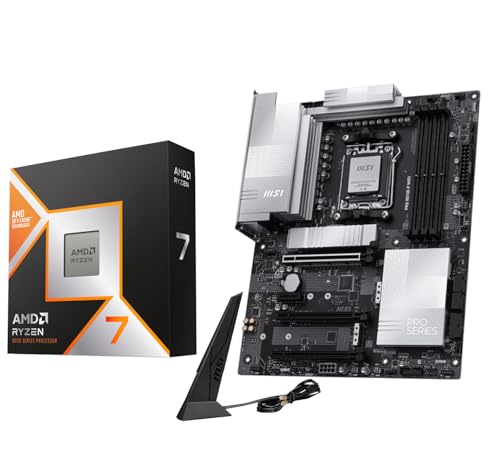
| MSI MAG X870E Tomahawk combo | X870E, Wi-Fi 7, Gen5 M.2 | Feature-rich gaming PC |
| MSI PRO X870E-P combo | X870E, 5G LAN, Wi-Fi 7 | Fast wired networking |
| ASRock B850 Steel Legend combo | B850, 14+2+1, 2.5G LAN | Spec-sheet readers |
| ASUS ROG Strix X870E-E R2 combo | X870E, 5X M.2, USB4 | Many-drive flagship |
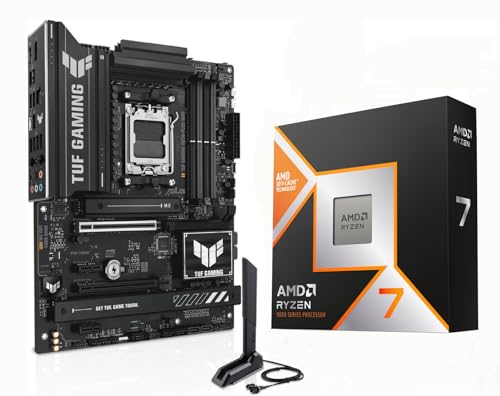
| ASUS TUF Gaming B850 PL combo | B850, 80A, Flashback | First AM5 system |
| Gigabyte X870E AORUS Elite combo | X870E, 4 M.2, dual USB4 | Gaming plus workstation |
| Gigabyte X870 Gaming WIFI6 combo | X870, WIFI6, USB4 | Mid-range USB4 |
| ASUS TUF Gaming B850-E combo (ships with a 7800X3D, not a 9800X3D) | 7800X3D, B850-E | Older X3D chip |
| ASUS B650E MAX Gaming WF combo (ships with a 7700X, not a 9800X3D) | 7700X, B650E | Budget Ryzen 7 |
The ten listings, one by one
Gigabyte B850 Gaming combo (Wi-Fi 6, Bluetooth 5.3)
The plainest listing here. It pairs the 9800X3D with a Gigabyte B850 Gaming board and names AM5, DDR5, PCIe 5.0, Wi-Fi 6 and Bluetooth 5.3. The title gives no full model name, form factor or M.2 count, so confirm those on the listing page before you commit. If the details check out, it is the simplest route to a working AM5 base. Because the bundle name leads with the retailer rather than the board, search the page for the exact model number and compare it with the manufacturer’s site.
Pros
- Wi-Fi and Bluetooth stated up front
- Straightforward B850 pairing
Cons
- Wi-Fi 6 rather than Wi-Fi 7
- Exact board model is vague
Who it’s for: anyone who wants the chip and a working AM5 board in one box and does not need a long list of extras.
MSI MAG X870E Tomahawk combo
A Tomahawk board on the X870E chipset. The title lists PCIe 5.0, M.2 Gen5, USB 40Gbps Type-C, Wi-Fi 7 and ATX size, plus an “AI Ready” tag that is marketing language rather than a spec. This is the first step where the feature list starts to read like a board meant to outlast the current graphics card. The Wi-Fi 7 and 40Gbps USB-C lines mean the board should handle new peripherals, though whether you will use them is another question.
Pros
- Wi-Fi 7 and 40Gbps USB-C named
- Gen5 M.2 mentioned
Cons
- Costs more than the B850 options
- “AI Ready” tells you nothing concrete
Who it’s for: a gamer who wants fast storage and modern ports and expects to keep the same board through several upgrades.
MSI PRO X870E-P combo
MSI’s PRO X870E-P sits in the same chipset family as the Tomahawk. The title mentions PCIe 5.0, DDR5, M.2 Gen5, 40Gbps USB-C, Wi-Fi 7 and 5G LAN. It makes a useful comparison point, because the listed features overlap heavily while the title is less busy than the Tomahawk’s. Open the page to count the M.2 slots. Note that 5G LAN pays off only if the rest of your wired network, such as the switch or router port, can match it.
Pros
- 5G LAN is a rare headline item
- Wi-Fi 7 and Gen5 M.2 listed
Cons
- Title shows no M.2 slot count
- Says little about power delivery
Who it’s for: a buyer who wants X870E features and a wired link faster than gigabit, without climbing to the premium tier.
ASRock B850 Steel Legend combo
ASRock’s B850 Steel Legend leans on numbers: a 14+2+1 power phase layout, 2.5G LAN, Wi-Fi 7, PCIe 5.0 and DDR5 “8000+ (OC)”. The memory figure is an overclock claim, not a guarantee, and depends on the kit and the processor’s memory controller. Treat the phase count as a description of the layout, not a quality score. ATX size and Wi-Fi 7 round out the title, so it works as an alternative to the plainer Gigabyte B850 listing if you prefer ASRock.
Pros
- 14+2+1 power phase count stated
- Wi-Fi 7 paired with 2.5G LAN
Cons
- DDR5 8000+ is an overclock claim
- Phase count alone does not rank VRM quality
Who it’s for: someone who reads spec sheets closely and wants a B850 board with a clearly stated power design.
ASUS ROG Strix X870E-E R2 combo
The flagship of the group: ROG Strix X870E-E R2 with a 9800X3D. The title lists ATX, DDR5, Wi-Fi 7, 5X M.2, PCIe 5.0 and USB4 Type-C. Five M.2 slots is the largest storage count in any title here, which matters if you keep adding drives over the years and dislike juggling SATA cables or add-in cards. The R2 in the name marks a revision, so confirm on the listing that the board you receive matches the one described.
Pros
- Five M.2 slots named
- USB4 Type-C listed
Cons
- Highest cost in the roundup
- Few systems ever fill five slots
Who it’s for: a builder planning a long-lived rig with many NVMe drives and a roomy, premium case.
ASUS TUF Gaming B850 PL combo
TUF Gaming B850 PL is the budget-minded ASUS option. The title names 14+2+1 power stages at 80A, DDR5, PCIe 5.0, Wi-Fi 7, 20Gbps USB-C and BIOS Flashback. Flashback lets you update firmware from a USB stick without a working CPU, a handy safety net on a fresh AM5 system that arrives with older firmware. It is the only B850 title that lists both an amp figure and a firmware recovery feature, which suits cautious first-timers.
Pros
- BIOS Flashback is listed
- 80A stages and Wi-Fi 7 in one B850 title
Cons
- M.2 count not given in the title
- 20Gbps USB-C, not USB4
Who it’s for: a first-time AM5 builder who wants a safety net and does not need flagship I/O.
Gigabyte X870E AORUS Elite combo
The X870E AORUS Elite puts four M.2 slots, dual USB4 Type-C ports, Wi-Fi 7, DDR5 and PCIe 5.0 in the title. Two fast USB ports and four drive slots suit a workstation-leaning gaming rig, such as one that also handles video exports or large project folders, and the bundle lands in the middle of the price ladder. ATX is stated, so check your case’s maximum board size, and read the manual for how the four slots are wired.
Pros
- Four M.2 and dual USB4 listed
- Wi-Fi 7 included
Cons
- Costs more than any B850 combo
- ATX only, so no small-case plans
Who it’s for: a gamer who also edits video or moves large files and wants fast external storage.
Gigabyte X870 Gaming WIFI6 combo
A Gigabyte X870 (not X870E) Gaming WIFI6 board, ATX, with 3X M.2, PCIe 5.0, USB4 and EZ-Latch. The WIFI6 label and the missing E in the chipset name are the two details to read twice before ordering. EZ-Latch refers to tool-light mounting of parts, a convenience rather than a performance feature. Three M.2 slots and USB4 give it more storage and port headroom than the B850 listings, but Wi-Fi 6 trails the Wi-Fi 7 boards.
Pros
- USB4 and three M.2 slots named
- Tool-light EZ-Latch design
Cons
- Wi-Fi 6, not Wi-Fi 7
- Plain X870, not the E variant
Who it’s for: a buyer who wants USB4 at a middle price and will not miss the top-tier chipset.
ASUS TUF Gaming B850-E combo (ships with a 7800X3D, not a 9800X3D)
Not a 9800X3D combo. The title says 7800X3D alongside an ASUS TUF Gaming B850-E, with DDR5, PCIe 5.0, Wi-Fi 6E, 2.5Gb Ethernet, DisplayPort, HDMI and BIOS Flashback. It is a runner-up here because the board suits the same AM5 platform, but the processor is the previous X3D chip, so it only fits if that older chip is acceptable. You are buying a different processor, not just a different board, so price comparisons with the 9800X3D bundles are not like for like.
Pros
- Same AM5 platform and DDR5
- Flashback and 2.5Gb Ethernet listed
Cons
- Wrong processor for this keyword
- Wi-Fi 6E, one generation behind
Who it’s for: a shopper open to the older X3D chip who wants a B850-E board in a bundle.
ASUS B650E MAX Gaming WF combo (ships with a 7700X, not a 9800X3D)
Also not a 9800X3D combo. The title shows a Ryzen 7 7700X with an ASUS B650E MAX Gaming WF board: AM5, DDR5, PCIe 5.0, 3X M.2, Wi-Fi 6E, USB 10Gbps and BIOS Flashback. This is a plain Ryzen 7 without the X3D label, so it answers a different question than the keyword and is included only as a clearly marked alternative. Its lower cost reflects the different processor, so do not read it as a bargain version of the same thing.
Pros
- Lowest cost in the roundup
- Three M.2 slots and Flashback named
Cons
- Not an X3D processor at all
- 10Gbps USB-C is the slowest listed
Who it’s for: someone who only wants an AM5 Ryzen 7 foundation and has no plan to chase X3D gaming performance.
How we picked these
We read each listing title, grouped the combos by chipset, and noted which features the title actually states. Specifications come from the published listing text and manufacturer documentation, with buyer reviews used only to spot recurring concerns. Nobody on the team used or measured these units. Anything a title does not say is marked “check the listing” instead of being filled in from memory, and every product gets the same read-through.
What to look for in a 9800X3D motherboard
Chipset tier: B850, X870 or X870E
The tier mostly decides I/O. X870E listings here name more M.2 slots, USB4 and faster networking, while B850 listings stick to essentials. Decide the ports and slots you need first, then work backward to the cheapest chipset that names them. Paying for a tier you never use is the most common waste with bundles like these.
Storage slots and USB
Count your drives. Titles stating 3X, 4 x or 5X M.2 are easy to judge; titles that say nothing need a visit to the listing page. A Gen5 M.2 mention matters only if you plan to buy a Gen5 SSD, and USB4 matters only if you own a device that uses it.
Networking
Wi-Fi 7, Wi-Fi 6E and Wi-Fi 6 all appear in the group. Many desktops sit near a router and run on Ethernet, so compare the LAN line as well: 2.5G and 5G both show up in titles, and the difference is real only if your switch and internet plan can use it.
Memory and form factor
All the titles say DDR5, but none includes memory, so budget for a kit separately. Most boards here are ATX, which needs a case that fits it; a few titles do not state size at all.
Firmware safety net
BIOS Flashback appears on three titles. It is cheap insurance for a new AM5 system, especially if you have never updated firmware on a board without a working processor.
A ten-minute listing audit
Before buying, check five things on the listing page: the processor name reads 9800X3D, the board model is spelled out, the form factor fits your case, the M.2 count covers your drives plus one spare, and the return window covers a bundle. Say you plan two NVMe drives now and one later; any title showing 3X M.2 or more passes, while a title with no count needs the page opened. If a listing fails any of the five, move on to the next.
For wider context on the platform, see our X870 board picks and the Ryzen CPU roundup.
Mistakes buyers make
The common errors are reading a 7800X3D or 7700X bundle as a 9800X3D one, paying for five M.2 slots while using one, assuming Wi-Fi 7 helps on an older router, and ignoring form factor until the case arrives. Another is treating “AI Ready” or a power phase count as a ranking of quality. They are descriptions, not verdicts, and none of them replaces reading the full listing. A last slip is forgetting to budget for memory, which the combo does not include.
Verdict
For most 9800X3D systems the ASUS TUF Gaming B850 PL combo is the sensible start, and the MSI PRO X870E-P is the step up if you want faster networking. Choose the ROG Strix X870E-E R2 only if you genuinely need five M.2 slots and the premium tier. Skip the two non-9800X3D bundles unless you specifically want those older chips and have checked the price gap.
Related guides
- How To Apply Thermal Paste How Much And Which Pattern
- How To Choose Power Supply Wattage For A Pc Build
- Cpu Coolers For Small Form Factor Cases
Frequently asked questions
Do I need an X870E board for the 9800X3D?
No. The listings here pair the chip with both B850 and X870-class boards, and the processor itself is not tied to one chipset tier. Higher tiers mainly add I/O such as more M.2 slots, USB4 and faster networking. If your plan is one graphics card and one or two drives, a B850 combo covers the basics for less.
What does BIOS Flashback do?
BIOS Flashback is a firmware update method that works from a USB drive without a processor or memory installed. Three listings here mention it in the title. It is useful if a board ships with older firmware than a new processor expects. Check the listing or the manufacturer manual to see whether the combo arrives ready to boot.
Are Micro Center combos new or opened?
The titles do not say. Combos assembled by a retailer may be bundled from new parts, but condition, return terms and warranty handling can differ from buying each part separately. Read the listing description and the seller’s return policy, and keep the original boxes until the system has booted and run stably.
Is Wi-Fi 7 worth paying for on a desktop?
Only if your router and your other devices support it. A Wi-Fi 7 card gives no special advantage on an older router, and many desktop owners use Ethernet anyway. Treat Wi-Fi 7 as a future-proofing bonus rather than a reason to climb a tier, and check that the board also offers the wired speed you want.
Can I mix any DDR5 memory with these boards?
The titles list DDR5, but memory is not included in any combo. Check the manufacturer’s memory support list for your exact board and processor, then choose a kit from it. Advertised overclock speeds, such as the 8000+ figure on one listing, depend on the kit and the individual chip, so they are not guaranteed.


Write Your Review
No reviews yet. Be the first to share your experience!