

Our Top Picks
The best mini PC for dual 4K office monitors is one whose listing clearly names two video outputs that handle 4K, pairs them with at least 16GB of memory, and uses a processor that will not stall under a dozen browser tabs. Of the eight listings below, the Glorlin Ryzen 7 6800H unit and the Beelink Mini S12 PRO are the two that fit that description most naturally on paper, at very different price levels, while the GMKtec M6 Ultra is the overbuilt option and the ACEMAGICIAN K1 is a good-looking computer whose title never mentions its video outputs at all.
A word of method before the details. This is a specifications-first comparison, and we make no benchmark claims. Every product statement is limited to what the listing title says; anything else is flagged as “check the listing.” We would rather give you a short list of questions to ask a seller than pretend to know how a unit behaves on your desk.
Port math: how two 4K monitors actually get connected

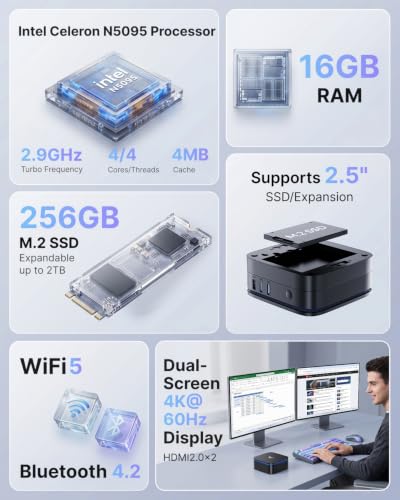
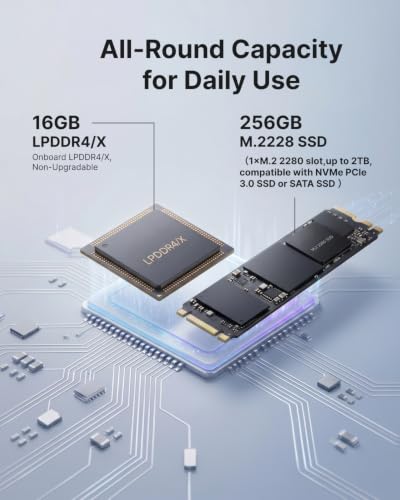
KAMRUI AK1PLUS Mini PC Computer, Intel Celeron N5095 (Up to 2.9GHz), 16GB RAM 256GB SSD, Dual 4K Mini Desktop Computer, Support 2.5'' SSD Expansion, WiFi, Bluetooth, Ethernet, Business Home Office PC



As an Amazon Associate we earn from qualifying purchases. Product prices and availability are accurate as of the date/time indicated.

GMKtec G3S Mini PC Computers Intel N95 Processor (Turbo 3.4GHz) | 8GB DDR4 256GB SSD Desktop Computer 4K Dual HDMI Display/3x USB3.2/WiFi 5 BT5.0/RJ45 Ethernet


As an Amazon Associate we earn from qualifying purchases. Product prices and availability are accurate as of the date/time indicated.

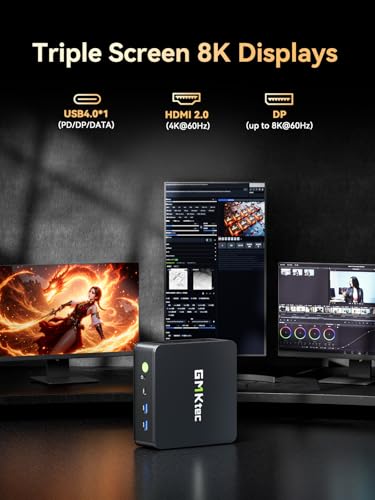
GMKtec M6 Ultra Gaming Mini PC Ryzen 7640HS 32GB RAM DDR5 1TB SSD | Desktop Mini Computers Office Home, Dual NIC LAN 2.5GbE, Triple 4K Display, WiFi 6, USB4, BT5.2, DP, HDMI 2.0



As an Amazon Associate we earn from qualifying purchases. Product prices and availability are accurate as of the date/time indicated.

BOSGAME E5 Plus Mini PC, AMD Ryzen 5400U(4C/8T) 8GB DDR4 256GB SATA SSD | (up to 4.0GHz), Wi-Fi 5, BT 5.0, Typle-C, 2.5G Dual LAN, Mini Desktop Computers Support 4K Triple Display Home & Office


As an Amazon Associate we earn from qualifying purchases. Product prices and availability are accurate as of the date/time indicated.

ACEMAGICIAN K1 Mini PC Win 11 Pro AMD Ryzen 7 7730U, 16GB RAM 512GB SSD


As an Amazon Associate we earn from qualifying purchases. Product prices and availability are accurate as of the date/time indicated.

Glorlin Mini PC Ryzen 7 6800H(up to 4.7GHz), 16GB LPDDR5 512GB NVMe SSD, Radeon 680M, Triple 4K Display HDMI/DP/Type-C, Dual LAN, WiFi 6 BT5.3, Mini Desktop Computer for Office, Home & Gaming


As an Amazon Associate we earn from qualifying purchases. Product prices and availability are accurate as of the date/time indicated.

BOSGAME E2 Plus Mini PC AMD Ryzen 5 3501U 8GB RAM 256GB SSD | Triple 4K displays via USB-C & Dual HDMI, Gigabit Ethernet, Compact Desktop for Office, Business and Study


As an Amazon Associate we earn from qualifying purchases. Product prices and availability are accurate as of the date/time indicated.

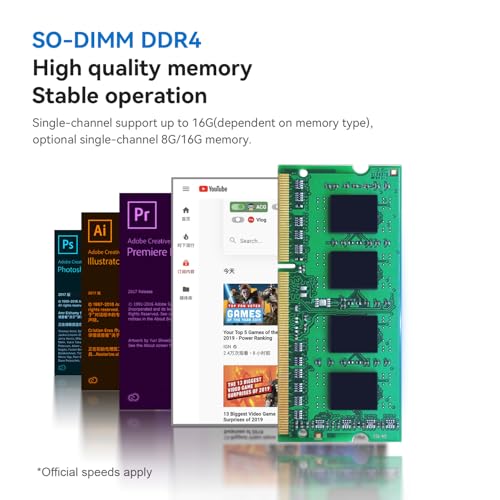
Beelink Mini S12 PRO Mini PC,12 Generation Intel N100 (Up to 3.4GHz) 4C/4T,16GB DDR4 512GB M.2 SSD,Micro PC 4K,Dual Display,WiFi6,BT5.2,2.5G LAN, Low Power Mini Computer



As an Amazon Associate we earn from qualifying purchases. Product prices and availability are accurate as of the date/time indicated.
“Dual 4K” in a title is a promise about resolution, not about refresh rate. The same port can output 4K at 60Hz or 4K at 30Hz, and the difference is obvious the moment you move a window: 30Hz feels like dragging through glue. Before choosing a mini PC, work out which cable each monitor will use and what that connection can carry.
| Connection | What it can carry (general rule) | What to confirm on the listing |
|---|---|---|
| HDMI 2.0 | 4K at 60Hz | That the port is 2.0, not an older revision |
| HDMI 1.4 | 4K at 30Hz | Refresh rate; avoid for two main monitors |
| DisplayPort 1.2 or newer | 4K at 60Hz | Full-size DisplayPort versus USB-C |
| USB-C with DisplayPort Alt Mode | 4K at 60Hz on supporting ports | That the port carries video, not just data |
| USB4 | Video plus data, typically | Cable quality and monitor compatibility |
Here is the arithmetic behind those rules. A 4K frame is 3,840 by 2,160 pixels, or about 8.3 million pixels. At 24 bits per pixel that is roughly 199 megabits per frame, and at 60 frames per second it comes to about 11.9 gigabits per second of raw picture data for one monitor. HDMI 2.0 offers an 18 gigabit-per-second link, enough for 4K60 in common color modes. HDMI 1.4 offers 10.2, which cannot fit 4K60 and therefore drops to 30Hz. Two monitors do not share a link; each uses its own port, so two good ports means two good screens.
That is why the titles that say “Dual HDMI” or “Triple 4K Display” are only a first clue. The follow-up question for any of the eight is the port version and the stated refresh rate. If the seller cannot answer, plan on a return or choose a listing that does.
Memory worksheet for a two-monitor office day
Integrated graphics have no private video memory; they borrow system RAM. A 4K desktop framebuffer is about 33 megabytes (3,840 x 2,160 x 4 bytes), and the graphics driver keeps several of them per display, plus the window compositor’s working space. The overhead is not huge, but it is not zero, and on an 8GB machine it competes with everything else.
Here is a worksheet with deliberately round assumptions. Our figures are estimates, not measurements of any listed unit.
| Item | Assumed memory use |
|---|---|
| Windows and background services | 3GB |
| Browser with 30 tabs at about 200MB each | 6GB |
| Video-call app with screen share | 1GB |
| Spreadsheet and document apps | 1GB |
| Graphics overhead for two 4K desktops | 0.5 to 2GB |
| Total | about 11.5 to 13GB |
On those assumptions, a 16GB mini PC runs the day with a little room, and an 8GB one will lean on the page file and feel slow around mid-afternoon. A 32GB machine, like the GMKtec M6 Ultra, is comfortable but more than most desks need. Check the listings for whether memory is soldered or removable: LPDDR5 on the Glorlin title is generally soldered, which means what you buy is what you keep, while DDR4 modules in other listings are often replaceable, though the titles do not promise it.
Scaling: what two 4K screens look like in daily use
A 27 inch 4K monitor shown at 100 percent scaling has very small text. Most office users set 150 percent, which gives an effective working area of 2,560 by 1,440 per screen, and across two screens a combined workspace of 5,120 by 1,440 pixels. That is a lot of room for a spreadsheet on one side and a document on the other, with sharper text than a 1080p panel. Scaling does not reduce the pixels the graphics chip must drive; it just changes how big things are drawn. So the load on the PC is the full 4K, even though the layout looks like 1440p.
If your monitors are 32 inch, 125 percent may be comfortable. If they are 24 inch, 200 percent is likelier. For help choosing monitors to go with the PC, our comparison of monitors for coding and programming covers 4K, QHD and ultrawide options and what the text looks like on each.
The eight listings at a glance
| Listing | CPU (as titled) | RAM / storage (as titled) | Display claim in title | Price tier |
|---|---|---|---|---|
| BOSGAME E2 Plus | Ryzen 5 3501U | 8GB / 256GB SSD | Triple 4K via USB-C and dual HDMI | Budget |
| BOSGAME E5 Plus | Ryzen 5400U (4C/8T) | 8GB DDR4 / 256GB SATA SSD | 4K triple display, Type-C | Budget |
| GMKtec G3S | Intel N95 | 8GB DDR4 / 256GB SSD | 4K dual HDMI | Budget |
| KAMRUI AK1PLUS | Celeron N5095 | 16GB / 256GB SSD | Dual 4K | Mid-range |
| Beelink Mini S12 PRO | Intel N100, 4C/4T | 16GB DDR4 / 512GB M.2 | 4K, dual display | Mid-range |
| ACEMAGICIAN K1 | Ryzen 7 7730U | 16GB / 512GB SSD | Not stated in title | Mid-range |
| Glorlin Mini PC | Ryzen 7 6800H | 16GB LPDDR5 / 512GB NVMe | Triple 4K via HDMI, DP, Type-C | Mid-range |
| GMKtec M6 Ultra | Ryzen 7640HS | 32GB DDR5 / 1TB SSD | Triple 4K, USB4, DP, HDMI 2.0 | Premium |
The eight mini PCs, one by one
BOSGAME E2 Plus, Ryzen 5 3501U, 8GB RAM, 256GB SSD
The E2 Plus is the lowest-priced listing, and its title promises triple 4K displays via USB-C and dual HDMI, gigabit Ethernet and a compact desktop for office, business and study. It runs an AMD Ryzen 5 3501U, a low-power “U” series part by AMD naming convention (check the maker’s page for its generation and core count), with 8GB of RAM and a 256GB SSD. Three video outputs is generous for the price, and you only need two of them.
The worksheet above is the main caution. With 8GB, a two-monitor office day sits at the edge of memory, and the title does not say whether the RAM can be upgraded. If it can, a larger module is the best money you could spend on this machine; if not, you are living with 8GB. The title also does not state refresh rates for the 4K outputs, and the USB-C port needs to be confirmed as a video-capable port.
It is wise to think about what the machine is replacing. If your current setup is a ten-year-old tower, this feels brisk for browsing and documents. If it is a recent laptop, you may find it slower in heavy multitasking. We do not have benchmark data, so judge from the CPU name and RAM, and read recent buyer comments for signs of slowdowns under load. Also ask whether the unit ships with an operating system installed, because the title does not say.
The title lists gigabit Ethernet, with no Wi-Fi or Bluetooth information in the portion supplied, so check the listing if wireless matters to you.
Pros
- Lowest price tier in the set
- Three display paths named in the title, via USB-C and dual HDMI
- Gigabit Ethernet
Cons
- 8GB RAM is tight for dual 4K office use
- Processor generation and core count are not spelled out; no benchmark claims to rely on
- Refresh rate and USB-C video support need confirming
Who it’s for: a light-duty desk with very modest multitasking where price is the priority.
BOSGAME E5 Plus, Ryzen 5400U, 8GB DDR4, 256GB SATA SSD
The E5 Plus title lists an AMD Ryzen 5400U with four cores and eight threads, up to 4.0GHz, 8GB DDR4, a 256GB SATA SSD, Wi-Fi 5, Bluetooth 5.0, a Type-C port, dual 2.5G LAN, and support for 4K triple display in home and office. The 4C/8T note is useful: eight threads help a processor juggle many small tasks, which is what an office desktop does all day.
Two features stand out. First, the dual 2.5G LAN is unusual for a mini PC at this price, though only useful if you have a switch or router that goes beyond gigabit. Second, the SATA SSD is slower than the NVMe drives named on some other listings. For booting and opening documents the difference is small; for copying large files you will notice it.
The same 8GB caveat applies. Two 4K screens and a busy browser will press on memory, and the title does not say whether a spare slot exists. A quick question to the seller, or a look at a teardown photo in the listing, will tell you.
Our estimate for a modest office day on this unit, with 20 browser tabs rather than 30, is that it fits within 8GB with little to spare. That is an assumption, not a measurement. Add a video call with screen sharing and you may hit the limit.
The price sits just above the lowest-priced option and well below the mid-range group, which makes it the budget pick with the most complete networking. Keep in mind that “Typle-C” in the original title is spelled that way by the seller, a small reminder to read the actual port list on the product page rather than the headline.
Pros
- 4C/8T processor suits multitasking
- Dual 2.5G LAN and Type-C stated
- Budget price tier
Cons
- 8GB RAM limits heavy tab use
- SATA SSD is slower than NVMe
- Type-C video support not confirmed in the title
Who it’s for: a budget buyer who values networking and thread count over memory headroom.
GMKtec G3S, Intel N95, 8GB DDR4, 256GB SSD
The G3S title names an Intel N95 processor with turbo to 3.4GHz, 8GB DDR4, a 256GB SSD, 4K dual HDMI display output, three USB 3.2 ports, Wi-Fi 5, Bluetooth 5.0 and RJ45 Ethernet. The key phrase for this keyword is “4K Dual HDMI Display.” Two HDMI ports is the simplest possible route to two monitors, and it does not rely on a USB-C port that may or may not carry video.
The N95 belongs to Intel’s low-power family, which suits quiet, cool operation but has limited headroom. Four efficient cores are normally enough for email, documents and a browser, and less comfortable for large spreadsheets, many tabs plus video calls, or anything that leans on the CPU for long periods. Check how the listing describes cooling and noise, since the title is silent on both.
With 8GB, the same memory warning applies as with other budget units. If you can open the case and add RAM, the G3S becomes much more comfortable; if not, keep your tab habit modest. Three USB 3.2 ports are handy for a keyboard, a mouse and a webcam without a hub, and RJ45 Ethernet means a stable wired connection for video calls, which matters more on a two-screen desk than people expect.
As a rough comparison, the N95 sits below the N100 in the Beelink listing in the same family; the N100 title lists 4C/4T and 16GB. If you can afford the step up, the extra memory is the more valuable change than the minor CPU difference. The G3S is in the budget tier by price.
Pros
- Two HDMI ports named for 4K dual display
- Three USB 3.2 ports
- Budget price tier
Cons
- 8GB RAM is thin for dual 4K desktops
- Low-power processor limits heavy multitasking
- HDMI version and 4K refresh rate are not stated
Who it’s for: a simple two-HDMI setup for email, documents and web apps.
KAMRUI AK1PLUS, Celeron N5095, 16GB RAM, 256GB SSD
KAMRUI’s title says Intel Celeron N5095 with speeds up to 2.9GHz, 16GB RAM, 256GB SSD, Dual 4K mini desktop, support for 2.5 inch SSD expansion, Wi-Fi, Bluetooth and Ethernet, aimed at business and home office. That combination is distinctive: 16GB of RAM on a modest processor. It means memory will not be your bottleneck, but the CPU may be.
The 2.5 inch SSD expansion is a practical plus for an office PC. You can add a second drive for archives or backups without going to external storage, though the title does not give the maximum size or say whether a cable and bracket are included. It is a “check the listing” item.
The Celeron name signals an entry-level processor. For documents, web apps and video playback it is generally fine; for anything computationally heavy, expect it to take longer. A balance like this is sensible for a receptionist or hotdesk computer that runs a few apps, and less so for an analyst with giant spreadsheets.
The “Dual 4K” phrase is exactly what this keyword asks for, but the title does not say which ports provide it. Confirm the ports and the refresh rate in the listing. Compare it with the Beelink N100 unit at 16GB and 512GB for a similar price tier; the Beelink title also names a newer-generation N100 chip and a larger drive. One more practical angle: with only 256GB of included storage and an expansion bay, the sensible plan is to treat the internal drive as the system disk and keep working files on the second drive, which also makes a future replacement simpler.
The price puts it in the mid-range tier.
Pros
- 16GB RAM on an entry-level system
- 2.5 inch SSD expansion supported per the title
- Dual 4K stated
Cons
- Celeron-class processor has modest headroom
- Only 256GB of storage included
- Ports providing the dual 4K are not named
Who it’s for: hotdesk, front-desk or light-office use where memory matters more than raw speed.
Beelink Mini S12 PRO, Intel N100, 16GB DDR4, 512GB M.2 SSD
The Beelink title lists a 12th Generation Intel N100 up to 3.4GHz with 4 cores and 4 threads, 16GB DDR4, a 512GB M.2 SSD, a micro PC with 4K and dual display, Wi-Fi 6, Bluetooth 5.2, 2.5G LAN and “Low Power” operation. For the keyword, that is a tidy fit: 16GB, a fast storage format, two displays and a low-power processor that is likely to keep fan noise modest.
The fan-noise point is an inference from the processor class, not a claim in the title. Chips at this power level are designed to run on small heatsinks, which usually means quieter operation, but the title does not state a decibel figure. Check buyer comments and the seller’s specification sheet.
“Dual display” and “4K” appear in the title, but the combination is not spelled out. Confirm that both displays can run 4K at 60Hz at the same time, or whether one is limited. Wi-Fi 6 and a 2.5G port are good extras for a desk that streams video calls and moves large files.
With 4 threads, the N100 is a less natural fit for heavy multitasking than 8-thread Ryzen chips, but for an office desk with a browser, Office apps and a call it is generally adequate. Its advantage over the other Intel units in the set is the combination of 16GB and 512GB at a mid-range price tier.
If you want a plain, sensible office box with a modest power draw, this is the one the title makes easiest to recommend, with the usual condition that you verify the ports.
Pros
- 16GB RAM and 512GB M.2 SSD
- Wi-Fi 6 and 2.5G LAN
- Low-power design suggested by the title
Cons
- 4 threads limit heavy multitasking
- Which ports run dual 4K, and at what refresh rate, are not stated
- Fan noise is unspecified
Who it’s for: general office users who want 16GB, quiet operation and low power use.
ACEMAGICIAN K1, Windows 11 Pro, Ryzen 7 7730U, 16GB, 512GB SSD
The ACEMAGICIAN K1 title is short: Win 11 Pro, AMD Ryzen 7 7730U, 16GB RAM and 512GB SSD. Notably, it says nothing about display outputs. For this keyword, that is the headline caution. The hardware is a sensible office-class machine, but a title that does not mention HDMI, DisplayPort or USB-C video leaves the central question unanswered. Do not buy this listing for dual 4K until the product page confirms two ports and the refresh rates.
What the title does tell you is useful: it comes with Windows 11 Pro, which includes features businesses use such as device management and remote desktop hosting, and it pairs an eight-core-class Ryzen 7 with a healthy 16GB of memory. Other listings in the set do not state an operating system, so check them for licensing.
The “U” in Ryzen 7 7730U is AMD’s usual marker for a low-power mobile part, which suggests a balance between speed and heat. Again, the title says no more than that, so cooling and noise are questions for the seller. If the page confirms two usable 4K outputs, this becomes a very credible office machine, comparable to the Glorlin on CPU class but without the triple-display emphasis.
The right way to handle it: open the listing, find the port list and the manual, and check them against the port-math table above. If the ports are two HDMI 2.0 or HDMI plus DisplayPort, it is fine. If one of the outputs is a legacy standard, move on.
It sits in the mid-range price tier.
Pros
- Ryzen 7 with 16GB RAM and 512GB SSD
- Windows 11 Pro stated in the title
- Mid-range price tier
Cons
- Title does not mention any video outputs
- Dual 4K capability must be confirmed elsewhere
- Few other details in the title
Who it’s for: office buyers who want Windows 11 Pro and are willing to verify the ports themselves.
Glorlin Mini PC, Ryzen 7 6800H, 16GB LPDDR5, 512GB NVMe, Radeon 680M
The Glorlin title is dense with specifics: Ryzen 7 6800H up to 4.7GHz, 16GB LPDDR5, 512GB NVMe SSD, Radeon 680M graphics, triple 4K display over HDMI, DP and Type-C, dual LAN, Wi-Fi 6, Bluetooth 5.3, and pitched at office, home and gaming. Three different video connectors means you can pick the two best ones for your monitors, whether that is HDMI and DisplayPort or any other pair.
The Radeon 680M integrated graphics are named, which matters because the graphics engine is the part that drives your monitors. A stronger integrated GPU gives more headroom for smooth window movement across two 4K screens and for occasional video editing or light gaming. For plain office work the extra capability is a cushion rather than a necessity.
LPDDR5 is a newer, faster memory type than the DDR4 on most other listings, but it is usually soldered, so the 16GB you buy is the 16GB you keep. Given our memory worksheet, 16GB covers a heavy office day, but this is not a machine you can upgrade later.
The 6800H is a higher-power chip than the N100 or N95, and the title says nothing about the cooling design or noise. Higher performance generally means more heat, so check buyer comments about fan behavior and allow airflow around the case.
Among the units here, this is the best match for a desk that needs strong performance, many ports and a straightforward dual-4K connection, at a mid-range price tier near the upper end.
Pros
- HDMI, DisplayPort and Type-C video named in the title
- Ryzen 7 with 16GB LPDDR5 and a 512GB NVMe drive
- Radeon 680M integrated graphics
Cons
- LPDDR5 memory is typically soldered, which limits upgrades (confirm on the page)
- Cooling and noise are not described
- Higher price than the N100 and N95 units
Who it’s for: demanding office users who want performance, flexibility and a clear multi-monitor path.
GMKtec M6 Ultra, Ryzen 7640HS, 32GB DDR5, 1TB SSD
The M6 Ultra is branded a gaming mini PC. The title lists Ryzen 7640HS, 32GB DDR5, 1TB SSD, dual 2.5GbE LAN, triple 4K display, Wi-Fi 6, USB4, Bluetooth 5.2, DisplayPort and HDMI 2.0. It is the only listing that names HDMI 2.0, which answers the 4K60 question for at least one of the ports, and USB4 adds a flexible high-speed port for a dock or an external display.
For office work, this is overkill. The 32GB of DDR5 and 1TB of storage are plentiful, and the processor is far beyond what spreadsheets need. That makes sense if the machine also serves as a development box, a light editing station, a home server or a hybrid work and gaming PC. If it is only for documents and email, you would be paying for capability you never touch.
The advantages for longevity are real, though: a machine with 32GB and a fast CPU will remain responsive for many years of software updates, and the dual 2.5GbE ports suit a network-heavy desk. Fan noise under load is not stated; gaming-branded mini PCs often use more active cooling, so check comments. A practical test of fit: if your two monitors will mostly show spreadsheets, mail and a call, the extra 16GB of memory over the 16GB units is unlikely to be used, whereas a developer running containers or a designer with large files would fill it.
Because it is the premium-tier listing by a wide margin, the honest question is whether your workload justifies it. A rule of thumb: if your two-monitor setup is for office tasks only, the Beelink or Glorlin units cover the same screens for much less. If you do heavier work, this is the future-proof choice.
Pros
- 32GB DDR5 and 1TB SSD
- HDMI 2.0, DisplayPort and USB4 named in the title
- Dual 2.5GbE LAN
Cons
- Premium price tier
- Gaming-oriented, so likely more than office use needs
- Noise and cooling are unspecified
Who it’s for: power users who want one machine for dual-monitor office work plus heavier tasks.
Five questions to ask before you buy any of them
- Which two ports will drive my monitors, and are both rated for 4K at 60Hz?
- Is the RAM upgradeable, and what is the maximum size?
- Does the USB-C port carry video, or only data and charging?
- Is Windows included and licensed, or is the machine sold without an operating system?
- What is the return window if the dual-monitor setup does not work as hoped?
How we picked these
This comparison was put together by the Editorial team from published specifications, manufacturer documentation and buyer reviews. Nobody on the team used or measured these units. Because of that, there are no benchmark numbers in this article, and anything beyond a listing’s own title appears as a labeled estimate with its assumptions shown, such as the memory worksheet and the bandwidth arithmetic. We kept all eight supplied listings, including the one whose title omits its video ports, because a buyer deserves to know which listings leave the key question open.
Price tiers are relative within the group: Budget, Mid-range or Premium, taken from the supplied price field.
Verdict
For most offices, the Beelink Mini S12 PRO is the easiest sensible recommendation on paper: 16GB, 512GB, dual display, low-power. The Glorlin offers more performance and a clearer three-connector layout for a higher price. The GMKtec M6 Ultra is the premium option for people who want one machine for more than office work. On a strict budget, the GMKtec G3S with two HDMI ports is the plainest route to two screens, with the caution about 8GB of RAM. Whichever you choose, ask the seller the five questions above before ordering.
Related guides
Frequently asked questions
Can a mini PC really drive two 4K monitors for office work?
Yes, if its video outputs support it. Most modern mini PCs with two HDMI ports, or HDMI plus DisplayPort or USB-C video, can drive two 4K screens for documents, email and browsers. The question is the refresh rate: some ports run 4K at 30Hz, which feels sluggish, while 4K at 60Hz feels normal. Titles rarely state this, so check the listing or manual before buying.
How much RAM do I need for dual 4K office monitors?
For general office work, 16GB is the comfortable target, and 8GB is a squeeze. Integrated graphics borrow system memory, two 4K desktops add overhead, and browsers with dozens of tabs consume several gigabytes. Our estimate for a heavy office day is 11 to 13GB of use, so an 8GB machine may slow down. Check whether the listed RAM is upgradeable on the product page.
Do I need USB-C video to run two 4K monitors?
Not necessarily. Two HDMI ports, or one HDMI and one DisplayPort, are enough. USB-C video helps when it supports DisplayPort Alternate Mode, because it lets you connect a monitor with a USB-C cable and sometimes power the monitor too. If a listing mentions Type-C video or USB4, confirm that the port carries video, since some USB-C ports only handle data and charging.
Are mini PCs loud under office use?
Usually quiet for light work, but fan noise is not in any of these titles. Low-power processors tend to run cooler and need less cooling than high-performance chips, so units like the N100 or N95 models are likelier to stay quiet in an office. Higher-performance Ryzen units may spin up under heavy loads. Read buyer comments on noise and heat before choosing, and give the unit airflow.
Is a gaming mini PC overkill for office monitors?
For spreadsheets, email and video calls, usually yes. A Ryzen 7 with fast memory is capable well beyond office needs, and you pay for it. The upside is longevity: faster chips remain responsive for longer as software grows heavier. If your work includes photo editing, large datasets or virtual machines, the extra capability is useful. Otherwise, a lower-cost model with 16GB of RAM is often enough.




Write Your Review
No reviews yet. Be the first to share your experience!