

Key takeaways
- Pros: predictable shape, excellent switches, strong wireless, great battery life.
- Cons: premium price, no Bluetooth, limited buttons, heavier than the Pulsar and Razer rivals.
The best gaming mouse for most players in 2026 is a lightweight wireless model in the 50 to 60 g range, and the Logitech G Pro X Superlight 2 is the safest all-round choice, with the Razer Viper V3 Pro and Pulsar X2 V3 as lighter alternatives, the Razer DeathAdder V4 Pro for a more ergonomic shape, and the Logitech G305 as the budget pick. Weight, shape and grip style matter more than the sensor, because every current flagship sensor tracks accurately beyond what a human hand can use. This guide compares seven mice by the specs that change how they feel, explains how to match a mouse to your grip, and flags what wears out first.
Our top picks



As an Amazon Associate we earn from qualifying purchases at no extra cost to you.
Quick comparison of the seven picks
| Pick | Best for | Weight | Sensor | Polling | Battery | Price tier |
|---|---|---|---|---|---|---|
| Logitech G Pro X Superlight 2 | Best overall, esports staple | About 60 g | HERO 2 | Up to 2,000 Hz or higher with updates | About 95 hours | Premium |
| Razer Viper V3 Pro | Fast, symmetrical, light | About 54 g | Focus Pro 35K Gen-2 | Up to 8,000 Hz | About 95 hours at 1,000 Hz | Premium |
| Pulsar X2 V3 | Lightest value flagship | About 52 g | Pulsar XS-1, 32,000 DPI | 1,000 Hz, 8,000 Hz with optional dongle | Varies by polling | Mid-range |
| Pulsar X2 V3 Mini | Small hands and claw grip | About 51 g | Pulsar XS-1 | 1,000 Hz, up to 8K with optional dongle | Varies by polling | Mid-range |
| Razer DeathAdder V4 Pro | Ergonomic right-hand shape | About 56 g | Focus Pro 45K Gen-2 | Up to 8,000 Hz | Up to about 150 hours | Premium |
| Logitech G502 X Plus | Many buttons, MMO and general use | About 106 g | HERO 25K | 1,000 Hz | About 130 hours without lighting | Upper mid-range |
| Logitech G305 Lightspeed | Budget wireless | About 99 g | HERO 12K | 1,000 Hz | Up to 250 hours on 1 AA | Budget |
Figures come from manufacturer specification pages and published reviews. Weights vary by about one gram between sources and between colour versions, and polling rate claims differ between software versions, so check the exact model listing. Both the Superlight 2 and Viper V3 Pro have successor models on the market, and the older versions can still be the better value while stocks last.
Best overall: Logitech G Pro X Superlight 2
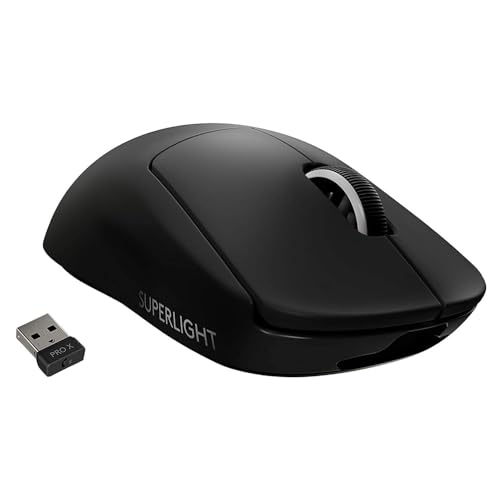
The Superlight 2 is the mouse most often seen in esports pro surveys. It weighs around 60 g, uses Logitech’s HERO 2 sensor, LIGHTFORCE hybrid optical-mechanical switches, five programmable buttons and USB-C charging, with a rated battery life around 95 hours. It connects through a 2.4 GHz receiver or a cable and has no Bluetooth. Reported sensor figures differ across spec sources, with maximum DPI listed between 32,000 and 44,000, so treat the sensor as a ceiling you will never reach in practice.
Who it suits: medium and large hands in palm or relaxed claw grip who prefer a low, symmetrical shape. Its reliability record and consistent coating make it a safe default for anyone unsure where to start.
- Pros: predictable shape, excellent switches, strong wireless, great battery life.
- Cons: premium price, no Bluetooth, limited buttons, heavier than the Pulsar and Razer rivals.
Best for speed: Razer Viper V3 Pro
The Viper V3 Pro is a 54 g symmetrical mouse with Razer’s Focus Pro 35K optical sensor, optical switches and 8,000 Hz polling through the supplied dongle. Razer rates battery life around 95 hours at 1,000 Hz, and independent summaries put it near 17 hours at 8,000 Hz, so the high polling rate costs real runtime. Sensor tracking is rated at 750 IPS and 70 G, ahead of the Superlight 2’s published tracking limits.
Who it suits: players who want lower weight than the Logitech and who are comfortable with a slightly narrower body. Pro usage data shows it as one of the most popular mice in competitive Valorant and CS2 lineups.
- Pros: very light, high polling, fast optical switches, strong software.
- Cons: premium price, narrow body is not for large palm grips, 8K mode drains the battery.
Best lightweight value: Pulsar X2 V3
Pulsar’s X2 V3 reaches about 52 g, uses the company’s XS-1 sensor rated to 32,000 DPI and 750 IPS, and runs at 1,000 Hz as standard or 8,000 Hz with an optional dongle. A third-party measurement of a retail unit came out at about 53 g, close to the claim. It sits at a lower price than the Razer and Logitech flagships and is a favourite among enthusiasts who want to try ultralight without paying the full flagship price.
Who it suits: medium hands in claw or fingertip grip who value weight. Trade-offs: brand support and retail availability are less broad than at Logitech or Razer, and the software is simpler.
Best for small hands: Pulsar X2 V3 Mini
The Mini version drops to about 51 g and measures roughly 116 by 61 by 37 mm. It shares the XS-1 sensor and optical switches. A heavier eS Mini variant adds an OLED display and 8K polling and weighs about 59 g, so be careful to pick the standard Mini if weight is your priority.
Who it suits: hands shorter than about 17 cm and anyone who uses a fingertip or tight claw grip. Larger hands will find it cramped within minutes.
Best ergonomic shape: Razer DeathAdder V4 Pro
The DeathAdder V4 Pro reduces the classic ergonomic right-hand shape to about 56 g, which is lighter than the previous V3 Pro at about 63 g. Razer lists a Focus Pro 45K Gen-2 sensor with up to 45,000 DPI, 8,000 Hz polling and battery life around 150 hours. The body is about 128 by 68 by 44 mm, with a clear hump that supports a palm grip.
Who it suits: right-handed players with medium to large hands who want a supported palm grip in a modern lightweight shell. It also suits shooters and strategy games where you spend hours with the hand in one position.
- Pros: comfortable shape, very light for the size, long battery life.
- Cons: right-handed only, premium price, not ideal for fingertip grip.
Best multi-button choice: Logitech G502 X Plus
The G502 X Plus is a heavier mouse at about 106 g, with 13 programmable buttons, a HERO 25K sensor, a freewheeling scroll wheel and RGB lighting. Logitech removed the old adjustable weight system and rates battery life at roughly 130 hours with lighting off. It is built for players who need extra buttons for MMOs, strategy games or productivity tasks, rather than for tournament shooters.
Who it suits: MMO and MOBA players, creators and anyone who wants a single mouse for games and work. Trade-off: at roughly twice the weight of the featherweights, it is tiring for fast flick aiming.
Best budget wireless: Logitech G305 Lightspeed
The G305 uses a HERO 12K sensor, 1,000 Hz polling and six programmable buttons, with a 99 g body powered by one AA battery for up to about 250 hours of use. It connects through a 2.4 GHz dongle, and the AA design means no charging downtime, since you can swap a battery in seconds.
Who it suits: students, casual players and shared computers. Trade-offs: the mouse is heavier and has fewer premium touches. It is a dependable entry point, but a competitive player will feel the weight difference immediately.
How to choose: grip, hand size and weight
| Hand length | Grip | Good fits |
|---|---|---|
| Under 17 cm | Claw or fingertip | Pulsar X2 V3 Mini |
| 17-19 cm | Claw | Viper V3 Pro, Pulsar X2 V3 |
| 17-19 cm | Palm or relaxed claw | Superlight 2 |
| Over 19 cm | Palm | DeathAdder V4 Pro, G502 X Plus |
| Any | Budget focus | Logitech G305 |
Measure first
Measure length from the wrist crease to the tip of the middle finger, and width across the knuckles. A good rule is that mouse length should be about 60 to 65 percent of hand length for palm grip and about 55 to 60 percent for claw. A 19 cm hand therefore suits a mouse roughly 115 to 125 mm long. Most flagships sit between 120 and 128 mm.
Weight and battery in numbers
The difference between 52 g and 60 g is about 15 percent. Over a long session your arm moves the mouse thousands of times, so lighter mice cause less fatigue and let you stop quickly. Battery life usually falls by half or more when polling is raised from 1,000 Hz to 8,000 Hz, so a mouse rated at 95 hours may deliver about 17 hours at 8K. For most players, 1,000 Hz is plenty, and 2,000 or 4,000 Hz is a reasonable compromise on a fast monitor.
DPI and sensitivity example
If you play at 800 DPI with an in-game sensitivity of 0.35, your eDPI is 280. A 40 cm swipe on a pad at that setting turns the character roughly 360 degrees in many shooters. To keep the same feel on a new mouse, multiply DPI by in-game sensitivity and keep the product constant. If you move to 1,600 DPI, halve the in-game sensitivity to 0.175.
Polling rate: when 8,000 Hz helps
Higher polling lowers input delay by shortening the gap between reports. At 1,000 Hz, the gap is 1 ms; at 8,000 Hz it falls to 0.125 ms. The benefit shows up mostly on 240 Hz and faster monitors, and the cost is higher CPU use and shorter battery life. Not every game handles 8K polling cleanly, and some older CPUs stutter. A sensible approach is to try 2,000 or 4,000 Hz first, keep what feels smooth, and fall back to 1,000 Hz if you notice frame time spikes.
Ownership realities: what wears first
- Mouse feet: PTFE skates wear down first, especially on glass or rough pads. Replacement skates cost little and make an old mouse feel new.
- Switches: optical switches avoid the double-click problem that plagued older mechanical designs, but hybrid and mechanical switches can still develop it over years of use.
- Battery: rechargeable cells lose capacity after a few years. AA-powered models avoid that, which is one reason the G305 remains popular.
- Coating and grips: smooth plastic shines and gets slippery. Grip tape is a cheap fix that also adds a gram or two.
- Cleaning: wipe the body with a microfibre cloth and a tiny amount of isopropyl alcohol. Do not spray liquid into the sensor window.
- Common mistakes: buying by weight alone, ignoring hand size, and using a mouse too large because it looks more comfortable on paper.
Mousepad and surface considerations
The mouse and pad work as a pair. Speed pads allow quicker glide but demand more control, while control pads add friction for precision. A wide pad of about 45 by 40 cm or larger leaves room for low sensitivity swipes. Ultralight mice often feel floaty on very slick pads, so test a medium-speed pad first if you are new to the category.
Shape families explained
Gaming mice fall into a handful of shape families, and knowing which one you like shortens the shopping list dramatically. Symmetrical low-profile shells, the family that includes the Superlight 2 and Viper V3 Pro, suit claw and relaxed palm grips and work for left and right hands in principle, although side buttons are usually on the left side only. Ergonomic shells such as the DeathAdder V4 Pro rise toward the back to fill the palm and have a thumb groove, which cuts finger strain on long sessions. Small ambidextrous shells like the X2 V3 Mini suit fingertip control, and larger multi-button shells such as the G502 X Plus favour games with many binds.
If you cannot tell which family fits you, the cheapest experiment is to borrow or buy a budget version of each shape first. A low-cost symmetrical mouse and a low-cost ergonomic mouse will show within a week which one your hand prefers, and you can then spend more on the premium version of the winner.
Software, buttons and firmware
- Logitech G HUB: handles DPI stages, button remaps and profiles per game. Settings save to onboard memory, so you can close the app afterwards.
- Razer Synapse: offers the same functions plus optional lighting and cloud profiles. Keep it updated, since polling modes and firmware ship through the app.
- Pulsar Fusion: a lightweight web or desktop tool for DPI, lift-off distance and button assignment, with fewer extras.
- Lift-off distance: set it as low as the mouse allows without tracking loss. A low lift-off setting stops the cursor drifting when you reposition the mouse on the pad.
- Motion sync and angle snapping: leave angle snapping off. Motion sync adds a small delay on some mice and is usually unnecessary at high polling rates.
A general rule is to change one setting at a time and play a few matches before changing the next. Players who change DPI, polling rate and lift-off simultaneously often cannot tell which change helped.
Worked example: cost of ownership over three years
Assume a premium wireless mouse and a budget AA-powered mouse are used 4 hours a day, 300 days a year. That is 1,200 hours a year, or 3,600 hours over three years. The premium mouse usually needs one set of replacement feet and may lose some battery capacity, while the budget model needs about 14 AA batteries, since each battery lasts around 250 hours. Spread over 3,600 hours, the difference in cost per hour is small, so choose on shape and weight rather than on purchase price alone.
Frequently Asked Questions
How light should a gaming mouse be?
For fast shooters, 50 to 65 g is the common range among esports players, while 70 to 100 g suits those who prefer more stability. Lighter is not always better. If a very light mouse feels twitchy, a 60 g model like the Superlight 2 is a good compromise.
Wired or wireless for competitive play?
Modern 2.4 GHz wireless mice are as fast as wired for practical purposes, and most pros use them. Wired models avoid battery management but add cable drag unless you use a good bungee or paracord cable.
Do I need more than 1,600 DPI?
No. Most players use between 400 and 1,600 DPI. High DPI figures in spec sheets are mostly marketing, and extremely high settings can create jitter when the sensor interpolates.
Are optical switches better than mechanical ones?
Optical switches register presses with a light beam, which removes debounce delay and prevents the double-click issue caused by worn metal contacts. Mechanical switches can feel crisper to some users, but both types are fast enough for competitive play.
Is the Pulsar X2 V3 as good as Razer or Logitech?
On shape, weight and sensor performance it is competitive. The difference lies in support network, software polish and resale value. If you value those, the big brands are safer. If you want the lightest build for less, Pulsar is a strong option.
What grip style do I have?
Rest your hand naturally on the mouse. If the entire palm touches the shell, you use palm grip. If the fingers arch and the palm hovers at the back, you use claw. If only the fingertips touch and the palm is clear, you use fingertip. Choose a mouse shaped for that grip rather than for your favourite brand.




Write Your Review
No reviews yet. Be the first to share your experience!