

The best prebuilt gaming PC in 2026 for most people is a Lenovo Legion Tower 5i or HP Omen 35L built around an RTX 5070 Ti, because that GPU class handles high-refresh 1440p and entry-level 4K while the cases use mostly standard parts. If you want maximum frame rates and do not mind a smaller brand, a Ryzen 7 9800X3D system such as the Skytech King 95 or Blaze 5 gives you the fastest gaming CPU on the market. Buyers on a tighter budget should look at an RTX 5060 Ti machine like the MSI MAG Infinite S3 and plan on upgrading storage and memory later.
Prebuilt desktops have a mixed reputation, and for good reason: the same model name can ship with very different parts depending on the retailer, and some brands use proprietary motherboards, power supplies or cases that limit upgrades. This guide focuses on what actually matters when you pay a system integrator to assemble a PC for you: the GPU and CPU pairing, memory and storage configuration, power supply headroom, cooling, upgrade paths and warranty terms. Specifications below come from manufacturer listings, retailer spec sheets and independent review coverage as of late 2026, and configurations change often, so always confirm the exact parts on the product page before you order.
Our top picks

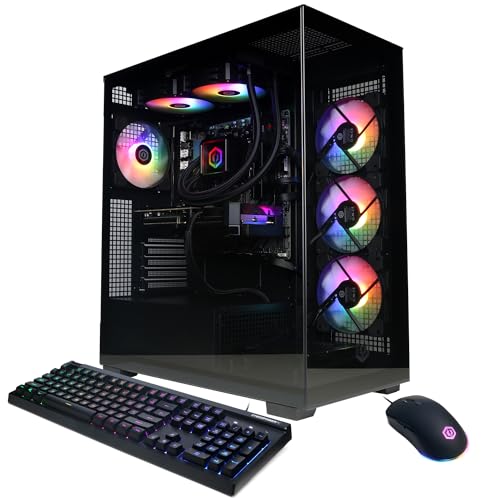


As an Amazon Associate we earn from qualifying purchases at no extra cost to you.
Quick Comparison of the Best Prebuilt Gaming PCs
| Pick | Best for | CPU / GPU | Memory / Storage | Market tier |
|---|---|---|---|---|
| Lenovo Legion Tower 5i | Best overall value | Core Ultra 7 265F / RTX 5070 Ti 16GB | 32GB DDR5-5600 / 1TB NVMe | Mid-premium |
| HP Omen 35L | Best compact all-rounder | Ryzen 7 9800X3D / RTX 5070 Ti 16GB | 32GB DDR5-6000 / 1TB SSD | Premium |
| Skytech King 95 | Best for 4K and raw speed | Ryzen 7 9800X3D / RTX 5080 16GB | 32GB or 64GB DDR5-6000 / 1TB to 4TB Gen4 | High-end |
| Skytech Blaze 5 | Best RTX 5080 value | Ryzen 7 9800X3D / RTX 5080 16GB | 32GB DDR5 / 2TB NVMe | High-end |
| Alienware Aurora | Best premium brand support | Core Ultra 9 285 / RTX 5080 16GB | 32GB DDR5-5200 / 1TB to 2TB | Premium |
| MSI Aegis R2 | Best for creators who also game | Core Ultra 9 285 / RTX 5070 Ti 16GB | Up to 2TB storage | Premium |
| MSI MAG Infinite S3 | Best budget entry | Core i5 or i7 14th gen / RTX 5060 Ti | 16GB DDR5 / 1TB SSD | Budget to mid |
How These Prebuilt Gaming PCs Were Chosen
This list is based on published manufacturer specifications, retailer listings and independent review coverage rather than personal benchmarking. Each system had to meet four conditions. It needed a current-generation GPU from the GeForce RTX 50 series, at least 16GB of system memory, a solid state boot drive with room for a modern game library, and a clear warranty policy. Systems that hide their motherboard or power supply model in the listing were marked down, because those two parts decide whether the PC can be upgraded in two or three years.
Review coverage of prebuilt PCs is uneven. Many roundups are written by affiliate publishers and repeat the same short list, so the picks here were cross-checked against spec sheets from the makers themselves wherever possible. Where sources disagreed, for example on the power supply wattage of a specific Legion configuration, that disagreement is noted rather than guessed at.
Best Overall: Lenovo Legion Tower 5i (RTX 5070 Ti)
The Legion Tower 5i is the safest recommendation for buyers who want a major brand, simple support and strong 1440p performance without paying enthusiast prices. The RTX 5070 Ti configuration pairs a Core Ultra 7 265F, an Arrow Lake processor with 20 cores (8 performance and 12 efficiency) and a boost clock up to 5.3GHz, with a GeForce RTX 5070 Ti carrying 16GB of GDDR7 memory. Retail listings show 32GB of DDR5-5600 in two modules, a 1TB PCIe 4.0 NVMe drive, Wi-Fi 6E, 2.5Gb Ethernet and a 30-liter tower with a liquid-cooled CPU. A three-month PC Game Pass subscription is bundled in some listings.
Who it suits
This is a good fit for someone moving from a laptop or console who wants to plug in and play at 1440p with high settings, or at 4K with upscaling. The F-suffix processor has no integrated graphics, so every display must connect to the graphics card. That is rarely a problem for gaming, but it means you cannot fall back on the motherboard video output if the GPU ever needs servicing.
Main trade-offs
The board is a Lenovo-specific B860 design, so there is no CPU overclocking and fewer expansion options than a retail board. Review sites report different power supply and cooling details for different configurations, so check Lenovo’s spec sheet for the exact SKU, and confirm the power supply wattage if you plan to add drives or a larger GPU later. The warranty is typically one year mail-in, which is no better than what boutique builders offer. The 1TB drive is the weak point at this tier, and a second M.2 drive is the first upgrade most owners make.
Best Compact All-Rounder: HP Omen 35L
The 2026 Omen 35L reviewed by PC Gamer uses a Ryzen 7 9800X3D with an RTX 5070 Ti, 32GB of DDR5-6000, a 1TB SSD, Wi-Fi 7 and Bluetooth 5.4. The CPU is cooled by a 240mm liquid cooler, and the chassis measures about 21 by 40.8 by 41 centimeters, making it noticeably more compact than a typical mid tower. HP also sells Intel versions that top out at a Core Ultra 9 285K and an RTX 5080, which gives you a path to higher performance inside one product family.
Who it suits
Choose the Omen 35L if desk space matters and you want the fastest gaming processor available without moving to a full-size case. The X3D cache design excels in CPU-limited esports titles and simulation games, where frame rates depend more on the processor than on the graphics card.
Main trade-offs
PC Gamer noted that the micro-ATX board has only two memory slots, both filled in the reviewed configuration, so a memory upgrade means replacing the modules. The lower PCIe slot also sits very close to the graphics card shroud, limiting add-in card choices. Compact cases also run warmer under sustained load than large airflow builds.
Best for 4K and Raw Speed: Skytech King 95
Skytech’s King 95 is the configuration enthusiasts compare against hand-built PCs. Listings show a Ryzen 7 9800X3D (eight cores, sixteen threads, 4.7GHz base), a GeForce RTX 5080 with 16GB of GDDR7, DDR5-6000 memory in 32GB or 64GB options, Gen4 NVMe storage from 1TB up to 4TB, an 850W Gold ATX 3 power supply, a 360mm liquid cooler and a B650 motherboard. Skytech describes a one-year parts-and-labor warranty with lifetime technical support.
Who it suits
If you game on a 4K monitor or a high-refresh ultrawide, the RTX 5080 gives you headroom that the 5070 Ti class does not, and the 9800X3D removes the processor as a bottleneck. The standard ATX parts also mean you can swap the motherboard, power supply or cooler later without fighting a proprietary layout.
Main trade-offs
Smaller integrators rely on retail parts of varying brand, so the exact motherboard, RAM kit and power supply model can differ between purchases. Wi-Fi 5 appears in some listings, which is dated next to Wi-Fi 7 on competing systems, and a 1TB drive on the lowest configuration will fill quickly with modern games that exceed 100GB each. Support is online and phone based, with no on-site service network like the large brands run.
Best RTX 5080 Value: Skytech Blaze 5
The Blaze 5 targets the same buyer as the King 95, using a Ryzen 7 9800X3D, an RTX 5080, 32GB of DDR5 and a 2TB NVMe drive according to retailer roundups. The appeal is sensible defaults: storage and memory are already at the level most gamers end up upgrading to, so no immediate additions are needed.
Who it suits
This system suits someone who wants the same gaming performance as the King 95 without paying for extra memory or storage they will not use. A 2TB drive holds roughly fifteen to twenty large modern titles before you need to start uninstalling games.
Main trade-offs
Like other Skytech builds, the case, board and cooling details vary by configuration and retailer listing, so read the parts list carefully. Airflow is generally good thanks to the glass-front design, but fan noise under load is audible, and the same one-year warranty applies.
Best Premium Brand Support: Alienware Aurora
The Aurora ACT1250 is Dell’s flagship tower. Common configurations use a Core Ultra 9 285 with 24 cores and 76MB of cache, a GeForce RTX 5080 with 16GB of GDDR7, 32GB of dual-channel DDR5-5200 and a 1TB or 2TB NVMe drive. Dell pairs this with a 1000W Platinum-rated power supply, 240mm liquid cooling for the CPU, 2.5Gb Ethernet, Wi-Fi 7 and Bluetooth 5.4. A basic wired keyboard and mouse are included.
Who it suits
Buyers who value a recognizable brand, a clean look with a clear side panel, and an established service network will find the Aurora easiest to live with. The generous 1000W power supply leaves headroom for future GPU generations.
Main trade-offs
Intel’s Arrow Lake processors trail the Ryzen X3D chips in most gaming workloads, so the Aurora usually costs more than the Skytech systems while delivering similar or slightly lower frame rates in games. Dell’s list prices fluctuate widely, and sale pricing is far more attractive than the sticker price, so patience pays off. Proprietary parts in the chassis can complicate later upgrades compared with standard-layout builds.
Best for Creators Who Also Game: MSI Aegis R2
The MSI Aegis R2 pairs a Core Ultra 9 285 with an RTX 5070 Ti and storage up to 2TB, according to retailer roundups that name it a premium pick. The processor’s 24 cores handle video editing, 3D rendering and compiling better than gaming-focused chips, while the 16GB graphics card covers modern titles at 1440p.
Who it suits
Streamers, video editors and developers who spend as much time in creative software as in games will benefit from the multi-core performance and the GPU’s hardware video encoders.
Main trade-offs
There is less public feedback on this model than on the Legion or Omen, so read the full parts list and return policy before buying. The higher core count does not translate into higher frame rates in most games.
Best Budget Entry: MSI MAG Infinite S3
The MAG Infinite S3 14th generation is a compact tower with 14th-gen Intel processors on an H610 chipset and an RTX 5060 Ti. MSI’s specification page lists both 8GB and 16GB graphics card variants, so check which one you are buying. European and UK retailers list models such as an i7-14700F with 16GB of DDR5 and a 1TB SSD, or an i5-14400F with the same memory and storage.
Who it suits
This is the right pick for 1080p and entry-level 1440p gaming, for families, or for anyone who plans to upgrade piece by piece. The RTX 5060 Ti runs most current games at high settings at 1080p with room to spare.
Main trade-offs
The H610 chipset limits memory speed and expansion, 16GB of RAM is the minimum for modern gaming, and the 8GB graphics variant will struggle with newer titles at higher texture settings. Buy the 16GB graphics card version if the listing offers a choice.
How to Choose a Prebuilt Gaming PC
Match the GPU to your monitor
The graphics card determines most of your gaming experience, so choose it based on the resolution and refresh rate you plan to use. The table below gives a rough guide, and actual results vary with the game, settings and upscaling technology.
| Monitor | Suggested GPU class | Minimum VRAM | Minimum RAM |
|---|---|---|---|
| 1080p, 144Hz | RTX 5060 or 5060 Ti | 8GB (16GB preferred) | 16GB |
| 1440p, 144 to 165Hz | RTX 5070 or 5070 Ti | 12GB to 16GB | 32GB |
| 1440p ultrawide or 4K, 60 to 120Hz | RTX 5080 | 16GB | 32GB |
| 4K, 120Hz and higher | RTX 5080 or RTX 5090 | 16GB to 32GB | 32GB to 64GB |
Prioritize the CPU only when it matters
For competitive shooters at low settings and for simulation or strategy games, a Ryzen X3D processor produces visibly higher frame rates. For 4K gaming, the graphics card is almost always the limit, and a mid-range CPU is a sensible place to save money.
Check the power supply and motherboard
These two parts are the biggest difference between a good prebuilt and a disappointing one. A power supply rated 80 Plus Gold or better, with 750W for 5070-class cards and at least 850W for 5080-class cards, leaves room for transient power spikes. A standard ATX or micro-ATX motherboard means you can replace it later. If the listing says “proprietary” or does not name the model, assume it is hard to upgrade.
Decision matrix by situation
| Your situation | Choose | Why |
|---|---|---|
| First gaming PC, wants easy support | Legion Tower 5i | Big-brand service, 16GB GPU, enough power for 1440p |
| Small desk, wants top CPU | HP Omen 35L | Compact chassis with a 9800X3D |
| 4K gaming, upgrades later | Skytech King 95 or Blaze 5 | RTX 5080 with standard ATX parts |
| Wants on-site service and a polished look | Alienware Aurora | 1000W Platinum PSU and Dell service network |
| Streams or edits video | MSI Aegis R2 | 24-core CPU plus 16GB GPU |
| Tight budget, 1080p | MSI MAG Infinite S3 | RTX 5060 Ti at the lowest entry cost |
Worked storage calculation
Suppose a prebuilt ships with a 1TB drive and you play five modern titles averaging 90GB each. That is 450GB, plus about 120GB for Windows and apps, leaving less than half the drive free after only a few more installs. A 2TB drive roughly doubles your usable library to ten or eleven big games. If the 2TB configuration costs less than adding a second M.2 drive yourself, buy it upfront; if it costs much more, buy the 1TB system and add a drive, but only if the motherboard has a free M.2 slot. Count slots before you buy.
Upscaling and Frame Generation: What the GPU Name Does Not Tell You
RTX 50 series cards support DLSS upscaling and multi frame generation, which can multiply displayed frame rates in supported games. These features make a 5070 Ti feel faster than its raw power suggests, but frame generation adds latency and works best when the base frame rate is already around 60. Treat advertised frame rate claims with caution, because they often assume the most aggressive upscaling and generation settings. For competitive games, native rendering at high refresh rates still matters more than generated frames, and that is where a fast CPU helps most.
Prebuilt vs Building Your Own
Building yourself is usually cheaper when GPU supply is normal, but prebuilts have two advantages: you get a complete working system with a single warranty contact, and integrators sometimes buy GPUs in bulk at better prices than the open market. If you are not comfortable handling a cooler or cable management, a prebuilt costs less in time and risk. If you enjoy the process or want specific parts, building remains the better option. A middle path is to buy a prebuilt from an integrator that uses standard parts, then upgrade the drives and memory yourself.
Ownership Realities: Warranty, Dust and Upgrades
Most prebuilt gaming PCs carry a one-year parts warranty, and individual component makers such as the GPU or power supply brand may add their own coverage on top. Keep the original box and registration details, because some integrators void the warranty if you break a seal on a cooler or case. Dust filters need cleaning every three to six months, and thermal paste on the CPU can last for years, but fans and liquid cooler pumps are the parts that wear first. Plan a quick cleaning session twice a year to keep temperatures down and fan noise low.
Common mistakes include leaving the monitor plugged into the motherboard instead of the graphics card, forgetting to enable the XMP or EXPO memory profile so RAM runs at its rated speed, and skipping Windows and driver updates on a fresh machine. Spend the first evening checking that the memory speed in the BIOS matches the listing, that every case fan spins, and that the GPU is running in a full-speed PCIe slot.
Frequently Asked Questions
Is an RTX 5070 Ti enough for 4K gaming?
It can run many games at 4K with upscaling and mid-to-high settings, but demanding titles with ray tracing may need lowered settings to hold 60 frames per second. The RTX 5080 is a better match if 4K is your main target.
Are prebuilt gaming PCs worth it in 2026?
They are worth it when the integrator uses standard parts, names every component in the listing and offers a clear warranty. They are a poor choice when the listing hides the power supply or motherboard model, or when the price is far above the cost of the parts.
How much RAM do I need in a gaming PC?
16GB is the minimum, and 32GB is the sensible target for 2026 because modern games, background apps and streaming software add up. Choose two matched modules so the system runs in dual channel mode.
Should I choose an Intel or AMD processor?
For pure gaming, current Ryzen X3D chips such as the 9800X3D deliver the highest frame rates in most CPU-sensitive games. Intel Core Ultra processors have strong multi-core performance for creative work, and they are competitive when paired with a high-end GPU at 4K.
Can I upgrade a prebuilt gaming PC later?
Usually yes for storage, memory and the graphics card. Proprietary motherboards or power supplies can limit CPU and GPU upgrades, so check whether the case uses standard parts before you buy.
What warranty should I expect?
One year of parts coverage is typical, with some brands offering lifetime technical support. Extended plans from the seller can be worth it on high-end systems, but read what they exclude, such as accidental damage and shipping costs.




Write Your Review
No reviews yet. Be the first to share your experience!