

Key takeaways
- Scroll wheel feel: Logitech uses a light wheel with defined steps, while some budget mice have a looser scroll that overshoots in long documents.
- Click noise: The Lift is the quietest of the group, which matters in shared offices and for video calls.
- Multi-device pairing: Three-device Bluetooth switching on Logitech models saves time if you move between a desktop, laptop and tablet.
- Receiver storage: Anker stores its dongle in the base, which prevents losing it on the road.
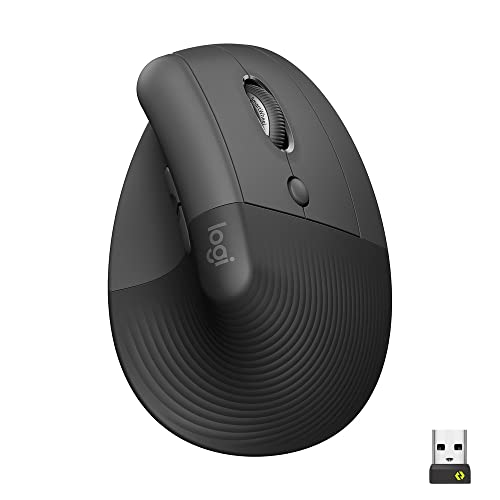
The best vertical mouse for most people in 2026 is the Logitech Lift, a quiet, 57-degree model with a left-handed version and a battery that lasts up to two years on one AA cell. Larger hands usually do better with the Logitech MX Vertical, and anyone who wants to try the idea cheaply can start with the Anker 2.4G Wireless Vertical or the ProtoArc EM11 NL. People who want a fully adjustable angle or a larger shape should look at the Contour Unimouse and the Evoluent VerticalMouse 4.
A vertical mouse turns the device on its side so your hand rests in a handshake position instead of lying flat with the palm down. The goal is to reduce the forearm twist that a standard mouse forces, which many people find more comfortable over a long day. This guide compares seven models, explains how to match one to your hand, and covers the details that decide whether a vertical mouse works for you: tilt angle, grip size, weight, battery type and button layout. It is general product information, not medical advice. If you have ongoing pain, numbness or tingling, see a qualified health professional.
Our top picks


As an Amazon Associate we earn from qualifying purchases at no extra cost to you.
Quick Comparison of the Best Vertical Mice
| Pick | Best for | Angle | Sensor | Connection | Power |
|---|---|---|---|---|---|
| Logitech Lift | Best overall, small to medium hands | 57 degrees | 400 to 4000 DPI | Bluetooth, Logi Bolt | 1 AA, up to 2 years |
| Logitech MX Vertical | Best for larger hands | 57 degrees | Up to 4000 DPI | Bluetooth, USB-C, receiver | USB-C rechargeable, up to 4 months |
| Anker 2.4G Wireless Vertical | Best budget | Not published | 800, 1200, 1600 DPI | 2.4GHz dongle only | AAA batteries |
| ProtoArc EM11 NL | Best low-cost Bluetooth | 58 degrees | 2400 DPI | Bluetooth, 2.4GHz | USB-C rechargeable |
| Evoluent VerticalMouse 4 | Best for hand-fit choices | Fixed handshake angle | 1000 to 3200 DPI | Wired or 2.4GHz wireless | 1 AA on wireless, about 3 months |
| Contour Unimouse | Best adjustable angle | 35 to 70 degrees | 800 to 2800 DPI | Wired or wireless | Rechargeable, up to 3 months |
| Razer Pro Click | Best semi-vertical for work | About 30 degrees | Up to 16000 DPI | Bluetooth, 2.4GHz, USB | Rechargeable |
How Vertical Mice Work and What They Fix
When you rest your hand flat on a standard mouse, the two bones of your forearm cross, which is called pronation. A vertical mouse tilts the grip so those bones sit closer to parallel, near the position your arm takes when you shake hands. Angles of 55 to 60 degrees are the most common design, and some mice, like the Razer Pro Click, use a gentler tilt of around 30 degrees as a compromise. Many users find the neutral position more relaxed, though research on how much it helps is mixed, and comfort depends heavily on how the mouse fits your hand and desk setup.
The trade-off is that precision tasks can feel different at first. Fine pointer control often relies on wrist movement and finger placement, and a vertical shape changes both. Expect a few days to a couple of weeks before it feels natural.
Best Overall: Logitech Lift
The Lift is the model most reviewers rank first. Per Logitech’s published specifications it has a 57-degree vertical angle, an adjustable sensor from 400 to 4000 DPI, six buttons (four customizable), Bluetooth Low Energy and Logi Bolt connections, and pairing with up to three devices. Dimensions are about 108 by 70 by 71 millimeters, and the weight is about 125 grams. A single AA battery is rated for up to two years. The clicks are quiet, and Logitech sells a left-handed version.
Who it suits
Small to medium hands, left-handed users, shared offices where noise matters, and anyone who wants a low-maintenance mouse. PCWorld gave it an Editors’ Choice badge.
Trade-offs
Large hands may find it cramped, and the side thumb rest is shorter than on the MX Vertical. The battery is not rechargeable, which is a plus if you prefer replacing a cell once every year or two, and a minus if you want USB-C.
Best for Larger Hands: Logitech MX Vertical
The MX Vertical has a 57-degree angle, a sensor up to 4000 DPI, and a rechargeable battery rated for up to four months, with a one-minute charge giving about three hours of use. It connects over Bluetooth, a Unifying receiver or a USB-C cable, can pair with up to three devices, weighs about 125 grams, and comes in graphite only. Its body is larger than the Lift, with more space for the palm.
Who it suits
Medium to large hands, power users who switch between several computers, and people who prefer a rechargeable battery.
Trade-offs
It is right-handed only. It also uses a Unifying receiver, which is an older standard than Logi Bolt, and the clicks are louder than the Lift’s.
Best Budget: Anker 2.4G Wireless Vertical Ergonomic Mouse
Anker’s vertical mouse is the standard low-cost starting point. It has 800, 1200 and 1600 DPI settings, five buttons, a 2.4GHz receiver that stores in the base, and runs on AAA batteries. It enters power-saving mode after several minutes of inactivity and weighs about 95 grams. It has no Bluetooth.
Who it suits
People who want to test whether a vertical mouse suits them before spending more, and anyone buying for a secondary desk or travel bag.
Trade-offs
Build quality and click feel are basic, the tilt angle is not published, buttons are not programmable in the same way as Logitech models, and the dongle takes a USB port.
Best Low-Cost Bluetooth: ProtoArc EM11 NL
The EM11 NL has a 58-degree angle, a 2400 DPI sensor, three-device pairing and USB-C charging. It measures about 138 by 69 by 68 millimeters and weighs about 112 grams. ProtoArc markets it for hands under roughly 7.5 inches.
Who it suits
Users who want Bluetooth and rechargeable power at an entry level, especially with small to medium hands.
Trade-offs
Buttons are not programmable through software, the body runs small for larger hands, and the forward and back buttons are not silent. Mac support is limited compared with Logitech.
Best for Hand-Fit Choices: Evoluent VerticalMouse 4
The VerticalMouse 4 has been a staple of ergonomic offices for years. It has six buttons, sensor speeds from 1000 to 3200 DPI, and a handshake-style shape that keeps the hand upright. Right-handed models are sold in Standard and Small sizes, in wired and 2.4GHz wireless versions, and a left-handed model is available in Standard. The wireless version uses a single AA battery rated for up to three months.
Who it suits
Users who want a size choice, accessible left-handed options and a proven shape for all-day use.
Trade-offs
It is larger and more pronounced than Logitech’s mice. The look is more utilitarian, and the wireless version does not offer Bluetooth in most Windows variants.
Best Adjustable Angle: Contour Unimouse
The Unimouse lets you tilt the body anywhere from 35 to 70 degrees and adjust the thumb rest, so you can set the vertical angle to your comfort. It has six programmable buttons, a scroll wheel and an 800 to 2800 DPI sensor. The wireless version uses a rechargeable lithium-polymer battery that lasts up to three months and charges in about two hours. It weighs about 140 grams.
Who it suits
People who are not sure which angle works, users with wide variations in hand size, and offices where several people share one design.
Trade-offs
The adjustability adds bulk, and it usually costs more than the base Logitech Lift. The wired and wireless versions differ in price.
Best Semi-Vertical Pick for Work: Razer Pro Click
The Razer Pro Click was developed with Humanscale and uses a gentler tilt of around 30 degrees rather than a full vertical design. It has eight programmable buttons, a high-resolution sensor rated up to 16,000 DPI, weighs about 106 grams, and connects through Bluetooth, a 2.4GHz receiver or a cable. Razer rates battery life at up to 400 hours on Bluetooth and 200 hours on the receiver, and newer versions add USB-C and a vertical edition.
Who it suits
People who want less wrist twist than a flat mouse but are not ready for a full vertical shape.
Trade-offs
It is not a true handshake design, so the benefit is smaller, and older units charge over micro-USB.
How to Choose: Decision Matrix
| Situation | Best match | Reason |
|---|---|---|
| Small to medium hand, quiet office | Logitech Lift | Quiet clicks, compact body, long battery |
| Large hand, multiple computers | Logitech MX Vertical | Bigger palm area, three-device pairing |
| Left-handed | Logitech Lift Left or Evoluent left-hand | Dedicated mirrored shapes |
| Under a tight budget | Anker or ProtoArc | Lowest cost of entry |
| Unsure which angle you like | Contour Unimouse | Adjustable 35 to 70 degrees |
| Gentle change from flat mouse | Razer Pro Click | About 30 degrees tilt |
Hand Size Guide
Measure your hand from the wrist crease to the tip of your middle finger. Under about 17 centimeters, look at the Lift, ProtoArc or an Evoluent Small. Between 17 and 20 centimeters, most models fit, with the Lift and MX Vertical the most popular. Above 20 centimeters, choose the MX Vertical, the Evoluent Standard or the Contour Unimouse. A mouse that is too small makes you grip with the fingers, which defeats the purpose.
Worked Example: Battery Cost Over Three Years
A Logitech Lift on one AA lasting two years needs one or two replacement cells over three years. An Anker on AAA batteries may need several sets depending on use, and an Evoluent wireless on one AA at three months needs about twelve cells. A rechargeable MX Vertical needs around nine charges over the same period. Rechargeable cells lose capacity with age, so the interval between charges shortens slowly. Pick the power type that fits your habits, not just the lowest listed number.
Setting Up and Getting Used to a Vertical Mouse
- Raise the desk position, not the elbow. Keep your elbow near 90 degrees and your forearm level so the mouse sits at or just below elbow height.
- Rest the whole hand. Let your palm and the side of your pinky lie on the mouse base to avoid gripping.
- Lower the speed first. A setting between 800 and 1600 DPI helps while you adjust.
- Use arm and wrist together. Moving from the shoulder and elbow lowers strain on the wrist.
- Take breaks. Stand up, stretch and change posture regularly, since a better mouse does not replace movement.
Ownership Realities
The skates on the underside wear down first, especially on rough desks, so a smooth mouse pad extends life. Side grips collect skin oil and need wiping with a damp cloth. Switches, especially on budget models, develop double-click problems after heavy use, so warranty length matters. Check the warranty length on the exact model before buying, since coverage varies by maker and region.
Vertical Mouse vs Trackball vs Standard Mouse
A vertical mouse changes the angle of your forearm but still asks you to move your arm across the desk. A trackball holds the device still and moves only your thumb or fingers, and a standard mouse keeps the palm-down position. If your main complaint is forearm twist, a vertical mouse addresses it directly. If your complaint is shoulder reach or limited desk space, a trackball may suit you better. Many people try a vertical mouse first because the learning curve is shorter, and the pointer behaves like a normal mouse.
| Type | Forearm position | Arm travel | Learning time | Best use |
|---|---|---|---|---|
| Standard mouse | Palm down | High | None | Gaming, precision work |
| Semi-vertical (about 30 degrees) | Slight tilt | High | A few days | Office work |
| Vertical (55 to 60 degrees) | Handshake | High | 1 to 2 weeks | Long desk days |
| Trackball | Varies | Very low | 1 to 3 weeks | Small desks, reach issues |
Buttons, Software and Day-to-Day Features
Button layout is where vertical mice differ most. Logitech’s Lift and MX Vertical place back and forward buttons under the thumb and a DPI button on top, and Logi Options+ lets you remap them per application. The Contour Unimouse and Evoluent offer six programmable buttons, which suit users who run shortcuts for spreadsheets or design tools. Budget mice often have fixed functions, so check whether the driver is available for your operating system before ordering.
- Scroll wheel feel: Logitech uses a light wheel with defined steps, while some budget mice have a looser scroll that overshoots in long documents.
- Click noise: The Lift is the quietest of the group, which matters in shared offices and for video calls.
- Multi-device pairing: Three-device Bluetooth switching on Logitech models saves time if you move between a desktop, laptop and tablet.
- Receiver storage: Anker stores its dongle in the base, which prevents losing it on the road.
Common Mistakes When Buying a Vertical Mouse
The most frequent mistake is buying the wrong size. A mouse that is too small forces the fingers to curl, while one that is too large makes the thumb stretch for the buttons. Another is judging the mouse after one afternoon, when muscles are still adapting. People also forget to adjust the pointer speed, then drag the mouse further than needed. Finally, be careful with listing details: manufacturers release revised versions, so confirm the model name, size and receiver type on the product page, and avoid mixing up the Lift with the MX Vertical when reading reviews, because they look similar but fit different hands.
Who Should Not Buy a Vertical Mouse
If you play fast competitive shooters, a lightweight flat mouse remains the better tool. If you work in design software that depends on delicate wrist pivots, a flat mouse may feel more precise. And if your discomfort has another cause, such as an awkward chair, a monitor too low or too little movement during the day, a new mouse alone will not fix it. Adjust the whole workstation first, then choose the mouse.
Desk Setup Checklist Before You Switch
Switching mice works better when the desk is ready. Place the mouse close to the keyboard so your upper arm hangs naturally at your side, and keep the keyboard flat or slightly negative so the wrist stays straight. Use a smooth, matte mouse pad that gives the feet even glide, because textured or glossy surfaces make a vertical shape feel sticky. Leave about 10 centimeters of clear desk in front of the keyboard so the heel of the hand can rest without catching on an edge. If you use two computers, assign one Bluetooth slot to each so the mouse follows you without re-pairing. Finally, set a reminder to review comfort after two weeks. If numbness or pain increases rather than eases, stop using it and consult a health professional.
Frequently Asked Questions
Are vertical mice better than regular mice?
They suit people who find the flat palm-down position uncomfortable, but results vary. Fit and desk setup matter as much as the shape.
How long does it take to get used to a vertical mouse?
Most users adapt within a week or two. Fine tasks like image editing often take a little longer.
Can I game with a vertical mouse?
You can for casual and strategy games. Competitive shooters usually prefer lighter, flatter mice for fast flick movements.
Which vertical mouse is best for small hands?
The Logitech Lift, the ProtoArc EM11 NL and the Small version of the Evoluent VerticalMouse 4 are the usual choices.
Do vertical mice work with Mac?
Logitech models work with macOS and use Logi Options+ for button mapping. Cheaper brands may offer fewer features on a Mac, so check the maker’s compatibility list.
More from Amazon
Programs that pair well with the guide above. Offers and eligibility are set by Amazon and may change.
Free shipping on eligible items, Prime Video and more. Eligible new members can start with a free trial.
Start a Prime free trialAd-free music streaming. Eligible new subscribers can start with a free trial.
Try Music Unlimited freeA Prime membership for ages 18-24 with a trial period. Eligibility is set by Amazon.
See Prime for Young AdultsAudiobooks and podcasts to listen to on the go. Eligible new members can start with a free trial.
Try Audible freeAs an Amazon Associate we earn from qualifying purchases.





Write Your Review
No reviews yet. Be the first to share your experience!