

Key takeaways
- Thumb models feel closer to a standard mouse, so the learning curve is shorter. The risk is that the thumb does a lot of small precise work, and some users find it tires over a long day.
- Finger models spread the work across stronger fingers and let you rest your wrist. They are usually ambidextrous, which helps left-handed users. The larger ball takes more room and more time to learn.
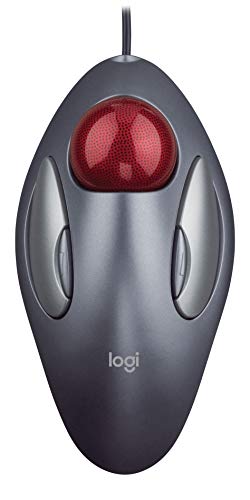
The best trackball mouse for most people in 2026 is the Logitech MX Ergo S, a thumb-operated model with a 20-degree tilt plate, rechargeable battery and Bluetooth plus Logi Bolt connectivity. If you would rather steer with your fingers, the Kensington Expert Mouse TB800 EQ (55mm ball) and the Elecom HUGE (52mm ball) are the strongest choices, and the Logitech Ergo M575S is the value pick for anyone who wants to try a trackball without a big commitment.
A trackball keeps the body of the device stationary while you roll a ball with your thumb or fingers. That removes the sweeping wrist and forearm movements a regular mouse demands, which is why trackballs are popular with people who work long hours at a desk, have limited desk space or want to vary how they use their hands. This guide covers the seven models that come up most often in 2026 coverage, explains the difference between thumb and finger control, and gives a practical way to decide. This is general product information, not medical advice. If you have persistent pain or numbness, speak to a qualified health professional.
Our top picks


As an Amazon Associate we earn from qualifying purchases at no extra cost to you.
Quick Comparison of the Best Trackball Mice
| Pick | Best for | Control | Ball size | Connection | Power |
|---|---|---|---|---|---|
| Logitech MX Ergo S | Best overall | Thumb | Not stated by maker | Bluetooth, Logi Bolt | USB-C rechargeable, up to 120 days |
| Logitech Ergo M575S | Best value | Thumb | About 34mm | Bluetooth, Logi Bolt | 1 AA, up to 18 months |
| Kensington Expert Mouse TB800 EQ | Best finger-control model | Fingers | 55mm | Bluetooth 5.3, 2.4GHz, USB-C wired | Rechargeable, up to 4 months |
| Kensington SlimBlade Pro | Best for ball-twist scrolling | Fingers | 55mm | Bluetooth, 2.4GHz, wired | Rechargeable, about 4 months |
| Elecom HUGE | Best for buttons | Fingers | 52mm | 2.4GHz wireless or wired | Battery powered (wireless model) |
| Kensington Pro Fit Ergo Vertical | Best for upright grip | Thumb | About 34mm | 2.4GHz, Bluetooth, or wired | 2 AA, up to 18 months |
| Ploopy Classic 2 | Best for tinkerers | Fingers | 1.75 in (about 44mm) | USB-C wired | USB powered |
Thumb Ball or Finger Ball? The First Decision
Thumb trackballs sit under your hand like a mouse, with the ball on the side where the thumb rests. Your fingers stay on the buttons, and the thumb does the pointing. Finger trackballs put a larger ball in the center, and your index and middle fingers roll it while the thumb and ring finger handle clicks. Neither is universally better.
- Thumb models feel closer to a standard mouse, so the learning curve is shorter. The risk is that the thumb does a lot of small precise work, and some users find it tires over a long day.
- Finger models spread the work across stronger fingers and let you rest your wrist. They are usually ambidextrous, which helps left-handed users. The larger ball takes more room and more time to learn.
As a rough guide, plan on one to two weeks of daily use before the new motion feels natural, and expect a dip in precision for drawing or fast aiming during that period.
Best Overall: Logitech MX Ergo S
The MX Ergo S is the model most roundups put first. Per Logitech’s specification, it has a 20-degree tilt angle with an adjustable plate that locks at 0 or 20 degrees, a top sensitivity of 2048 DPI, six programmable buttons and a USB-C rechargeable battery rated at up to 120 days (a one-minute charge gives about 24 hours of use). It connects through a Logi Bolt receiver or Bluetooth Low Energy, weighs about 259 grams, and is a right-handed thumb design. The Ergo S Plus bundle adds a wedge that raises the tilt to 30 degrees.
Who it suits
People who want a polished, low-maintenance trackball for work with multiple computers, Easy-Switch pairing and quiet clicks. The weight keeps it planted on the desk.
Trade-offs
It is right-handed only, the charging cable is not included in some listings, and the tilt plate can make the device feel tall for small hands. Because the ball size is not published by the maker, check hand fit by looking at user comparisons.
Best Value: Logitech Ergo M575S
The M575S is a quieter update to a long-running favorite. Listings show a thumb-operated ball of about 34mm, a sensor adjustable from 400 to 2000 DPI, five buttons (three customizable) with silent switches, and Bluetooth or a Logi Bolt receiver. It measures about 134 by 100 by 48 millimeters and weighs 145 grams on a single AA battery that lasts up to 18 months.
Who it suits
First-time trackball users, travelers, and anyone who wants to try thumb control without paying for flagship features. It is lighter than the MX Ergo S and easy to move between desks.
Trade-offs
There is no tilt adjustment, the battery is not rechargeable, and the design is right-handed only. It is Logi Bolt rather than Unifying, so older Unifying receivers will not pair with it.
Best Finger Trackball: Kensington Expert Mouse TB800 EQ
Kensington’s Expert Mouse has been the reference finger trackball for decades, and the TB800 EQ is the rechargeable update. Per the maker, it has a 55mm ball, two Bluetooth 5.3 connections plus a 2.4GHz dongle and a wired USB-C option, DPI settings of 400, 800, 1200 and 1600, and a battery rated at up to four months. The scroll ring around the ball and ambidextrous layout are carried over, and the body measures about 124 by 163 by 61 millimeters.
Who it suits
Left-handed users, people with sore thumbs, and anyone who prefers precise slow movements. The big ball is smooth to roll and good for photo editing and spreadsheet work.
Trade-offs
It is large, the older Expert Mouse Wireless from 2016 uses AA batteries and a single DPI setting, so make sure you are buying the TB800 EQ, and the wrist rest is fixed rather than detachable on some configurations. Bluetooth polling is lower than wired or dongle use, so gamers should choose the dongle or cable.
Best for Ball-Twist Scrolling: Kensington SlimBlade Pro
The SlimBlade Pro uses a 55mm ball and replaces the scroll wheel with a dual-sensor ball-twist scroll. Listings show eight buttons, a 1000Hz polling rate, USB-C charging with about four months of use per charge, and connections over Bluetooth, 2.4GHz wireless or a cable. The profile is slimmer than the Expert Mouse.
Who it suits
Users who like the Expert Mouse layout but want a lower profile and who spend lots of time scrolling through documents, timelines and web pages.
Trade-offs
Twist scrolling takes practice, and some users prefer a traditional wheel. It is also a high-priced device compared with the Logitech M575S.
Best for Buttons: Elecom HUGE
The Elecom HUGE has a 52mm ball, eight buttons with a tilting scroll wheel, a switchable 500, 1000 and 1500 DPI sensor, and an attached wrist rest. The body is about 115 by 182 by 57 millimeters and weighs about 260 grams without batteries. Models differ: the M-HT1DRBK is a 2.4GHz wireless version, while Elecom also sells a wired variant, so check the exact listing.
Who it suits
Users who want many programmable buttons for shortcuts, plus a large ball at a price that is usually lower than the Kensington finger models.
Trade-offs
Some owners report stiction from the stock ball bearings, which can be improved by cleaning and by replacing the bearings. The software support is less polished than Logitech’s, and battery counts differ between sources, so verify the battery type for the model you choose.
Best Upright Grip: Kensington Pro Fit Ergo Vertical Trackball
This model combines a vertical handshake posture of about 60 degrees with a thumb-operated ball. The wireless version has nine programmable buttons, connects to up to three computers through a 2.4GHz dongle and Bluetooth, uses two AA batteries rated for up to 18 months, and weighs about 155 grams. ErgoCanada lists a 34mm ball with 400 to 800 DPI. A newer TB675 variant is also listed by some retailers, with USB-C connectivity and a 4D scroll wheel, and older wired and wireless versions have been marked end of life at some stores.
Who it suits
People whose forearm twists uncomfortably on a flat mouse and who want the neutral handshake position with the extra control of a ball.
Trade-offs
It is tall, which can feel awkward at first, and the DPI range is low for large high-resolution monitors. Because model lines are changing, confirm the version you are buying.
Best for Tinkerers: Ploopy Classic 2
The Ploopy Classic 2 is an open-source, 3D-printed trackball with a PMW-3360 sensor, polling above 1000Hz, up to 12,000 DPI, Omron D2LS-21 switches rated for at least five million actuations, a Raspberry Pi RP2040 controller and USB-C. It runs QMK firmware with VIA support for button remapping. It uses a 1.75 inch (about 44mm) ball, and Ploopy sells both kits and assembled units.
Who it suits
Hobbyists, programmers and gamers who want complete control over firmware and are happy to assemble parts.
Trade-offs
It is wired only, the kit takes time to assemble, and the finish and ergonomics are less refined than the big brands. Support is community based.
How to Choose: A Decision Matrix
| Your situation | Best match | Reason |
|---|---|---|
| Right-handed, wants an easy switch | Logitech MX Ergo S | Familiar layout, tilt plate, multi-device pairing |
| Wants to try a trackball cheaply | Logitech Ergo M575S | Low commitment, light, single AA |
| Left-handed | Kensington TB800 EQ or Elecom HUGE | Ambidextrous finger designs |
| Thumb fatigue on thumb models | Kensington Expert Mouse | Spreads work across fingers |
| Forearm twist on a flat mouse | Kensington Pro Fit Ergo Vertical | Upright 60 degree grip |
| Macro-heavy workflows | Elecom HUGE | Eight programmable buttons |
| Wants to tweak firmware | Ploopy Classic 2 | QMK and VIA support |
Worked Example: Battery Cost Over Three Years
Battery type affects ownership more than people expect. A single AA that lasts 18 months (Ergo M575S) needs two replacements in three years. A rechargeable unit rated for 120 days (MX Ergo S) needs roughly nine charges in the same period, each taking a short session. For a Kensington rated at four months, you charge about nine times in three years. In practice, rechargeable batteries slowly lose capacity, so after about three years you may charge more often. If you hate remembering to charge, AA-powered models are easier. If you prefer never buying batteries, choose a rechargeable.
Setup, Cleaning and Wear
- Set the pointer speed low first. Trackballs need less physical travel, so start near 800 DPI and increase after a week.
- Adjust the tilt or wrist position. Keep your forearm in line with the device so the wrist stays neutral.
- Map the buttons. Assign back, forward and middle click to the buttons your thumb reaches without stretching.
- Clean the ball monthly. Pop the ball out, wipe the bearings and sensor window with a lint-free cloth and a little isopropyl alcohol, then dry before reassembly. Dust and skin oil are the main cause of jerky tracking.
- Replace worn parts. The ball and bearings are the first parts to show wear, followed by the click switches. Cheaper devices lose smoothness sooner.
Common Mistakes
The most common mistake is judging a trackball after one day. Another is choosing a thumb ball when the thumb already hurts, or a finger ball when desk space is tight. Gamers sometimes buy a Bluetooth-only model and notice added latency, which is why wired or dongle connections are better for fast action. Finally, check whether the device supports your operating system’s software, as Logitech Options and KensingtonWorks are not available on every platform.
Trackball vs Regular Mouse vs Vertical Mouse
A trackball is not the only ergonomic option, and it solves a different problem than a vertical mouse. A vertical mouse changes the angle of your forearm so the palm faces inward, but you still move your whole arm across the desk. A trackball keeps your arm still and moves only the digits. Some users get the best result from combining ideas, such as the Kensington Pro Fit Ergo Vertical, which stands upright and also uses a ball.
| Type | Arm movement | Desk space needed | Learning time | Precision for fast aiming |
|---|---|---|---|---|
| Regular mouse | High | Large mousepad area | None | Best |
| Vertical mouse | High | Large mousepad area | Days | Good |
| Thumb trackball | Very low | About the size of the device | 1 to 2 weeks | Fair |
| Finger trackball | Very low | Larger device footprint | 1 to 3 weeks | Fair to good |
Hand Size and Fit Guide
Fit matters more with a trackball than with a normal mouse because your thumb or fingers must reach the ball and the buttons without stretching. Measure your hand from the wrist crease to the tip of the middle finger, then use the rough guide below. Maker spec sheets are the reliable source for exact dimensions.
| Hand length | Likely comfortable choice | Why |
|---|---|---|
| Under 17 cm | Logitech Ergo M575S | Compact body, about 134 by 100 millimeters |
| 17 to 19 cm | Logitech MX Ergo S or Pro Fit Ergo Vertical | Mid-size bodies with defined thumb rests |
| Over 19 cm | Kensington Expert Mouse or Elecom HUGE | Large finger-control bodies with room for the palm |
If you are between sizes, a heavier device is usually easier to control because it does not slide when you roll the ball.
Software, Compatibility and Connection Tips
Logitech models use Logi Options+ for button remapping and Easy-Switch pairing, and the Bolt receiver is a different standard from the older Unifying receiver, so old dongles will not work. Kensington devices use KensingtonWorks, which supports Windows and macOS and lets you assign a different action to every button. Elecom offers its own assistant software on Windows, and the Ploopy Classic 2 is configured through VIA in a browser.
- Bluetooth is convenient for laptops and tablets, but polling is typically lower than a dongle, so pointer movement can feel slightly less smooth.
- 2.4GHz dongles give a steadier connection and lower latency, which suits long work sessions and light gaming. Plug the dongle into a front or desk-level port, not a hub behind the PC, to avoid interference.
- Wired USB removes battery concerns entirely and gives the best response, which is why the Ploopy and some Elecom variants are popular with power users.
Ball Size and Tracking Feel
Ball diameter changes how the device feels. Smaller balls of about 34mm suit the thumb, which makes small precise motions, and larger balls of 52 to 55mm suit the fingers because they are rolled with a sweeping motion. Larger balls give finer control across the screen but need more finger travel to cross a large monitor, which is why a higher DPI setting helps on a 4K display. Ball material and bearings affect smoothness too. Ruby or synthetic bearings last longer than plastic ones, and many finger trackballs allow you to swap the ball for a different color or finish.
Frequently Asked Questions
Are trackball mice good for wrist pain?
Many people find them more comfortable because the wrist does not need to move across the desk, but results vary. A trackball is not a treatment, so speak to a health professional if you have persistent pain.
Is a thumb or finger trackball better?
Thumb models are easier to learn, while finger models spread the effort and suit left-handed users. If your thumb is the sore point, choose a finger design.
Can you game with a trackball?
You can play strategy, role-playing and many casual games well. Fast first-person shooters are harder because flicking is slower, though dedicated users do compete with them.
How long does it take to get used to a trackball?
Most people adapt in one to two weeks of daily use. Precision tasks such as photo editing usually take a bit longer.
How often should I clean a trackball?
A monthly wipe of the ball and sensor area keeps tracking smooth. Clean it sooner if the pointer jumps or sticks.
More from Amazon
Programs that pair well with the guide above. Offers and eligibility are set by Amazon and may change.
Free shipping on eligible items, Prime Video and more. Eligible new members can start with a free trial.
Start a Prime free trialAd-free music streaming. Eligible new subscribers can start with a free trial.
Try Music Unlimited freeA Prime membership for ages 18-24 with a trial period. Eligibility is set by Amazon.
See Prime for Young AdultsAudiobooks and podcasts to listen to on the go. Eligible new members can start with a free trial.
Try Audible freeAs an Amazon Associate we earn from qualifying purchases.




Write Your Review
No reviews yet. Be the first to share your experience!