

Key takeaways
- The best ASUS gaming monitors compared: ROG Swift OLED flagships and TUF picks checked on panel, refresh rate, ports, sync and stand adjustment specs.
As an Amazon Associate, we earn from qualifying purchases made through links on this page.
ASUS sells gaming monitors under three badges, and the badge tells you most of what you need to know before you look at a single spec. ROG Swift is the flagship line, home to the current OLED models with the fastest panels ASUS makes. ROG Strix sits one step down, pairing quick IPS panels with extras such as USB Type-C and fuller stands. TUF Gaming is the value line, built around high refresh rates and the core sync features at the accessible end of the range. This roundup covers all three tiers, so every pick below is an ASUS gaming monitor, but the five models aim at very different desks.
The list runs from a 27-inch 4K QD-OLED flagship down to a compact 1080p screen for frame-rate-first play. Two picks use OLED panels, three use Fast IPS. All five support adaptive sync with both major graphics card families, and all five come from the current ASUS gaming catalogue rather than older generations that are being phased out. Specs quoted for each model come from ASUS product documentation, and each section closes with the limitations those specs create, because the differences between these monitors are mostly about which trade-off suits your setup.
What to look for in an ASUS gaming monitor
Panel technology. QD-OLED and WOLED panels deliver near-instant pixel response and per-pixel contrast, which is why they anchor the ROG Swift line. Fast IPS cannot match OLED contrast, but it holds brightness across the whole screen, has no burn-in exposure, and costs far less at the same size. Your genre mix decides: cinematic single-player games reward OLED, while long desktop hours mixed with gaming suit IPS.
Resolution and size. At 27 inches, 4K gives very sharp text and fine detail but demands a powerful graphics card to feed at high frame rates. QHD at 27 inches is the balance most gaming PCs can drive well. Full HD still makes sense at 23.8 inches for competitive play, where frame rate matters more than pixel density.
Refresh rate and response time. ASUS quotes response time as grey-to-grey. The OLED picks here are rated at 0.03ms, the Fast IPS picks at 1ms. Refresh ceilings run from 180Hz to 240Hz in this group, and a higher ceiling only helps if your PC can render frames to match it.
Sync support. Every monitor below is NVIDIA G-SYNC Compatible, and the TUF models add an explicit AMD FreeSync Premium listing. Either way, variable refresh works over DisplayPort on a modern graphics card, which removes tearing without the input penalty of fixed v-sync.
Ports. Check the version numbers, not just the port count. DisplayPort 2.1a on the PG27UCDM carries uncompressed 4K at 240Hz. HDMI 2.1 matters for consoles that output 4K at 120Hz, while HDMI 2.0 is enough for 1440p console play. A USB Type-C input with DisplayPort Alt Mode lets a laptop drive the screen over one cable.
HDR grade. VESA DisplayHDR True Black 400 on the OLED picks reflects real per-pixel dimming. The DisplayHDR 400 tier on an IPS panel is a much smaller step over SDR, and the TUF models carry HDR10 support without a VESA grade, so treat HDR as a bonus there rather than a reason to buy.
Stand and extras. Height adjustment is the feature you will notice daily. It is present on the ROG models and the smaller TUF pick, but missing from the 27-inch TUF model. OLED buyers should also weigh the care features, such as the proximity sensor and heatsink designs ASUS fits to its Swift panels, plus the warranty term that stands behind the panel.
ASUS ROG Swift OLED PG27UCDM — the 4K flagship pick
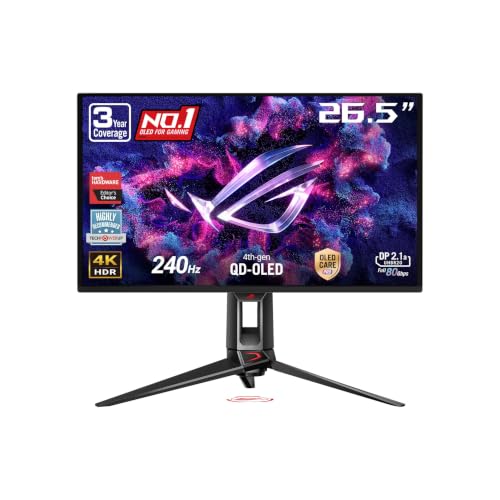
ASUS ROG Swift OLED PG27UCDM on Amazon
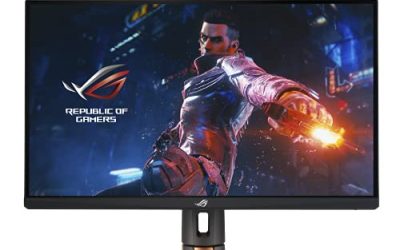
The PG27UCDM is the sharpest gaming monitor ASUS currently sells: a 26.5-inch QD-OLED panel at 3840 x 2160 with a 240Hz refresh rate and a 0.03ms grey-to-grey response time. Pixel density at this size is high enough that text stays crisp without scaling tricks, and the fourth-generation QD-OLED panel pairs that sharpness with a 99 percent DCI-P3 colour gamut and factory calibration. VESA DisplayHDR True Black 400 certification, a custom heatsink, and the OLED Care Pro package with its Neo Proximity Sensor handle the panel-protection side of ownership.
Connectivity is the other reason this model leads the list. DisplayPort 2.1a with UHBR20 bandwidth feeds 4K at 240Hz without compression, two HDMI 2.1 ports take current consoles at full specification, and USB Type-C with DisplayPort Alt Mode and 90W power delivery drives and charges a laptop over one cable. A USB hub and KVM switch round out a desk that mixes a gaming PC with a work machine.
Who it is for: players with a high-end graphics card who want one screen that does 4K gaming, console play, and colour-sensitive work without compromise.
Limitations from the specs: there are no built-in speakers, so budget for external audio. Full-screen brightness is modest next to good IPS panels, which matters in bright rooms. The 26.5-inch frame can feel small for 4K if you sit far back, and OLED panels always carry some long-term burn-in exposure with static desktop elements, even with the care features active.
ASUS ROG Swift OLED PG27AQDM — the QHD OLED pick

ASUS ROG Swift OLED PG27AQDM on Amazon
The PG27AQDM takes the OLED formula down one resolution step: a 26.5-inch WOLED panel at 2560 x 1440, still running at 240Hz with a 0.03ms response time. ASUS rates peak brightness at 1,000 nits for small HDR highlights, with a 99 percent DCI-P3 gamut and an anti-glare micro-texture coating that keeps reflections under control better than glossy OLED screens. A custom heatsink and intelligent voltage control work on panel longevity, and the slim frame carries a tripod socket on top for a camera or light.
Ports cover PC play well: DisplayPort 1.4 with compression for full 240Hz at QHD, two HDMI 2.0 inputs, and a two-port USB hub. G-SYNC Compatible and FreeSync Premium listings mean variable refresh works with either graphics card family.
Who it is for: competitive and mixed-genre players who want OLED motion clarity and contrast at the resolution a mid-range to high-end PC can actually drive at 240 frames per second.
Limitations from the specs: the HDMI inputs are version 2.0, so consoles are limited to 1440p output rather than a 4K feed. There is no USB Type-C video input, which makes this a poor single-screen choice for a laptop-first desk. Sustained full-screen brightness is lower than the HDR peak figure suggests, as with every WOLED panel of this generation.
ASUS ROG Strix XG27ACS — the QHD all-rounder with USB-C

ASUS ROG Strix XG27ACS on Amazon
The XG27ACS is the practical middle of this roundup: a 27-inch Fast IPS panel at 2560 x 1440 with a 180Hz refresh rate and 1ms grey-to-grey response. ELMB Sync allows backlight strobing to run alongside variable refresh, which sharpens moving images in fast games. Colour coverage is quoted at 97 percent DCI-P3 and 133 percent sRGB, with VESA DisplayHDR 400 certification, so it handles everyday content creation alongside gaming duties.
What separates the Strix from the TUF model below is the supporting hardware. USB Type-C with DisplayPort Alt Mode gives a laptop a one-cable path in, the stand adjusts for height, swivel, pivot, and tilt, and the base includes a phone holder plus a tripod socket on the top edge. DisplayWidget Center moves the on-screen settings into a Windows app, and ASUS adds gaming utilities such as a dynamic crosshair and shadow enhancement.
Who it is for: players who split time between a gaming PC and a laptop, and who want full stand adjustment and USB-C without paying for an OLED panel.
Limitations from the specs: DisplayHDR 400 on an IPS panel is an entry-level HDR grade with no local dimming, so HDR games will look flatter than on the OLED picks. The single HDMI input is version 2.0, and there is no USB-A hub, so peripheral sharing between two machines is limited.
ASUS TUF Gaming VG27AQ3A — the value QHD pick

ASUS TUF Gaming VG27AQ3A on Amazon
On headline numbers the VG27AQ3A matches the Strix almost line for line: a 27-inch Fast IPS panel at 2560 x 1440, a 180Hz refresh rate, a 1ms grey-to-grey response time, and ELMB Sync. It carries both FreeSync Premium and G-SYNC Compatible listings, HDR10 support, and a 130 percent sRGB gamut. Built-in speakers are included, which the ROG models above leave out, and the port set of DisplayPort 1.2 plus two HDMI 2.0 inputs covers a PC and two consoles at once.
The savings show up in the supporting details rather than the panel. Typical brightness is 250 nits, the stand adjusts for tilt and swivel only, and there is no USB connectivity of any kind. None of that affects the image in a dim gaming room, which is exactly the trade the TUF line is built on.
Who it is for: players who want 1440p at 180Hz as cheaply as ASUS sells it, and who already have their desk ergonomics handled by a monitor arm or a fixed setup that suits a tilt-only stand.
Limitations from the specs: no height adjustment and no pivot on the stand, no USB Type-C input, and a 250-nit brightness ceiling that struggles against strong daylight. HDR10 support here carries no VESA certification and no local dimming, so it should not factor into the decision.
ASUS TUF Gaming VG249QL3A — the compact 1080p esports pick

ASUS TUF Gaming VG249QL3A on Amazon
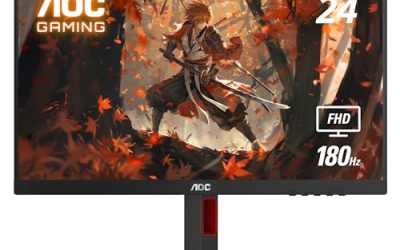
The VG249QL3A shrinks the TUF formula to 23.8 inches and 1920 x 1080, keeping the parts esports players care about: a Fast IPS panel at 180Hz, a 1ms grey-to-grey response time, and ELMB for motion clarity. FreeSync Premium and G-SYNC Compatible listings cover both card families, the gamut is quoted at 99 percent sRGB, and built-in speakers handle basic audio. Unlike its 27-inch sibling, this model includes height adjustment on the stand, along with tilt, which matters at the closer viewing distances a smaller screen encourages.
Full HD at this size is a deliberate choice rather than a compromise for its audience. A mid-range graphics card can hold very high frame rates at 1080p in competitive titles, and the smaller panel keeps the whole playfield in view without head movement.
Who it is for: competitive players on mid-range hardware, and anyone building a second screen for ranked play alongside a larger main monitor.
Limitations from the specs: 1080p looks soft for desktop work and media once you are used to 1440p, and the panel has no HDR certification and no USB Type-C input. Brightness sits in the same modest class as the larger TUF model, so a sunlit room is not its natural home.
Comparison table
| Model | Size | Resolution | Panel | Refresh rate | Response | Sync | Stand adjustment |
|---|---|---|---|---|---|---|---|
| ROG Swift OLED PG27UCDM | 26.5 in | 3840 x 2160 | QD-OLED | 240Hz | 0.03ms | G-SYNC Compatible | Height, swivel, pivot, tilt |
| ROG Swift OLED PG27AQDM | 26.5 in | 2560 x 1440 | WOLED | 240Hz | 0.03ms | G-SYNC Compatible, FreeSync Premium | Height, swivel, pivot, tilt |
| ROG Strix XG27ACS | 27 in | 2560 x 1440 | Fast IPS | 180Hz | 1ms | G-SYNC Compatible | Height, swivel, pivot, tilt |
| TUF Gaming VG27AQ3A | 27 in | 2560 x 1440 | Fast IPS | 180Hz | 1ms | G-SYNC Compatible, FreeSync Premium | Tilt, swivel |
| TUF Gaming VG249QL3A | 23.8 in | 1920 x 1080 | Fast IPS | 180Hz | 1ms | G-SYNC Compatible, FreeSync Premium | Height, tilt |
Frequently asked questions
Which ASUS line should I buy: ROG Swift, ROG Strix, or TUF Gaming?
ROG Swift is where the OLED panels and the highest specifications live. ROG Strix keeps fast IPS panels and adds convenience hardware such as USB Type-C and full ergonomic stands. TUF Gaming strips the extras back to the panel, the refresh rate, and sync support, which is why it anchors the accessible end of the range.
Do these monitors work with PlayStation 5 and Xbox Series X?
Yes. The PG27UCDM has HDMI 2.1 for a full 4K 120Hz console feed. The other picks use HDMI 2.0, which suits their native resolutions: the QHD models accept a 1440p console signal, and the 1080p TUF is a natural match for performance modes in console games.
Is OLED burn-in a real concern on the two Swift models?
It is a managed risk rather than a solved one. ASUS fits custom heatsinks, runs panel-care routines, and the PG27UCDM adds a proximity sensor that blanks the screen when you step away. Both carry a three-year warranty. If your screen shows a static desktop for most of the day, the IPS picks remove the question entirely.
What refresh rate do I actually need?
Match the monitor to the frame rates your PC produces. A 180Hz panel is already beyond what most single-player games sustain at QHD, while 240Hz pays off in competitive titles on strong hardware. Buying refresh headroom you cannot feed adds cost without adding smoothness.
Conclusion
ASUS makes the shortlist easy to read once you sort it by tier. The ROG Swift OLED PG27UCDM is the complete package for 4K gaming, with the port selection to match. The PG27AQDM brings the same OLED speed to QHD, where more PCs can use it. The ROG Strix XG27ACS is the sensible centre of the range, adding USB-C and a proper stand to a fast IPS panel. Below that, the TUF Gaming VG27AQ3A delivers 1440p at 180Hz with the extras trimmed away, and the VG249QL3A does the same job at 1080p for competitive play. Pick the tier that matches your hardware and your desk, and the model inside that tier follows from the specs.
More from Amazon
Programs that pair well with the guide above. Offers and eligibility are set by Amazon and may change.
Free shipping on eligible items, Prime Video and more. Eligible new members can start with a free trial.
Start a Prime free trialAd-free music streaming. Eligible new subscribers can start with a free trial.
Try Music Unlimited freeA Prime membership for ages 18-24 with a trial period. Eligibility is set by Amazon.
See Prime for Young AdultsAudiobooks and podcasts to listen to on the go. Eligible new members can start with a free trial.
Try Audible freeAs an Amazon Associate we earn from qualifying purchases.
Write Your Review
No reviews yet. Be the first to share your experience!