

Key takeaways
- Find the best gaming monitors for PS4 with 1080p resolution, HDMI, low response time and clear audio options, plus a simple guide to choosing the right size and panel.
As an Amazon Associate we earn from qualifying purchases.
Disclosure: This article contains affiliate links. If you buy through a link on this page, we may earn a commission at no extra cost to you.
Our top picks
Introduction
The PlayStation 4 makes monitor choice simpler than a high-end PC does. The console connects over HDMI and is built around 1080p output at up to 60Hz for most games. A native 1920 x 1080 monitor therefore matches the signal cleanly, while a 4K or ultrawide screen adds cost and scaling compromises without adding detail the PS4 did not send.
What matters most is a sharp Full HD picture at a desk-friendly size, a low response time so fast movement stays clear, a game mode, and a practical way to hear the game. Some gaming monitors have small built-in speakers, some have only a headphone output, and that difference decides whether you need a headset or separate speakers from day one.
The five monitors below are all 1080p gaming monitors with HDMI, so each connects directly to a PS4 with no converter. Their headline refresh rates range from 144Hz to 180Hz. The PS4 will still run at up to 60Hz, so those higher rates do not make a PS4 game faster. They leave headroom if the same screen is later used with a PC that can send a higher rate, and they come with the low response times and game features that define this class of panel.
Quick Picks
- Best overall balance: Acer Nitro VG240Y M3biip — 23.8-inch IPS, 1920 x 1080, up to 0.5ms listed, two HDMI 2.0 ports, HDR10 support.
- Best for speakers and dark-scene help: ASUS TUF Gaming VG249Q1A — 23.8-inch IPS, 1ms MPRT, built-in speaker, two HDMI 1.4 ports, Shadow Boost.
- Best for headset play and two HDMI devices: MSI Optix G241 — 23.8-inch IPS, 144Hz, 1ms MPRT, two HDMI 1.4b ports, earphone output.
- Best adjustable stand: Samsung Odyssey G32A 24-inch — 1920 x 1080, 165Hz, 1ms MPRT, height-adjustable screen, Eye Saver Mode.
- Best built-in sound and larger picture: BenQ MOBIUZ EX2510S — 24.5-inch IPS, 165Hz, 1ms MPRT, treVolo speakers at 2.5W x 2, two HDMI 2.0 ports.
1. Acer Nitro VG240Y M3biip

The Acer Nitro VG240Y M3biip is a 23.8-inch Full HD IPS gaming monitor. The 1920 x 1080 resolution matches the PS4 output one to one, so menus, maps, and subtitles stay native and sharp at a desk. The IPS panel also holds colour better from an angle than many older TN panels, which helps if you are not sitting perfectly centred.
Its listing names AMD FreeSync Premium, a 180Hz refresh rate, a response time of up to 0.5ms, HDR10 support, and a 99 percent sRGB figure. FreeSync and the high refresh rate do not change the fixed signal from a PS4. Their value is flexibility with other sources. For the console, the important points are native 1080p, HDMI, and a gaming panel designed for fast pixel changes.
Connectivity is a strength: one DisplayPort 1.2 port and two HDMI 2.0 ports are listed. A PS4 can stay connected while another HDMI device stays connected too, so you switch inputs instead of swapping cables. At 23.8 inches this is a desk monitor for close viewing, not a screen for a distant sofa or split-screen play across a room.
Specifications
- Size and panel: 23.8-inch IPS
- Resolution: 1920 x 1080
- Refresh rate: 180Hz listed
- Response time: up to 0.5ms listed
- Sync and HDR: AMD FreeSync Premium, HDR10 support
- Ports: 1 x DisplayPort 1.2, 2 x HDMI 2.0
- Model number listed: UM.QV0AA.302
Pros
- Native 1080p IPS panel matches the PS4 cleanly
- Two HDMI ports reduce cable swapping
- DisplayPort adds a useful PC connection
Cons
- Best for close desk use, not a distant sofa
- High refresh rate is not used in full by the PS4
- Check the listing for speaker details if monitor sound is essential
View the Acer Nitro VG240Y M3biip on Amazon
2. ASUS TUF Gaming VG249Q1A

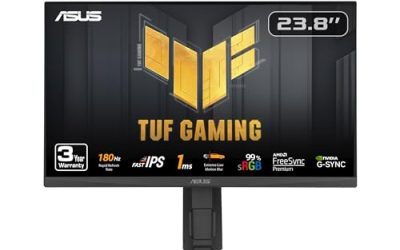
The ASUS TUF Gaming VG249Q1A is a 23.8-inch Full HD IPS monitor whose listing names a speaker, FreeSync Premium, Shadow Boost, VESA mounting, DisplayPort, and HDMI. That mix suits a simple console desk where the monitor handles picture, basic sound, and mounting without extra hardware.
Listed figures are a 165Hz refresh rate that supports 144Hz and a 1ms response time linked to Extreme Low Motion Blur. The PS4 uses the screen at 1080p and up to 60Hz, but the gaming panel and motion features still describe a display built for clear movement. Shadow Boost clarifies dark areas, which can help in dark interiors and night scenes, though some players will prefer an untouched picture.
Two HDMI 1.4 ports and one DisplayPort 1.2 port are listed, along with built-in speakers in the product title. Speakers cover dialogue and system sounds for a tidy setup, and VESA mounting lets you use an arm to free desk space and set a better height. Check the supplied stand adjustments on the listing if height movement from the stand itself is a must, because VESA support and a height-adjustable stand are not the same thing.
Specifications
- Size and panel: 23.8-inch viewable IPS, 24-inch class
- Resolution: 1920 x 1080
- Refresh rate: 165Hz listed, supports 144Hz
- Response time: 1ms MPRT listed
- Features: Extreme Low Motion Blur, Shadow Boost, FreeSync Premium
- Audio: built-in speaker listed
- Ports: 2 x HDMI 1.4, 1 x DisplayPort 1.2
- Mounting: VESA mountable
Pros
- Built-in speaker suits a tidy console desk
- Two HDMI ports for a PS4 and another device
- Shadow Boost can reveal detail in dark scenes
Cons
- Stand adjustment should be checked before buying
- Small speakers are for convenience, not room-filling sound
- 165Hz capability goes beyond the PS4 output
View the ASUS TUF Gaming VG249Q1A on Amazon
3. MSI Optix G241

The MSI Optix G241 is a 23.8-inch gaming monitor with a 1920 x 1080 IPS panel, a 144Hz refresh rate, and a 1ms MPRT response time in MSI specifications. It is a straightforward PS4 pick: native Full HD, HDMI included, and a size that fits a normal desk.
MSI describes a super narrow bezel and frameless design, Night Vision and Gaming OSD features, and a five-way joystick navigator for the on-screen display. A joystick is easier than a row of small buttons when changing input or picture settings in a dim room. The frameless front also suits a desk shared with work or a second screen.
Ports in MSI specifications are two HDMI 1.4b ports, one DisplayPort 1.2a port, and one earphone output. No built-in speaker is named in the specifications checked, so plan on headphones through the earphone output or sound from another device. That suits players who already use a headset for chat and directional sound. FreeSync is listed for wider gaming use, but it is not a PS4 feature and should not be the reason you choose this model.
Specifications
- Size and panel: 23.8-inch IPS
- Resolution: 1920 x 1080
- Refresh rate: 144Hz
- Response time: 1ms MPRT listed, 4ms GtG listed in MSI material
- Sync: AMD FreeSync, FreeSync Premium named in specifications
- Ports: 2 x HDMI 1.4b, 1 x DisplayPort 1.2a, 1 x earphone out
- Controls: five-way joystick navigator
Pros
- Two HDMI ports plus DisplayPort cover console and PC
- Earphone output suits headset play
- Joystick control makes menu changes easier
Cons
- No built-in speaker named in the specifications checked
- Height adjustment is not a headline feature
- 144Hz is beyond the PS4 output
View the MSI Optix G241 on Amazon
4. Samsung Odyssey G32A 24-Inch
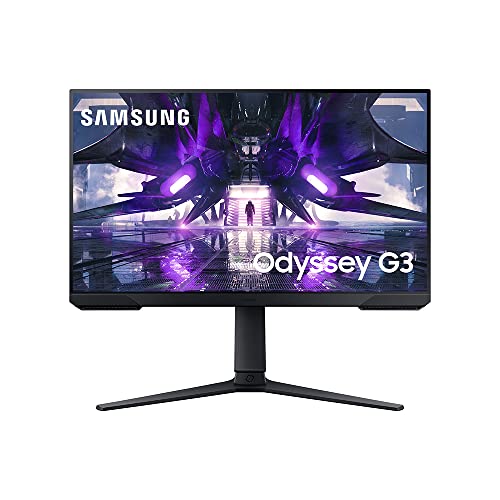
The Samsung Odyssey G32A in the 24-inch size, model LS24AG320NNXZA, emphasises ergonomics. Samsung naming for this line lists a 165Hz refresh rate, a 1ms MPRT response time, FreeSync Premium, Eye Saver Mode, a height-adjustable screen, and VESA mount capability. For long desk sessions, stand adjustment and eye-comfort settings can matter more than a small difference in headline refresh rate.
The 1920 x 1080 resolution is the key PS4 match. At 24 inches it keeps text and interfaces dense and clear for close viewing. A larger 1080p screen spreads the same pixels over more area and can look softer from the same distance.
Eye Saver Mode is best treated as an optional setting to try for evening play, not as the default for colour-critical viewing. Connectivity for the G32A family is listed with HDMI, DisplayPort, and a headphone connection in retailer specifications for the line. Confirm the exact port count on the 24-inch listing before buying, because the G32A name covers 24-inch, 27-inch, and 32-inch sizes. The model number is the identifier that matters.
Specifications
- Size and model: 24-inch, LS24AG320NNXZA
- Resolution: 1920 x 1080
- Refresh rate: 165Hz listed
- Response time: 1ms MPRT listed
- Sync: FreeSync Premium
- Features: Eye Saver Mode, height-adjustable screen
- Mounting: VESA mount capability listed
- Ports: HDMI and DisplayPort listed for the model line
Pros
- Height-adjustable screen helps set a better desk position
- Compact 1080p size stays sharp at a desk
- Eye Saver Mode is useful to try for long sessions
Cons
- G32A name covers several sizes, so check the model number
- Exact port count should be confirmed on the 24-inch listing
- No strong built-in speaker claim in the sources checked
View the Samsung Odyssey G32A 24-inch on Amazon
5. BenQ MOBIUZ EX2510S

The BenQ MOBIUZ EX2510S is the largest pick here at 24.5 inches and the one most clearly built for console desk play with sound included. Its listing describes a Full HD IPS gaming monitor with a 165Hz refresh rate, 1ms MPRT, FreeSync Premium, HDRi, a 99 percent sRGB figure, and treVolo speakers at 2.5W x 2. Specification summaries list two HDMI 2.0 ports, one DisplayPort 1.2 port, and a headphone port.
That audio setup is the main reason to shortlist it. For story and sports games, desk speakers can be enough, and the headphone port covers chat or late play without changing the console connection. The 24.5-inch IPS panel keeps native 1080p while making interfaces and subtitles a little larger than on a 23.8-inch model. Height, swivel, and tilt adjustment are listed, which helps on a shared desk.
Treat HDRi as a picture feature to try with supported content, not as the main reason to buy. The main reasons are native 1080p, HDMI, low listed response time, the adjustable stand, and speakers in one package.
Specifications
- Size and panel: 24.5-inch IPS
- Resolution: 1920 x 1080
- Refresh rate: 165Hz
- Response time: 1ms MPRT listed, 2ms GtG listed in summaries
- Sync and HDR: FreeSync Premium, HDRi
- Audio: treVolo speakers 2.5W x 2 listed, headphone port
- Ports: 2 x HDMI 2.0, 1 x DisplayPort 1.2
- Stand: height, swivel and tilt adjustment listed
Pros
- Strongest built-in speaker claim in this guide
- Two HDMI 2.0 ports for a PS4 plus another device
- Adjustable stand with height, swivel and tilt listed
Cons
- Larger body needs more desk space
- HDRi is a picture option, not a television-style HDR promise
- Higher refresh rate is for other sources, not extra PS4 performance
View the BenQ MOBIUZ EX2510S on Amazon
How to Choose a Gaming Monitor for PS4
Start with resolution. Choose native 1920 x 1080 unless you have a specific reason not to. It avoids scaling compromises and keeps text at the size game designers expected.
Confirm HDMI and count the ports you need. One HDMI port is enough for a PS4 alone. Two are better if a second console, laptop, or streaming device shares the screen. DisplayPort is useful for a PC, but it does not replace HDMI for a PS4.
Treat refresh rate honestly. A 144Hz, 165Hz, or 180Hz monitor displays a PS4 at the rate the console sends, up to 60Hz for most play. A faster panel is still useful with a PC, and gaming panels bring low response times and game modes, but do not pay only for a number you expect the PS4 to unlock.
Separate response time from input lag. Response time describes how quickly pixels change and affects motion clarity. Input lag is the delay before your action appears. Listings highlight response time, so use it to identify a gaming panel, then enable the game or low-lag mode during setup.
Check audio before buying. Decide whether sound will come from monitor speakers, a headset, or separate speakers. If a listing names only a headphone output, plan for headphones. Do not assume every gaming monitor has speakers.
Finally, check size, stand, and space. Measure the desk, note whether the stand adjusts for height, and check VESA mounting if you plan an arm. The 23.8-inch to 24.5-inch range suits a close desk. If you sit far away, a larger display or a television may be the better tool.
Frequently Asked Questions
Will a 144Hz or 165Hz monitor make PS4 games run faster?
No. The monitor displays what the PS4 sends, which is up to 60Hz for most play. A faster rate becomes useful with a PC or another source that can send it.
Is 1080p or 4K better for a PS4 monitor?
For most players, 1080p is the cleaner match. It is native for the console in monitor use, keeps interface text natural, and pairs with the low response times of the monitors in this guide.
Do I need FreeSync for a PS4?
No. FreeSync is mainly relevant to compatible PC graphics hardware. A monitor with FreeSync can still suit a PS4 because of its resolution, HDMI ports, panel, and response time.
How do I get sound on a monitor without speakers?
Use headphones or another audio route. Some monitors here include a headphone or earphone output that can carry audio received over HDMI. Check the exact audio feature on the listing, because provisions differ by model.
What size is best at a desk?
A 23.8-inch to 24.5-inch 1080p monitor is a strong desk range: large enough for game interfaces at a normal distance and small enough to keep 1080p looking sharp.
Can I use the same monitor for PS4 and PC?
Yes. Connect the PS4 by HDMI and the PC by DisplayPort or a second HDMI port, then switch inputs from the monitor menu.
Conclusion
The best PS4 monitor is a native 1080p display with HDMI, a low listed response time, the right size for your distance, and an audio and stand setup you will not need to fix later. Choose the Acer for balance and two HDMI 2.0 ports, the ASUS for speakers and Shadow Boost, the MSI for headset play and joystick control, the Samsung for a height-adjustable compact screen, or the BenQ for the most complete built-in sound package. Check the exact model number, port list, and audio feature for the size you are buying, connect by HDMI, select game mode, and set the console output to match the display.
More from Amazon
Programs that pair well with the guide above. Offers and eligibility are set by Amazon and may change.
Free shipping on eligible items, Prime Video and more. Eligible new members can start with a free trial.
Start a Prime free trialAd-free music streaming. Eligible new subscribers can start with a free trial.
Try Music Unlimited freeA Prime membership for ages 18-24 with a trial period. Eligibility is set by Amazon.
See Prime for Young AdultsAudiobooks and podcasts to listen to on the go. Eligible new members can start with a free trial.
Try Audible freeAs an Amazon Associate we earn from qualifying purchases.



Write Your Review
No reviews yet. Be the first to share your experience!