

Key takeaways
- Four 32-inch gaming monitors compared for November 2026: QHD and 4K panels, fast refresh rates, curved screens, and the ports your PC and console need.
A 32-inch gaming monitor changes the decision entirely, because the screen is large enough that resolution, panel type, and viewing distance pull in different directions. A fast QHD panel keeps frame rates high on a mid-range graphics card, while a 4K panel shows far more detail but asks much more of the GPU behind it, and a curved VA screen wraps the image around you in a way a flat IPS panel never will. The wrong combination leaves a monitor your hardware cannot feed or a picture that looks soft from your normal seat.
This roundup is for PC gamers moving up from a 24 or 27-inch screen, console players who want a large display that still handles high refresh rates, and anyone building a desk setup where one big monitor replaces two smaller ones. Every monitor below was chosen from the name and specifications shown on its Amazon product page, so the refresh rate, resolution, panel type, and ports listed here are the ones the listing states.
Quick Picks
As an Amazon Associate we earn from qualifying purchases.
| Product | Best for | Key spec from title |
|---|---|---|
| Samsung Odyssey G7 32-Inch WQHD Curved Gaming Monitor | Competitive play on a deeply curved screen | 240Hz WQHD 1000R curved panel |
| LG UltraGear 32GP850-B 32-Inch QHD Nano IPS Gaming Monitor | Colour-rich flat-panel gaming and everyday use | 165Hz QHD Nano IPS panel |
| GIGABYTE M32U 32-Inch 4K IPS Gaming Monitor | Sharp 4K gaming with a second device attached | 144Hz UHD 3840×2160 IPS panel |
| Dell S3222DGM 32-Inch QHD Curved Gaming Monitor | A gentle curve and strong contrast for dark games | 165Hz QHD 1800R curved VA panel |
How to Choose
Resolution Against Your Graphics Card
Resolution decides how hard your graphics card works for every frame, and at 32 inches the gap between QHD and 4K is easy to see from a normal desk distance. A 2560 x 1440 panel keeps frame rates reachable on mid-range cards, which matters when a game drops below the refresh rate and starts to stutter. A 3840 x 2160 panel looks noticeably sharper on text and distant scenery, yet it roughly doubles the pixels your GPU must render, so it suits high-end cards and players who accept lower settings in demanding titles. Check what frame rates your current card reaches at each resolution before choosing; a monitor usually outlives a graphics card by several years.
Panel Type and What It Does to the Picture
Panel type sets the character of the image more than any other single choice, and the three options here trade strengths openly. VA panels, found in both curved picks below, deliver deep blacks and high contrast, which makes night scenes and horror games look far richer, though fast motion can smear slightly on dark backgrounds. IPS panels keep colours accurate from wide viewing angles and respond quickly, so they suit shared desks and games where colour matters, at the cost of weaker black levels. OLED is absent from this roundup because the 32-inch OLED models change listings frequently; the VA and IPS screens below cover the two panel types most buyers actually end up comparing.
Refresh Rate and Adaptive Sync
Refresh rate is the ceiling on how smooth motion can look, and it only helps when your hardware can push frames near that ceiling. A 240Hz screen like the Samsung below shows its advantage in fast shooters where every frame counts, while 165Hz and 144Hz panels cover the great majority of games comfortably and leave budget for a better panel or higher resolution. Adaptive sync matters just as much: G-Sync Compatible and FreeSync Premium Pro both smooth out tearing when frame rates dip, so confirm your graphics card supports the standard on the monitor you pick. A high refresh rate without matching sync support is a wasted number on the box.
HDR, Brightness, and the Ports on the Back
HDR claims on gaming monitors vary wildly, so look past the badge and check brightness and contrast instead. A panel rated at 350 nits with strong contrast will show dark scenes better than a dimmer screen carrying a fancier HDR label, and true HDR impact needs local dimming or an OLED panel. Ports deserve the same scrutiny: DisplayPort is the route to full refresh rate at QHD and 4K, while HDMI 2.1 is the one that lets a current console run at 4K and 120Hz. If you plan to connect a PC and a console, count the inputs before buying, and check whether USB-C with KVM matters for a laptop you also dock at the same desk.
The 4 Best Options
Samsung Odyssey G7 32-Inch WQHD Curved Gaming Monitor
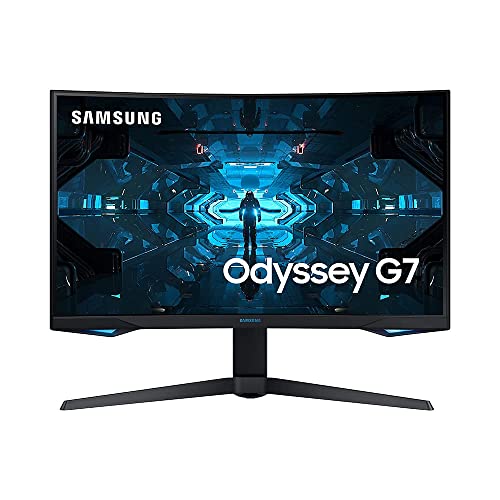
The Odyssey G7 pairs a 240Hz refresh rate with a 1000R curve that bends the screen to match the shape of your field of view, and at 32 inches that combination feels closer to sitting inside the game than watching it. QHD resolution keeps frame rates within reach of strong mid-range and high-end cards, so the extra refresh rate is something you can actually use rather than admire on a spec sheet. Quantum Dot colour and DisplayHDR 600 give bright scenes plenty of punch, and G-Sync plus FreeSync Premium Pro cover both graphics card brands. This is the pick for players who rank speed and immersion above everything else.
Specs
- 32-inch WQHD (2560 x 1440) curved gaming monitor
- 240Hz refresh rate with 1ms response time
- 1000R curved VA panel with QLED colour
- DisplayHDR 600
- NVIDIA G-Sync Compatible and AMD FreeSync Premium Pro
- HDMI and DisplayPort inputs
Best for: Fast-paced competitive games where a 240Hz refresh rate and a wraparound curve matter most.
Watch out for: The aggressive 1000R curve bends straight lines noticeably, so check whether you also use the screen for spreadsheets or photo work before committing.
LG UltraGear 32GP850-B 32-Inch QHD Nano IPS Gaming Monitor

The UltraGear 32GP850-B is the flat-panel counterpoint in this roundup, trading the drama of a curve for colour accuracy and viewing angles that hold up when someone watches from the side of the desk. Its Nano IPS panel covers a wide colour gamut, and the 165Hz refresh rate with a 1ms response time keeps fast games smooth without demanding a flagship graphics card. Overclocking pushes the refresh rate to 180Hz for players who want a little more headroom. The height, tilt, and pivot stand adjusts easily, which helps when the same desk serves gaming in the evening and work during the day.
Specs
- 32-inch QHD (2560 x 1440) Nano IPS gaming monitor
- 165Hz refresh rate, overclockable to 180Hz
- 1ms (GtG) response time
- NVIDIA G-Sync Compatible with AMD FreeSync Premium
- DCI-P3 98 percent colour gamut with HDR10
- HDMI and DisplayPort inputs with tilt, height, and pivot stand
Best for: Gamers who want accurate colour and a flat screen that doubles as a work monitor.
Watch out for: IPS black levels are weaker than VA, so very dark scenes will look grey rather than black in a dim room.
GIGABYTE M32U 32-Inch 4K IPS Gaming Monitor

The M32U is the only 4K panel in this roundup, and it earns its place by pairing that sharpness with a 144Hz refresh rate instead of settling for 60Hz like many 4K office screens. A 3840 x 2160 IPS display shows fine detail in open-world games and makes text crisp when the monitor doubles as a workspace, while the 1ms MPRT response keeps motion clean. Its standout practical feature is the built-in KVM with USB-C, which lets one keyboard and mouse control a PC and a second device through the same screen. Two HDMI 2.1 ports mean a console can join the setup without unplugging anything.
Specs
- 32-inch IPS gaming monitor with UHD 3840 x 2160 resolution
- 144Hz refresh rate with 1ms MPRT response time
- AMD FreeSync Premium Pro
- Type-C KVM for switching between two devices
- HDMI, DisplayPort, and Type-C inputs
- Height-adjustable stand
Best for: Players with a strong graphics card who want 4K sharpness and a monitor that also serves a laptop or console.
Watch out for: 4K at 144Hz needs DisplayPort 1.4 or HDMI 2.1 with a capable graphics card, so confirm your GPU and cable support the full refresh rate.
Dell S3222DGM 32-Inch QHD Curved Gaming Monitor

The Dell S3222DGM takes a gentler approach to the curved screen, using an 1800R bend that adds immersion without warping the picture the way tighter curves do. Its VA panel delivers the deep contrast that makes shadowy games look atmospheric, and the 165Hz refresh rate with a 1ms MPRT response keeps motion smooth at QHD resolution. Two HDMI 2.0 ports plus DisplayPort cover a PC and a console, and the height-adjustable stand makes it easy to set the screen at eye level. This is the straightforward choice for buyers who want a big curved gaming screen without chasing the fastest numbers.
Specs
- 31.5-inch QHD 2560 x 1440 curved (1800R) gaming monitor
- 165Hz refresh rate with 1ms (MPRT) and 2ms (gray to gray) response time
- VA panel with 99 percent sRGB colour gamut
- AMD FreeSync Premium adaptive sync
- 2 x HDMI 2.0 with HDCP 2.2, 1 x DisplayPort 1.2, 1 x headphone-out jack
- Height-adjustable stand with 100 x 100 mm VESA mounting
Best for: Immersive single-player games in dark scenes, where contrast and a gentle curve matter more than peak refresh rate.
Watch out for: The HDMI ports top out at 144Hz, so use DisplayPort to reach the full 165Hz, and note there are no built-in speakers or USB ports.
Which One Fits Your Situation
You Play Fast Shooters and Want Every Frame
Choose the Samsung Odyssey G7, because its 240Hz refresh rate is the highest here and the 1000R curve pulls the edges of the screen into your peripheral vision. QHD resolution keeps frame rates high enough to use that refresh rate, and G-Sync plus FreeSync Premium Pro cover either graphics card brand. Accept the strong curve as part of the package, and pair it with a graphics card that can push well past 165 frames per second in your main games.
You Want One Monitor for Gaming and Work
Choose the LG UltraGear 32GP850-B, because its flat Nano IPS panel keeps colours accurate and text sharp from any angle, and the pivot and height adjustments suit a desk that changes roles during the day. The 165Hz refresh rate handles games comfortably while the wide colour gamut helps with photo and video work. It is the least specialised screen here, which is exactly what a shared desk needs.
You Have a Powerful GPU and Want 4K
Choose the GIGABYTE M32U, because it is the only 4K option in this roundup and it still runs at 144Hz instead of forcing a choice between sharpness and smoothness. The Type-C KVM adds real value when a laptop shares the desk, and HDMI 2.1 ports keep a console connected at the same time. Make sure your graphics card can drive 4K at high frame rates before buying, or the extra pixels will sit unused.
You Want a Big Curved Screen Without a Big Learning Curve
Choose the Dell S3222DGM, because its gentle 1800R curve adds depth to games without distorting everyday windows, and its VA contrast makes dark scenes look rich. The 165Hz refresh rate is plenty for most players, and the straightforward port layout covers a PC and a console with nothing to configure. Remember to connect over DisplayPort for the full refresh rate and to add external speakers, since none are built in.
Common Mistakes
- Buying a 4K monitor for a graphics card that cannot sustain high frame rates at that resolution, then running games at lower settings to compensate.
- Choosing a monitor by its HDR badge alone without checking brightness, contrast, and whether local dimming is actually present.
- Connecting over HDMI and wondering why the refresh rate caps below the advertised maximum, when DisplayPort is the port that unlocks it.
- Placing a 32-inch screen at the same distance as a 24-inch one, then finding text too small or the edges too far into peripheral vision.
- Ignoring the curve radius on a curved monitor, so a tight 1000R bend surprises someone who mainly works with straight lines and documents.
Frequently Asked Questions
Is 32 inches too big for a gaming monitor?
A 32-inch screen suits desks where you sit an arm’s length away, and it feels natural once viewing distance grows with the panel. At QHD the pixels are larger than on a 27-inch screen, so sit a little farther back to keep the image sharp. If your desk is shallow, measure first, because a screen this wide can dominate a small setup and force constant head movement.
Is QHD or 4K better for 32-inch gaming?
QHD is the safer choice for most graphics cards, since it delivers high frame rates without demanding flagship hardware. 4K looks sharper on a 32-inch panel, especially for text and distant detail, but it needs a powerful GPU to hold high refresh rates. Choose QHD for competitive play and mid-range cards, and 4K when your hardware is strong and visual detail matters more than maximum frame rate.
Do I need HDMI 2.1 on a 32-inch gaming monitor?
HDMI 2.1 matters mainly for console players, because it carries 4K at 120Hz from current consoles, while older HDMI versions cap the signal. PC gamers usually rely on DisplayPort instead, which reaches full refresh rate at QHD and 4K on the monitors here. If a console shares the desk, check that at least one HDMI 2.1 port is present before buying.
Does a curved gaming monitor help or hurt?
A curved screen helps immersion by wrapping the image edges toward you, which suits single-player games and racing titles where the screen fills your view. It hurts mainly for work with straight lines, such as spreadsheets and photo editing, where a tight curve bends what should be straight. Gentle curves around 1800R are a mild compromise, while aggressive 1000R curves are best reserved for dedicated gaming desks.
A 32-inch monitor is a long-term desk decision, not a quick upgrade, so weigh resolution against your graphics card, panel type against the games you actually play, and ports against every device that will share the screen. The four monitors above cover the main trade-offs honestly: speed, colour, sharpness, and contrast each have a champion here, and the right one is the one whose strengths line up with your games and your hardware.
More from Amazon
Programs that pair well with the guide above. Offers and eligibility are set by Amazon and may change.
Free shipping on eligible items, Prime Video and more. Eligible new members can start with a free trial.
Start a Prime free trialAd-free music streaming. Eligible new subscribers can start with a free trial.
Try Music Unlimited freeA Prime membership for ages 18-24 with a trial period. Eligibility is set by Amazon.
See Prime for Young AdultsAudiobooks and podcasts to listen to on the go. Eligible new members can start with a free trial.
Try Audible freeAs an Amazon Associate we earn from qualifying purchases.



Write Your Review
No reviews yet. Be the first to share your experience!