

Key takeaways
- Five gaming monitors that sat in the under-200 bracket on price trackers checked in November 2026, compared on refresh rate, panel, sync and ports.
Shopping inside a fixed bracket sounds simple until you open the listings: the under-200 shelf is packed with 24-inch 1080p panels that all advertise big refresh numbers, and the real differences hide in panel type, sync support, stand adjustment and port selection. Prices in this bracket also move week to week, so every pick below was checked against price trackers on 24 November 2026 and sat inside the bracket on that date — confirm the live figure on the product page before you order.
The five monitors here suit three kinds of buyer: competitive PC players chasing 180Hz on a budget, console players who need HDMI headroom for 120Hz modes, and anyone replacing an old office screen with something game-ready. Each one was chosen from its Amazon listing name and stated specifications — 1080p resolution, a Fast IPS or IPS panel, adaptive sync and at least one DisplayPort input — rather than from headline refresh claims alone.
Quick Picks
As an Amazon Associate we earn from qualifying purchases.
| Product | Best for | Key spec |
|---|---|---|
| ASUS TUF Gaming VG249QL3A | All-round PC gaming with a proper stand | 180Hz Fast IPS, height adjustable |
| AOC 24G4 | PC and console sharing one desk | 180Hz IPS, HDMI 2.0 plus DisplayPort |
| KOORUI 24E3 | Slim-frame setups and VESA arms | 165Hz Fast IPS, 99% sRGB |
| Acer Nitro KG241Y M3biip | Two HDMI devices plus HDR content | 180Hz IPS, HDR10, 2× HDMI 2.0 |
| Samsung Odyssey G3 G30D | Long sessions and dark game scenes | 180Hz, Black Equalizer, adjustable stand |
How to Choose
Refresh Rate and Response Time
At this budget, 165Hz to 180Hz is the realistic ceiling, and the jump from a 60Hz or 75Hz screen is the single most noticeable upgrade you will feel in fast games. Look at the response figure alongside the refresh rate: listings here quote 1ms, and Acer quotes up to 0.5ms on its panel. Those numbers are measured under each brand’s own conditions, so treat them as a rough guide rather than a laboratory ranking. What matters practically is pairing a high refresh rate with adaptive sync so the panel can actually use it without tearing.
Panel Type and Colour Coverage
Every monitor in this roundup uses an IPS or Fast IPS panel, which is the right default at this size and price point: viewing angles stay wide when you lean back or share the screen, and colour shift is minimal compared with older TN panels. Two listings state 99% sRGB coverage, which matters if the same screen doubles for photo work or content creation. VA panels can offer deeper contrast, but they sit outside this particular shortlist — if contrast for dark-room movie watching is your priority, you are shopping a different bracket of features than the five below.
Sync Technology and Console Compatibility
FreeSync appears across this list in some form, and the ASUS adds G-SYNC Compatible support, so both AMD and NVIDIA graphics cards can drive variable refresh without tearing. Console players should check the HDMI specification carefully: a port listed as HDMI 2.0 is what allows a PlayStation 5 or Xbox Series console to output its 120Hz performance modes at 1080p. DisplayPort still matters for PC use because it carries the full refresh rate with the widest graphics card support, so a monitor offering both connection types gives you the most flexible desk setup.
Stand Adjustment and Mounting
Budget monitors often save money on the stand, which is why two picks here stand out: the ASUS VG249QL3A is listed as height adjustable, and the Samsung Odyssey G3 includes an adjustable stand, both of which help you set the screen at eye level without stacking books underneath. If you already own a monitor arm, check for VESA mount support instead — the KOORUI 24E3 lists VESA mounting and an ultra-slim frame, which suits dual-screen or arm-mounted layouts. Built-in speakers, included on the ASUS, are a convenience feature worth having for calls and casual video.
The 5 Best Options
ASUS TUF Gaming VG249QL3A

The VG249QL3A leads this list because it covers the most bases without a weak point: a Fast IPS panel running at 180Hz, both FreeSync Premium and G-SYNC Compatible support, a height-adjustable stand and built-in speakers. ASUS also lists ELMB, its backlight strobing feature aimed at motion clarity in fast shooters. For a single-monitor desk that handles competitive games, everyday work and the occasional console session, this is the most complete package in the bracket, and the stated three-year warranty is longer than budget monitors typically advertise.
Specs
- 24-inch class (23.8-inch viewable) 1080p Full HD
- 180Hz refresh rate, 1ms response
- Fast IPS panel
- ELMB motion clarity feature
- FreeSync Premium and G-SYNC Compatible
- Built-in speakers
- DisplayPort input
- Height adjustable stand
- 3-year warranty
Best for: PC players who want one monitor that does everything well, including stand ergonomics.
Watch out for: Confirm the height-adjustable configuration is the one in your cart, since TUF model names cover several near-identical variants.
ASIN: B0CHN4JZT8
AOC 24G4

The AOC 24G4 is the natural pick for a desk shared between a gaming PC and a console. Its listing pairs a 180Hz IPS panel with one HDMI 2.0 port and one DisplayPort, and AOC explicitly describes it as console gaming ready, which lines up with the 120Hz modes current consoles offer at 1080p. Adaptive-Sync support keeps PC gameplay tear-free, and the 1ms response figure matches the competitive focus of the panel. If your setup involves switching inputs between a tower and a PlayStation or Xbox every evening, this is the balanced choice.
Specs
- 24-inch gaming monitor
- Full HD 1920×1080 IPS panel
- 180Hz refresh rate, 1ms response
- 1× HDMI 2.0
- 1× DisplayPort
- Adaptive-Sync support
- Console gaming ready
Best for: Mixed PC and console desks that switch inputs daily.
Watch out for: Order the exact listing tied to this ASIN — the AOC 24G4E is a separate variant listing with its own page, and the two should not be merged or substituted.
ASIN: B0F22C6BTS
KOORUI 24E3

The KOORUI 24E3 trades a little refresh rate for flexibility in how you mount and arrange it. Its Fast IPS panel runs at 165Hz, still more than double a standard office screen, and the listing highlights an ultra-slim frame plus VESA mount support, which makes it the easiest fit here for a monitor arm or a tidy dual-screen layout. Stated 99% sRGB coverage also gives it a second life for light creative work. Buyers who care about a clean desk and colour accuracy over the last few hertz will find this the sensible middle option.
Specs
- 24-inch Fast IPS panel
- 165Hz FHD display, 1ms response
- 99% sRGB colour coverage
- Adaptive Sync support
- Ultra-slim frame
- VESA mountable
Best for: Arm-mounted or dual-monitor setups and light colour-sensitive work.
Watch out for: An older crawl of this listing showed it temporarily out of stock, so confirm it is in stock and ready to ship at checkout before relying on a delivery date.
ASIN: B0BQ1WCQT2
Acer Nitro KG241Y M3biip
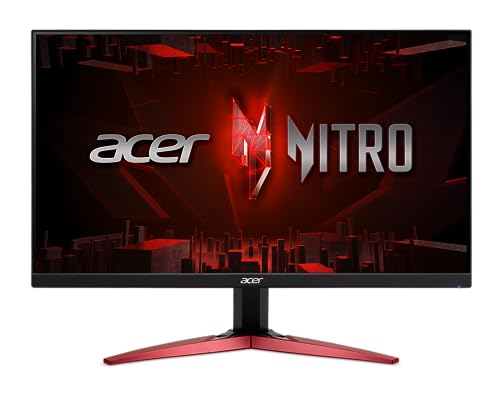
The Acer Nitro KG241Y M3biip is the connectivity pick: two HDMI 2.0 ports plus a DisplayPort 1.2 input mean a PC, a console and a streaming box can stay plugged in at once. The IPS panel runs at 180Hz with FreeSync Premium, Acer quotes up to 0.5ms response, and HDR10 support is listed for compatible games and video. Stated 99% sRGB coverage rounds out a specification sheet that leans toward media as much as matches. For a crowded desk with several devices competing for screen time, this is the easiest monitor to live with.
Specs
- 23.8-inch Full HD 1920×1080 IPS panel
- 180Hz refresh rate, up to 0.5ms response
- AMD FreeSync Premium
- HDR10 support
- 99% sRGB colour coverage
- 1× DisplayPort 1.2
- 2× HDMI 2.0
Best for: Desks running a PC plus two HDMI devices, with HDR video in the mix.
Watch out for: Recheck this product page for a live in-bracket offer before publishing your plans around it — tracker records keyed to this ASIN have older data points, and do not confuse this IPS model with the VA 165Hz Sbiip variant, which is a different panel entirely.
ASIN: B0CJQ7V6M8
Samsung Odyssey G3 G30D

The Samsung Odyssey G3 G30D is aimed at players who sit down for long sessions in darker games. Samsung lists a 180Hz refresh rate with 1ms response and AMD FreeSync, plus two features aimed squarely at visibility and comfort: Black Equalizer, which lifts detail in shadowed scenes, and Eye Saver Mode with flicker-free operation for reduced strain. The adjustable stand is still uncommon at this level and helps position the 24-inch panel properly. As a 2024 model from Samsung’s Odyssey line, it brings a recognisable gaming feature set into the bracket.
Specs
- 24-inch FHD gaming monitor
- 180Hz refresh rate, 1ms response
- AMD FreeSync
- Adjustable stand
- Black Equalizer
- Virtual Aim Point
- Eye Saver Mode
- Flicker-free
- 2024 model
Best for: Long evening sessions and games with dark, shadow-heavy scenes.
Watch out for: Availability signals for this ASIN conflict — tracker data shows no current first-party price while third-party offers exist — so confirm a live Amazon offer and the bracket price on the product page before ordering.
ASIN: B0D5ZZ9G26
Which One Fits Your Situation
You Play Competitive Shooters on PC
Choose the ASUS VG249QL3A. Its 180Hz Fast IPS panel, ELMB motion clarity feature and dual sync support cover both AMD and NVIDIA cards, and the height-adjustable stand helps you set a proper competitive posture. The AOC 24G4 is a close alternative if you prefer its port layout, matching the same refresh rate and response figure.
Your Desk Hosts a PC and a Console
Pick the AOC 24G4 or the Acer Nitro KG241Y. The AOC pairs HDMI 2.0 with DisplayPort and is described as console gaming ready, while the Acer goes further with two HDMI 2.0 ports, so a console and a streaming device can stay connected alongside your PC without cable swapping.
You Are Upgrading From an Old Office Monitor
Any pick here transforms the experience, but the KOORUI 24E3 suits a tidy desk best: 165Hz is a dramatic step up from 60Hz, the ultra-slim frame looks clean, and VESA mounting lets you add an arm later. Its stated 99% sRGB coverage also keeps work documents and photos looking right.
You Play Long Sessions Into the Evening
Look at the Samsung Odyssey G3. Eye Saver Mode and flicker-free operation target comfort over hours, Black Equalizer helps in dark scenes, and the adjustable stand supports a healthier viewing angle. Pair it with regular breaks, sensible room lighting and a screen height that keeps your neck neutral for the full benefit during marathon sessions.
Common Mistakes
- Assuming every high-refresh monitor delivers its full rate over HDMI — check which port carries 180Hz before connecting your PC.
- Ignoring the stand: a fixed tilt-only base can leave you stacking books, so confirm height adjustment or VESA support if posture matters.
- Mixing up near-identical model variants, such as the AOC 24G4 and 24G4E or Acer’s IPS and VA versions, which carry different panels and specifications.
- Treating the under-200 bracket as permanent — tracker checks date quickly, so verify the live price on the product page on the day you buy.
- Skipping the sync check: pairing an NVIDIA card with a FreeSync-only assumption, or the reverse, can leave variable refresh unused.
Frequently Asked Questions
Is 1080p Enough for Gaming in 2026?
For 24-inch monitors, yes. At this screen size, Full HD keeps text and game detail sharp at a normal desk distance, and it lets mid-range graphics cards reach the 165Hz to 180Hz rates these panels offer. Stepping up to 1440p usually means stepping out of this bracket and demanding more from your graphics card.
Can These Monitors Run 120Hz Modes on a PlayStation 5?
The models listing HDMI 2.0 — the AOC 24G4 and Acer Nitro KG241Y — are positioned for exactly that, since 1080p at 120Hz is the performance mode current consoles target. Enable the console’s 120Hz output setting, use the cable supplied with the console, and confirm the monitor’s on-screen menu reports the higher refresh rate.
Why Do Prices in This Bracket Change So Often?
Gaming monitors are discounted in rotations, and stock levels shift between first-party and third-party sellers, so a model can sit inside the under-200 bracket one week and outside it the next. That is why this roundup was verified against price trackers on a specific date and why checking the live product page before ordering is part of the process.
Should I Choose IPS or Look for a VA Panel Instead?
IPS panels, used by every pick here, give wide viewing angles and consistent colour, which suits mixed gaming and work. VA panels typically offer stronger contrast for dark rooms but can show slower dark transitions in fast games. If competitive play is your focus, IPS remains the safer default at this budget.
More from Amazon
Programs that pair well with the guide above. Offers and eligibility are set by Amazon and may change.
Free shipping on eligible items, Prime Video and more. Eligible new members can start with a free trial.
Start a Prime free trialAd-free music streaming. Eligible new subscribers can start with a free trial.
Try Music Unlimited freeA Prime membership for ages 18-24 with a trial period. Eligibility is set by Amazon.
See Prime for Young AdultsAudiobooks and podcasts to listen to on the go. Eligible new members can start with a free trial.
Try Audible freeAs an Amazon Associate we earn from qualifying purchases.




Write Your Review
No reviews yet. Be the first to share your experience!