

Key takeaways
- Memory: DDR5 only. Official support is DDR5-5600, though many kits run at DDR5-6000 with EXPO profiles, which is widely regarded as the sweet spot for Ryzen 9000 because it keeps the memory controller and fabric clocks in a one-to-one relationship.
- Storage and graphics: the CPU supplies PCIe 5.0 lanes, enough for a PCIe 5.0 x16 graphics slot and a PCIe 5.0 x4 NVMe drive on most boards.
- Cooler mounting: AM5 uses the same cooler mounting holes as AM4, so many AM4 coolers work with the bracket supplied by the cooler maker.
- Integrated graphics: the two-compute-unit graphics block is meant for troubleshooting and basic display output, not for gaming.
The Ryzen 9 9950X3D is a 16-core, 32-thread AM5 desktop processor with 144 MB of combined L2 and L3 cache (16 MB L2 plus 128 MB L3), a 4.3 GHz base clock, a boost clock up to 5.7 GHz and a 170 W default TDP. It pairs the second generation of AMD 3D V-Cache with the same dual-chiplet layout as the Ryzen 9 9950X, which makes it the flagship choice for people who game and do heavy multithreaded work on the same machine.
This guide goes through the specification sheet line by line, explains what each number means in daily use, compares the chip with its closest siblings, and lists the platform requirements you need to plan around before buying. Figures come from AMD’s published product pages and spec sheets, cross-checked against reputable review outlets such as Tom’s Hardware and StorageReview.
Our top picks
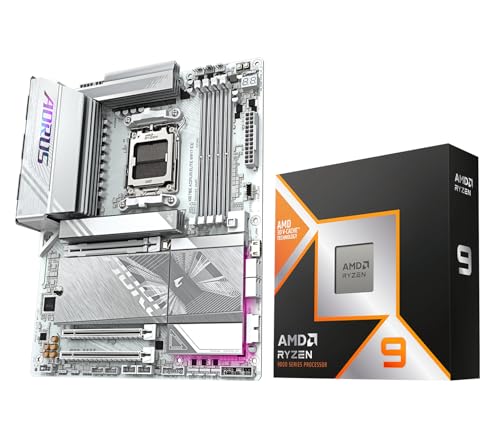

As an Amazon Associate we earn from qualifying purchases at no extra cost to you.
Ryzen 9 9950X3D at a glance
| Specification | Ryzen 9 9950X3D |
|---|---|
| Architecture | Zen 5, two core chiplets plus an I/O die |
| Cores / threads | 16 / 32 |
| Base clock | 4.3 GHz |
| Maximum boost clock | Up to 5.7 GHz |
| L2 cache | 16 MB (1 MB per core) |
| L3 cache | 128 MB (one chiplet carries stacked 3D V-Cache) |
| Total cache (L2 + L3) | 144 MB |
| Default TDP | 170 W (peak package power around 230 W) |
| Socket | AM5 (LGA 1718) |
| Memory | Dual-channel DDR5, officially up to DDR5-5600 |
| PCI Express | PCIe 5.0 from the CPU |
| Integrated graphics | Basic RDNA 2 block with 2 compute units for display output |
| Process | 4 nm core chiplets, separate I/O die |
Some retail listings quote only “128 MB” of cache because they count L3 alone, while others quote 144 MB because they add the L2. Both are correct; they simply measure different things. The cache layout is worth understanding carefully, because the way the stacked cache is distributed between the two chiplets is the single most important design decision in this processor.
Cores, threads and the dual-chiplet layout
The 9950X3D uses two eight-core Zen 5 chiplets. Each chiplet holds eight cores, each with 1 MB of private L2 cache and a shared L3 pool. On the 9950X3D, one of those chiplets carries an additional layer of stacked V-Cache, while the other keeps its standard 32 MB of L3. The two chiplets together provide the 128 MB headline L3 figure.
In practice this means the processor behaves like two different CPUs sharing one package. The cache-heavy chiplet is the one you want for latency-sensitive games, because a large L3 keeps game data close to the cores and reduces trips to main memory. The other chiplet can run slightly higher clocks and is well suited to rendering, encoding and compiling, where raw frequency matters more than cache size. Windows decides which chiplet a program runs on with help from AMD’s chipset driver and the Xbox Game Bar game detection, so keeping those components up to date is part of owning this CPU.
Sixteen cores with simultaneous multithreading deliver 32 threads. That is enough for demanding creator workflows such as 4K video export, large photo batches, code builds and virtual machines, while leaving headroom for a game and streaming software running at the same time.
Cache: what second-generation 3D V-Cache changes
The first generation of 3D V-Cache, used on the Ryzen 7 5800X3D and the Ryzen 7000 X3D parts, placed the extra cache on top of the cores. Because heat from the cores had to travel through the cache layer, AMD had to cap clock speeds and voltage, and the processors could not be overclocked in the traditional way.
The second generation, used on Ryzen 9000 X3D models, moves the extra cache underneath the compute chiplet. The cores now sit directly against the heat spreader, so cooling behaves much like a regular Ryzen 9000 processor. According to AMD, this allows higher clocks and permits overclocking and Precision Boost Overdrive tuning on X3D chips. That is why the 9950X3D reaches a 5.7 GHz boost, matching the non-X3D Ryzen 9 9950X, a gap that older X3D models never closed.
The extra L3 is useful mostly where the working set is large and unpredictable: open-world games, simulation titles, strategy games with many units, and some engineering workloads. It matters much less for tasks that stream through data linearly, which is why content-creation scores between the 9950X and 9950X3D are close. Independent reviews from Puget Systems and Tom’s Hardware reach the same conclusion: the cache is a gaming feature first and a productivity feature only in narrow cases.
Why latency matters more than raw size
A cache hit costs a few nanoseconds, while a trip to DDR5 main memory costs several times more. When a game engine walks through thousands of entities per frame, a bigger L3 turns many of those slow trips into fast hits. The benefit shows up most in minimum frame rates and frame-time consistency rather than in average frames per second, which is why enthusiasts who chase smooth one-percent lows often prefer X3D chips even when average numbers look similar.
Power, thermals and cooling requirements
The 170 W TDP is the same as the Ryzen 9 9950X. Under sustained all-core load the package can draw up to roughly 230 W, so cooling matters. Reputable reviewers generally recommend a 280 mm or 360 mm liquid cooler or a top-tier dual-tower air cooler for full all-core performance. In gaming the processor typically draws far less, because games rarely load all sixteen cores.
Because the cache sits below the cores, thermal behaviour is easier than on earlier X3D chips, but a 16-core part at this power level still rewards a good cooler. Pair it with a quality motherboard whose voltage regulator modules can sustain 230 W loads without throttling.
Worked example: sizing a power supply
Take a build with a graphics card rated at 304 W board power, such as the Radeon RX 9070 XT. Add 230 W for the processor at its limit and about 100 W for the motherboard, memory, drives and fans. That totals 634 W. Adding 20 percent headroom for transient spikes gives about 760 W, so a quality 750 W to 850 W unit is the sensible choice. With a mid-range card rated near 200 W, the same arithmetic gives roughly 640 W, and a 650 W to 750 W unit is enough.
Platform and compatibility
The 9950X3D uses the AM5 socket, the same socket as Ryzen 7000 and Ryzen 8000G desktop chips. It works in boards with the 600-series chipsets (X670E, X670, B650E, B650, A620) and the 800-series chipsets (X870E, X870, B850, B840). A BIOS update may be required on older boards, so check the manufacturer’s CPU support list before buying.
- Memory: DDR5 only. Official support is DDR5-5600, though many kits run at DDR5-6000 with EXPO profiles, which is widely regarded as the sweet spot for Ryzen 9000 because it keeps the memory controller and fabric clocks in a one-to-one relationship.
- Storage and graphics: the CPU supplies PCIe 5.0 lanes, enough for a PCIe 5.0 x16 graphics slot and a PCIe 5.0 x4 NVMe drive on most boards.
- Cooler mounting: AM5 uses the same cooler mounting holes as AM4, so many AM4 coolers work with the bracket supplied by the cooler maker.
- Integrated graphics: the two-compute-unit graphics block is meant for troubleshooting and basic display output, not for gaming.
How it compares with nearby Ryzen processors
| Processor | Cores / threads | Boost clock | L3 cache | TDP |
|---|---|---|---|---|
| Ryzen 9 9950X3D | 16 / 32 | Up to 5.7 GHz | 128 MB | 170 W |
| Ryzen 9 9950X | 16 / 32 | Up to 5.7 GHz | 64 MB | 170 W |
| Ryzen 9 9900X3D | 12 / 24 | Up to 5.5 GHz | 128 MB | 120 W |
| Ryzen 9 9900X | 12 / 24 | Up to 5.6 GHz | 64 MB | 120 W |
| Ryzen 7 9800X3D | 8 / 16 | Up to 5.2 GHz | 96 MB | 120 W |
| Ryzen 9 7950X3D | 16 / 32 | Up to 5.7 GHz | 128 MB | 120 W |
9950X3D versus 9950X
The two share cores, clocks and TDP. The difference is the stacked cache. If your day is rendering and compiling, the 9950X delivers nearly the same results with a simpler scheduling story. If you play modern games at high refresh rates, the 9950X3D is the one that benefits.
9950X3D versus 9900X3D
The 9900X3D keeps the same 128 MB L3 but has twelve cores arranged as two six-core chiplets. Its V-Cache chiplet therefore has only six cores, which can matter for games that want more than six fast threads. The 9950X3D keeps all eight cores on the cache chiplet.
9950X3D versus 9800X3D
The eight-core 9800X3D uses a single chiplet with a stacked cache, which means every core is a cache core and no scheduling is needed. Many reviewers describe it as the simplest high-end gaming processor. The 9950X3D sits in a higher tier but doubles the core count for people who also work on the machine.
9950X3D versus 7950X3D
The older 7950X3D has a lower TDP and the first-generation stack. The newer part has faster Zen 5 cores, higher sustained clocks and overclocking support. Published reports also describe a higher-cache 9950X3D2 variant with 192 MB of L3 and a 200 W TDP, but the standard 9950X3D remains the mainstream model.
Who should choose the Ryzen 9 9950X3D
| Your situation | Recommended choice | Why |
|---|---|---|
| High-refresh gaming only | Ryzen 7 9800X3D | Same gaming strength with eight cores and a lower power draw |
| Gaming plus streaming, editing or compiling | Ryzen 9 9950X3D | Cache chiplet for games, 16 cores for background work |
| Rendering, simulation, virtual machines | Ryzen 9 9950X | Identical cores without the cache premium |
| Balanced mid-range workstation | Ryzen 9 9900X | Twelve cores at a lower power level |
| Upgrading from an AM5 Ryzen 7000 build | Ryzen 9 9950X3D or 9800X3D | Same socket, BIOS update only, no new board needed |
Real-world behaviour worth knowing
Game scheduling
The first time you launch a game, the AMD driver checks whether the title is on its list of cache-sensitive programs. If it is, the game is parked on the V-Cache chiplet and the other chiplet sleeps. If a game is not on the list, Windows may spread its threads across both chiplets, which can add cross-chiplet latency. Reviewers have noted that a small number of titles benefit from manual affinity settings, though the process is automatic for popular games.
Idle power and efficiency
Idle draw on AM5 is higher than on older platforms because the I/O die and chipset consume power even when the machine does nothing. Expect a desktop idle figure in the tens of watts for the whole system. Gaming efficiency is strong, because the cache reduces memory traffic and the cores finish their work quickly.
Memory tuning
Ryzen 9000 does not need extreme memory to perform well. A DDR5-6000 kit with low CL30 timings is the common recommendation. The larger L3 on X3D chips makes them less sensitive to memory speed than standard Ryzen processors, so spending extra on faster kits yields smaller gains than on a non-X3D chip.
Productivity workloads in more detail
Creators often ask whether the extra cache helps outside games. For video encoding, 3D rendering and compression, the answer from independent reviews is that the 9950X3D and 9950X land within a few percent of each other, because those jobs stream data and scale with core count and clock speed rather than cache. The advantages of sixteen cores are real when compared with a twelve-core or eight-core chip: a long export that takes an hour on eight cores finishes in roughly half the time on sixteen when the software scales well.
Developers see a similar pattern. Large code builds, container workloads and virtual machines benefit from thread count, and 32 threads give room to run a build while a test suite and a browser stay responsive. Engineering simulations that keep large datasets resident, such as some finite-element and fluid solvers, can benefit from the larger L3, though results depend heavily on the specific software. The practical advice is to check whether your main application is known to respond to cache before paying for it.
For streamers, the combination is attractive: the game occupies the cache chiplet while encoding and chat tools use the second chiplet, which reduces contention and helps keep frame times steady. Dedicated hardware encoders on the graphics card remain the more efficient path for live streaming, leaving the CPU free for the game itself.
Ownership realities and common mistakes
- Keep chipset drivers current. The scheduler relies on AMD’s 3D V-Cache driver and the game list to steer games to the cache chiplet. Outdated drivers can send a game to the wrong cores.
- Do not skip the BIOS update. New AGESA versions regularly improve memory compatibility and boost behaviour on AM5 boards.
- Use EXPO memory at DDR5-6000. Pushing for much higher speeds often forces the fabric out of sync and can reduce performance.
- Do not undersize the cooler. A cooler that holds a gaming load may still throttle during a long render.
- Check case clearance. Large dual-tower air coolers can collide with tall memory modules or side panels.
- Apply thermal paste carefully. A thin, even layer works best; too much paste can squeeze onto the socket area and cause cleaning headaches later.
Longevity is a point in favour. AMD has said it plans to support the AM5 socket for several generations, so a board bought now can accept future processors with a BIOS update. That lowers the long-term cost of ownership compared with platforms that change sockets every two generations.
Buying checklist
- Confirm your workload: if games are less than a quarter of your use, the standard 9950X may be the better fit.
- Choose an AM5 board with strong power delivery, such as an X870 or a high-end B850 model.
- Budget for a 280 mm or 360 mm liquid cooler or a flagship air cooler.
- Select a DDR5-6000 EXPO kit, 32 GB for most users and 64 GB for heavy creative work.
- Size the power supply with the worked example above and leave 20 percent headroom.
- After assembly, update the BIOS and install the latest AMD chipset driver before loading games.
Frequently Asked Questions
How many cores does the Ryzen 9 9950X3D have?
It has 16 Zen 5 cores and 32 threads, split across two eight-core chiplets. One of those chiplets carries the stacked 3D V-Cache, which is why AMD lists 128 MB of L3 cache for the processor as a whole.
Does the 9950X3D support overclocking?
Yes. Unlike first-generation X3D parts, the second-generation design places the cache beneath the cores, and AMD allows overclocking and Precision Boost Overdrive tuning. Gains are modest, though, because the processor already boosts to 5.7 GHz out of the box.
What motherboard and memory does it need?
Any AM5 motherboard works, from A620 to X870E, provided the BIOS supports Ryzen 9000. Memory must be DDR5, and DDR5-6000 EXPO kits are the usual recommendation for the best balance of speed and stability.
Is the 9950X3D worth it over the 9950X?
It is worth it if you play games, especially cache-sensitive titles, and also need sixteen cores. If you only render or compile, the 9950X offers nearly identical results and the extra cache will go unused.
Does it have integrated graphics?
It includes a small two-compute-unit graphics block for display output and troubleshooting. It is not designed for gaming, so you still need a discrete graphics card for any 3D workload.
How much cooling does it need?
Plan on a 280 mm or 360 mm liquid cooler or a flagship dual-tower air cooler if you load all cores for long periods. For gaming-focused use, a good tower cooler is usually adequate because the chip draws far less power in games.





Write Your Review
No reviews yet. Be the first to share your experience!