

Key takeaways
- Gaming laptops with 15-inch screens favoring raw GPU power: five 15.6-inch picks with RTX graphics, fast panels and the specs that matter for heavy games.
The strongest gaming laptops with 15-inch screens right now pair an RTX 4070 or RTX 3070 Ti graphics chip with a fast 15.6-inch panel, and the MSI Katana A15 AI leads this group because it matches that GPU to a Ryzen 9 processor and a generous memory configuration. The 15-inch class hits the balance point in gaming hardware: the chassis is still wide enough for dual-fan cooling and a full-power graphics chip, yet it stays easier to carry than a 17-inch machine. Every pick below was chosen for GPU muscle first, then for the cooling and screen speed needed to use that muscle in demanding games.
Quick Picks
As an Amazon Associate we earn from qualifying purchases
| Product | Best for | Key spec from title |
|---|---|---|
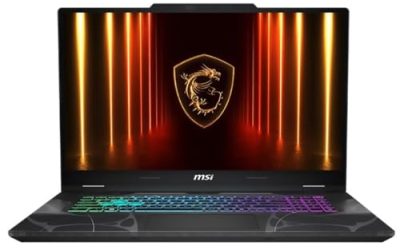
| MSI Katana A15 AI B8VG-450US | Heaviest games at QHD settings | RTX 4070, Ryzen 9 8945HS, 15.6-inch QHD 165Hz |
| ASUS ROG Strix Scar 15 G533ZW-AS94 | Esports pace on a 300Hz panel | RTX 3070 Ti, Core i9-12900H, 15.6-inch FHD 300Hz |
| Razer Blade 15 | QHD play at 240Hz in a metal shell | RTX 4070, 15.6-inch QHD 240Hz, Thunderbolt 4 |
| Alienware m15 R7 AMD | High-refresh QHD with 32GB memory | RTX 3070 Ti, Ryzen 9 6900HX, 15.6-inch QHD 240Hz |
| MSI Katana 15 B13VGK-2000US | RTX 4070 power on an Intel platform | RTX 4070, Core i7-13620H, 15.6-inch QHD 165Hz |
How to Choose
Start with the graphics chip, not the badge
The GPU decides how a 15-inch gaming laptop handles heavy titles, so rank your shortlist by graphics tier before anything else. An RTX 4070 laptop GPU gives you modern ray tracing support and frame generation features that an older or lower tier chip cannot match, while an RTX 3070 Ti remains potent when its power limit is high. Watch the wattage figure in the listing where it is stated: the same GPU name can hide very different power envelopes, and a higher limit usually means the chip holds its boost clocks longer during extended sessions in open-world games.
Match the panel to the GPU you picked
A powerful graphics chip is wasted on a slow screen, and an ultra-fast screen is wasted on a weak chip. For an RTX 4070 class machine, a QHD panel at 165Hz or 240Hz is the natural pairing, because the GPU can drive that resolution in most current games with settings adjusted sensibly. If you mainly play competitive shooters, a Full HD panel at 300Hz makes more sense, since frame rate matters more than pixel density there. Check the listing for both resolution and refresh rate together; either figure alone tells only half the story about how a game will actually look and feel.
Give the cooling system room to work
Sustained performance in a 15.6-inch chassis is a cooling problem before it is a silicon problem. Look for named cooling systems in the listing, such as MSI Cooler Boost 5, and for designs that exhaust air through the rear rather than into the hinge area. A machine that throttles after twenty minutes delivers less real performance than its spec sheet promises. Also consider where you will play: a flat desk with space behind the laptop lets the fans breathe, while a bed or a couch cushion blocks intakes and punishes even a well-designed thermal system during long sessions.
Balance memory and storage against your library
Sixteen gigabytes of DDR5 memory is the working minimum for modern games running alongside voice chat and a browser, and 32GB removes the need to think about it at all. Storage fills faster than buyers expect, because a single large title can claim a noticeable share of a 1TB drive once updates arrive. Every machine in this guide ships with a 1TB SSD or better on paper, so the real question is memory headroom. If you stream, record, or edit clips from the same laptop, favor the 32GB configurations and keep the lighter ones for purely gaming-focused setups.
The 5 Best Options
MSI Katana A15 AI B8VG-450US

This is the pick for players who want the strongest all-round specification in the group without moving to a larger chassis. The Ryzen 9 8945HS feeds the RTX 4070 with plenty of CPU headroom, and 32GB of DDR5 memory means streaming software, voice chat, and a demanding game can run together without the machine juggling resources. The QHD panel at 165Hz suits story-driven games where detail matters, and Cooler Boost 5 gives the hardware a cooling system designed for sustained loads rather than short bursts.
Specs
- CPU: AMD Ryzen 9 8945HS
- GPU: NVIDIA GeForce RTX 4070
- RAM: 32GB DDR5
- Storage: 1TB SSD
- Display: 15.6-inch QHD, 165Hz
- Cooling: Cooler Boost 5
- Operating system: Windows 11
Best for: Demanding QHD gaming with streaming or recording running alongside
Watch out for: Confirm the exact B8VG-450US variant at checkout, since Katana A15 listings group several configurations together
ASIN: B0CXV9CTM8
ASUS ROG Strix Scar 15 G533ZW-AS94
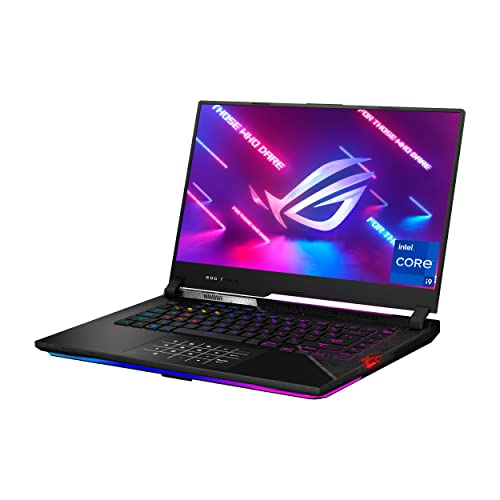
The Scar 15 is built around outright speed. Its listing states a maximum TGP of 150W for the RTX 3070 Ti, which is the figure that separates a full-power implementation from the restrained versions found in thinner machines, and the Core i9-12900H keeps frame rates fed in CPU-heavy titles. The 300Hz Full HD panel is aimed squarely at competitive play, where smoothness outranks resolution. ROG Intelligent Cooling with liquid metal on the processor underlines the performance-first brief of this model.
Specs
- CPU: Intel Core i9-12900H
- GPU: NVIDIA GeForce RTX 3070 Ti, max TGP 150W per listing
- RAM: 16GB DDR5
- Storage: 1TB SSD
- Display: 15.6-inch FHD IPS, 300Hz, 3ms
- Operating system: Windows 11 Home
Best for: Competitive players who value frame rate and a high GPU power limit
Watch out for: This is an earlier-generation platform, so check the listing carefully for the exact G533ZW-AS94 configuration before ordering
ASIN: B09RMW1L7Y
Razer Blade 15

The Blade 15 takes the same RTX 4070 tier and wraps it in a CNC aluminum chassis with the fastest QHD panel in this guide. A 240Hz refresh rate at 2560 x 1440 gives competitive players a sharper image than Full HD without giving up speed, and the 14-core Intel i7 processor handles game logic plus background tasks comfortably. Thunderbolt 4 makes it the easiest machine here to dock with a fast external drive or a single-cable desk setup when the gaming session ends.
Specs
- CPU: 13th Gen Intel Core i7, 14-core
- GPU: NVIDIA GeForce RTX 4070
- RAM: 16GB DDR5
- Storage: 1TB PCIe SSD
- Display: 15.6-inch QHD, 240Hz
- Chassis: CNC aluminum, Chroma RGB keyboard
- Connectivity: Thunderbolt 4
- Operating system: Windows 11
Best for: QHD gaming at 240Hz with a premium metal build and docking options
Watch out for: Memory is 16GB in this configuration, so heavy multitaskers should weigh the 32GB options in this guide
ASIN: B0BTQLKPYD
Alienware m15 R7 AMD
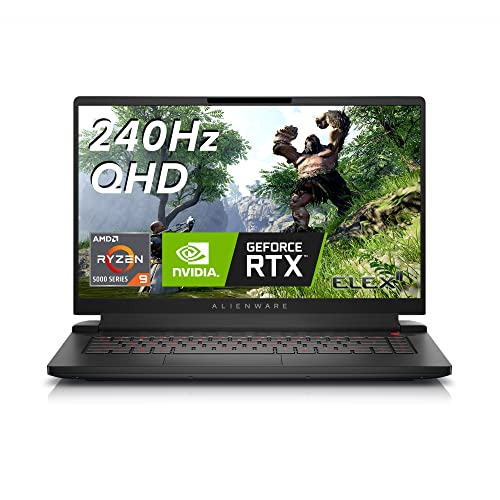
Alienware’s m15 R7 AMD pairs a Ryzen 9 6900HX with an RTX 3070 Ti and doubles the memory of most rivals here, which makes it a strong fit for players who keep many applications open around their games. The QHD panel runs at 240Hz, so it serves both detailed single-player titles and faster competitive sessions from the same screen. With 32GB of DDR5 and a 1TB SSD, the specification leaves little that needs attention later, and the AMD platform gives this pick a different character from the Intel-based machines above.
Specs
- CPU: AMD Ryzen 9 6900HX
- GPU: NVIDIA GeForce RTX 3070 Ti
- RAM: 32GB DDR5
- Storage: 1TB SSD
- Display: 15.6-inch QHD (2560 x 1440), 240Hz
- Operating system: Windows 11
Best for: High-refresh QHD gaming with generous memory for multitasking
Watch out for: The listing includes bundled service terms, so read what is included in this configuration before comparing it with simpler listings
ASIN: B09PHB6RPN
MSI Katana 15 B13VGK-2000US

The Intel-based Katana 15 delivers the same RTX 4070 and QHD 165Hz combination as its AMD sibling, but on a Core i7-13620H platform that some buyers prefer for its mix of gaming and everyday software behavior. Sixteen gigabytes of DDR5 memory covers gaming comfortably, the 1TB NVMe drive holds a working library, and Cooler Boost 5 again handles the thermal side. Choose this one when you want the Katana formula with an Intel processor at the center of the build.
Specs
- CPU: Intel Core i7-13620H
- GPU: NVIDIA GeForce RTX 4070
- RAM: 16GB DDR5
- Storage: 1TB NVMe SSD
- Display: 15.6-inch QHD, 165Hz
- Cooling: Cooler Boost 5
- Operating system: Windows 11
Best for: RTX 4070 QHD gaming on an Intel platform
Watch out for: A Full HD 144Hz version of this model also exists under a similar name, so verify the QHD 165Hz panel in the listing title
ASIN: B0CT4BHS2M
Which One Fits Your Situation
You play demanding story games at high settings
Start with the MSI Katana A15 AI. Its RTX 4070, Ryzen 9 processor, and 32GB of memory form the most complete specification here for graphically heavy titles, and the QHD 165Hz screen shows that detail without demanding the extreme frame rates of an esports panel. The Razer Blade 15 is the alternative if you also want a metal chassis and a 240Hz screen for faster-paced sessions between story games.
You compete in fast online shooters
The ROG Strix Scar 15 is your machine. The 300Hz Full HD panel exists for exactly this use, and the listing’s 150W maximum TGP for its RTX 3070 Ti means the graphics chip is allowed to work at full strength. The Blade 15 at 240Hz QHD is the compromise pick if you want one screen that covers competitive play and sharper everyday visuals without switching machines.
You game, stream, and keep everything open at once
Choose between the Katana A15 AI and the Alienware m15 R7 AMD, the two 32GB configurations in this guide. Both pair that memory with a strong graphics chip and a 1TB drive, so neither forces you to close applications before launching a game. The Katana brings the newer RTX 4070, while the Alienware counters with its QHD 240Hz panel and Ryzen 9 processor.
You want one laptop for the desk and the road
The Razer Blade 15 fits this pattern best. The 15.6-inch size keeps it portable by gaming laptop standards, the aluminum shell suits a shared workspace, and Thunderbolt 4 supports a tidy single-cable desk connection. Every machine here is a 15-inch class model, so none of them demands the bag space of a 17-inch system, but the Blade’s build makes the daily carry feel the least like a compromise.
Common Mistakes
- Assuming every laptop with the same GPU name performs the same, when the power limit in the listing can change sustained performance dramatically.
- Choosing a 300Hz screen for slow, cinematic games where a QHD panel would look better and the extra refresh rate goes unused.
- Buying 16GB of memory for a machine that will also stream and record, then blaming the GPU when the system struggles under the combined load.
- Blocking the rear or underside vents with soft surfaces, which starves the cooling system that a high-power 15-inch chassis depends on.
- Mixing up near-identical model names at checkout and receiving a different panel or memory configuration than the one you compared.
Frequently Asked Questions
Are gaming laptops with 15-inch screens powerful enough for modern games?
Yes, provided the graphics chip is strong. The 15.6-inch chassis used by every pick in this guide has room for full-power laptop GPUs such as the RTX 4070 and for dual-fan cooling, so the size itself is not the limiting factor. What matters is the specific GPU, its power limit where the listing states one, and whether the cooling system can sustain it during long sessions.
Is QHD or Full HD better on a 15.6-inch gaming laptop?
It depends on the games you play. QHD looks sharper and suits story-driven titles, and an RTX 4070 class GPU can drive it well at 165Hz. Full HD at 300Hz serves competitive players who gain more from frame rate than from extra pixels. Match the panel to the GPU tier rather than treating resolution as a simple bigger-is-better figure.
How much memory does a 15-inch gaming laptop need?
Sixteen gigabytes of DDR5 is the sensible floor for gaming alone, and it covers the machines in this guide that focus purely on play. Step up to a 32GB configuration if you stream, record gameplay, edit video, or habitually leave many applications open, because those tasks compete with the game for the same memory pool and the shortage shows up as stutters rather than clean slowdowns.
Why do two laptops with the same GPU perform differently?
Power limits and cooling explain most of the gap. A listing that states a high maximum TGP, like the Scar 15 in this guide, allows its GPU to hold higher clocks, while a restrained design trades that sustained speed for a thinner body. Chassis size, fan design, and the surface the laptop sits on all influence how much of the paper specification you actually get in a long session.
More from Amazon
Programs that pair well with the guide above. Offers and eligibility are set by Amazon and may change.
Free shipping on eligible items, Prime Video and more. Eligible new members can start with a free trial.
Start a Prime free trialAd-free music streaming. Eligible new subscribers can start with a free trial.
Try Music Unlimited freeA Prime membership for ages 18-24 with a trial period. Eligibility is set by Amazon.
See Prime for Young AdultsAudiobooks and podcasts to listen to on the go. Eligible new members can start with a free trial.
Try Audible freeAs an Amazon Associate we earn from qualifying purchases.

Write Your Review
No reviews yet. Be the first to share your experience!