

Key takeaways
- Buying a clicky switch for a shared room or office.
- Choosing a 60% layout without checking how often you use arrow, function and navigation keys.
- Paying for 8,000 Hz polling when you do not play fast-paced competitive games.
- Overlooking warranty length, which differs from one year on the Dell to three years on the Logitech.
- Assuming every revision of a long-running model has the same build; confirm the exact variant.
The best wired keyboard for most people in 2026 is the Corsair K70 Core, a full-size mechanical board with linear MLX Red switches and a 1,000 Hz polling rate that suits both typing and gaming. If you only need a dependable office board, the Logitech K120 does the job for very little money, and if you play competitive shooters the Wooting 60HE v2 gives you adjustable magnetic switches and 8,000 Hz polling. A wired connection avoids battery charging and pairing problems, and it gives the lowest and most consistent latency a keyboard can offer.
This guide covers seven real wired keyboards across three groups: office and budget, mainstream mechanical, and performance gaming. It explains who each one suits, what it gives up, and how to choose between membrane, mechanical and magnetic designs. Specifications come from manufacturer pages and independent reviews, and prices are described only as budget, mid-range or premium tiers because street prices change often.
Our top picks
As an Amazon Associate we earn from qualifying purchases at no extra cost to you.
Quick comparison of the seven picks
| Pick | Best for | Layout and switch type | Key spec | Price tier |
|---|---|---|---|---|
| Corsair K70 Core | Best overall | Full-size mechanical, MLX Red linear | 45 g force, 1.9 mm actuation, 1,000 Hz | Mid-range |
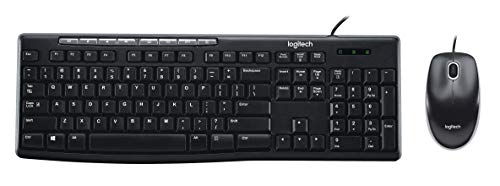
| Logitech K120 | Best budget office | Full-size membrane | Spill-resistant, 450 mm wide, 550 g | Budget |
| Dell KB216 | Quiet workplaces | Full-size chiclet membrane | Media hot keys, 1.8 m cable | Budget |
| Redragon K552 Kumara | Cheapest mechanical | 87-key TKL, Outemu switches | Metal plate, PBT keycaps listed on some units | Budget |
| HyperX Alloy Origins Core | Compact durable board | 87-key TKL, HyperX switches | Aluminum body, detachable USB-C cable | Mid-range |
| Razer Huntsman V3 Pro TKL 8KHz | Esports | TKL, analog optical switches | 0.1 to 4.0 mm actuation, 8,000 Hz | Premium |
| Wooting 60HE v2 | Competitive 60% play | 60%, Lekker Tikken magnetic switches | 0.1 to 4.0 mm actuation, 8 kHz | Premium |
Why choose a wired keyboard in 2026
Wireless keyboards have improved a great deal, but a cable still wins on four points. First, there is no battery to charge or replace, so a cabled board works the day you take it out of the box and the year after. Second, there is no radio pairing, so you avoid dropped connections in crowded offices or noisy 2.4 GHz environments. Third, wired boards can poll at higher rates, up to 8,000 Hz on some current models, which lowers input delay and reduces timing jitter. Fourth, you avoid the slow, steady loss of battery capacity that eventually limits a wireless keyboard’s lifespan.
The cost is a visible cable and a tethered position, which matters little on a desktop and more on a couch or on a cluttered desk. A detachable USB-C cable, as on the HyperX and Corsair boards, softens that downside because you can swap in a shorter, braided or coiled cable.
Best overall: Corsair K70 Core
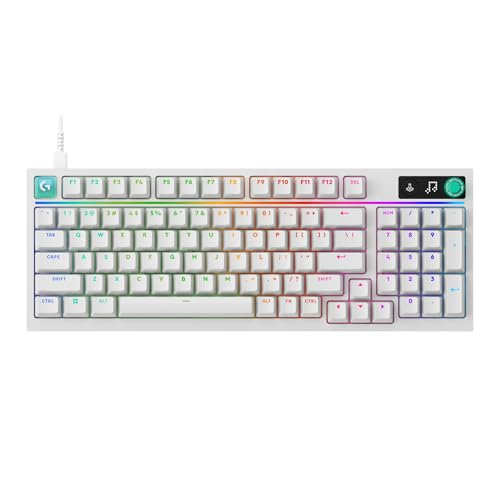
The K70 Core is a full-size board with Corsair MLX Red linear switches rated at 45 g actuation force, a 1.9 mm actuation point, 4.0 mm total travel and a 70 million keystroke lifespan. It polls at 1,000 Hz, adjustable down to 125 Hz, and has per-key RGB lighting. It is a conventional mechanical design with no magnetic sensing, so there is no adjustable actuation or rapid trigger, but the switches are smooth and the response is good for typing, general gaming and office work.
It also comes with a multimedia dial and a comfortable full-size layout with a number pad, and reviewers praise the typing feel for the money. The main limitation is that serious esports players will want rapid trigger. A TKL version using MLX Red v2 linear switches exists for people who want more desk room.
Who it suits: general users who want one keyboard for work and play. Main trade-off: no adjustable actuation and the software is required for lighting changes.
Best budget office keyboard: Logitech K120
The K120 is a full-size membrane keyboard with a number pad, a spill-resistant design, quiet keys and a curved space bar. It measures about 450 by 155 by 23.5 mm, weighs about 550 g and has a 150 cm cable. Logitech rates the keys for up to 10 million keystrokes and covers it with a three-year warranty. It has no backlighting and uses no special software, which keeps it plug-and-play on Windows, Linux and most systems.
It is the board many businesses buy in volume because it is cheap, durable and uncomplicated. The key feel is soft and unremarkable, and the plastic body flexes if you press hard, but for forms, spreadsheets and email it is perfectly capable.
Who it suits: offices, schools and anyone who needs a replacement board fast. Main trade-off: no backlight and a mushy key feel compared with mechanical boards.
Best for quiet, tidy desks: Dell KB216
Dell’s KB216 is a full-size, chiclet-style wired keyboard with dedicated media keys for volume, mute and track control. Dell’s datasheet lists about 441.7 by 127.3 by 24.3 mm, a 1.8 m cable, adjustable tilt at 4 or 7 degrees and a one-year warranty. Listed weights differ by source, from about 400 g to just over 500 g.
The low-profile chiclet keys are quiet, which suits shared offices and call-heavy jobs. It has no backlight and no programmability, and the one-year warranty is shorter than the Logitech’s. The compact width, however, leaves more room for the mouse.
Who it suits: corporate desks and home offices where quiet matters. Main trade-off: basic build and a short warranty.
Best entry-level mechanical: Redragon K552 Kumara
The Kumara K552 is an 87-key tenkeyless board with Outemu switches in blue, brown or red, a wired cable around 1.8 m, and full anti-ghosting. Sources list a metal plate and an ABS body, with some versions using PBT keycaps, so check the exact variant on the box. Build details such as hot-swap support differ between revisions, and a newer Magnetic version with Hall-effect switches also exists.
For beginners who want to try a mechanical keyboard without spending much, it is a popular choice. It is noisy with the blue switches, so choose brown or red if you share a room. The stabilizers and keycaps are not as refined as those on mid-range boards, but the price-to-feature ratio is strong.
Who it suits: first-time mechanical keyboard buyers on a tight budget. Main trade-off: variable build quality across revisions.
Best compact durable board: HyperX Alloy Origins Core
The Alloy Origins Core is an 87-key tenkeyless keyboard with a full aircraft-grade aluminum body, per-key RGB lighting and a detachable USB-C cable of about 1.8 m. It comes with HyperX Red linear, Aqua tactile or Blue clicky switches, which are soldered rather than hot-swappable. Dimensions are roughly 133 by 360 by 34.5 mm, weight is around 0.9 kg, and three profiles can be stored on the keyboard itself.
The aluminum frame gives it a solid feel with almost no flex, and three adjustable angles let you set the typing slope. The lack of hot-swap sockets limits future switch changes, so it suits people who want a finished product rather than a hobby board.
Who it suits: gamers and typists who want a sturdy TKL. Main trade-off: soldered switches and a design that has been on the market for several years.
Best for esports: Razer Huntsman V3 Pro TKL 8KHz
The Huntsman V3 Pro TKL uses Razer’s second-generation analog optical switches, which let you adjust actuation from 0.1 to 4.0 mm and use Rapid Trigger, which resets a key as soon as it moves up by as little as 0.1 mm. Razer lists 8,000 Hz HyperPolling, a 100 million keystroke rating, a 40 g actuation force and Snap Tap for fast direction changes. Razer claims an average latency of 0.48 ms in its own testing, a vendor figure rather than an independent one.
It is a wired-only board and aimed squarely at competitive first-person shooters. The tenkeyless layout leaves more room for mouse sweeps. A low-profile version also exists, so confirm which variant you are choosing before you buy.
Who it suits: competitive players who want rapid trigger without a 60% layout. Main trade-off: cost, and some tournaments restrict features like Snap Tap.
Best 60% for competitive play: Wooting 60HE v2
RTINGS names the Wooting 60HE v2 the best 60% keyboard it has reviewed. It uses Lekker Tikken magnetic switches with adjustable actuation from 0.1 to 4.0 mm, rapid trigger and true 8 kHz polling, and it comes with ABS or aluminum cases in standard or split ANSI layouts. Total travel is 4.0 mm, with a starting force around 40 gf and a bottom-out force around 60 gf on the related Lekker switch.
RTINGS notes that 8,000 Hz gives a small measurable latency gain that players will rarely notice by feel, but it improves consistency. The software and support from Wooting are among the best in the market. The 60% layout drops the function row, arrows and navigation cluster, which is fine for gaming but frustrating for spreadsheets.
Who it suits: competitive players who want the best performance in a compact format. Main trade-off: premium price and the learning curve of a 60% layout.
How to choose: decision matrix
| Your situation | Choose | Reason |
|---|---|---|
| Office work, spreadsheets, a tight budget | Logitech K120 or Dell KB216 | Full-size, quiet, durable |
| One board for work and games | Corsair K70 Core | Full-size mechanical with a media dial |
| First mechanical keyboard, minimal spend | Redragon K552 Kumara | Cheap TKL mechanical |
| Sturdy compact board | HyperX Alloy Origins Core | Aluminum body, detachable cable |
| Competitive shooters, want TKL | Razer Huntsman V3 Pro TKL 8KHz | Analog optical, rapid trigger |
| Competitive shooters, want small | Wooting 60HE v2 | 60% with magnetic switches |
Switch types explained with numbers
Membrane keyboards like the K120 and KB216 use rubber domes that collapse when pressed. They are quiet and cheap but have a soft bottom-out and shorter life, usually a few million to ten million presses. Mechanical keyboards use an individual spring and slider under each key. A linear switch such as MLX Red offers smooth travel at 45 g, a tactile switch has a bump at the actuation point, and a clicky switch adds an audible click. Mechanical life ratings run from 50 million to over 100 million keystrokes. Magnetic and analog optical switches measure how far the key moves, which lets you set actuation anywhere from 0.1 to 4.0 mm and use rapid trigger.
For typing, a 45 g linear or a light tactile suits most people. For gaming, a lower actuation point of about 1.0 to 1.5 mm is a popular setting on adjustable boards because it reduces finger travel, but too light a setting causes accidental presses. Change one setting at a time and give it a few days.
Worked example: cost per year of use
Consider a keyboard used 6 hours a day for 300 days a year, which is 1,800 hours. A typist hitting about 5,000 keystrokes per hour produces about 9 million keystrokes a year. A membrane board rated at 10 million keystrokes is close to its stated limit in about a year, while a mechanical switch rated at 70 million would last roughly 7.8 years at that rate, and a 100 million rating would last about 11 years. Ratings are lab figures, and real lifespan depends on spills, dust and abuse, but the difference explains why mechanical boards cost more up front and less per year of use.
Ergonomics, noise and desk fit
Keyboard width decides how far your mouse hand reaches. A full-size board such as the K120, at about 450 mm wide, pushes the mouse roughly 100 mm further right than a tenkeyless board of about 360 mm, and a 60% board like the Wooting shortens that reach again. Over a long day, a shorter reach keeps the shoulder relaxed, so right-handed users who rarely touch the number pad often feel better on a TKL.
Noise is the other practical factor. Membrane boards and linear switches are the quietest, tactile switches add a soft bump with a modest sound, and clicky switches such as the HyperX Blue or Outemu Blue options are loud enough to disturb a shared room or a call. If you are unsure, pick a linear or tactile switch, because you can always add sound-dampening later but you cannot make a clicky switch silent.
Finally, measure your desk. A tenkeyless board needs about 36 cm of width and 14 cm of depth, a full-size board needs roughly 45 cm, and a keyboard tray or a shallow desk may not take a board taller than 3 cm without a wrist rest. A few minutes with a tape measure prevents returns.
Setup and care steps
- Plug the board straight into a rear motherboard USB port for the most stable polling, rather than through an unpowered hub.
- Install the manufacturer’s software only if you need lighting, macros or actuation changes, then save the profile to onboard memory where supported.
- Set the tilt feet so your wrists stay flat, and add a wrist rest if the board is taller than about 30 mm.
- Pull keycaps every few months to remove crumbs, and wipe the surface with a lightly damp cloth.
- Keep a spare cable for detachable models, since a damaged cable is the most common wired keyboard failure.
Common mistakes to avoid
- Buying a clicky switch for a shared room or office.
- Choosing a 60% layout without checking how often you use arrow, function and navigation keys.
- Paying for 8,000 Hz polling when you do not play fast-paced competitive games.
- Overlooking warranty length, which differs from one year on the Dell to three years on the Logitech.
- Assuming every revision of a long-running model has the same build; confirm the exact variant.
Frequently Asked Questions
Are wired keyboards better than wireless ones?
For latency and reliability, yes. A cable removes battery concerns and pairing issues, and it supports the highest polling rates. Wireless wins on desk tidiness and portability, so the best choice depends on how you use the keyboard.
Is a mechanical keyboard worth it over a membrane one?
If you type or game for several hours a day, yes. Mechanical switches last longer, feel more consistent and can be replaced or customized on hot-swappable models. For occasional use, a membrane board is perfectly adequate.
What does polling rate mean?
Polling rate is how many times per second the keyboard reports its state to the computer. A 1,000 Hz board reports once per millisecond, while 8,000 Hz reports every 0.125 ms. The difference is small for typing, but it can make input timing more consistent in fast games.
What is rapid trigger?
Rapid trigger resets a key the instant it moves upward by a small set distance, instead of waiting for a fixed release point. It allows quicker repeated taps and direction changes, and it needs magnetic or analog optical switches like those in the Wooting and Razer boards.
Which layout should I choose, full-size, TKL or 60%?
Full-size keeps the number pad and suits office and finance work. Tenkeyless removes the number pad and gives more mouse space. A 60% layout is the smallest and best for gaming, but requires function layers for arrows and navigation.
Can I use a wired keyboard with a laptop or console?
Most wired keyboards work with laptops through USB, and some, like the HyperX Alloy Origins Core, are licensed for consoles. Check the manufacturer’s compatibility notes, since support varies by device and model.




Write Your Review
No reviews yet. Be the first to share your experience!