

Key takeaways
- Forgetting the BIOS update: the most common reason a new Ryzen 5000 CPU fails to post is an old BIOS. Update first, while the old chip is still installed.
- Skipping the cooler: an X3D chip without proper cooling will throttle sooner than a regular part.
- Mismatched memory: mixing kits or running four sticks can force lower speeds. Use a matched two-stick kit.
- Buying an unverified chip: counterfeit or relabelled processors have been reported on online marketplaces. Buy from reputable sellers and keep the receipt.
- Too much thermal paste: a pea-sized dot is enough; excess can spill onto the socket and the pins.
- Expecting overclocking headroom: Ryzen 5000 already boosts close to its limits, and X3D chips are locked, so tuning memory and cooling matters more than raising clocks.
- Bending pins: AM4 CPUs have pins on the processor itself. Lift the chip straight out of the socket and never twist it, especially after a cooler has bonded to the paste.
The Ryzen 7 5800X3D is the fastest Ryzen 5000 processor for gaming, the Ryzen 7 5700X3D delivers almost the same frame rates for less money, and the Ryzen 5 5600 is the smartest budget pick for an existing AM4 board. All three use the same AM4 socket and DDR4 memory, which is exactly why the 5000 series is still worth buying in 2026: you can upgrade a PC built between 2018 and 2021 without replacing the motherboard or the RAM.
This guide ranks seven Zen 3 processors by gaming value, explains what the 3D V-Cache actually changes, and shows how to decide between a drop-in AM4 upgrade and a full move to a newer platform. Specifications come from AMD’s published product pages and spec sheets; performance behaviour is described in general terms from widely published reviews rather than invented benchmark numbers.
Our top picks


As an Amazon Associate we earn from qualifying purchases at no extra cost to you.
Quick comparison of the best Ryzen 5000 CPUs for gaming
| Pick | Best for | Cores / threads | Base / boost clock | L3 cache | TDP | Cooler in box | Market tier |
|---|---|---|---|---|---|---|---|
| Ryzen 7 5800X3D | Fastest AM4 gaming | 8 / 16 | 3.4 / 4.5 GHz | 96 MB | 105 W | No | Premium |
| Ryzen 7 5700X3D | Best value gaming | 8 / 16 | 3.0 / 4.1 GHz | 96 MB | 105 W | No | Mid-range |
| Ryzen 5 5600 | Best budget | 6 / 12 | 3.5 / 4.4 GHz | 32 MB | 65 W | Yes (Wraith Stealth) | Budget |
| Ryzen 5 5600X | Higher clocks, same cores | 6 / 12 | 3.7 / 4.6 GHz | 32 MB | 65 W | Yes (Wraith Stealth) | Budget |
| Ryzen 7 5700X | Cool, efficient 8-core | 8 / 16 | 3.4 / 4.6 GHz | 32 MB | 65 W | No | Mid-range |
| Ryzen 9 5900X | Gaming plus heavy multitasking | 12 / 24 | 3.7 / 4.8 GHz | 64 MB | 105 W | No | Upper mid-range |
| Ryzen 9 5950X | Streaming, rendering, gaming | 16 / 32 | 3.4 / 4.9 GHz | 64 MB | 105 W | No | Premium |
What makes a Ryzen 5000 CPU good at gaming?
Games care about three things on the processor side: how fast a few cores can run, how much cache sits close to those cores, and how quickly memory can feed them. Zen 3 improved all three over Zen 2 by moving to a unified eight-core complex, which cut the latency penalty for cores talking to each other. That design is why even the six-core Ryzen 5 5600 still handles modern games at 1080p and 1440p without drama.
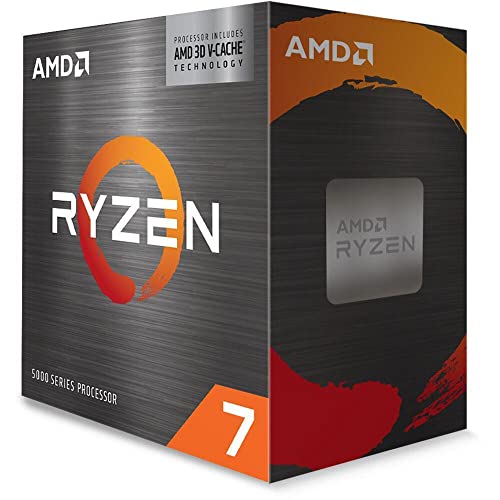
The 3D V-Cache models change the equation in a different way. AMD stacks an extra 64 MB of L3 cache on top of the regular 32 MB, giving the Ryzen 7 5800X3D and 5700X3D 96 MB in total. Many game engines repeatedly touch the same data, such as world state, physics objects and AI, and a large cache lets the cores find that data without waiting on system RAM. The effect is largest in CPU-heavy titles such as simulation, strategy, open-world and competitive shooters at high frame rates, and it is small in games that are limited by the graphics card.
The trade-off is clock speed. The X3D chips run lower boost clocks than the regular parts and have a locked multiplier, so they are weaker at lightly threaded desktop tasks than a 5600X or 5900X. Their strength is gaming, and little else.
Best overall: Ryzen 7 5800X3D
The Ryzen 7 5800X3D is still the strongest gaming processor you can put in an AM4 board. It has eight cores and 16 threads, a 3.4 GHz base clock, a 4.5 GHz boost clock and 96 MB of L3 cache in a 105 W TDP envelope. It was the first desktop chip with stacked cache, and in CPU-bound games it was widely reported to beat much newer parts on other platforms when it launched.
Who it suits: anyone with a fast graphics card on an older AM4 board who wants the biggest frame-rate improvement without changing platform. It is also the right choice for esports players chasing high refresh rates and for simulation fans whose games depend on cache.
Main trade-offs: the multiplier is locked, so there is no traditional overclocking, and AMD built it to run cool and stable rather than to be tweaked. There is no boxed cooler, so you need to budget for a decent tower air cooler or a 240 mm liquid cooler. Its maximum junction temperature is also lower than on other Ryzen 5000 chips, so cooling quality matters. Supply has been inconsistent since AMD wound down regular production, so make sure you are buying genuine, new stock.
Best value: Ryzen 7 5700X3D
The Ryzen 7 5700X3D is the same idea with lower clocks and a lower price. It offers eight cores, 16 threads, a 3.0 GHz base clock, a 4.1 GHz boost and the same 96 MB L3 cache, again at 105 W. AMD launched it in early 2024 as a more affordable path to V-Cache for AM4 owners. It uses DDR4 and PCIe 4.0, has no integrated graphics and, like its sibling, has a locked multiplier.
Because games lean on cache rather than raw clocks, the gap between the 5700X3D and the 5800X3D in real games is usually small, often in the low single digits, though it grows in the most CPU-bound titles. If the price difference between the two is meaningful, the 5700X3D is almost always the better buy per frame.
Who it suits: gamers upgrading from a Ryzen 3000 series chip, a first-generation Ryzen or an older Intel quad-core who want the best value jump. Main trade-off: weaker in single-threaded desktop tasks than the 5700X, and it has no boxed cooler. Check that your motherboard BIOS lists support for it before buying.
Best budget: Ryzen 5 5600
The Ryzen 5 5600 offers six cores and 12 threads, a 3.5 GHz base clock, a 4.4 GHz boost, 32 MB of L3 cache and a 65 W TDP, and it ships with the Wraith Stealth cooler. It is a small step down from the 5600X in clock speed, and in games the real-world difference is typically a few frames per second. Unlike the X3D chips, it can be overclocked, though gains are modest.
Who it suits: builders pairing a mid-range graphics card with an older AM4 board, and anyone upgrading from a Ryzen 5 1600 or 2600 who wants the cheapest meaningful gain. Main trade-off: six cores are fine for today’s games but give less headroom for heavy background tasks, and the included cooler is adequate rather than quiet. If you also stream or keep dozens of browser tabs open, consider an eight-core part.
Best for higher clocks on a budget: Ryzen 5 5600X
The Ryzen 5 5600X shares the 5600’s core layout but runs a 3.7 GHz base and a 4.6 GHz boost. Single-thread performance is slightly higher, and it is a good choice when it is priced close to the 5600 or when it is already in your system. If you already own a 5600X, there is rarely a good reason to replace it with another six-core chip; move to an X3D part instead.
Who it suits: general-purpose builds that mix gaming with lightly threaded work such as office apps, coding and browsing. Main trade-off: it costs more than the 5600 for a small performance edge, and it lacks the cache that makes the X3D parts special.
Best efficient eight-core: Ryzen 7 5700X
The Ryzen 7 5700X is an eight-core, 16-thread part with a 3.4 GHz base clock, a 4.6 GHz boost, 32 MB of L3 and a 65 W TDP. It does not include a cooler. It is the choice when you want more cores than the 5600 series, lower heat than a 105 W chip, and the clock speed that desktop workloads like.
In games it lands between the 5600X and the X3D models: better than six-core chips when a game uses many threads, but clearly behind the 3D V-Cache parts in cache-sensitive titles. Who it suits: small-form-factor builds, quiet systems and people who game and also run virtual machines or video encodes. Main trade-off: if gaming is the priority, the 5700X3D is a better use of the same socket for a moderate step up in cost.
Best for gaming plus multitasking: Ryzen 9 5900X
The Ryzen 9 5900X has 12 cores and 24 threads, a 3.7 GHz base clock, a 4.8 GHz boost, 64 MB of L3 cache and a 105 W TDP. It does not come with a cooler. The cores are split across two chiplets, so a game that spreads threads over both can see a small latency penalty, but with high clocks it remains a strong gaming chip.
Who it suits: people who game and also edit video, compile code, stream with software encoding or run several heavy applications at once. Main trade-off: for pure gaming it is outperformed by the 5800X3D, so only choose it if your workload actually uses the extra cores.
Best for streaming and content creation: Ryzen 9 5950X
The Ryzen 9 5950X tops the family with 16 cores and 32 threads, a 3.4 GHz base clock, a 4.9 GHz boost, 64 MB of L3 and a 105 W TDP. It is the best way to get big multi-core performance on an AM4 board, which is useful for rendering, 3D work and long encodes.
Who it suits: creators who want one machine for work and play without leaving AM4. Main trade-off: it needs a strong cooler and capable motherboard power delivery, and for games alone it is not a better buy than a 5800X3D. A newer platform may serve a pure creator better, since the 5950X is a late-life purchase on a platform AMD has moved past.
Decision matrix: which Ryzen 5000 chip fits your situation
| If your priority is… | Choose | Why |
|---|---|---|
| Highest gaming frame rates on AM4 | Ryzen 7 5800X3D | 96 MB L3 and the highest X3D clocks |
| Best frames per unit of spend | Ryzen 7 5700X3D | Same cache, lower clocks and lower cost |
| Cheapest meaningful upgrade | Ryzen 5 5600 | Six fast cores, includes a cooler |
| Quiet or small build | Ryzen 7 5700X | Eight cores in 65 W |
| Streaming while gaming | Ryzen 9 5900X | 12 cores for background work |
| Workstation plus gaming | Ryzen 9 5950X | 16 cores on AM4 |
Which upgrade makes sense from your current CPU?
| Current processor | Reasonable upgrade | What to expect |
|---|---|---|
| Ryzen 5 1600 / 1600X | Ryzen 5 5600 or 5700X | Large gain in frame rates and smoothness |
| Ryzen 5 2600 / 2600X | Ryzen 5 5600 or 5700X3D | Large gain; X3D if your graphics card is fast |
| Ryzen 5 3600 / 3600X | Ryzen 7 5700X3D | Clear gain in CPU-bound games |
| Ryzen 7 3700X / 3800X | Ryzen 7 5800X3D | Noticeable in cache-heavy games only |
| Ryzen 5 5600X | Ryzen 7 5700X3D (optional) | Worth it only for high refresh rates |
| Older Intel quad-core | New AM4 board plus Ryzen 5 5600 or 5700X3D | Need a board and DDR4, still cheaper than a new platform |
How to choose a Ryzen 5000 CPU for your build
1. Check motherboard and BIOS support first
Ryzen 5000 works on 500-series boards out of the box with a current BIOS, and on many 400-series boards such as B450 and X470 after a BIOS update. Some 300-series boards also received support, but not all. Look up your exact board model on the manufacturer’s CPU support list and note the minimum BIOS version. If your board needs an update to recognize the new CPU, flash it while the old CPU is still installed, and use the latest stable version.
2. Match the CPU to your graphics card
A fast processor cannot lift a slow graphics card. If you play at 1440p or 4K with a mid-range card, most of the load sits on the GPU, and a Ryzen 5 5600 or 5700X will give nearly the same frame rate as an X3D chip. The X3D parts earn their keep when you pair them with a fast graphics card, play at 1080p high refresh rates, or play CPU-heavy games.
3. Plan the cooler
The two X3D chips, the 5700X, 5900X and 5950X ship without a cooler. A 105 W part should get a quality tower air cooler or a 240 mm AIO. The 5600 and 5600X include a basic Wraith Stealth cooler that works but is noisy under load.
4. Get the memory right
Ryzen 5000 supports DDR4. The usual sweet spot is DDR4-3600 with CL16 timings, which lets the Infinity Fabric run at 1800 MHz in sync with the memory. Two sticks in a dual-channel configuration are better than four sticks, which often force lower speeds. The X3D chips are less sensitive to memory speed than regular Zen 3 because the large cache hides some of the latency.
5. Mind the PCIe generation
On 500-series boards the first graphics slot runs PCIe 4.0. On B450 and X470 boards the graphics slot is PCIe 3.0, which is enough for most current cards at the resolutions an AM4 build targets, but a card with a narrow x8 interface can lose a little performance. Check your graphics card’s interface before pairing it with an older board.
A worked example: is the upgrade worth it?
Suppose a game on a Ryzen 5 3600 runs at roughly 90 frames per second at 1080p with a fast graphics card, and the CPU is the limiter. That is about 11.1 milliseconds per frame. If an X3D chip in the same game reaches 130 frames per second, frame time drops to about 7.7 milliseconds, a 3.4 ms saving. The same upgrade in a GPU-limited game at 4K may change nothing at all, because the graphics card is already the bottleneck. These numbers are illustrative, not measurements, but they show the rule: upgrade the CPU when frame rate does not rise as you lower the resolution.
A quick power example shows the cost of a higher TDP. If a 105 W chip ran at its rated limit for 1,000 hours of heavy use, it would draw about 105 kWh against 65 kWh for a 65 W chip, a difference of roughly 40 kWh. Real gaming loads rarely hit the rated limit, so the difference is usually smaller, but it explains why 65 W parts are easier to keep cool and quiet.
Should you stay on AM4 or move to a newer platform?
Staying on AM4 makes sense when you already own a working board and DDR4 memory, because a Ryzen 5000 swap can be done in an afternoon at a fraction of the cost of a new platform. Moving to AM5 costs a new board, new DDR5 memory and often a different cooler mount, but it adds PCIe 5.0, faster memory and an upgrade path to newer processors. For a new build in 2026 with no old parts to reuse, a current-generation platform is generally the better long-term choice. For an existing AM4 build, the Ryzen 7 5700X3D or 5800X3D is typically the most cost-effective way to extend the system’s life by several years.
Ownership notes and common mistakes
- Forgetting the BIOS update: the most common reason a new Ryzen 5000 CPU fails to post is an old BIOS. Update first, while the old chip is still installed.
- Skipping the cooler: an X3D chip without proper cooling will throttle sooner than a regular part.
- Mismatched memory: mixing kits or running four sticks can force lower speeds. Use a matched two-stick kit.
- Buying an unverified chip: counterfeit or relabelled processors have been reported on online marketplaces. Buy from reputable sellers and keep the receipt.
- Too much thermal paste: a pea-sized dot is enough; excess can spill onto the socket and the pins.
- Expecting overclocking headroom: Ryzen 5000 already boosts close to its limits, and X3D chips are locked, so tuning memory and cooling matters more than raising clocks.
- Bending pins: AM4 CPUs have pins on the processor itself. Lift the chip straight out of the socket and never twist it, especially after a cooler has bonded to the paste.
Upgrade checklist before you order
- Note your exact motherboard model and read its CPU support page for the minimum BIOS version.
- Update the BIOS with your current processor installed, then confirm the new version in the setup screen.
- Check that your cooler supports AM4 and has enough rated capacity for a 105 W part if you are buying an X3D chip.
- Confirm your memory runs at its rated speed with the XMP or EXPO profile enabled.
- Check that the power supply has enough capacity for your graphics card plus the processor, with some headroom.
- After installing, verify idle and load temperatures with a monitoring tool and keep an eye on boost behaviour during a long gaming session.
Frequently Asked Questions
Is the Ryzen 7 5800X3D still worth buying in 2026?
Yes, if you already own an AM4 board and want the best gaming performance without rebuilding. It remains one of the strongest gaming processors for the platform. If you are building from scratch with no old parts, a newer platform is usually a better long-term investment.
Is the 5700X3D noticeably slower than the 5800X3D?
In most games the difference is small because both share the same 96 MB cache, and the 5800X3D simply runs higher clocks. The gap is largest in highly CPU-bound games at high frame rates. If the 5700X3D costs noticeably less, it is usually the better value.
Will a Ryzen 5000 CPU work on my B450 motherboard?
Most B450 boards support Ryzen 5000 after a BIOS update, but you must check your exact model on the manufacturer’s CPU support list. Some boards with smaller BIOS chips only support certain processors, and a few require removing older CPU support to fit the update.
Do I need a new cooler for Ryzen 5000?
The 5600 and 5600X come with a Wraith Stealth cooler. The 5700X, 5700X3D, 5800X3D, 5900X and 5950X do not, so you need to buy one. AM4 cooler mounts are widely compatible, so a cooler from an earlier Ryzen build will usually fit.
Is the Ryzen 5 5600 enough for gaming in 2026?
For 1080p and 1440p gaming with a mid-range graphics card, yes. It will struggle more with the most CPU-heavy games and high refresh rates, and has less headroom for background tasks. It is a good value starter chip that can later be replaced by an X3D model.
Which is better for gaming, the 5900X or the 5800X3D?
For gaming alone, the 5800X3D is usually faster thanks to its extra cache. The 5900X pulls ahead in workloads that use many cores, such as video rendering and compiling. Choose based on whether you do more gaming or more heavy productivity work.





Write Your Review
No reviews yet. Be the first to share your experience!