

Key takeaways
- Clean dust filters every month or two and blow out radiators every six months.
- Update BIOS, GPU drivers and cooler software, but only from the manufacturer’s pages.
- Keep original packaging if you plan to ship the system for service.
- Check that the 12V-2×6 cable is fully seated after any move or reseating of the GPU.
The best premium prebuilt gaming PC with an RTX 5080 or higher in 2026 is the Corsair Vengeance a7500 for balanced RTX 5080 gaming and the Corsair Vengeance a8200 when you want an RTX 5090 with a 360 mm-class cooling setup and a 1200 W power supply. The NZXT Player Three, MSI Aegis ZS2, Alienware Aurora, HP OMEN 45L and Lenovo Legion Tower 7i Gen 10 round out a field where the real differences are the CPU, cooling, power supply size and how standard the parts are. This guide compares seven current systems using manufacturer spec pages and explains how to judge a configuration so you are not paying for a name.
Our top picks


As an Amazon Associate we earn from qualifying purchases at no extra cost to you.
Quick Comparison of the Seven Picks
| Pick | Best for | Typical CPU and GPU | Cooling and PSU | Price tier |
|---|---|---|---|---|
| Corsair Vengeance a7500 | Best overall RTX 5080 | Ryzen 7 9800X3D, RTX 5080, 32 GB DDR5-6000, 2 TB | 240 mm liquid cooler, 1000 W Gold | Premium |
| Corsair Vengeance a8200 | Best RTX 5090 showpiece | Ryzen 9 9950X3D or Ryzen 7 9800X3D, RTX 5090, 64 GB | iCUE LINK TITAN RX liquid cooler, 1200 W Gold | Flagship |
| NZXT Player Three | Best quiet cooling and support | Ryzen 7 9800X3D, RTX 5080, 32 GB DDR5-6000, 4 TB | Kraken Elite 360 RGB V2, 850 W Gold | Premium |
| MSI Aegis ZS2 | Best value RTX 5080 | Ryzen 9 9900X or Ryzen 7 9800X3D, RTX 5080, 32 GB | 360 mm liquid cooler, 850 W Gold | Mid-range to premium |
| Alienware Aurora ACT1250 | Best compact design | Core Ultra 9 285 or 285K, RTX 5080 16 GB | Liquid cooled, 1000 W Platinum | Premium |
| HP OMEN 45L | Best Intel RTX 5090 | Core Ultra 9 285K, RTX 5090 32 GB, 64 GB DDR5-5600 | 360 mm LCD liquid cooler, up to 1200 W | Flagship |
| Lenovo Legion Tower 7i Gen 10 | Best upgrade and port selection | Core Ultra 9 285K, RTX 5090 or 5080 | 360 mm liquid cooler, 1200 W on 5090 models | Premium to flagship |
What Premium Means for a Prebuilt in 2026
A premium prebuilt gaming PC is one where every part is chosen to feed the GPU. At the RTX 5080 tier and above that means a gaming-focused CPU such as an AMD X3D chip or a Core Ultra 9, DDR5 memory at 6000 MT/s or close, a Gen 4 or Gen 5 NVMe SSD, a 240 to 360 mm liquid cooler and a power supply sized for the card with headroom. It also means a warranty and support that a custom builder cannot match, which is the main reason people buy prebuilt systems at this level.
The RTX 5080 has 16 GB of GDDR7 and a 360 W rating, and NVIDIA recommends an 850 W supply. The RTX 5090 has 32 GB of GDDR7, a 575 W rating and a recommended 1000 W supply. Those two figures decide most of your PSU requirements, and they are why a well-configured RTX 5090 prebuilt usually ships with a 1000 to 1200 W unit.
Best Overall RTX 5080: Corsair Vengeance a7500
The Vengeance a7500 pairs a Ryzen 7 9800X3D with an RTX 5080 in a tempered glass mid-tower. Corsair’s listing for the white RTX 5080 version shows 32 GB of DDR5-6000, a 2 TB NVMe drive, a Corsair Nautilus 240 mm liquid cooler and a 1000 W 80 Plus Gold fully modular power supply. An X870 motherboard rounds out the platform. A higher RTX 5090 configuration adds 64 GB of memory and a 1200 W supply, and an Air variant swaps the case for a mesh-front FRAME 4000D with a 240 mm cooler and six fans.
Corsair builds with its own branded parts, which makes upgrades and replacements simple because the memory, cooler and power supply are standard retail components.
Who it suits: gamers who want a fast 1440p or 4K system and a straightforward upgrade path.
Main trade-off: the 240 mm cooler is fine for an efficient X3D chip but would not suit a hotter processor.
Best RTX 5090 Showpiece: Corsair Vengeance a8200
The a8200 moves to the 5000T case with an X870 board and a flagship configuration. Corsair’s listings show an RTX 5090 with a Ryzen 7 9800X3D or a Ryzen 9 9950X3D, 64 GB of DDR5 up to 6400 MT/s, up to 6 TB of NVMe storage across multiple drives, an iCUE LINK TITAN RX liquid cooler and a 1200 W 80 Plus Gold fully modular supply. The 9950X3D versions use a 360 mm radiator with three 120 mm fans. There is also an RTX 5080 configuration with the 9950X3D and 64 GB.
Who it suits: enthusiasts who want an RTX 5090 with a high-core-count X3D chip for gaming and streaming at once.
Main trade-off: it is a big case with a high premium over the a7500, and most games will see little gain from the 9950X3D.
Best Quiet Cooling and Support: NZXT Player Three
NZXT builds its Player Three around the H6 Flow case and a Kraken Elite 360 RGB V2 cooler. Specs listed in 2026 show an RTX 5080 with a Ryzen 7 9800X3D, 32 GB of DDR5-6000, a 4 TB NVMe SSD and an 850 W Gold ATX power supply. A Player Three Prime step-up uses an RTX 5090 with a Ryzen 9 9950X3D, 64 GB of DDR5-6000, an H9 Flow case and a 1000 W Gold ATX 3.1 power supply. Reviewers have praised how quietly the system cools under load.
The 850 W supply meets NVIDIA’s RTX 5080 recommendation but leaves less margin than 1000 W, so it is not an ideal base for an RTX 5090 swap later.
Who it suits: buyers who want good acoustics, a clean look and easy support.
Main trade-off: the RTX 5080 build’s 850 W supply caps upgrade options.
Best Value RTX 5080: MSI Aegis ZS2
The Aegis ZS2 is the value-oriented RTX 5080 tower. MSI lists configurations with a Ryzen 9 9900X, an RTX 5080 16 GB, 32 GB of DDR5, a 2 TB NVMe SSD, a 360 mm liquid cooler, Wi-Fi 7 and an 850 W 80 Plus Gold power supply. A Ryzen 7 9800X3D version exists, and MSI also lists flagship models with an RTX 5090 and a 1300 W supply. MSI’s own motherboard and graphics card appear in many builds, which can help compatibility.
Who it suits: gamers who want RTX 5080 performance and liquid cooling without flagship cost.
Main trade-off: the Ryzen 9 9900X version is less gaming-optimized than the X3D chips, and the 850 W power supply leaves modest headroom.
Best Compact Design: Alienware Aurora ACT1250
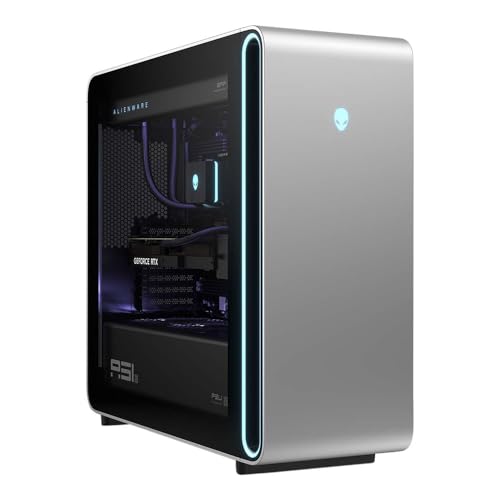
The Aurora ACT1250 is a redesigned Alienware tower that Dell says is about 40 percent smaller than the previous generation. Listings show a Core Ultra 9 285 or 285K, an RTX 5080 with 16 GB of GDDR7, 32 to 64 GB of DDR5, a 240 mm liquid-cooled CPU on K-series builds and a 1000 W Platinum power supply. Dimensions are about 18.05 x 7.75 x 16.46 inches and the weight is roughly 34 pounds. Front PowerShare ports charge devices even when the PC is off, and Wi-Fi 7 is standard.
Dell’s configurator lists RTX 5060 Ti, 5070 and 5080 options, and reviewers have noted there is room to swap in a larger card later, so confirm your exact GPU choice before ordering.
Who it suits: buyers who want a smaller tower with a distinctive look and a strong warranty network.
Main trade-off: Intel’s Core Ultra 9 trails AMD’s X3D chips in many games, and base storage is sometimes only 1 TB.
Best Intel RTX 5090: HP OMEN 45L
The OMEN 45L brings a showcase design and a flagship GPU. The RTX 5090 configuration uses a Core Ultra 9 285K, 32 GB of GDDR7 graphics memory, 64 GB of DDR5-5600, a 2 TB Gen 4 SSD, HP’s CRYO CHAMBER airflow design and a 360 mm LCD liquid cooler. HP’s store lists 850 W and 1000 W options for some builds, while B&H and Micro Center list the RTX 5090 model with a 1200 W power supply. Networking includes 2.5 GbE and Wi-Fi 6E.
An AMD OMEN MAX 45L with a Ryzen 9 9900X3D and RTX 5090 also exists, according to third-party listings, so confirm which platform you are ordering.
Who it suits: buyers who want an Intel flagship with eye-catching cooling and an LCD display on the radiator.
Main trade-off: memory speed and wireless features are a step behind rivals, and proprietary elements can complicate later upgrades.
Best Upgrade and Port Selection: Lenovo Legion Tower 7i Gen 10
The Legion Tower 7i Gen 10 stands out for ports and memory ceiling. Listings show a Core Ultra 9 285K, an RTX 5090 with 32 GB or an RTX 5080 with 16 GB, DDR5-5600 memory from 32 GB up to 128 GB, storage up to 8 TB and Thunderbolt 4 with DisplayPort 2.1. RTX 5090 versions carry a 360 mm liquid cooler and a 1200 W power supply. Lenovo’s Legion Coldfront cooling and a tool-light case make the system easy to open.
PSU wattage on the RTX 5080 version is not consistently listed, so check the product page before buying.
Who it suits: buyers who want Thunderbolt connectivity, big memory options and a business-class warranty option.
Main trade-off: it relies on Intel’s platform, and configuration listings vary between channels.
Decision Matrix by Situation
| Your situation | Choose | Why |
|---|---|---|
| High-refresh 1440p and 4K gaming on a strict budget | MSI Aegis ZS2 | RTX 5080 with 360 mm cooling at a lower tier |
| Best gaming CPU plus RTX 5080 | Corsair Vengeance a7500 or NZXT Player Three | Ryzen 7 9800X3D |
| RTX 5090 with an AMD X3D processor | Corsair Vengeance a8200 | 9800X3D or 9950X3D, 1200 W supply |
| RTX 5090 with an Intel processor | HP OMEN 45L or Legion Tower 7i | Core Ultra 9 285K, 360 mm cooling |
| Small footprint and warranty network | Alienware Aurora | Compact chassis and 1000 W Platinum supply |
| Quiet operation matters most | NZXT Player Three | Praised cooling acoustics |
Worked Example: Running Costs for RTX 5080 and RTX 5090 Builds
Premium hardware also uses premium power. A typical RTX 5080 gaming system draws about 450 to 550 W at the wall under load. At 500 W for three hours of gaming a day, that is 1.5 kWh a day, or about 548 kWh a year. At 0.15 per kWh, the annual cost is roughly 82. An RTX 5090 system under gaming load can approach 700 W, which at three hours a day equals 2.1 kWh daily and about 767 kWh a year, or roughly 115 in electricity.
Use that to size your power supply as well. A 700 W gaming draw on a 1000 W unit is 70 percent load, comfortably within a Gold-rated range. The same draw on an 850 W unit is 82 percent load, which works but leaves less room for transient spikes. That is why 1000 W or more is the safer pairing with an RTX 5090.
How to Evaluate Any Premium Prebuilt
- Read the full parts list, not just the GPU. Confirm CPU model, memory capacity and speed, SSD size, cooler type, power supply wattage and rating.
- Check power supply headroom. Match it to NVIDIA’s recommendation: 850 W for an RTX 5080, 1000 W for an RTX 5090.
- Confirm the memory is a dual-channel kit. Two sticks of 16 GB or 32 GB are standard on a premium build, and speed should be at least DDR5-5600.
- Look for standard parts. Standard ATX motherboards, power supplies and coolers keep upgrades and repairs simple.
- Check storage. 2 TB is a practical minimum for modern games, and a second slot should be free.
- Compare warranty and support. Look at coverage length, onsite service and what happens if you open the case to upgrade.
- Verify the exact configuration before ordering. Retail and manufacturer channels list different CPUs, memory sizes and power supplies under similar model names.
Prebuilt Versus Building Your Own
A custom build typically costs less for the same parts and gives full control over components, but it takes time and leaves warranty claims to each part’s maker. Premium prebuilts bundle a system warranty, a validated thermal design and software support, which many buyers value at this tier. When GPU supply is tight, a prebuilt may be the easiest way to get an RTX 5080 or 5090 at all, since system builders receive stock allocations that individual shoppers do not.
Ownership Realities: What Wears First
In a premium prebuilt, liquid cooler pumps and fans are the components most likely to need replacement after several years, followed by case fans and the power supply fan. Dust filters clog quickly in homes with pets. RGB controllers and proprietary software can break after operating system updates. Thermal paste on the CPU and GPU should be replaced after about four to five years if temperatures creep up.
- Clean dust filters every month or two and blow out radiators every six months.
- Update BIOS, GPU drivers and cooler software, but only from the manufacturer’s pages.
- Keep original packaging if you plan to ship the system for service.
- Check that the 12V-2×6 cable is fully seated after any move or reseating of the GPU.
Memory, Storage and Connectivity Details Worth Checking
Premium configurations differ in less obvious ways than the CPU and GPU. Memory speed varies from DDR5-5600 on the HP OMEN 45L and Lenovo Legion Tower 7i to DDR5-6000 on the Corsair a7500 and NZXT Player Three and up to 6400 MT/s on some Corsair a8200 builds. For Ryzen X3D processors, DDR5-6000 is the practical sweet spot, so a system sold with slower memory is leaving a little performance on the table. Capacity matters too: 32 GB is enough for gaming alone, while 64 GB suits streaming, editing and running several heavy applications together.
Storage is the other quiet differentiator. A 1 TB drive fills quickly when a single modern game can take 100 GB or more, so favor 2 TB at minimum and look for an open M.2 slot. Wireless standards range from Wi-Fi 6E on the OMEN 45L to Wi-Fi 7 on the Alienware and MSI systems, and if your router is Wi-Fi 7 capable it is worth the match. Wired Ethernet at 2.5 GbE is standard on most and remains the better choice for competitive play.
Ports are the final check. Front USB-C, a Thunderbolt 4 port for fast external drives and enough rear display outputs for a multi-monitor desk can all differ between models. If you stream or work with capture cards, count the USB ports you actually need rather than relying on the total in the marketing list.
Frequently Asked Questions
Is an RTX 5080 prebuilt enough for 4K gaming?
Yes. The RTX 5080 handles most modern games at 4K with high settings, especially with DLSS upscaling. For the highest settings and ray tracing at 4K with frame generation, the RTX 5090 gives more headroom.
What power supply should an RTX 5090 prebuilt have?
NVIDIA recommends 1000 W. Premium systems often ship with 1200 W, which gives margin for transients and a high-power CPU.
Are AMD or Intel processors better in a premium gaming prebuilt?
AMD’s X3D chips, such as the Ryzen 7 9800X3D, generally lead in gaming performance because of large 3D V-Cache, while Intel’s Core Ultra 9 285K is strong for mixed gaming and creator workloads. Choose based on whether you stream or render as well.
Can I upgrade a premium prebuilt later?
Most can be upgraded, but check for proprietary motherboards, power supplies or cooler mounts. Corsair, NZXT and MSI generally use standard-sized parts, while some large OEM systems use more custom elements.
Is liquid cooling necessary for an RTX 5080 prebuilt?
The GPU cools itself, so liquid cooling matters for the CPU. An X3D chip runs cool enough for a good air cooler or a 240 mm radiator, while hotter Intel chips benefit from a 360 mm unit.










Write Your Review
No reviews yet. Be the first to share your experience!