

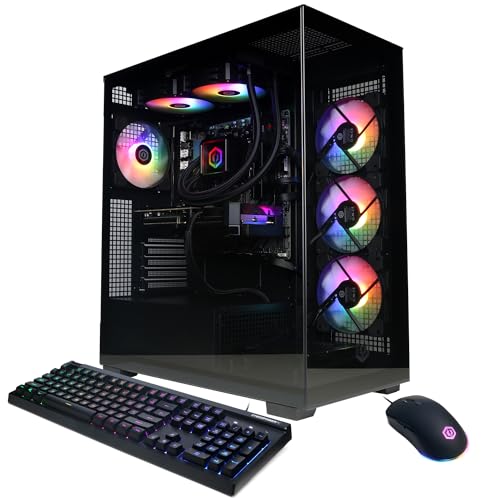
The CyberPowerPC Gamer prebuilts pairing a GeForce RTX 5080 with a Core Ultra 7 265KF are a solid choice for 4K and high-refresh 1440p gaming, as long as you check the power supply, RAM configuration and cooling in the exact listing before you buy. The RTX 5080 does the heavy lifting at high resolution, and the 20-core 265KF handles gaming and creative work well, though a Ryzen 7 9800X3D would deliver higher frame rates in CPU-limited games. This guide explains what the configuration contains, where it shines, where it compromises, and how to compare it with alternatives.
Our top picks



As an Amazon Associate we earn from qualifying purchases at no extra cost to you.
What is inside this configuration
CyberPowerPC sells this pairing under several model names, including the Gamer Xtreme and Gamer Supreme lines, with slightly different cases and cooling. Retail listings for the common variants share this core specification.
| Component | Typical specification | What it means |
|---|---|---|
| Processor | Intel Core Ultra 7 265KF, 20 cores (8P + 12E), up to 5.5 GHz, 30 MB cache | Strong gaming and multitasking; the F suffix means no integrated graphics |
| Graphics | GeForce RTX 5080 16 GB GDDR7, 10,752 CUDA cores, 256-bit bus, 360 W board power | High-end card for 4K gaming with DLSS 4 |
| Chipset | Intel Z890 | Supports overclocking and PCIe 5.0 |
| Memory | 32 GB DDR5, often listed around 6000 to 6400 MT/s | Enough for gaming; check it is two sticks |
| Storage | 2 TB PCIe 4.0 NVMe SSD | Fast load times; room for a large game library |
| Cooling | Liquid cooler on the CPU | Handles the 265KF’s turbo power; verify radiator size |
| Networking | Wi-Fi 6 and Bluetooth 5.3, wired LAN | Fine for gaming; wired is better for latency |
| Warranty | One year parts and labor with lifetime technical support, per the listings | Standard for prebuilts; check current terms |
Specifications and model numbers change frequently between production runs, so treat the table as the typical pattern, not a guarantee for the unit you will receive.
Why the RTX 5080 and 265KF make sense together
The GeForce RTX 5080 uses the GB203 chip with 10,752 CUDA cores and 16 GB of GDDR7 memory on a 256-bit bus, delivering about 960 GB/s of bandwidth. NVIDIA rates it at 360 W total graphics power and recommends an 850 W power supply. It is positioned below the RTX 5090 and above the RTX 5070 Ti, and it handles native 4K in most games, particularly with DLSS upscaling and multi-frame generation.
The Core Ultra 7 265KF is an Arrow Lake processor with 8 performance cores at up to 5.5 GHz and 12 efficiency cores, on the LGA 1851 socket. Its base power is 125 W and its maximum turbo power is 250 W. Intel dropped Hyper-Threading in this generation, so it has 20 threads. It runs cool compared with Intel’s older 14th generation flagships, and Intel states that this platform does not share the Vmin Shift instability that affected 13th and 14th generation chips.
At 4K, the graphics card sets the frame rate in nearly every game, so a 265KF is adequate. The difference between processors grows at 1080p and 1440p with high refresh rates, where a faster gaming chip lifts the ceiling. If you play competitive shooters at very high frame rates, this is where the pairing compromises.
Where it falls short
The 265KF is a capable all-rounder but not the fastest gaming chip. The Ryzen 7 9800X3D, with 96 MB of L3 cache, leads it in most games by a meaningful margin at lower resolutions, while the Intel chip leads in some multithreaded productivity workloads. Reviewers generally describe the 265K family as better value for mixed use than for pure gaming. Intel’s refreshed Core Ultra 7 270K Plus, released in March 2026 with 8 performance cores, 16 efficiency cores and support for faster DDR5, narrows the gap, so ask whether a newer-chip variant of the same system is available.
Prebuilt versus building it yourself
| Factor | CyberPowerPC prebuilt | DIY build |
|---|---|---|
| Time | Arrives assembled, ready to boot | Several hours to assemble and configure |
| Parts control | Brand and model of PSU, cooler and RAM may not be listed | You choose every part |
| Warranty | One support contact for the whole system | Separate warranties per part |
| Upgrade path | Standard parts, but verify case and PSU headroom | Fully planned |
| Software | Windows installed, possible preloaded extras | You install a clean OS |
| Cost | Often competitive when graphics cards are scarce, with the OS and labor included | Usually lower if you have the skills and time |
CyberPowerPC is generally described as using standard, replaceable parts, unlike some large brands that use proprietary motherboards or power supplies. That makes later upgrades practical. The weakness is listing detail: some CyberPowerPC listings do not name the exact power supply, cooler or memory speed, so you may need to ask or check the manufacturer’s configurator.
Checklist before you order
- Find the power supply wattage, brand and efficiency rating. An RTX 5080 at 360 W plus a 265KF that can reach 250 W needs at least 850 W, and 1000 W gives comfortable headroom. Look for 80 Plus Gold or better and a model with the 12V-2×6 connector for the graphics card.
- Confirm the memory is two modules. A 32 GB kit should be 2 x 16 GB so it runs in dual channel. A single stick can reduce gaming performance by a noticeable margin.
- Check the rated memory speed and enable it. Memory may run at a lower default until XMP is switched on in the BIOS. Enable it on first boot.
- Identify the cooler. A 240 mm or 360 mm liquid cooler suits the 265KF. A smaller cooler may let the chip throttle in long sessions.
- Check the case airflow. Glass front panels look good but can restrict intake. A case with mesh intake and at least three fans keeps a 360 W graphics card cooler.
- Verify the SSD model and size. A branded PCIe 4.0 NVMe drive is preferable to an unbranded one, and 2 TB fills slowly with modern games.
- Read the warranty and return window. One year parts and labor with lifetime support is common, and return authorizations can expire quickly after issue.
- Confirm the operating system license. Windows 11 Home is typical.
First-day setup steps
- Inspect the inside. Look for loose cables, shipping foam and a graphics card held firmly in its slot. Transit can shake components loose.
- Update the BIOS and Windows. Boards often ship with older firmware. Updated microcode and memory compatibility improve stability.
- Enable XMP. Turn on the memory profile in the BIOS.
- Install the latest NVIDIA driver. Use a clean install from NVIDIA directly.
- Remove unneeded preinstalled software. Trial utilities slow startup.
- Run a monitoring overlay for a first session. Check that CPU temperatures settle below the throttling range and the graphics card holds its boost clock.
- Back up the recovery information. Save your license and warranty documents in a safe place.
What to expect at each resolution
Performance varies by game, so use these as qualitative expectations rather than promises. At 1440p, the RTX 5080 drives high-refresh monitors in nearly every current title at high settings, and the processor choice starts to matter in esports games. At 4K, expect strong results at high or ultra settings in most games, with DLSS upscaling used to hold 60 to 120 frames per second in the most demanding titles with ray tracing. At 1080p, the card is more than you need, and a cheaper system is the more sensible spend.
| Resolution | Typical limit | CPU importance | Is this system a good fit? |
|---|---|---|---|
| 1080p, 240 Hz or higher | CPU in many games | High | Overkill on the GPU; a 9800X3D system suits better |
| 1440p, 165 Hz to 240 Hz | Mixed | Medium | Good fit, especially for single-player titles |
| Ultrawide 1440p | GPU | Medium | Very good fit |
| 4K, 60 Hz to 144 Hz | GPU | Low | Best fit for this configuration |
Who should buy it and who should not
| Your situation | Verdict |
|---|---|
| You want a 4K gaming PC delivered ready to use | Good match |
| You edit video or stream as well as game | Good match, thanks to 20 cores |
| You play mainly esports titles at 360 Hz | Look at X3D-based systems |
| You like to tinker and want to choose each part | Consider a DIY build |
| You need a system for a small desk or living room | Check the case dimensions first; RTX 5080 cards are large |
| You need a quiet workstation | Ask about fan and pump noise, or plan to adjust fan curves |
Thermals and airflow in more detail
The RTX 5080 dissipates up to 360 W, and the 265KF can add another 250 W at its peak, so a combined heat load above 600 W goes into a single case. A case with a solid glass front and few intake fans will recirculate hot air, and the graphics card will throttle its boost clock when its hot spot passes the thermal limit. Mesh front panels and three intake fans make a real difference. Keep the radiator exhaust or top-mounted so the hot air from the CPU cooler does not pass over the graphics card. Clean dust filters every few months, and leave at least a few centimeters of space between the case and a wall.
Liquid coolers also age. The pump and fans in an all-in-one cooler wear after years of use, so treat the cooler as a consumable with a typical lifetime of five to seven years. Check the pump noise on day one; a rattling or gurgling sound that does not settle after a few minutes of running is covered under the warranty.
Memory and storage notes
Arrow Lake supports DDR5 up to 6400 MT/s officially, and most prebuilts use kits rated near that figure. Dual-channel configurations matter more than the last few hundred megatransfers per second. For storage, the PCIe 4.0 NVMe drives found in most prebuilts offer sequential speeds up to about 7,000 MB/s, which is more than games require. If the motherboard has a PCIe 5.0 M.2 slot, you can add a faster drive later, though real-world gaming benefits are small.
How to verify what you actually received
- Open Windows System Information and note the CPU, memory and BIOS version. Compare them with the order confirmation.
- Use a hardware information tool to list the power supply model if visible, the memory speed and the number of modules. Mismatches are grounds to contact support during the return window.
- Check the graphics card model and driver version in the NVIDIA app. Confirm it reports the RTX 5080 with 16 GB.
- Run a stress workload for 30 minutes. Watch temperatures and clocks. A cooler that cannot keep the processor off its throttle limit is defective or mounted poorly.
- Record serial numbers. Keep the system serial and the component serials for warranty claims.
Power, noise and electricity
A system with these parts can pull roughly 550 to 650 W from the wall under combined CPU and GPU load. If you game three hours a day at an average of 450 W, that is 1.35 kWh a day, or about 490 kWh a year. Idle draw is far lower, usually under 100 W. Noise depends on the case and cooler: liquid-cooled prebuilts tend to be moderately loud under load, and you can set custom fan curves in the BIOS or software to quiet them.
Five ways to get this performance class
| Option | CPU | GPU | Best for | Main trade-off |
|---|---|---|---|---|
| This configuration | Core Ultra 7 265KF | RTX 5080 16 GB | 4K gaming plus creative work | Not the top gaming CPU |
| Ryzen-based prebuilt | Ryzen 7 9800X3D | RTX 5080 16 GB | Highest frame rates at 1440p | Weaker in some multithreaded tasks |
| Step-down prebuilt | Core Ultra 7 265KF | RTX 5070 Ti 16 GB | 1440p and entry 4K | Less headroom at 4K |
| Newer Intel variant | Core Ultra 7 270K Plus | RTX 5080 16 GB | Mixed use with faster memory | Availability varies |
| DIY build | Your choice | RTX 5080 16 GB | Control over every part | Your time and skills |
Option one: the CyberPowerPC 265KF and RTX 5080 system
This is the configuration discussed throughout the guide. It suits buyers who want a ready-to-play 4K machine with a single support contact. The compromise is a processor that trails AMD’s best gaming chips and listings that sometimes omit part details.
Option two: a Ryzen 7 9800X3D and RTX 5080 prebuilt
With 8 cores, 16 threads and 96 MB of L3 cache, the 9800X3D is the stronger gaming processor and pairs well with an RTX 5080 for high-refresh play. It suits competitive gamers and simulation fans. Its trade-off is lower throughput in heavily threaded work such as long video exports than 20- and 24-core Intel chips.
Option three: a step-down with the RTX 5070 Ti
Dropping to an RTX 5070 Ti with the same processor lowers the graphics budget while keeping 16 GB of video memory. It suits 1440p ultrawide and 4K with upscaling. It gives up some headroom for the newest games at native 4K.
Option four: a Core Ultra 7 270K Plus variant
The refreshed 270K Plus has 8 performance cores, 16 efficiency cores, a 5.5 GHz boost and support for DDR5-7200, and it works on Z890 boards. If a seller offers it with an RTX 5080, it is a worthwhile upgrade over the 265KF for a small premium. Stock varies, so confirm availability.
Option five: build it yourself
Choosing your own parts lets you pick the 850 W or 1000 W power supply, the airflow case and the exact memory kit. It suits people comfortable with assembly. The trade-off is time and separate warranties for each part.
Upgrade path and longevity
The Z890 platform supports Intel Core Ultra 200S processors, including the refreshed Plus chips through a BIOS update, and DDR5 memory. The RTX 5080’s 16 GB of video memory is adequate for current games at 4K, though the most demanding titles with maximum texture settings may press it. A 2 TB drive can be supplemented with a second M.2 SSD if the board has a free slot. Replacing the processor later is possible within the same socket, but future Intel generations may need a new board.
Frequently Asked Questions
Is the Core Ultra 7 265KF good enough for an RTX 5080?
Yes for most uses. At 4K the graphics card is the limit, so the 265KF rarely holds it back. At 1080p and 1440p in high-refresh competitive games, a faster gaming processor like the Ryzen 7 9800X3D will deliver higher frame rates.
What power supply does an RTX 5080 system need?
NVIDIA recommends 850 W for the RTX 5080. With a 265KF that can draw up to 250 W, an 850 W unit is the minimum and a quality 1000 W unit leaves headroom. Check that the listing names the model and an 80 Plus Gold or better rating.
Does the F in 265KF matter?
The F means the chip has no integrated graphics. That is fine with a dedicated RTX 5080, but if the graphics card fails you cannot use the display output from the motherboard for troubleshooting.
Can I upgrade a CyberPowerPC prebuilt later?
Generally yes. The company is described as using standard parts, so memory, storage and the graphics card can be swapped. Confirm the case size and power supply wattage before choosing a larger card or adding drives.
Is 32 GB of RAM enough?
For gaming, yes. Heavy video editing or running virtual machines benefits from 64 GB, and a prebuilt with two memory slots free is easier to expand. Make sure the kit is two sticks for dual channel.
Should I wait for a newer processor variant?
If the refreshed Core Ultra 7 270K Plus or a Ryzen 7 9800X3D configuration is available for a similar budget, either is worth considering. If the 265KF system is the one in stock and meets your needs at 4K, it remains a strong machine.










Write Your Review
No reviews yet. Be the first to share your experience!