

Key takeaways
- About three to five hours of assembly and setup time. At even a modest hourly value for your time, that offsets part of the premium.
- A warranty on the whole system, usually one to three years.
- Pre-installed operating system and drivers.
Yes, prebuilt gaming PCs can be good in 2026, but only if you check four parts before you buy: the power supply, the motherboard, the cooling and the memory configuration. A prebuilt from a reputable system integrator with standard parts, a quality power supply and a real warranty is a sensible choice, particularly at the entry and mid-range tiers. A prebuilt that hides its power supply brand, uses a proprietary motherboard or skimps on cooling is a poor deal no matter how good the graphics card looks.
The old advice that building your own is always cheaper has weakened. Memory and graphics card pricing has been volatile, system integrators buy components in bulk, and the savings from building have shrunk at the lower end of the market. This guide explains where prebuilts win, where they lose, which corners manufacturers tend to cut, and a practical checklist you can run through on any product page before spending money.
Our top picks

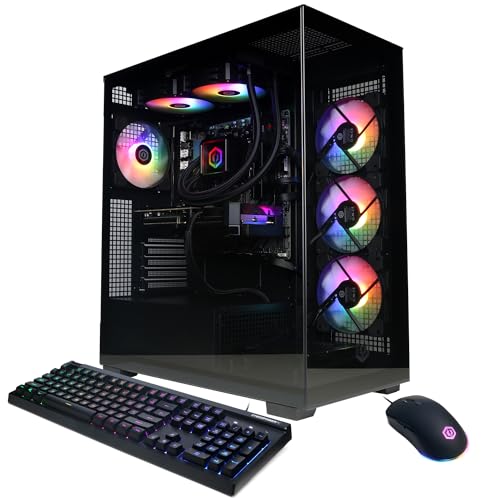


As an Amazon Associate we earn from qualifying purchases at no extra cost to you.
Prebuilt versus custom build at a glance
| Factor | Prebuilt gaming PC | Self-built PC |
|---|---|---|
| Cost at entry level | Often close to parts cost, sometimes lower | Usually small savings if parts are on sale |
| Cost at high end | Premium of roughly 10 to 25 percent over parts | Larger savings and more control |
| Time | Plug in and play | Several hours for a first-time builder |
| Warranty | One point of contact for the whole system | Separate warranty per part; you diagnose faults |
| Component choice | Fixed by the seller | Any parts you like |
| Upgrade path | Depends on board and PSU | You design for upgrades |
| Software | May include trial software | Clean Windows install |
| Risk | Hidden low-quality parts | Assembly mistakes and compatibility errors |
Sources on the cost gap vary, and some come from vendors with a commercial interest, so treat any exact percentage as a rough guide. The reliable pattern is that the premium grows as the system becomes more expensive, because a builder can choose a better case, cooler and power supply with the same budget.
Where prebuilts are genuinely good
Saved time and a single warranty
A prebuilt arrives assembled, with Windows installed and the parts burned in at the factory. If anything fails in the first year or two, one company handles the repair. For someone who does not want to troubleshoot, that single point of contact is worth real money. Better integrators also offer longer parts and labor coverage and customer support in your region.
Bulk component pricing
Integrators buy graphics cards, memory and processors in large quantities. During periods of component shortages, this can mean a complete system costs about the same as the parts alone, especially at the lower end. Seasonal sales on prebuilts can also undercut buying the equivalent parts separately.
Convenience for non-builders
Parents buying a first gaming PC, students without tools or space, and professionals who need a working machine immediately all benefit from buying a complete system. Cable management, thermal paste, BIOS settings and memory profiles are done for you.
Where prebuilts go wrong
Proprietary parts
The biggest risk is the use of non-standard components. Some large-brand prebuilts, mostly mainstream desktop lines from big computer makers, use motherboards with unusual mounting holes or front-panel connectors, and power supplies with non-standard shapes or connectors. These systems cannot easily accept a regular ATX power supply, a normal case, or a better motherboard later. When the graphics card needs more power than the stock supply can deliver, the upgrade can force a replacement of the entire platform. Specialist brands such as iBUYPOWER, CyberPowerPC, Skytech, MSI and Corsair generally use standard ATX or micro-ATX boards, standard power supplies and standard cases, which keeps the system upgradeable.
Unnamed or weak power supplies
Product pages often list only the wattage of the power supply, such as 650 W or 750 W, without a brand or model. The power supply is the part most likely to damage other components if it fails, so an unnamed unit is a red flag. Look for a named manufacturer, an efficiency rating of 80 Plus Bronze at minimum (Gold is better), and enough wattage for the graphics card with headroom. A modern graphics card needs a unit with the correct 12V-2×6 or PCIe connectors without adapters.
Cooling that barely keeps up
To reduce cost, some systems pair a powerful processor with a small cooler or a cheap all-in-one liquid cooler. The result is high temperatures, loud fans and lower boost clocks. Look for a processor cooler named in the specifications, a case with front intake fans and an exhaust fan at the rear, and a mesh front panel rather than a solid glass one for airflow.
Memory configuration and speed
Many prebuilts ship with a single memory module in a motherboard with two channels, which halves memory bandwidth and noticeably hurts frame rates in some games, especially on integrated and AMD processors. Check that the specifications list two modules, such as 2 x 16 GB, and that the speed is the rated one (DDR5-6000 is a sensible target for current AMD Ryzen systems) with the profile enabled.
Small or slow storage
Entry-level systems may use a QLC NVMe drive with 500 GB or 1 TB. This is not a problem for the first year, but modern games can exceed 100 GB each, so check that there is a free M.2 slot for adding more storage.
Unbalanced specifications
A common pattern is a high-end graphics card paired with a weak processor, or the reverse, designed to make the listing look impressive. A balanced system for 1440p gaming typically pairs a mid-range to upper mid-range graphics card with a six to eight-core modern processor, 32 GB of memory and a 1 TB fast drive.
Prebuilt brand categories and what to expect
| Category | Examples | Typical strengths | Watch out for |
|---|---|---|---|
| Value specialists | iBUYPOWER, CyberPowerPC, Skytech, Yeyian | Standard parts, broad configurations, competitive cost | Variable PSU and case quality; check the exact configuration |
| Major PC brands | Alienware, HP Omen, Lenovo Legion, Acer Predator, ASUS ROG | Strong support networks, polished design | Proprietary parts on some lines, higher premium |
| Component makers | MSI, Corsair, NZXT | Use the maker’s own quality parts | Cost can be higher than a value specialist |
| Boutique builders | Origin PC, Maingear, Falcon Northwest, Digital Storm | Premium parts, tuning, careful assembly, long warranties | Substantial premium over parts |
Names are examples of well-known sellers, not recommendations of a specific model; configurations change often, so judge the exact specification list.
A worked comparison: is the premium worth it?
Suppose a prebuilt costs 15 percent more than the sum of its parts bought separately. If the parts add up to 1,000 units of your currency, the premium is 150. What does that buy?
- About three to five hours of assembly and setup time. At even a modest hourly value for your time, that offsets part of the premium.
- A warranty on the whole system, usually one to three years.
- Pre-installed operating system and drivers.
What it does not buy is guaranteed part quality. If the prebuilt uses a cheaper power supply and case than you would have selected, the premium becomes harder to justify. At a higher spending level, say 3,000 units of parts, a 15 percent premium is 450, and you could spend that on a better power supply, cooler and case if you built it yourself. This is why the advice commonly given is to consider prebuilts at the entry and mid-range level and to lean toward building as the budget rises.
The prebuilt buying checklist
Work through these items on the product page before you commit. If the page does not list a detail, treat it as unknown and ask the seller.
- Power supply: brand, model, wattage and efficiency rating listed. At least 80 Plus Bronze; Gold is better for high-end cards.
- Motherboard: chipset and form factor named, and it should be a standard ATX or micro-ATX board from a known maker.
- Processor cooler: named model, with a tower air cooler or a 240 mm or larger liquid cooler for higher-end chips.
- Memory: two modules, DDR5 for current platforms, 32 GB for new builds, with the rated speed listed.
- Graphics card: exact model, not just the GPU family, and ideally with 12 or 16 GB of VRAM for 1440p gaming.
- Storage: at least 1 TB NVMe and a free M.2 slot.
- Case airflow: mesh front panel and at least three fans.
- Warranty and returns: at least one year of parts and labor, a clear return window and, ideally, a seller that offers standard-part replacement.
- Operating system: a licensed copy of Windows included.
- Reviews of the seller: read independent reviews of the integrator, focusing on shipping damage and support responsiveness.
Power supply sizing by graphics card tier
The power supply is the single most important hidden part, so it helps to know what a sensible unit looks like for each class of system. The wattages below are practical minimums for a typical gaming build with a modern six to eight-core processor; the graphics card maker’s own recommendation always takes priority.
| Graphics card class | Example models | Typical board power | Sensible PSU |
|---|---|---|---|
| Entry 1080p | RTX 5050, RX 9060 class | 130 to 170 W | 550 W to 650 W, Bronze or better |
| Mid-range 1080p/1440p | RTX 5060 Ti, RX 9060 XT | 180 to 190 W | 650 W to 750 W |
| Upper mid-range 1440p | RTX 5070, RX 9070 | 220 to 250 W | 750 W |
| High-end 1440p/4K | RTX 5070 Ti, RX 9070 XT, RTX 5080 | 300 to 360 W | 850 W, Gold preferred |
| Enthusiast 4K | RTX 5090 | 575 W | 1000 W or more, ATX 3.1 |
If a listing pairs a high-end card with a power supply at the low end of this table, the integrator is leaving no safety margin, and the system may shut down under heavy load. Prefer a unit with at least 100 W of spare capacity, and look for a native 12V-2×6 cable on cards that use it.
How to read the warranty before you buy
Warranty text is where good and bad prebuilts diverge. Read these specifics rather than the headline number:
- Parts versus labor: a three-year parts warranty with only ninety days of labor means you may pay for repair work or shipping after the first quarter.
- Who pays shipping: some sellers cover both directions for the first year, others only one.
- Turnaround time: look for independent reports on how long repairs take. A system that is away for several weeks is a heavy price for a warranty claim.
- Component manufacturer coverage: in many cases, individual parts such as the graphics card carry their own warranty, which you can claim directly if the integrator is slow.
- Upgrade policy: confirm in writing whether opening the case or replacing parts affects coverage.
What to do in the first week after delivery
A prebuilt is not finished when the box arrives. A short checklist helps you catch faults while the return window is open.
- Inspect for shipping damage. Check that the graphics card is seated, the side panel is intact and no loose parts rattle inside the case. Photograph any damage before contacting the seller.
- Remove packing materials. Many systems ship with foam or brackets that hold the graphics card in place, which must be removed before first use.
- Update Windows and drivers. Install current graphics drivers directly from the GPU maker, and chipset drivers from the motherboard or processor vendor.
- Verify the specifications. A free utility such as HWiNFO or CPU-Z shows the real processor, memory speed, memory channel configuration and graphics card model. Compare them to your order confirmation.
- Enable the memory profile. In the BIOS, turn on EXPO or XMP, because memory sometimes runs at a low default speed from the factory.
- Run a stress check. Play a demanding game for an hour while watching temperatures. Processor temperatures consistently near the thermal limit or frequent crashes are reasons to start a return or support request.
- Listen to it. Coil whine, grinding fans and pump noise show up in the first days and are covered in the return period.
Prebuilt versus building if you have never built a PC
First-timers often overestimate the difficulty of building. Modern parts use keyed connectors, and detailed guides exist for every step. Still, a first build involves compatibility checks, BIOS updates and a risk of damaging a component through a mistake such as bending processor pins or overtightening a cooler. If you are comfortable following instructions and have a few spare hours, building is a rewarding project that teaches you how to maintain and upgrade the machine. If you would rather spend that time playing, a carefully chosen prebuilt is a perfectly respectable decision. A middle path is to buy a prebuilt that uses standard parts and replace weak components, such as the power supply or the memory kit, later.
Upgradability: the long-term test
The real test of a prebuilt comes two or three years later. Check whether the system uses a socket platform with a future, such as AM5 for AMD, and whether the motherboard has spare memory slots and a second M.2 slot. A standard ATX power supply with a few spare connectors makes a future graphics card swap easy. If the system uses a dated socket or proprietary parts, the whole machine will need replacing sooner than a custom build.
Common mistakes buyers make
- Focusing only on the graphics card: the supporting parts determine reliability and noise.
- Buying on the wattage number alone: a poor 850 W unit is worse than a good 650 W unit.
- Ignoring return policies: test the system thoroughly in the first weeks and report faults immediately.
- Assuming gaming laptops and desktops are equivalent: this guide covers desktops, which are generally more powerful and easier to upgrade.
- Paying for unnecessary extras: RGB, glass panels and branded software add cost without improving performance.
Final verdict
Prebuilt gaming PCs are a good option for buyers who value convenience and a warranty, especially in the entry and mid-range tiers where integrator pricing is competitive. They are a worse deal for enthusiasts who care about quiet operation, long-term upgrades and the highest spending levels, where building usually provides better parts for the same money. The deciding factor is not whether a system is prebuilt, but whether it uses standard, named, quality components and comes with strong support.
Frequently Asked Questions
Are prebuilt gaming PCs a rip-off?
Not necessarily. Premiums over parts cost range from small at the entry level to substantial at the high end. A well-specified system from a reputable integrator can be a fair deal, while a prebuilt with hidden low-quality parts is not.
Are prebuilt PCs less reliable than custom builds?
Reliability depends on the parts and assembly quality, not on whether the PC was built by a company or an individual. Poor power supplies and thermal design cause the majority of problems. Prebuilts from good integrators go through factory testing, which catches some faults before delivery.
Can I upgrade a prebuilt gaming PC?
Often yes, provided the system uses a standard motherboard, case and power supply. Adding memory and storage is usually straightforward. Upgrading the graphics card may require a larger power supply, so check the wattage and connectors first.
What is the biggest red flag in a prebuilt listing?
An unnamed power supply, listed only as a wattage, is the most common warning sign. Other red flags include a single memory module, a vague motherboard description and a processor cooler that is not named.
Is it cheaper to build or buy a gaming PC in 2026?
At the budget level, prebuilts are often close to parts cost, so buying can make sense. As the budget grows, building typically saves more because you avoid the integrator’s markup and can choose better supporting parts.
Does buying a prebuilt void the warranty if I upgrade it?
Policies vary. Many integrators allow standard upgrades such as adding memory or storage without voiding coverage, but some use warranty stickers on screws or restrict modifications. Read the warranty terms before opening the case.










Write Your Review
No reviews yet. Be the first to share your experience!