
Our Short List of 3
All 4 Picks at a Glance
| Product | Specs | Action |
|---|---|---|
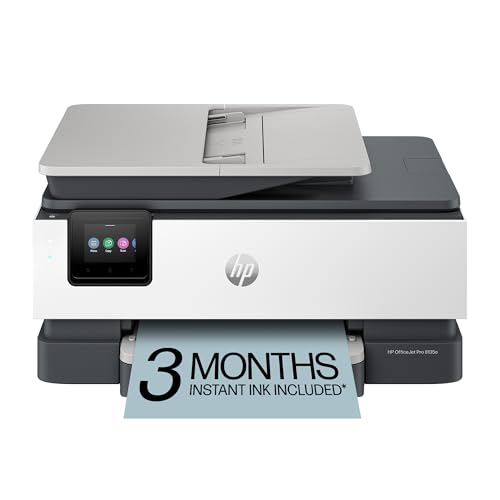 HP OfficeJet Pro 8135e Wireless All-in-One | Check price on Amazon | |
 Brother MFC-J4335DW INKvestment Tank All-in-One | Check price on Amazon | |
 Epson EcoTank ET-2850 Wireless Supertank Printer, Black | Check price on Amazon | |
 Canon PIXMA TR4720 All-in-One Wireless Printer | Check price on Amazon |
Key takeaways
- Best network printers for home compared: Wi-Fi and Ethernet all-in-one printers for shared family printing, scanning and copying, with buying guidance.
The best network printers for home are the printers that every device in the house can reach without a cable. A network printer connects over Wi-Fi or Ethernet, so a laptop in the study, a phone in the kitchen and a tablet in the living room can all print to the same machine. That shared access is the point of this guide: a printer that only works when plugged into one computer is not a network printer, however good its print quality may be.
A home network printer also has to fit a home. It sits on a shelf or a desk, runs on a household wireless network, and gets used in bursts: school homework in the evening, boarding passes and forms at the weekend, photos and craft projects now and then, and a steady stream of everyday documents. It should wake quickly, print reliably from a phone, and keep ink or toner costs predictable. The four printers below all connect over a home network, all print, scan and copy, and all suit a household rather than an office. They differ in how they handle ink, how much they print before needing attention, and which households they suit best.
Read the buying criteria first. Connection type, ink system and mobile printing matter more than raw print speed for home use, and a printer that is cheap to buy can be expensive to run if its cartridges are small. The comparison table at the end lines the four picks up side by side so you can see the trade-offs at a glance.
How to Choose
Connection: Wi-Fi, Ethernet and Wi-Fi Direct
A network printer should connect to your router over Wi-Fi or Ethernet, and ideally both. Wi-Fi keeps the printer free of cables and lets it sit anywhere with a wireless signal; Ethernet gives a steadier connection in a room with weak Wi-Fi, and suits a printer that sits next to the router. Wi-Fi Direct lets a phone or laptop print to the printer without joining the home network, which is handy for guests. Check that the printer supports the connection you plan to use, and place it where the wireless signal is strong enough for reliable printing.
Print, scan, copy and fax
Most home all-in-one printers cover printing, scanning and copying, and some add fax. An automatic document feeder, or ADF, feeds multi-page documents through the scanner without manual page changes, which matters for school forms, tax paperwork and anything longer than a page or two. Automatic two-sided printing, or duplex, saves paper and suits households that print documents regularly. If you only print the occasional page, a simpler machine without an ADF or fax may be enough, but the convenience of duplex printing is worth having in most homes.
Ink system: cartridges, tanks or laser toner
How a printer holds its ink shapes its running costs. Cartridge printers use small replaceable cartridges and suit light, occasional printing. Tank printers use refillable ink bottles that last far longer and suit households that print often, especially in colour. Laser printers use toner, which does not dry out between uses and suits households that print mostly black-and-white documents with long gaps between jobs. Match the system to your volume: a cartridge printer that prints a few pages a month is fine, while a household that prints daily will spend less per page with a tank or a laser machine.
Mobile printing and apps
Home printing now happens from phones and tablets as often as from computers. Check that the printer works with the mobile printing system on your devices, and that the maker’s app lets you print photos and documents, check ink levels and scan to your phone. Voice assistant support lets you print from a smart speaker, which is a convenience rather than a necessity. Test the app before you commit to a printer if mobile printing will be your main way of using it.
Print quality and speed
For documents, look for crisp black text and clean colour on plain paper. For photos, look for a printer that handles glossy photo paper and prints borderless images if you print pictures at home. Print speed matters less in a home than in an office, but a slow printer is noticeable when printing a long school project or a multi-page document. A speed of around ten pages per minute in black is adequate for most households; faster speeds help only if you regularly print long documents.
Size, noise and running costs
Measure the space before you buy, including room for the paper tray and the output tray when extended. A printer that is too large for its shelf will live on the floor or in a cupboard, where it is less likely to be used. Noise matters in a home: a printer that runs in a bedroom or a study should be quiet enough not to disturb others. Finally, check the cost of replacement ink or toner and how many pages a cartridge or bottle covers, since that is the real cost of owning the printer over a year or two.
Top Picks
HP OfficeJet Pro 8135e Wireless All-in-One
View the HP OfficeJet Pro 8135e on Amazon
The HP OfficeJet Pro 8135e is a wireless all-in-one inkjet that prints, scans, copies and faxes, with automatic two-sided printing and a 35-sheet automatic document feeder. It connects over Wi-Fi with self-healing wireless, prints from phones and tablets through the HP app, and has a colour touchscreen for copying and scanning without a computer. It suits a household that prints documents regularly and wants a machine that handles multi-page jobs without manual page feeding. The included trial of HP Instant Ink covers the first months of printing, after which the subscription can be continued or cancelled.
Who it is for: households that print documents most days and want an ADF, duplex printing and mobile printing in one machine. Caveats: it is a cartridge inkjet, so households that print in high volume should compare its per-page ink costs with the tank printer below. The printer is sized for a desk or a shelf, so measure the space and leave room for the output tray.
Brother MFC-J4335DW INKvestment Tank All-in-One
View the Brother MFC-J4335DW on Amazon
The Brother MFC-J4335DW is a wireless all-in-one inkjet with a high-capacity ink tank system, printing, scanning, copying and faxing with automatic two-sided printing. Its ink tank design includes a generous supply of ink in the box, which suits households that print in colour often and want to avoid frequent cartridge changes. It connects over Wi-Fi and Ethernet, prints from phones and tablets, and works with voice assistants. The compact body fits a home office desk or a shared family shelf, and the machine handles everyday documents, schoolwork and photos on plain paper.
Who it is for: households that print in colour regularly and want fewer ink changes and a longer interval between refills. Caveats: the model has been superseded in Brother’s line, so confirm the exact model number on the live listing and check that the included ink and the compatible cartridges match the listing. Ink tank printers still need occasional use to keep the print heads clear, so very light users may prefer a laser machine.
Epson EcoTank ET-2850 Wireless Supertank Printer, Black
View the Epson EcoTank ET-2850 on Amazon
The Epson EcoTank ET-2850 is a cartridge-free supertank printer that prints, scans and copies, with automatic two-sided printing and wireless connectivity. Instead of cartridges it uses refillable ink tanks filled from bottles, which suits households that print a lot and want to keep the cost per page low. It handles everyday documents and photos, prints from phones and tablets, and has a small colour display for copying and scanning without a computer. The black model is the standard home version, and a white version is sold under a separate listing.
Who it is for: households with heavy printing volume, especially families with school-age children who print homework, projects and photos through the week. Caveats: tank printers are larger than cartridge machines and the ink bottles need careful handling when refilling, so allow space and keep the bottles out of reach of small children. Confirm the colour and the included ink bottles on the live listing before ordering.
Canon PIXMA TR4720 All-in-One Wireless Printer
View the Canon PIXMA TR4720 on Amazon
The Canon PIXMA TR4720 is a compact wireless all-in-one that prints, scans, copies and faxes, with an automatic document feeder, mobile printing and automatic two-sided printing. It is the smallest printer in this guide, which suits a household that needs a network printer but has limited space on a desk or shelf. It connects over Wi-Fi, prints from phones and tablets, and handles everyday documents and photos on plain and photo paper. Its standard ink cartridges suit light to moderate printing, and its size makes it easy to place where the household actually uses it.
Who it is for: households with limited space and light to moderate printing needs, especially those who want fax and an ADF in a compact machine. Caveats: the small cartridges suit occasional printing rather than heavy daily use, so households that print in volume should look at the Brother or Epson tank picks instead. The same model is sold under more than one Amazon listing, so confirm the model number and the included cartridges on the live listing.
Comparison Table
| Printer | Connection | Functions | Ink system | Duplex | ADF |
|---|---|---|---|---|---|
| HP OfficeJet Pro 8135e | Wi-Fi, Wi-Fi Direct | Print, scan, copy, fax | Cartridge inkjet | Yes | 35-sheet |
| Brother MFC-J4335DW | Wi-Fi, Ethernet | Print, scan, copy, fax | Ink tank | Yes | Yes |
| Epson EcoTank ET-2850 | Wi-Fi, Wi-Fi Direct | Print, scan, copy | Refillable tank | Yes | No |
| Canon PIXMA TR4720 | Wi-Fi | Print, scan, copy, fax | Cartridge inkjet | Yes | Yes |
Which One Is Right for You?
Choose the HP OfficeJet Pro 8135e if your household prints documents most days and you want an ADF, duplex printing and a touchscreen in one machine. It is the most complete document printer in this guide for regular home use.
Choose the Brother MFC-J4335DW if you print in colour often and want to change ink less frequently. Its tank system suits households that print schoolwork, photos and everyday documents in volume, and its Ethernet port suits a printer that sits near the router.
Choose the Epson EcoTank ET-2850 if printing volume is high and keeping the cost per page low matters most. Its refillable tanks suit families that print through the week, though it needs more space than the Canon and lacks a document feeder.
Choose the Canon PIXMA TR4720 if space is tight and printing is light to moderate. It is the compact pick, with fax and an ADF in a small body, and it suits a household that needs a network printer on a crowded desk or shelf.
Frequently Asked Questions
What makes a printer a network printer?
A network printer connects to your home network over Wi-Fi or Ethernet, so any device on that network can print to it. A printer that only connects by USB cable to one computer is not a network printer. Wi-Fi Direct is an extra feature that lets a device print to the printer without joining the network, which is useful for guests.
Do I need Ethernet, or is Wi-Fi enough?
Wi-Fi is enough for most homes, provided the printer sits where the wireless signal is strong. Ethernet suits a printer that sits next to the router or in a room with weak Wi-Fi, and it gives a steadier connection for large print jobs. The Brother pick in this guide has both, so it covers either setup.
Are tank printers better than cartridge printers for home use?
Tank printers suit households that print a lot, because the ink bottles last far longer than cartridges and the cost per page is lower. Cartridge printers suit light, occasional printing, where the convenience of swapping a cartridge outweighs the higher cost per page. Very light users who print mostly black-and-white documents may prefer a laser printer, since toner does not dry out between uses.
Can I print from my phone to a network printer?
Yes. All four printers in this guide print from phones and tablets over Wi-Fi, through the maker’s app or the phone’s built-in printing system. Set the printer up on the same wireless network as your phone, install the maker’s app if you want scanning and ink checks, and print directly from a document or photo.
Disclosure: As an Amazon Associate, we may earn from qualifying purchases.
More from Amazon
Programs that pair well with the guide above. Offers and eligibility are set by Amazon and may change.
Free shipping on eligible items, Prime Video and more. Eligible new members can start with a free trial.
Start a Prime free trialAd-free music streaming. Eligible new subscribers can start with a free trial.
Try Music Unlimited freeA Prime membership for ages 18-24 with a trial period. Eligibility is set by Amazon.
See Prime for Young AdultsAudiobooks and podcasts to listen to on the go. Eligible new members can start with a free trial.
Try Audible freeAs an Amazon Associate we earn from qualifying purchases.









Write Your Review
No reviews yet. Be the first to share your experience!