
Our Short List of 3

- Best for: Address labels, file labels and small product labels from a single desk.
- Direct thermal printing in black and red
- Labels up to around 2.4 inches wide
- Automatic cutter
- USB connection
- Best for: A busy desk that prints many kinds of label every day.
- Direct thermal printing, no ink or toner
- More than sixty label layouts
- Prints address, shipping, barcode, file and name badge labels
- USB connection

- Best for: Four-by-six shipping labels printed in batches by online sellers and small businesses.
- Direct thermal printing for four-by-six shipping labels
- Works with any brand of direct thermal label stock
- USB connection for Windows and Mac
- Fanfold and roll label support
All 4 Picks at a Glance
| Product | Specs | Action |
|---|---|---|
| Brother QL-800 |
| Check price on Amazon |
| DYMO LabelWriter 450 Turbo |
| Check price on Amazon |
| Rollo USB Shipping Label Printer |
| Check price on Amazon |
 Brother QL-1110NWB |
| Check price on Amazon |
Key takeaways
- Best printers for printing labels: thermal label printers for shipping, address, barcode and product labels, compared for home and small business use.
The best printers for printing labels are the ones that match the labels you actually print, day after day, rather than the ones with the longest feature list. A printer that turns out crisp shipping labels at volume is a different machine from one that prints small colourful product labels, and a printer built for address labels on envelopes is different again. This guide covers the main kinds of label printer sold for home and small business use, explains how to tell them apart, and compares four machines that cover the most common jobs: fast desktop shipping labels, wide-format labels, and everyday address and filing labels. Every pick below is a dedicated label printer, so none of them asks you to feed label sheets through a standard office printer and hope the sheets do not jam.
How to Choose
Print method: thermal or inkjet
Most dedicated label printers use direct thermal printing, which needs no ink or toner and prints black text and barcodes onto heat-sensitive label stock. Thermal is the right choice for shipping labels, address labels, barcodes and filing, because the running cost stays low and there is nothing to dry out between uses. Inkjet label printing suits colour product labels and small runs where colour matters more than speed, but it needs ink and the right coated label stock. Decide which kind of label you print most often before looking at anything else, because the print method decides the running cost and the label stock you will buy for years.
Label width and label types
Label printers are built around a maximum label width, and that width decides what you can print. A printer that takes labels up to around two and a half inches wide handles address labels, name badges, file labels and small product labels, while a four-inch-wide machine handles the standard four-by-six shipping label that carriers expect. Wide-format machines also handle larger barcode labels, postage labels and warehouse labels. Check the label widths you already use, or the label size your carrier and your marketplace require, and choose a printer that covers the largest label you print regularly rather than the smallest.
Speed and daily volume
Label printers are rated by how many labels they print per minute, and the number matters once volume grows. A home user printing a handful of address labels a week does not need the fastest machine, while a small business shipping dozens of parcels a day will feel every second of a slow printer. Look at the print speed alongside the duty the machine is built for, and remember that a printer with an automatic cutter saves time on every label when you print in batches, because you do not have to tear each label off by hand.
Connectivity
A label printer that only connects by USB works well on a single desk, but a shared workspace usually needs more. Wi-Fi and Ethernet let several computers and phones send labels to one printer, and Bluetooth lets a phone or tablet print a label without a computer nearby. If the printer will sit in a packing area away from your desk, wireless connectivity is worth having, and if several people share it, a network connection keeps the queue simple. Check that the connection you need is built in rather than an add-on, and that the printer works with the operating system on every computer that will use it.
Software and label design
The software that comes with a label printer decides how pleasant it is to use. Good label software offers ready-made templates for address labels, shipping labels, barcodes and name badges, lets you import addresses from a spreadsheet, and keeps your label designs saved for the next run. Some printers also work with the label tools built into marketplaces and carrier sites, so a shipping label can go straight from an order to the printer. Before buying, check that the software runs on your system and supports the label sizes you use, because a printer with awkward software will sit unused whatever its hardware can do.
Running costs and label stock
A label printer is only as economical as its label stock. Thermal printers use rolls or fanfold stacks of labels, and the cost per label depends on the brand and the size you buy. Some printers accept third-party label rolls, which keeps the cost down, while others work best with the maker’s own rolls. Check the cost of the label rolls you will use most, how many labels each roll holds, and whether the printer wastes a label or two at the start of each run. A machine that looks economical on its own can become expensive if its label stock costs more than the alternatives.
Top Picks
Brother QL-800
- Best for: Address labels, file labels and small product labels from a single desk.
- Direct thermal printing in black and red
- Labels up to around 2.4 inches wide
- Automatic cutter
- USB connection
Address labels, file labels and small product labels from a single desk.
It prints in black and red only, so it cannot produce full-colour product labels, and it connects by USB, so it is not a shared network printer.
The Brother QL-800 is a compact desktop label printer built for address labels, file labels, name badges and small product labels, and it is the pick for a home office or a small desk where space is tight. It prints in black and red on Brother DK rolls, which covers the two-colour labels that many small businesses use for branding and for highlighting, and it cuts each label automatically as it prints, so a batch of address labels comes out ready to stick. The printer connects by USB, works with Windows and Mac, and comes with label design software that includes templates for the common label sizes. It handles labels up to around two and a half inches wide, which covers address labels and most small product labels, and it prints quickly enough for daily use without feeling slow. The QL-800 suits anyone who prints address labels, filing labels and small product labels from one desk and wants a machine that is ready to use without a network setup.
Watch out for: It prints in black and red only, so it cannot produce full-colour product labels, and it connects by USB, so it is not a shared network printer.
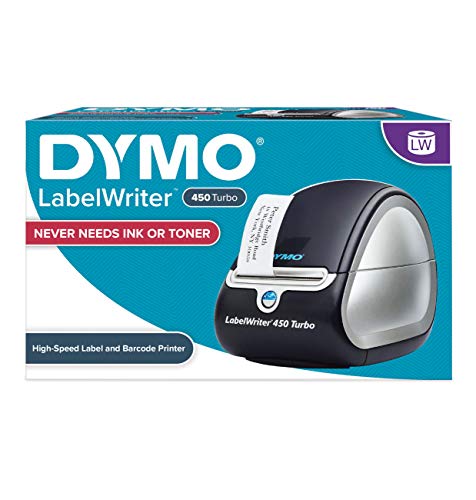
DYMO LabelWriter 450 Turbo
- Best for: A busy desk that prints many kinds of label every day.
- Direct thermal printing, no ink or toner
- More than sixty label layouts
- Prints address, shipping, barcode, file and name badge labels
- USB connection
A busy desk that prints many kinds of label every day.
It connects by USB only, so sharing it across a room needs a shared computer or a print server, and it takes DYMO label rolls, so check the cost of the roll sizes you use most.
The DYMO LabelWriter 450 Turbo is a long-running desktop label printer for address labels, shipping labels, barcodes, file labels and name badges, and it is the pick for a busy desk where labels come in many sizes. It prints direct thermal labels from rolls, needs no ink or toner, and handles more than sixty label layouts, so one machine covers address labels, postage labels, barcode labels and filing labels without changing hardware. The printer connects by USB, works with Windows and Mac, and its software can print addresses straight from common contact lists and can print postage labels with the companion postage software. It prints quickly for its size, which matters when a batch of shipping labels has to go out before a carrier collection, and its small footprint fits on a desk that already holds a computer and a packing area. The 450 Turbo suits a home business or a small office that prints several kinds of label every day and wants one machine to handle them all.
Watch out for: It connects by USB only, so sharing it across a room needs a shared computer or a print server, and it takes DYMO label rolls, so check the cost of the roll sizes you use most.
Rollo USB Shipping Label Printer
- Best for: Four-by-six shipping labels printed in batches by online sellers and small businesses.
- Direct thermal printing for four-by-six shipping labels
- Works with any brand of direct thermal label stock
- USB connection for Windows and Mac
- Fanfold and roll label support
Four-by-six shipping labels printed in batches by online sellers and small businesses.
It prints shipping labels and similar large labels, so it is not the machine for small address labels or name badges, and it connects by USB, so it sits beside one computer.
The Rollo USB Shipping Label Printer is a commercial-grade thermal printer built for four-by-six shipping labels, and it is the pick for anyone who ships parcels regularly. It prints four-by-six labels at high speed, works with any brand of direct thermal label roll, and connects by USB to Windows and Mac computers, which keeps the setup simple and the running cost low because you are not tied to one label supplier. The printer handles fanfold and roll labels, prints barcodes and text sharply at 203 dots per inch, and is widely used by online sellers who print shipping labels from marketplace and carrier sites. Its solid build suits a packing bench where it will be used every day, and its ability to use any brand of label stock means the cost per label stays down as volume grows. The Rollo suits a small business, an online seller, or a home shipper who prints four-by-six shipping labels in batches and wants a fast, simple machine with no ink to replace.
Watch out for: It prints shipping labels and similar large labels, so it is not the machine for small address labels or name badges, and it connects by USB, so it sits beside one computer.
Brother QL-1110NWB
- Best for: Wide shipping and barcode labels shared across several computers in a packing area.
- Direct thermal printing up to four inches wide
- 300 dots per inch print resolution
- USB, Wi-Fi, Ethernet and Bluetooth
- Automatic cutter
Wide shipping and barcode labels shared across several computers in a packing area.
It is larger and heavier than the compact desktop printers in this guide, so it needs a proper place on a packing bench, and it uses Brother DK rolls, so check the cost of the wide rolls you will use.
The Brother QL-1110NWB is a wide-format label printer for shipping labels, barcode labels, postage labels and large product labels, and it is the pick for a workspace that needs large labels and shared access. It prints labels up to four inches wide, which covers four-by-six shipping labels and wide barcode labels, and it prints at 300 dots per inch, so barcodes scan reliably and small text stays sharp. The printer connects by USB, Wi-Fi, Ethernet and Bluetooth, so it can sit on a network and serve several computers and phones, and it works with Windows, Mac, and mobile devices. It has an automatic cutter, prints in black on Brother DK rolls, and comes with label design software that handles barcodes, postage and address layouts. The QL-1110NWB suits a packing area, a warehouse desk or a small business where several people print large labels and the printer needs to be reachable from more than one computer.
Watch out for: It is larger and heavier than the compact desktop printers in this guide, so it needs a proper place on a packing bench, and it uses Brother DK rolls, so check the cost of the wide rolls you will use.
Comparison Table
| Printer | Print method | Max label width | Connectivity | Cutter | Best for |
|---|---|---|---|---|---|
| Brother QL-800 | Direct thermal, black and red | Around 2.4 inches | USB | Automatic | Address and small product labels |
| DYMO LabelWriter 450 Turbo | Direct thermal | Standard label rolls | USB | Manual feed | Many label kinds from one desk |
| Rollo USB Shipping Label Printer | Direct thermal | Four-by-six shipping labels | USB | Manual feed | High-volume shipping labels |
| Brother QL-1110NWB | Direct thermal | Four inches | USB, Wi-Fi, Ethernet, Bluetooth | Automatic | Wide labels shared on a network |
Which One Is Right for You?
Pick the Brother QL-800 if your labels are mostly address labels, file labels and small product labels printed from one desk, and you want a compact machine that cuts each label for you. Its black and red printing covers the two-colour labels many small businesses use, and its size means it fits where a larger printer would not.
Pick the DYMO LabelWriter 450 Turbo if you print many kinds of label from the same desk and want one machine to handle address labels, postage labels, barcodes and filing labels. Its wide range of label layouts and its long history on office desks make it the flexible choice for a home business that does a bit of everything.
Pick the Rollo USB Shipping Label Printer if shipping labels are your main job and you print four-by-six labels in batches. Its speed and its ability to use any brand of label stock keep the cost per label down, and its simple USB setup suits a packing bench beside one computer.
Pick the Brother QL-1110NWB if you need labels up to four inches wide and several people need to reach the printer. Its Wi-Fi and Ethernet connections and its sharp 300 dots per inch printing make it the right machine for a shared packing area where barcode labels have to scan first time.
Frequently Asked Questions
Do label printers need ink or toner?
Direct thermal label printers need neither ink nor toner, because they print by heating heat-sensitive label stock. That is why thermal printers are popular for shipping labels and address labels: there is nothing to dry out if the printer sits unused for weeks. Inkjet label printers do need ink, and they suit colour product labels where thermal printing cannot produce the colours you need.
What size label do I need for shipping?
Most carriers and marketplaces use a four-by-six-inch shipping label, and a printer that handles labels up to four inches wide covers it. Check the label size your carrier asks for before buying, because a printer built for address labels cannot print a four-by-six shipping label, and a shipping label printer is the wrong machine for small address labels.
Can I use third-party label rolls?
It depends on the printer. The Rollo printer in this guide works with any brand of direct thermal label stock, while the Brother and DYMO printers work best with their own label rolls. Check the label cost for the sizes you use most before buying, because label stock is the running cost you will pay for the life of the printer.
Do I need Wi-Fi on a label printer?
You need Wi-Fi or Ethernet if several computers or phones will share the printer, or if the printer will sit away from your desk. A USB-only printer works well beside one computer, and it is simpler to set up. Choose the connection that matches where the printer will sit and how many people will use it.
Disclosure: As an Amazon Associate, we may earn from qualifying purchases.
More from Amazon
Programs that pair well with the guide above. Offers and eligibility are set by Amazon and may change.
Free shipping on eligible items, Prime Video and more. Eligible new members can start with a free trial.
Start a Prime free trialAd-free music streaming. Eligible new subscribers can start with a free trial.
Try Music Unlimited freeA Prime membership for ages 18-24 with a trial period. Eligibility is set by Amazon.
See Prime for Young AdultsAudiobooks and podcasts to listen to on the go. Eligible new members can start with a free trial.
Try Audible freeAs an Amazon Associate we earn from qualifying purchases.








Write Your Review
No reviews yet. Be the first to share your experience!