

Our Short List of 3
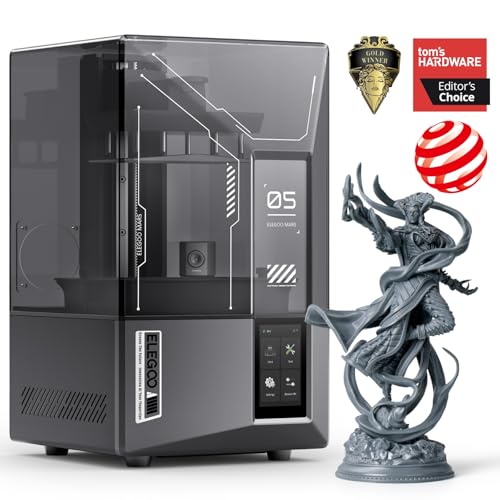
- Best for: A first resin printer for miniatures and small detailed parts.
- 7-inch 9K mono LCD, 8520 x 4320 resolution
- Print speed up to 150mm/h
- Build volume 153.36 x 77.76 x 165 mm
- Smart mechanical sensor and AI camera

- Best for: Large, highly detailed display models and busts where surface finish matters most.
- 10-inch 16K mono LCD
- Smart tank heating at 30°C
- Print speed up to 150mm/h
- Build volume 8.33 x 4.66 x 8.66 inches

- Best for: Fast, large-format printing in a workshop that gets cold.
- 10.1-inch 14K mono LCD
- Print speed up to 170mm/h
- Resin heating with dynamic temperature control
- COB LighTurbo 3.0 light source
All 5 Picks at a Glance
| Product | Specs | Action |
|---|---|---|
| ELEGOO Mars 5 Ultra |
| Check price on Amazon |
| ELEGOO Saturn 4 Ultra 16K |
| Check price on Amazon |
| ANYCUBIC Photon Mono M7 Pro |
| Check price on Amazon |
 ANYCUBIC Photon Mono 4 Ultra |
| Check price on Amazon |
 ELEGOO Saturn 4 12K |
| Check price on Amazon |
Key takeaways
- Compare the 5 best SLA resin printers for miniatures, prototypes and detailed models, with build sizes, screen resolution and print speeds from Amazon listings.
Buying an SLA printer is really a decision about how much detail you need and how much resin handling you are willing to take on. A small, high-resolution machine turns out crisp miniatures and jewellery prototypes, while a larger printer takes on busts and multi-part props, and the two shapes rarely overlap. Resin also brings a workflow that filament printers do not have: gloves, ventilation, washing and curing, so the machine itself is only half of the purchase.
This guide is for miniature painters, tabletop gamers, jewellery makers and product designers who want smooth surfaces and fine detail that a filament printer cannot reach. The five printers below were picked from the names and specifications on their Amazon listings, covering a compact starter machine, two mid-size workhorses and two large-format options, all of them resin printers that cure liquid photopolymer with UV light.
Quick Picks
As an Amazon Associate we earn from qualifying purchases
| Product | Best for | Key spec from title |
|---|---|---|
| ELEGOO Mars 5 Ultra | First resin printer with guided setup | 7-inch 9K mono LCD, up to 150mm/h |
| ELEGOO Saturn 4 Ultra 16K | Largest detail for big display models | 10-inch 16K mono LCD, tank heating at 30°C |
| ANYCUBIC Photon Mono M7 Pro | Fast printing in a cold workshop | 10.1-inch 14K mono LCD, resin heating |
| ANYCUBIC Photon Mono 4 Ultra | Compact miniatures on a small desk | 7-inch 10K mono LCD, up to 120mm/h |
| ELEGOO Saturn 4 12K | Big parts without the flagship screen | 10-inch 12K mono LCD, 218.88 x 122.88 x 220 mm build |
How to Choose
Build volume decides what fits on the plate
A compact resin printer with a build around 153 x 77 x 165 mm handles one miniature or a few small parts at a time, which suits painters who print single figures. Step up to a large-format machine near 219 x 123 x 220 mm and a helmet section or a bust base fits in one piece, though the printer takes far more desk space and drinks more resin per job. Measure the largest model you expect to print, then add room for supports and a raft, because a plate that is only just big enough forces awkward angles and extra seams.
Screen resolution sets the visible detail
The mono LCD is the heart of a modern SLA printer, and its resolution is usually quoted as 4K, 10K, 14K or 16K. What matters in practice is pixel size: a 17-micron pixel leaves finer layer lines on a 28 mm figure than a 24-micron pixel, and the difference shows up on faces, cloth folds and engraved text. A 16K screen on a large machine can still have bigger pixels than a 10K screen on a small one, so compare the pixel size rather than the headline number when detail is the reason you are buying resin.
Print speed is a resin and temperature question
Manufacturers quote top speeds with high-speed resin at a set layer height, and a cold room can slow a print or cause failures that the headline speed never mentions. A printer with a heated resin vat keeps the resin near its working temperature through winter, which matters more than a few extra millimetres per hour on paper. If your workspace drops below normal room temperature in winter, treat tank heating as a core feature rather than a luxury, and budget extra time for the first layers on any machine.
Resin handling and safety shape the daily routine
Liquid resin is a skin irritant, so every print ends with gloves, a wash step and a cure step before the part is safe to handle bare-handed. Look for a printer with a flip-up lid or an enclosed cover, an activated carbon filter for odour, and sensors that warn when the vat runs low or something sits on the screen. A wash and cure station is a separate purchase on most of these machines, and skipping it means washing parts by hand in solvent, which gets old fast once you print every week.
The 5 Best Options
ELEGOO Mars 5 Ultra
- Best for: A first resin printer for miniatures and small detailed parts.
- 7-inch 9K mono LCD, 8520 x 4320 resolution
- Print speed up to 150mm/h
- Build volume 153.36 x 77.76 x 165 mm
- Smart mechanical sensor and AI camera
A first resin printer for miniatures and small detailed parts.
The compact build volume means larger models must be split, and resin still needs gloves, ventilation and a separate wash and cure step.
The Mars 5 Ultra is the friendliest way into resin printing in this group, pairing a sharp 9K screen with automatic levelling and a camera that watches the print as it runs. Its compact build suits a single miniature or a small batch of parts, and the mechanical sensor flags foreign objects before they can crack the screen. WiFi cluster printing lets a second machine join later without rewiring the desk, which is a sensible path for anyone who starts small and grows into batch work.
ELEGOO Saturn 4 Ultra 16K
- Best for: Large, highly detailed display models and busts where surface finish matters most.
- 10-inch 16K mono LCD
- Smart tank heating at 30°C
- Print speed up to 150mm/h
- Build volume 8.33 x 4.66 x 8.66 inches
Large, highly detailed display models and busts where surface finish matters most.
It is the heaviest machine in this guide, so it needs a sturdy desk, and the large vat uses more resin per fill than a compact printer.
The Saturn 4 Ultra 16K is the detail flagship here, built for makers who print display pieces where layer lines would ruin the result. Its 10-inch 16K screen resolves fine textures that smaller machines blur, and the heated tank holds the resin at 30°C so cold rooms do not quietly sabotage a long print. The flip-up lid is a small touch that matters every day, since it opens with one hand while the other holds a dripping build plate.
ANYCUBIC Photon Mono M7 Pro
- Best for: Fast, large-format printing in a workshop that gets cold.
- 10.1-inch 14K mono LCD
- Print speed up to 170mm/h
- Resin heating with dynamic temperature control
- COB LighTurbo 3.0 light source
Fast, large-format printing in a workshop that gets cold.
Top speed needs high-speed resin, and the printer still requires gloves, ventilation and a wash and cure routine after every job.
The Photon Mono M7 Pro is built around speed and cold-room reliability, with a heated vat that keeps resin at working temperature instead of leaving the first layers to chance. Its 14K screen and COB LighTurbo 3.0 light source spread UV evenly across the plate, which helps large, flat parts cure uniformly. Levelling-free setup removes one of the most common beginner frustrations, and the 170mm/h top speed is the fastest quoted in this guide when paired with high-speed resin.
ANYCUBIC Photon Mono 4 Ultra
- Best for: Miniature printing on a small desk where space is tight.
- 7-inch 10K mono LCD, 9024 x 5120 resolution
- Print speed up to 120mm/h with high-speed resin
- COB light source with Fresnel lens
- Build volume 153.4 x 87 x 165 mm
Miniature printing on a small desk where space is tight.
Levelling is manual rather than automatic, and the small vat needs refilling more often on long print sessions.
The Photon Mono 4 Ultra squeezes a lot of capability into the smallest footprint here, making it the natural pick for a crowded desk. Its 7-inch 10K screen and COB light source with a Fresnel lens deliver the same pixel size as machines twice its size, so miniature detail does not suffer for the compact frame. Five intelligent inspections watch for resin shortages, failed prints and other faults, catching problems early instead of letting a print run for hours before failing.
ELEGOO Saturn 4 12K
- Best for: Large parts printed in sections, such as helmets and busts, on a moderate budget.
- 10-inch 12K mono LCD, 11520 x 5120 resolution
- XY resolution 19 x 24 microns
- Build volume 218.88 x 122.88 x 220 mm
- Smart automatic levelling
Large parts printed in sections, such as helmets and busts, on a moderate budget.
No tank heating, so cold rooms can cause failed first layers, and resin handling still demands gloves and ventilation.
The Saturn 4 12K is the value large-format pick, offering the biggest build volume in this guide without the flagship screen or heated tank of its Ultra sibling. Its 10-inch 12K screen still resolves fine detail, and automatic levelling plus AI print monitoring take care of the setup steps that trip up new owners. For makers who split large parts anyway, the extra plate space matters more than the last step of resolution, and this machine delivers it at a lower tier.
Which One Fits Your Situation
You paint miniatures and have never owned a resin printer
Choose the ELEGOO Mars 5 Ultra, because automatic levelling, the mechanical sensor and the AI camera remove the setup steps that cause most first-print failures. Its 9K screen is sharp enough for 28 mm figures, and the compact size fits a desk that already holds paints and tools. Add a wash and cure station to the same order so the post-processing routine is ready on day one.
You print display busts and want the smoothest possible surface
Choose the ELEGOO Saturn 4 Ultra 16K, because its 16K screen and heated tank combine the finest pixels in this guide with stable resin temperature through long prints. The large build takes a bust base in fewer pieces, and the flip-up lid makes removing a dripping plate less awkward. Plan for a sturdy desk and a larger resin budget per print.
Your workshop is cold and you print often
Choose the ANYCUBIC Photon Mono M7 Pro, because its heated vat and dynamic temperature control are designed exactly for rooms where resin would otherwise stay too thick to print well. The 170mm/h top speed with high-speed resin also shortens the working day when you run batches back to back. Keep a spare bottle of the same resin on hand so a long session is not cut short.
You need big parts but want to keep the outlay down
Choose the ELEGOO Saturn 4 12K, because it has the largest build volume in this guide while skipping the flagship screen and heated tank that push its sibling up a tier. Automatic levelling and AI monitoring still cover the beginner-friendly setup, and the 12K screen is detailed enough for props and busts. If your room runs cold, warm the resin bottle in water before pouring it in.
Common Mistakes
- Buying the biggest printer first when most of your models are miniatures, then wasting resin on a vat sized for parts you never print.
- Comparing screens by the K number alone instead of checking pixel size, which is what actually decides visible detail.
- Printing in a cold room with no tank heating and blaming the resin when the first layers fail to stick.
- Touching uncured resin or parts with bare hands, or pouring leftover resin back into the bottle without filtering it first.
- Skipping the wash and cure step to save time, which leaves parts tacky, weak and unsafe to handle.
Frequently Asked Questions
What is the difference between SLA and MSLA printers?
True SLA printers cure resin with a laser, while almost every desktop machine sold as an SLA printer today is an MSLA printer that uses an LCD screen to mask UV light. The practical result is the same for most buyers: smooth, detailed resin parts. Check the listing for the screen type and light source rather than worrying about the label.
Do I need a wash and cure station with an SLA printer?
A wash and cure station is not strictly required, but it makes the routine far easier and more consistent than washing parts by hand in solvent and curing them under a separate lamp. Every printer in this guide needs washing and curing after printing, so budget for a station if you plan to print more than occasionally.
Is resin printing safe to do at home?
Resin printing is workable at home with the right habits: wear nitrile gloves, keep the room ventilated, avoid skin contact with liquid resin, and cure parts fully before handling them bare-handed. Keep resin away from children and pets, and dispose of failed prints and used solvent according to local hazardous waste rules.
How long does a resin print take?
A small miniature often finishes in two to four hours, while a large bust can take eight hours or more, depending on height, layer thickness and resin type. Print time grows with height rather than with the number of parts on the plate, so filling the build plate with several small models costs little extra time.
More from Amazon
Programs that pair well with the guide above. Offers and eligibility are set by Amazon and may change.
Free shipping on eligible items, Prime Video and more. Eligible new members can start with a free trial.
Start a Prime free trialAd-free music streaming. Eligible new subscribers can start with a free trial.
Try Music Unlimited freeA Prime membership for ages 18-24 with a trial period. Eligibility is set by Amazon.
See Prime for Young AdultsAudiobooks and podcasts to listen to on the go. Eligible new members can start with a free trial.
Try Audible freeAs an Amazon Associate we earn from qualifying purchases.










Write Your Review
No reviews yet. Be the first to share your experience!