

Key takeaways
- Compare five sublimation printers for mugs, shirts and gifts, from dedicated Epson and Sawgrass models to wide-format EcoTank conversions.
Choosing a sublimation printer is really a choice between two paths: a printer sold for sublimation, with the right ink and colour profiles in the box, or an ink-tank office printer converted with third-party sublimation ink. The first path costs more up front and keeps the warranty intact, while the second path saves money but puts the conversion risk on you. Print size matters just as much, because a letter-size printer cannot make a full-front shirt transfer, and a wide-format printer takes up far more desk space.
This guide is for crafters printing their first mugs and T-shirts, for sellers building a small custom-gift shop, and for makers who want larger transfers without outsourcing. The five printers below were picked from the names and specifications on their Amazon listings, covering a dedicated starter model, a professional workhorse, and three ink-tank printers that owners commonly convert.
Quick Picks
As an Amazon Associate we earn from qualifying purchases
| Product | Best for | Key spec from title |
|---|---|---|
| Epson SureColor F170 | First dedicated sublimation setup | Genuine sublimation ink included |
| Sawgrass SG500 | Small business sublimation work | 8.5 x 14 in media, SubliJet UHD ink |
| Epson EcoTank ET-2800 | Lowest-cost way to start converting | Cartridge-free supertank, scan and copy |
| Epson EcoTank ET-15000 | Large-format shirt transfers | Prints up to 13 x 19 in |
| Epson EcoTank ET-8550 | Photo-quality wide-format transfers | Six-colour 552 ink set |
How to Choose
Dedicated printer or converted ink-tank printer
A dedicated sublimation printer arrives with sublimation ink, colour profiles and software made for heat transfer, so the first print usually looks right and the warranty still applies. A converted ink-tank printer starts cheaper, because the hardware is a mass-market office model, but you must fill it with third-party sublimation ink before the regular ink ever runs through it, and the maker will not cover a converted machine. Choose the dedicated route if you sell what you print or want support when something clogs. Choose conversion if the budget is tight, you accept the risk, and you are comfortable following setup guides from the ink seller.
Print size and media handling
Letter-size printers handle mugs, coasters, phone cases and small shirt graphics, and they fit on a normal desk beside a heat press. Wide-format models print up to 13 by 19 inches, which covers full-front shirt designs, garden flags, tote bags and larger signs, but they need a wider desk and longer transfer paper. Check the maximum media size, not just the paper size in the box, and confirm the printer feeds the sublimation paper you plan to buy. A bypass tray that takes longer sheets is useful for banners and extra-long designs.
Ink system and running costs
Sublimation ink is the ongoing cost, so look at how it is supplied before you compare printers. Dedicated models use cartridges with a fixed capacity, and the ink is made for that printer, which keeps colours consistent from one batch to the next. Converted tank printers use refill bottles, which hold far more ink per fill and suit high-volume printing, but third-party ink quality varies and a bad batch can waste paper and blanks. Count the cost per print, not per bottle, and keep spare ink on hand, because a printer that sits unused can clog and waste ink on cleaning cycles.
Software, connectivity and warranty
Sublimation work starts on a computer, so the software and connections matter as much as the print head. Dedicated printers ship with design and colour-management software that prepares artwork for transfer, while converted printers rely on third-party profiles and generic drivers. Wi-Fi lets you print from a laptop anywhere in the room, Ethernet suits a shared workshop, and USB is the fallback when the network drops. Read the warranty before buying: dedicated models carry multi-year cover, while converted machines lose the maker warranty the moment third-party ink goes in, so the saving has a real trade-off.
The 5 Best Options
Epson SureColor F170

The SureColor F170 is the simplest way into sublimation, because Epson sells it as a dye-sublimation printer with genuine sublimation ink in the box. There is no conversion, no third-party ink to research, and no warranty question to worry about, which suits a first-time buyer who wants to print mugs and small shirt graphics the same week the printer arrives. Its compact letter-size format fits a home craft desk, and the included ink, user guide and power cable mean the only extras are transfer paper, blanks and a heat press.
Specs
- Dedicated dye-sublimation printer, compact 8.5 x 11 in format
- Includes genuine Epson sublimation ink, user guide and power cable
- Model C11CJ80201
- Wi-Fi, Ethernet and USB connectivity
- Compact desktop design for home craft rooms
Best for: A first dedicated sublimation printer for mugs and small shirt graphics.
Watch out for: Letter-size format cannot print full-front shirt transfers, so check your largest design before ordering.
ASIN: B09WBHDCJR
Sawgrass SG500

The SG500 is the professional pick for a small business, because Sawgrass builds it only for sublimation and backs it with SubliJet UHD ink, colour profiles and design software made for transfer work. It prints media up to 8.5 by 14 inches from the main tray and longer sheets through the bypass tray, which covers mugs, coasters, signs and larger shirt graphics. Automatic print head maintenance keeps it ready between jobs, and the three-year or 100,000-print warranty gives a working shop cover that converted printers cannot match.
Specs
- Dedicated dye-sublimation printer with SubliJet UHD CMYK cartridges, 31 mL
- Media up to 8.5 x 14 in from the main tray, up to 8.5 x 51 in via the bypass tray
- Print resolution up to 4,880 x 1,200 dpi
- Wi-Fi, Ethernet and USB connectivity
- MySawgrass design software included
- Three-year or 100,000-print warranty with lifetime technical support
Best for: A small sublimation business that needs consistent colour and warranty cover.
Watch out for: Cartridge ink costs more per millilitre than refill bottles, so check running costs for high-volume work.
ASIN: B0F8RFLH9Q
Epson EcoTank ET-2800

The ET-2800 is the lowest-cost entry point in this guide, because it is a cartridge-free supertank printer that owners commonly convert by filling it with third-party sublimation ink before the regular ink is used. It prints, scans and copies, connects over Wi-Fi, and fits easily on a desk, which makes it a practical first machine for testing whether sublimation suits your crafts. The trade-off is clear: Epson sells it as an office printer, the boxed ink is not sublimation ink, and converting it means giving up the maker warranty.
Specs
- Wireless colour all-in-one supertank printer with scan and copy
- Cartridge-free refillable ink tanks
- Wi-Fi connectivity
- Model ET-2800, Black
- Ships with regular Epson 522 ink, not sublimation ink
Best for: Testing sublimation on a tight budget before committing to a dedicated printer.
Watch out for: Conversion must happen before regular ink is used, and it voids the maker warranty.
ASIN: B096N8DN2H
Epson EcoTank ET-15000

The ET-15000 is the wide-format choice for makers who outgrow letter-size printing, because it prints up to 13 by 19 inches and handles full-front shirt graphics, garden flags and large signs. It is a wireless all-in-one with a scanner, copier, fax and Ethernet, and its Amazon listing notes standard or sublimation ink among its specific uses, which is why so many crafters convert it. The large ink tanks suit long print runs, and the wide format removes the size limit that pushes many owners to buy a second printer.
Specs
- Wireless colour all-in-one supertank printer with scanner, copier and fax
- Prints up to 13 x 19 inches
- Ethernet connectivity
- Cartridge-free refillable ink tanks with Epson 502 ink bottles
- Amazon listing notes standard or sublimation ink as a specific use
- Model ET-15000
Best for: Large-format sublimation transfers such as full-front shirts and garden flags.
Watch out for: It is sold as an office printer, so conversion with third-party ink is at your own risk.
ASIN: B084TV6NTZ
Epson EcoTank ET-8550

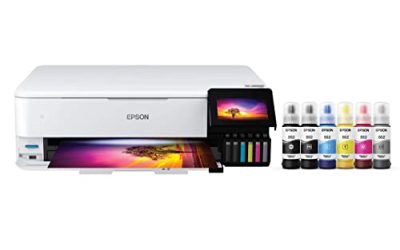
The ET-8550 suits makers who care about photo quality, because it is a wide-format photo printer with six inks, including photo black and grey, and a 4.3-inch colour touchscreen. It prints lab-quality wide-format colour photos and graphics, which translates into smooth gradients and skin tones on sublimation transfers. Like the other EcoTank models here, owners convert it with third-party sublimation ink, and its wide format covers the same large designs as the ET-15000 while adding finer colour control for detailed artwork.
Specs
- Wireless wide-format colour all-in-one supertank printer with scanner and copier
- Six 552 inks: Photo Black, Black, Cyan, Magenta, Yellow and Gray
- 4.3-inch colour touchscreen
- Ethernet connectivity
- Prints lab-quality wide-format colour photos and graphics
- Model ET-8550
Best for: Photo-quality sublimation transfers with smooth gradients and fine detail.
Watch out for: Six inks mean more bottles to buy for conversion, and it is not sold as a sublimation printer.
ASIN: B08R5M2HDH
Which One Fits Your Situation
Starting your first sublimation hobby
Pick the SureColor F170 if you want to print mugs and small gifts without learning conversion. It arrives ready for sublimation, so your first week goes to designs and heat-press settings instead of ink research. If the budget is tight, the ET-2800 is the cheaper test, but accept the warranty trade-off before you fill the tanks.
Running a small custom-gift shop
Choose the Sawgrass SG500 when orders pay the bills. Its dedicated ink, colour profiles and warranty keep repeat orders looking the same, and automatic head maintenance means fewer wasted blanks between jobs. Keep a converted EcoTank as a backup for wide-format orders rather than relying on one printer for everything.
Printing large shirt graphics and signs
Take the ET-15000 when your designs outgrow letter size. Its 13 by 19 inch format covers full-front shirts, flags and signs in one pass, and the large tanks suit long runs. The ET-8550 is the better pick when those large designs are photo-style artwork that needs smoother colour for detailed prints.
Chasing the best-looking transfers
Pick the ET-8550 if colour quality is the priority. Its six-ink set handles gradients and skin tones better than four-ink models, which shows on photo transfers and detailed artwork. Pair it with good transfer paper and a heat press you trust, because the printer can only carry the design as far as the rest of the setup allows.
Common Mistakes
- Filling a new EcoTank with regular ink before deciding to convert it, which makes conversion far harder.
- Buying letter-size transfer paper for designs that need a wide-format printer.
- Skipping a heat press and expecting a home iron to give even transfers.
- Letting a sublimation printer sit unused for weeks, then losing ink to cleaning cycles.
- Ordering blanks that are not coated for sublimation or lack enough polyester content.
Frequently Asked Questions
Can I use a regular inkjet printer for sublimation?
Yes, if it is an ink-tank model that owners commonly convert, such as the EcoTank printers in this guide. Fill it with third-party sublimation ink before regular ink is used, and use sublimation paper and a heat press. Note that conversion voids the maker warranty, so weigh the saving against the risk first.
Do I need a heat press for sublimation printing?
Yes. Sublimation ink transfers into coated blanks and polyester fabric only under heat and pressure, and a heat press applies both evenly across the whole design. A home iron heats unevenly and cannot hold steady pressure, which leads to faded patches and ghosting on mugs and shirts.
What size printer do I need for T-shirts?
Letter-size printers cover chest logos, pocket prints and small graphics, while full-front adult shirt designs need a wide-format printer that prints up to 13 by 19 inches. Measure your largest design before buying, and remember the transfer must fit the heat press platen as well as the printer.
How long does sublimation ink last once printed?
Transfers made with sublimation ink bond into polyester fibres and coated surfaces, so they do not peel or crack like vinyl and survive normal washing well. Colours stay vivid when blanks are washed in cold water and kept out of harsh bleach, while direct sunlight over long periods can fade any printed fabric.
More from Amazon
Programs that pair well with the guide above. Offers and eligibility are set by Amazon and may change.
Free shipping on eligible items, Prime Video and more. Eligible new members can start with a free trial.
Start a Prime free trialAd-free music streaming. Eligible new subscribers can start with a free trial.
Try Music Unlimited freeA Prime membership for ages 18-24 with a trial period. Eligibility is set by Amazon.
See Prime for Young AdultsAudiobooks and podcasts to listen to on the go. Eligible new members can start with a free trial.
Try Audible freeAs an Amazon Associate we earn from qualifying purchases.




Write Your Review
No reviews yet. Be the first to share your experience!