

Our Short List of 3
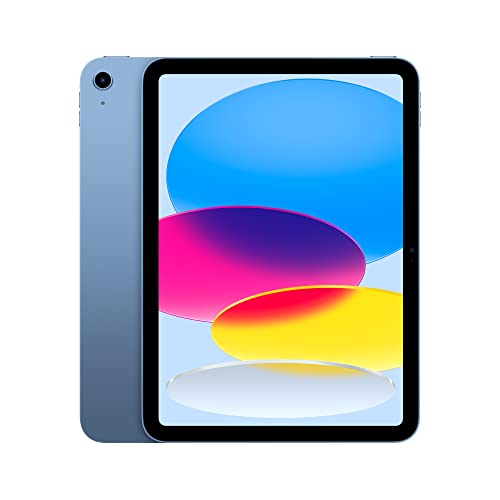
- Best for: Everyday web browsing, reading, email, and video calls.
- A14 Bionic chip with 6-core CPU, 4-core graphics, and 16-core Neural Engine
- 10.9-inch Liquid Retina display with True Tone
- 64GB storage
- Wi-Fi 6

- Best for: Daily Android browsing with roomy storage and a newer Android version.
- 11-inch display with 1920 x 1200 resolution
- MediaTek MT8775 processor
- 6GB RAM
- 128GB storage with expandable storage

- Best for: Browsing and reading with a protective case already in the box.
- 11-inch display with 1920 x 1200 resolution
- MediaTek Helio G88 octa-core processor
- 4GB RAM
- 128GB storage
All 3 Picks at a Glance
| Product | Specs | Action |
|---|---|---|
| 1. Apple iPad (10th Generation) |
| Check price on Amazon |
| 2. Samsung Galaxy Tab A11+ |
| Check price on Amazon |
| 3. Lenovo Tab M11 |
| Check price on Amazon |
Key takeaways
- Best tablets for web browsing in November 2026: three sharp 11-inch tablets with fast Wi-Fi, smooth scrolling, and long battery life for reading and research.
Web browsing is the job most tablets do more than any other, yet it is easy to buy the wrong one for it. A screen that strains your eyes, a browser that reloads tabs every time you switch away, or a battery that fades halfway through a long reading session can turn a simple habit into a daily frustration. The right tablet keeps text sharp, pages loading quickly, and the device light enough to hold for an hour, while the wrong one pushes you back to a phone or a laptop for the same task.
This guide is for casual readers, students working through research, and home workers who live in browser tabs all day. The three tablets below come from Amazon listing titles and details: a 10.9-inch iPad for Apple users, a newer Samsung Galaxy Tab A11+ for Android users, and a Lenovo Tab M11 that arrives with a folio case in the box.
Quick Picks
As an Amazon Associate we earn from qualifying purchases
| Product | Best for | Key spec from title |
|---|---|---|
| Apple iPad (10th Generation) | Everyday browsing and reading | 10.9-inch Liquid Retina display, A14 Bionic chip, 64GB |
| Samsung Galaxy Tab A11+ | Newest Android pick for daily browsing | 11-inch display, 6GB RAM, 128GB storage |
| Lenovo Tab M11 | Browsing with a folio case in the box | 11-inch display, Helio G88, 128GB storage, folio case included |
How to Choose
Screen Sharpness and Size
A tablet for web browsing lives or dies by its screen, because every article, document, and page renders there. Look for a display of at least 10.9 inches with a sharp resolution, so full desktop pages fit without constant zooming and small text stays readable. The three tablets here use 10.9-inch and 11-inch screens, which strike a good balance between a roomy reading area and a body that still fits in a bag. Brightness matters too: a dim panel washes out near a window, while a bright one keeps text clear in daylight. Weight counts as well, since a tablet you hold for an hour should not tire your wrist.
Browser Speed and Memory
Pages today carry images, video, and scripts that punish slow hardware, so chip and memory decide how browsing feels. A modern chip opens pages quickly and keeps several tabs ready at once, while too little memory forces the browser to reload a page each time you return to it. The iPad here runs on the A14 Bionic chip, the Samsung uses a MediaTek MT8775 processor with 6GB of memory, and the Lenovo pairs a Helio G88 chip with 4GB. For light reading, all three cope well, but buyers who keep a dozen tabs open or jump between a browser, email, and documents will feel the difference that extra memory brings.
Battery Life for Long Sessions
A browsing tablet should last through a full day of reading, research, and video calls without hunting for a charger. The iPad lists up to 10 hours of surfing the web on Wi-Fi, and the Lenovo lists up to 10 hours of battery life as well, while the Samsung carries a 26.34 Wh battery built for long sessions. A large battery matters most to readers who browse in bed, students who move between lectures, and travelers who spend hours away from a socket. Check how the tablet charges too: USB-C charging with a common cable is easier to live with than a rare connector, and a power adapter in the box saves a separate purchase.
Wi-Fi, Storage, and Extras
Since browsing depends on the wireless link, check the Wi-Fi standard before you buy. The iPad supports Wi-Fi 6, and the Samsung lists Wi-Fi 802.11ac and 802.11ax, which is the newer Wi-Fi 6 standard, so both keep up with a modern home router. Storage shapes how much you can keep offline: the Samsung and Lenovo hold 128GB with room to expand, while the iPad holds 64GB with no card slot. Extras also matter for browsing comfort, such as speakers for video calls, a folio case that props the screen up, and software updates that keep the browser current for years.
The 3 Best Options
1. Apple iPad (10th Generation)
- Best for: Everyday web browsing, reading, email, and video calls.
- A14 Bionic chip with 6-core CPU, 4-core graphics, and 16-core Neural Engine
- 10.9-inch Liquid Retina display with True Tone
- 64GB storage
- Wi-Fi 6
Everyday web browsing, reading, email, and video calls.
Storage is fixed at 64GB on this model, with no microSD slot, so heavy downloads need cloud space or a larger model.
The 10th-generation iPad is the simplest pick for everyday browsing, pairing a sharp 10.9-inch Liquid Retina display with the A14 Bionic chip and Wi-Fi 6. Text stays crisp on full desktop pages, tabs load quickly, and the tablet lists up to 10 hours of surfing the web on Wi-Fi, which covers a long day of reading and research. Touch ID unlocks the device in a moment, USB-C handles charging and accessories, and the 12MP front camera suits video calls. The slim body slips into a bag beside a notebook, and the wide choice of browsers and reading apps makes it an easy daily companion.
Watch out for: Storage is fixed at 64GB on this model, with no microSD slot, so heavy downloads need cloud space or a larger model.
2. Samsung Galaxy Tab A11+
- Best for: Daily Android browsing with roomy storage and a newer Android version.
- 11-inch display with 1920 x 1200 resolution
- MediaTek MT8775 processor
- 6GB RAM
- 128GB storage with expandable storage
Daily Android browsing with roomy storage and a newer Android version.
The screen is a TFT LCD panel rather than AMOLED, so colors look less vivid than on higher-end Samsung tablets.
The Galaxy Tab A11+ is the newest Android tablet in this guide, and its 11-inch display with 1920 x 1200 resolution gives web pages plenty of room. The MediaTek MT8775 processor and 6GB of memory keep many tabs ready at once, while 128GB of storage with room to expand holds downloads, documents, and offline reading. Dolby Atmos speakers add depth to video calls and clips, the 5MP front camera handles meetings, and the tablet runs Android 16 with a two-year manufacturer warranty. At 1.05 pounds it stays comfortable to hold through long reading sessions.
Watch out for: The screen is a TFT LCD panel rather than AMOLED, so colors look less vivid than on higher-end Samsung tablets.
3. Lenovo Tab M11
- Best for: Browsing and reading with a protective case already in the box.
- 11-inch display with 1920 x 1200 resolution
- MediaTek Helio G88 octa-core processor
- 4GB RAM
- 128GB storage
Browsing and reading with a protective case already in the box.
The 4GB of memory suits browsing and reading, but heavy multitasking with many tabs open can feel slower than on the 6GB Samsung here.
The Lenovo Tab M11 suits buyers who want a complete browsing setup from the first day, because a folio case comes in the box to prop the tablet up or protect it in a bag. Its 11-inch display with 1920 x 1200 resolution keeps articles and documents sharp, the Helio G88 octa-core processor handles everyday pages and apps, and 128GB of storage leaves room for downloads. The battery lists up to 10 hours of life, and the ambient light sensor adjusts the screen to the room. It is a straightforward Android pick for reading and research.
Watch out for: The 4GB of memory suits browsing and reading, but heavy multitasking with many tabs open can feel slower than on the 6GB Samsung here.
Which One Fits Your Situation
You Browse in Apple Apps and Safari
Pick the iPad when your reading lists, passwords, and notes already live in Apple apps. Safari, Apple Books, and the App Store work together smoothly, Touch ID signs you in quickly, and the 10.9-inch screen shows full desktop pages clearly. It also suits households that already own iPhones, since tabs and reading lists move between devices without extra setup.
You Want the Newest Android Tablet with More Memory
Pick the Galaxy Tab A11+ when you want the freshest Android version here and the most memory for tab-heavy browsing. Its 6GB of memory keeps many pages ready, 128GB of storage with room to expand holds plenty of downloads, and Android 16 brings the newest browser features. The two-year manufacturer warranty adds peace of mind for a tablet you plan to keep for years.
You Want a Case Included from Day One
Pick the Lenovo Tab M11 when you want nothing extra to buy before you begin browsing. The folio case in the box props the tablet up on a table and shields the screen in a bag, while the 11-inch display and 128GB of storage cover reading, research, and video. Its 10-hour battery suits long sessions away from a charger, and Android keeps the setup simple.
You Share the Tablet with Family
Pick the Galaxy Tab A11+ when the tablet passes between family members through the day. Its large 11-inch screen suits reading, homework, and video for different ages, the 128GB of storage holds apps and downloads for everyone, and the sturdy slim body travels from room to room. The long battery life and Dolby Atmos speakers also suit shared viewing in the evening.
Common Mistakes
- Choosing a screen under 10 inches, then zooming and scrolling on every desktop page you open.
- Ignoring the Wi-Fi standard, so a new router cannot reach the speeds the tablet supports.
- Buying 64GB of storage without a card slot, then running out of room for downloads and offline reading.
- Skipping a case or stand and holding the tablet by hand through every long reading session.
- Picking an older Android version with a short update path, so the browser falls behind within a year.
Frequently Asked Questions
What screen size is best for web browsing?
An 11-inch screen is the sweet spot for most buyers, because it shows full desktop pages without constant zooming while still fitting in a bag. The three tablets here use 10.9-inch and 11-inch screens, which suit reading, research, and split-screen work. Smaller screens save weight but force more scrolling, while much larger screens suit desks better than laps.
Is 4GB of memory enough for web browsing?
Yes, 4GB of memory handles everyday browsing, reading, and email without trouble, which is why the Lenovo Tab M11 suits casual readers. Buyers who keep many tabs open at once, or switch often between a browser, documents, and video calls, will feel the difference with 6GB, as in the Galaxy Tab A11+. Match the memory to how many tabs you usually keep open.
Do I need cellular data on a browsing tablet?
No, a Wi-Fi-only tablet covers most browsing, since reading and research usually happen at home, at school, or at work with wireless nearby. All three tablets here connect over Wi-Fi, and the iPad supports Wi-Fi 6 while the Samsung lists Wi-Fi 6 as well. Choose a cellular model only when you often browse away from wireless, such as on trains or in parks.
Can these tablets open desktop websites?
Yes, the browsers on all three tablets can load desktop versions of websites, which show full layouts instead of narrow mobile pages. The 10.9-inch and 11-inch screens display those layouts clearly, with text and images at a readable size. When a site still loads its mobile view, look for the desktop-site setting in the browser menu and switch it on for that page.
More from Amazon
Programs that pair well with the guide above. Offers and eligibility are set by Amazon and may change.
Free shipping on eligible items, Prime Video and more. Eligible new members can start with a free trial.
Start a Prime free trialAd-free music streaming. Eligible new subscribers can start with a free trial.
Try Music Unlimited freeA Prime membership for ages 18-24 with a trial period. Eligibility is set by Amazon.
See Prime for Young AdultsAudiobooks and podcasts to listen to on the go. Eligible new members can start with a free trial.
Try Audible freeAs an Amazon Associate we earn from qualifying purchases.









Write Your Review
No reviews yet. Be the first to share your experience!