
Our Short List of 3
All 4 Picks at a Glance
| Product | Specs | Action |
|---|---|---|
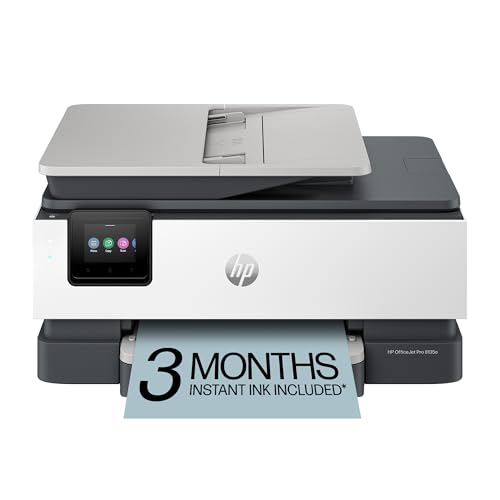 HP OfficeJet Pro 8135e | Check price on Amazon | |
 HP OfficeJet Pro 9135e | Check price on Amazon | |
 Epson WorkForce Pro WF-3820 | Check price on Amazon | |
 Canon PIXMA TR4720 | Check price on Amazon |
Key takeaways
- Four inkjet printers for in-house marketing material, each checked on maker-documented borderless letter output, automatic duplex and brochure paper support.
As an Amazon Associate, we earn from qualifying purchases made through links on this page.
Marketing material printed in-house — flyers, two-sided brochures, postcards, sell sheets and event handouts — fails in predictable ways. A design that bleeds to the edge of the page comes out with a white frame because the printer cannot print borderless at that size. A brochure run turns into an afternoon of manual page flipping because the machine has no automatic duplex unit. Thick brochure stock jams or emerges with smeared color because the paper path and ink were never documented for that media. This guide judges desktop inkjet printers on collateral production only, and every model below had to meet three hard conditions taken from its own maker’s documentation: borderless printing up to US Letter or A4, automatic two-sided printing, and documented support for brochure or card media.
That frame is deliberately narrower than the other printer guides on this site. A separate guide here ranks borderless printers by their maximum edge-to-edge size, including wide-format photo machines that print 13 by 19 inches; this one stops at letter and A4, because that is the size nearly all flyers and brochures ship at. The office printer guides on this site rank machines by shared-workgroup volume and document handling, and they include color lasers — a class no maker documents for true borderless output, so lasers are absent here by design rather than by oversight. If your marketing printing is a poster on a wall, this is the wrong guide. If it is a stack of two-sided brochures on a table, read on.
What to look for in a printer for marketing material
Borderless output at the size you actually ship. Many inkjets advertise borderless printing and then limit it to 4 by 6 photo paper. For flyers and sell sheets, the size that matters is Letter or A4. Check the maker’s specification sheet for the borderless size list, not the box art, and note which media the borderless mode is documented for — some makers allow it on photo and brochure paper, others on photo paper alone.
Automatic duplex for two-sided pieces. A tri-fold brochure or a double-sided flyer needs the printer to flip the sheet itself. Look for automatic two-sided printing in the maker’s specifications, and then check which papers the duplex path accepts: on several models below, duplex is documented for plain paper, while heavy glossy stock is a single-sided job.
A paper path documented for brochure and card stock. Matte and glossy brochure paper, presentation paper and postcard stock are heavier and slicker than office paper. Makers publish media weight ranges and paper type lists per model; the printers below document card media at meaningful weights, which is what keeps a postcard run feeding sheet after sheet instead of skewing.
Ink yield matched to color coverage. A page of marketing collateral covers far more of the sheet with ink than a page of office text. Standard cartridges that look adequate for documents can empty quickly on full-color flyers, so compare the maker’s page yield figures for standard and high-yield cartridges or bottles before you commit to a machine for weekly runs.
Recommended monthly volume, not the headline duty cycle. Makers publish both a maximum duty cycle and a much lower recommended monthly volume. A single afternoon run of 300 two-sided brochures is 600 printed sides, so match your typical batch size to the recommended figure and treat the duty cycle as a ceiling the machine should rarely touch.
HP OfficeJet Pro 8135e
The HP OfficeJet Pro 8135e earns its place on the wording of HP’s own data sheet: borderless printing is documented “on Photo & Brochure only,” up to 8.5 by 11 inches in US Letter and A4. It is the only maker in this guide that names brochure paper inside the borderless specification itself, which makes it the most direct fit for edge-to-edge flyers and sell sheets. Automatic duplex printing is standard, at up to 10 images per minute in black and 6 in color, and single-sided speeds reach 20 pages per minute in black and 10 in color under ISO testing.
Paper handling suits small-batch collateral work. The single input tray holds 225 sheets, and HP documents media weights of 60 to 75 lb for photo paper and 90 to 110 lb for card stock, so postcard-weight media sits inside the published range rather than at its edge. Output resolution reaches 4800 by 1200 optimized dpi in color, and the four pigment-based inks are the type HP positions for documents and brochures that get handled, stacked and pinned to boards. HP rates the machine for a duty cycle of up to 20,000 pages a month with a recommended volume of up to 800 pages, and it uses HP 923 cartridges, with the standard black cartridge documented at roughly 500 pages.
Who it fits: a small business or solo marketer printing flyers, sell sheets and short brochure runs every week on one shared machine, where the borderless-on-brochure wording removes guesswork.
Limitations from the specifications: the single input tray means switching between plain paper and brochure stock is a manual tray change every time, and the recommended monthly volume of 800 pages is the lowest ceiling in this guide, so daily mass runs belong on a bigger machine. Borderless mode is documented for photo and brochure media, not for plain paper.
HP OfficeJet Pro 9135e
The HP OfficeJet Pro 9135e is the volume pick in this group. HP documents ISO speeds of up to 25 pages per minute in black and 20 in color, with duplex speeds of 15 and 13 images per minute, a duty cycle of up to 30,000 pages a month and a recommended monthly volume of up to 2,000 pages. Two 250-sheet input trays let one tray stay loaded with brochure stock while the other holds plain paper, which removes the tray-swapping chore that slows down the smaller model above, and the automatic document feeder scans both sides of a sheet in a single pass when you need to copy or digitize existing collateral.
Borderless printing is documented up to 8.5 by 11 inches and A4, and HP lists brochure and professional paper, matte presentation paper, labels and cards among the supported media types, with card stock documented at 90 to 110 lb. The machine runs on HP 936 cartridges, which HP rates at roughly 1,250 pages in black and 800 per color, with 936e EvoMore cartridges documented at roughly 2,500 black and 1,650 color pages for longer runs between changes.
Who it fits: an office that prints marketing material in larger batches — hundreds of brochures or flyers at a time — and wants the second tray permanently stocked with collateral paper.
Limitations from the specifications: read HP’s borderless line carefully, because on this model it is documented for photo paper, while brochure paper is a supported media type that prints with margins; if your brochure design bleeds to the edge on matte brochure stock, the 8135e above documents that combination and this one does not. It is also the heaviest machine here at roughly 26 pounds, and the HP+ setup documented in the data sheet ties the printer to Original HP ink cartridges for its working life.
Epson WorkForce Pro WF-3820
The Epson WorkForce Pro WF-3820 approaches collateral from the paper side. Epson’s specification sheet lists its borderless sizes as 3.5 by 5, 5 by 7, 4 by 6, 8 by 10, A4 and Letter, so full-page flyers print edge to edge, and Epson’s own paper range for this model includes a matte brochure and flyer paper that is double-sided, built for exactly the two-sided pieces this guide is about. The PrecisionCore print head lays down DURABrite Ultra pigment ink, which Epson describes as instant-dry — a practical trait when a stack of freshly printed brochures comes off the tray and gets folded or bundled right away.
Speeds are strong for the class: 21 ISO pages per minute in black and 11 in color, with two-sided printing at 12 and 7 ISO pages per minute, and a maximum resolution of 4800 by 2400 dpi. The paper tray holds 250 sheets, the document feeder takes 35 sheets, and Epson rates the duty cycle at up to 26,000 pages a month with a recommended volume of up to 1,300 pages. It uses Epson 822 cartridges; the standard color cartridges are documented at 240 pages each, while the 822XL high-capacity set is documented at 1,100 pages in black and 1,100 per color.
Who it fits: a brochure-heavy workflow built around matte stock — menus, folded leaflets, double-sided flyers — where Epson’s own double-sided brochure paper and the pigment ink set are the draw.
Limitations from the specifications: the standard 822 color cartridges, at 240 documented pages, are small for full-color collateral, so the XL set is effectively required for regular runs. There is a single paper tray, and the borderless size list stops at Letter and A4, so nothing wider or longer prints edge to edge.
Canon PIXMA TR4720
The Canon PIXMA TR4720 is the compact, short-run option. Canon’s specification for the model lists borderless printing at 4 by 6, 5 by 7, 8 by 10 and Letter sizes, plus automatic two-sided printing for letter-size documents, and Canon includes its Poster Artist Lite software for Windows in the box — a layout tool aimed at posters and notices, which tells you the kind of output Canon expects this machine to produce. The hybrid ink system pairs a pigment black cartridge with dye-based color in two FINE cartridges (PG-260 and CL-261, with XL versions), and print resolution reaches 4800 by 1200 dpi.
Paper handling is modest but honestly documented: a 100-sheet front tray, a 20-sheet automatic document feeder, plain paper weights of 64 to 105 gsm and Canon papers up to roughly 300 gsm, which covers postcard and light brochure stock fed a few sheets at a time. This is a desk machine for a one-person operation that prints a notice, a price list or a small stack of postcards today and nothing again until next week.
Who it fits: a solo seller, tutor, agent or club organizer who prints short runs of flyers and postcards at one desk and values the small footprint over throughput.
Limitations from the specifications: Canon documents print speeds of 8.8 images per minute in black and 4.4 in color, the slowest in this guide by a wide margin, so a 200-copy flyer run is a long job. Duplex printing is documented for plain paper, which puts two-sided printing on thick glossy brochure stock outside the documented path, and the 100-sheet tray needs reloading during any serious batch.
Comparison table
| Model | Borderless maximum (maker-documented) | Automatic duplex | ISO speed, black / color | Input capacity | Recommended monthly volume | Ink system |
|---|---|---|---|---|---|---|
| HP OfficeJet Pro 8135e | Letter / A4, on photo and brochure paper | Yes | 20 / 10 ppm | 225 sheets, 1 tray | Up to 800 pages | HP 923 cartridges, pigment |
| HP OfficeJet Pro 9135e | Letter / A4, on photo paper | Yes | 25 / 20 ppm | 2 trays, 250 sheets each | Up to 2,000 pages | HP 936 / 936e cartridges, pigment |
| Epson WorkForce Pro WF-3820 | Letter / A4 | Yes | 21 / 11 ppm | 250 sheets, 1 tray | Up to 1,300 pages | Epson 822 / 822XL cartridges, pigment |
| Canon PIXMA TR4720 | Letter | Yes, plain paper | 8.8 / 4.4 ipm | 100 sheets, 1 tray | Not published in Canon’s spec summary | Canon PG-260 / CL-261 cartridges, hybrid |
Frequently asked questions
Can a color laser printer produce borderless flyers?
Not on the evidence of the makers’ own documents. Desktop color lasers print sharp text and flat color, but their specification sheets do not document true edge-to-edge output; a narrow white margin is part of how the process works. That is why every model in this guide is an inkjet, and why the laser machines in this site’s office printer guides were not carried over.
Can these printers handle postcard stock and thick brochure paper?
Within each maker’s published limits, yes. HP documents card media at 90 to 110 lb for both OfficeJet Pro models, Epson lists card stock among the WF-3820’s paper types, and Canon rates the TR4720 for Canon papers up to roughly 300 gsm. Feed the thickest stock in small stacks, and expect the duplex path to be documented for plain paper even when single-sided thick media is fine.
Why does recommended monthly volume matter more than duty cycle for collateral?
Because collateral arrives in batches. A duty cycle of 20,000 or 30,000 pages describes what the machine can survive in an exceptional month; the recommended volume — 800 pages for the 8135e, 1,300 for the WF-3820, 2,000 for the 9135e — describes the pace the maker expects it to sustain. One 300-copy two-sided brochure run is 600 printed sides, which nearly exhausts the smallest machine’s recommended month in a single afternoon.
Should a two-sided brochure be printed borderless on both sides?
None of the four makers documents borderless two-sided printing in a single pass on these models; borderless mode and the duplex unit are separate documented features. In practice, two-sided brochures are printed either with a small margin through the duplex path, or as two single-sided borderless passes. Design with that in mind: keep critical text and logos inside the margins and let only background color run to the edge.
Pigment or dye ink for marketing pieces?
Three of the four models here use pigment inks for all four colors, per their makers’ documents — both HP OfficeJet Pro models and the Epson’s DURABrite Ultra set. The Canon TR4720 uses a hybrid system: pigment black for text and dye-based colors. Pigment color on matte brochure paper is the combination the makers of the three workgroup models document for document and brochure work, while the Canon’s dye colors are aimed at photo-style output on glossy media.
Conclusion
For in-house marketing material at letter size, the deciding evidence is not print quality in the abstract; it is whether the maker documents borderless output at Letter or A4, an automatic duplex unit, and a paper path rated for brochure and card media. The HP OfficeJet Pro 8135e is the most direct match, because HP documents borderless printing on brochure paper itself. The HP OfficeJet Pro 9135e suits bigger batches, with two trays and the highest recommended volume here, as long as your edge-to-edge work sits on photo paper. The Epson WorkForce Pro WF-3820 is the matte-brochure specialist, with Epson’s own double-sided brochure paper in its documented paper list, and the Canon PIXMA TR4720 covers the small end: slow and lightly built, but documented for borderless letter output and automatic two-sided printing at a single desk. Pick by the size of your typical run, and let the makers’ paper and volume documents — not the box art — make the final call.
More from Amazon
Programs that pair well with the guide above. Offers and eligibility are set by Amazon and may change.
Free shipping on eligible items, Prime Video and more. Eligible new members can start with a free trial.
Start a Prime free trialAd-free music streaming. Eligible new subscribers can start with a free trial.
Try Music Unlimited freeA Prime membership for ages 18-24 with a trial period. Eligibility is set by Amazon.
See Prime for Young AdultsAudiobooks and podcasts to listen to on the go. Eligible new members can start with a free trial.
Try Audible freeAs an Amazon Associate we earn from qualifying purchases.








Write Your Review
No reviews yet. Be the first to share your experience!