
Our Short List of 3
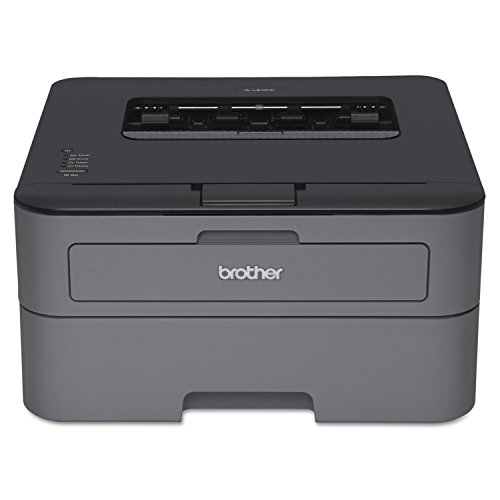
- Best for: Home users who print black-and-white documents most days and want a compact laser printer on one desk.
- Monochrome laser printer, print only
- Hi-Speed USB 2.0 connection, 1 USB port
- Print speed up to 27 ppm
- Maximum print resolution 2400 x 600 dpi

- Best for: Students and home users who need colour documents and photos from one computer on a small desk.
- Inkjet photo printer, print only
- Hi-Speed USB connection, 1 USB 2.0 port
- Maximum print resolution 4800 x 1200 dpi
- Print speed up to 7.7 ipm black and 4 ipm colour

- Best for: Home offices and households with heavier black-and-white printing who want the fastest USB-only laser in this guide.
- Monochrome laser printer with automatic duplex
- Hi-Speed USB 2.0 interface for local connectivity
- Print speed up to 30 ppm
- Maximum print resolution 2400 x 600 dpi
All 3 Picks at a Glance
| Product | Specs | Action |
|---|---|---|
| Brother HL-L2300D |
| Check price on Amazon |
| Canon PIXMA TS202 |
| Check price on Amazon |
| Brother HL-L2320D |
| Check price on Amazon |
Key takeaways
- Three USB-only printers for one computer and one desk, compared by print type, duplex, tray size and cable needs from Amazon listings before you buy.
A local printer plugs straight into one computer with a USB cable and prints only for that machine. There is no wireless network to set up, no cloud account to link, and no second computer that can reach it over the house network. That simplicity changes the buying decision: the cable matters, the desk space matters, and the kind of pages you print matters far more than any network feature, because the printer will never do anything its cable and its driver cannot do.
This guide is for home users, students, and anyone with a single desk computer who wants printing without wireless setup — a spare-room desk, a study corner, or a home office where one laptop does all the work. The three printers below were picked from Amazon listings, and every specification comes from the listing title or product details: connection type, print technology, speed, resolution, duplex, and paper capacity as the seller states them.
Quick Picks
As an Amazon Associate we earn from qualifying purchases.
| Product | Best for | Key spec from title |
|---|---|---|
| Brother HL-L2300D | Everyday black-and-white documents | Monochrome laser, USB, automatic duplex |
| Canon PIXMA TS202 | Colour documents and photos | Inkjet photo printer, Hi-Speed USB, print only |
| Brother HL-L2320D | Heavier black-and-white volume | Monochrome laser, USB 2.0, duplex, up to 30 ppm |
How to Choose
Check the USB connection first
A local printer lives or dies by its cable, so confirm the connection before anything else. Each printer in this guide connects through Hi-Speed USB 2.0, and two of them ship without a USB cable in the box, which means you need a standard USB A-to-B printer cable of your own. Measure the distance from the computer to the spot where the printer will sit, because a cable that is too short forces an awkward desk layout, while an overly long one drapes across the workspace. Also confirm the computer still has a free USB-A port, since many slim laptops now need an adapter or a hub before a wired printer can attach at all.
Pick laser for text and inkjet for colour
The print technology decides what the printer is good at and what it costs to keep running. A monochrome laser printer uses toner, which does not dry out between uses, so it suits someone who prints a few pages of text each week and leaves the machine idle for days at a time. An inkjet printer uses liquid ink and handles colour documents and photos far better, but its cartridges can dry out if the printer sits unused for weeks. If nearly everything you print is black text, choose laser; if school projects, photos, or colour forms are a regular part of the week, choose inkjet and accept the cartridge upkeep.
Look at duplex and paper capacity
Two-sided printing and tray size decide how much manual work each print job needs. Automatic duplex flips the sheet for you, which halves the paper used on long documents and removes the fiddly step of re-feeding pages by hand. A 250-sheet tray suits a household that prints in batches and dislikes refilling, while a 60-sheet tray fits a light user who prints a few pages at a time and keeps the machine tucked away. Match the tray to the biggest job you run in a normal week, not to the average day, because the tray only feels small when a long document stops halfway through.
Weigh the consumables before the machine
A printer is only as cheap as its next cartridge or toner, so read the consumable details on the listing before deciding. Toner cartridges for the laser printers here are named by model number, with a standard cartridge and a higher-yield option, and the higher-yield cartridge usually prints more pages per cartridge even though it costs more up front. Inkjet cartridges come in standard and XL sizes, and the XL size makes sense when colour printing is frequent. Check that the cartridge or toner the listing names is still easy to find, and confirm the starter cartridge in the box, since a machine that arrives with a low-fill starter needs a replacement sooner than expected.
The 3 Best Options
Brother HL-L2300D
- Best for: Home users who print black-and-white documents most days and want a compact laser printer on one desk.
- Monochrome laser printer, print only
- Hi-Speed USB 2.0 connection, 1 USB port
- Print speed up to 27 ppm
- Maximum print resolution 2400 x 600 dpi
Home users who print black-and-white documents most days and want a compact laser printer on one desk.
The USB cable is not included in the box, so buy a USB A-to-B cable separately. Confirm it is still sold before buying, since the listing evidence is a crawl from April 2026 with no live buy box shown.
The HL-L2300D is the straightforward pick for a household that prints mostly black-and-white text and wants the machine to simply work when the cable is plugged in. Its monochrome laser engine prints at up to 27 pages per minute, its automatic duplex handles two-sided documents without manual re-feeding, and its 250-sheet tray holds enough paper for a full week of schoolwork or home-office documents. The compact body fits a crowded desk, and because it connects only by USB, there is no wireless setup to troubleshoot when a new laptop arrives.
Watch out for: The USB cable is not included in the box, so buy a USB A-to-B cable separately. Confirm it is still sold before buying, since the listing evidence is a crawl from April 2026 with no live buy box shown.
Canon PIXMA TS202
- Best for: Students and home users who need colour documents and photos from one computer on a small desk.
- Inkjet photo printer, print only
- Hi-Speed USB connection, 1 USB 2.0 port
- Maximum print resolution 4800 x 1200 dpi
- Print speed up to 7.7 ipm black and 4 ipm colour
Students and home users who need colour documents and photos from one computer on a small desk.
The USB cable is required and not included, so add a USB A-to-B cable to the order. Confirm it is still sold before buying, since the listing could not be opened live and the evidence comes from listing content only.
The PIXMA TS202 is the pick for colour printing on a small desk, covering homework, photos, and colour forms that a monochrome laser cannot handle. Its FINE hybrid ink system prints at up to 4800 x 1200 dpi, and its 7.7 images per minute black and 4 images per minute colour speeds are enough for light household use. The 60-sheet tray keeps the footprint small, and the print-only design means there are no scanner menus to learn. It connects by Hi-Speed USB only, so it suits a single computer that sits next to the printer.
Watch out for: The USB cable is required and not included, so add a USB A-to-B cable to the order. Confirm it is still sold before buying, since the listing could not be opened live and the evidence comes from listing content only.
Brother HL-L2320D
- Best for: Home offices and households with heavier black-and-white printing who want the fastest USB-only laser in this guide.
- Monochrome laser printer with automatic duplex
- Hi-Speed USB 2.0 interface for local connectivity
- Print speed up to 30 ppm
- Maximum print resolution 2400 x 600 dpi
Home offices and households with heavier black-and-white printing who want the fastest USB-only laser in this guide.
Confirm it is still sold before buying, since the listing could not be opened live and older stock of this model is thin. The USB cable is not included in the box.
The HL-L2320D is the faster sibling of the HL-L2300D, built for a household that prints black-and-white documents in larger batches. It reaches up to 30 pages per minute, keeps the same automatic duplex and 250-sheet tray, and connects to one computer through Hi-Speed USB 2.0 with no wireless hardware at all. The larger speed figure matters when a long document or a stack of forms needs to finish before a deadline, and the toner-based engine stays ready after days idle. It is the right choice when the lighter Brother model feels too slow for the weekly volume.
Watch out for: Confirm it is still sold before buying, since the listing could not be opened live and older stock of this model is thin. The USB cable is not included in the box.
Which One Fits Your Situation
You print black-and-white text most days
Choose the Brother HL-L2300D. Its laser engine handles everyday documents without ink drying out, its duplex saves paper on long files, and its 250-sheet tray means refills are rare. It is the calmest option for a desk where printing is routine rather than occasional, and the toner stays ready even after a quiet week with no printing at all.
You need colour and photos
Choose the Canon PIXMA TS202. It is the only printer in this guide that prints in colour, and its photo resolution suits school projects and printed pictures. Keep in mind the smaller tray and the cartridge upkeep, and buy the USB cable with it. Its small tray is easy to live with when colour jobs are short and occasional.
You print long documents in batches
Choose the Brother HL-L2320D. Its 30 pages per minute speed clears a stack of forms faster than the other laser here, while the same duplex and tray size keep the workflow identical. It fits a household where one person prints heavily and everyone else prints rarely, and the toner engine stays ready through idle days between print runs.
You also need to scan or copy
None of the three printers in this guide scans or copies, so do not force one of them into that job. Look instead for a USB-only all-in-one and check its listing for a flatbed scanner, then confirm the USB cable situation and the cartridge type the same way this guide checks them.
Common Mistakes
- Assuming a printer has wireless printing because most new models do — the printers here connect by USB only, and adding a second computer means moving the cable or sharing through the host computer.
- Forgetting to buy a USB A-to-B cable, since two of the three printers in this guide ship without one in the box.
- Choosing an inkjet for rare printing, then finding the cartridges dried out after weeks of sitting idle.
- Ignoring duplex, then hand-feeding every second page of a long two-sided document.
- Skipping the driver check for an older model, which can leave a printer unusable on a newer operating system.
Frequently Asked Questions
What is a local printer?
A local printer connects directly to one computer, usually with a USB cable, and prints only for that machine. It has no wireless or Ethernet connection and no cloud service, so nothing on the house network can reach it. The setup is simpler than a network printer, but sharing it with a second computer takes extra steps.
Can a local printer work without internet?
Yes. A local printer needs only the USB cable and the driver installed on the connected computer, so it prints with no internet connection at all. That makes it a solid choice for a desk in a room with weak wireless coverage or for anyone who prefers to keep printing off the network entirely.
Do I need to buy a USB cable separately?
Often yes. The Brother HL-L2300D and the Brother HL-L2320D ship without a USB cable, and the Canon PIXMA TS202 also requires one that is not included. A standard USB A-to-B printer cable is the usual type, and the cable length should reach comfortably from the computer to the printer without pulling tight.
Can I share a local printer with a second computer?
You can, but not directly. The usual options are moving the USB cable between computers, or sharing the printer through the host computer’s operating system so the second machine prints through the first. Both need the host computer switched on, so a local printer suits one main computer far better than a shared household fleet.
More from Amazon
Programs that pair well with the guide above. Offers and eligibility are set by Amazon and may change.
Free shipping on eligible items, Prime Video and more. Eligible new members can start with a free trial.
Start a Prime free trialAd-free music streaming. Eligible new subscribers can start with a free trial.
Try Music Unlimited freeA Prime membership for ages 18-24 with a trial period. Eligibility is set by Amazon.
See Prime for Young AdultsAudiobooks and podcasts to listen to on the go. Eligible new members can start with a free trial.
Try Audible freeAs an Amazon Associate we earn from qualifying purchases.









Write Your Review
No reviews yet. Be the first to share your experience!