

Key takeaways
- Find the best iPhone printers with AirPrint and iOS app support. Compare five wireless all-in-one printers for home and home office printing from an iPhone.
Printing from an iPhone should feel as simple as tapping Share and choosing a printer, yet the real decision is narrower than most buyers expect. A printer can be wireless and still fail the test if it needs a computer in the middle, drops off a 5 GHz network, or forces every job through a clumsy app. The choice that matters is how the printer talks to iOS: direct AirPrint support, a reliable companion app, or both, matched to the documents and photos you actually print.
This guide is for iPhone owners who print at home or in a small home office, from school forms and boarding passes to homework, invoices, and family photos. Every printer below was chosen from the name and specifications on its Amazon product page, with the iPhone connection stated on the listing, so you can see exactly how each model reaches your phone before you buy.
Quick Picks
As an Amazon Associate we earn from qualifying purchases
| Product | Best for | Key spec from title |
|---|---|---|
| HP DeskJet 2855e | Light home printing from an iPhone on a 2.4 GHz network | Wireless All-in-One Color Inkjet Printer, Scanner, Copier |
| Canon PIXMA TR4720 | Home office documents with fax and two-sided printing | All-in-One Wireless Printer with Auto Document Feeder |
| Epson EcoTank ET-2800 White | Frequent home printing without buying cartridges | Wireless Color All-in-One Cartridge-Free Supertank Printer |
| HP OfficeJet Pro 8135e | A busy home office with scanning, fax, and a large paper tray | Wireless All-in-One Color Inkjet Printer, Print, Scan, Copy, Fax, ADF |
| Brother MFC-J1010DW | A compact desk setup with fast duplex printing | Wireless Color Inkjet All-in-One Printer, Duplex Printing, Mobile and Cloud Print |
How to Choose
AirPrint support or a good iOS app
AirPrint is the simplest path because it needs no extra software: the printer appears in the iPhone share sheet once both devices share the same Wi-Fi network. A companion app such as the HP app, Canon PRINT, Epson Smart Panel, or Brother Mobile Connect adds scanning, ink checks, and remote printing, which matters when you print away from home. Check the listing for both options before buying, because a printer with only an app can feel slower for a one-page document, while a printer with AirPrint alone gives you fewer controls. The strongest picks in this guide offer both, so a quick document goes through AirPrint and a longer job can use the app.
Wi-Fi band and network setup
Many home printers connect only to a 2.4 GHz Wi-Fi network, and the HP DeskJet 2855e states this limit on its Amazon listing. That is fine in most homes, but it causes trouble when a router merges the 2.4 GHz and 5 GHz bands under one name or when the iPhone sits on 5 GHz while the printer cannot see that band. Dual-band models such as the HP OfficeJet Pro 8135e and the Epson EcoTank ET-2800 avoid this friction by joining either band. Before choosing, confirm which band your router uses for the printer location, and place the printer within steady range of the router so jobs do not stall halfway through a page.
What you print most often
A printer built for plain documents wastes money and desk space if your main job is photos, and a photo-focused model frustrates when you need fifty pages of homework. Inkjet all-in-one printers cover mixed home use well, while a refillable tank model suits households that print every day and want to avoid frequent cartridge changes. If you scan school forms or sign contracts, an automatic document feeder saves real time over a flatbed alone. Match the paper tray to your volume too: a 60-sheet tray is enough for occasional printing, while a 225-sheet tray suits a household that prints in batches.
Ink, paper handling, and running costs
The cheapest printer on the shelf is rarely the cheapest to run, so read the cartridge or ink bottle type on the listing before deciding. Cartridge printers such as the HP models in this guide use named cartridges, and some include a trial of an ink delivery plan that needs activation at setup. Tank printers such as the Epson EcoTank ET-2800 ship with ink bottles instead of cartridges and refill from those bottles. Also check automatic two-sided printing, which cuts paper use on long documents, and the maximum paper size, since a printer that stops at letter size cannot handle legal forms or larger photos.
The 5 Best Options
HP DeskJet 2855e
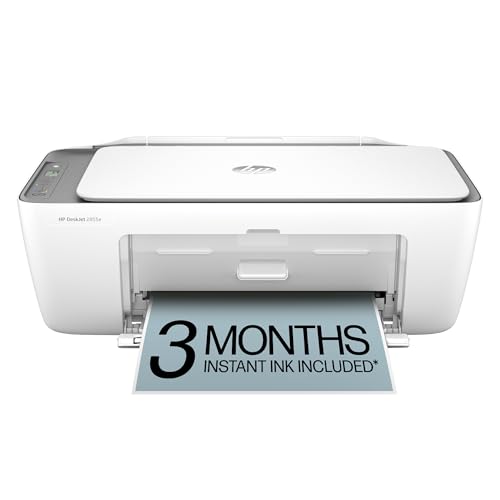
The HP DeskJet 2855e is the straightforward pick for light home printing from an iPhone. It connects over single-band 2.4 GHz Wi-Fi and works with the HP app, while Best Buy confirms AirPrint support for iPhones, so most jobs need nothing more than the share sheet. The 60-sheet input tray and flatbed scanner suit occasional documents, permission slips, and copies, and the compact body fits a shelf or a small desk corner. Setup runs through the HP app on a phone, which keeps the process short for buyers who do not want to involve a computer at all.
Specs
- Wireless all-in-one color inkjet printer with scanner and copier
- Single-band Wi-Fi, 2.4 GHz only, plus USB 2.0
- 60-sheet paper capacity
- Flatbed scanner
- Uses HP 67 cartridges
- Works with the HP app and AirPrint from iPhone
- Includes a 3 month Instant Ink trial with HP+ activation at printer setup
Best for: iPhone owners who print a few pages a week at home and want the simplest wireless setup.
Watch out for: the 2.4 GHz-only Wi-Fi can complicate setup on routers that merge the 2.4 GHz and 5 GHz bands under one network name.
Canon PIXMA TR4720

The Canon PIXMA TR4720 is the most complete home office option in this group for iPhone users who still need fax and multi-page scanning. Its listing states that you can print directly from iOS devices without drivers or apps using AirPrint, and the Canon PRINT app adds scanning and creative projects. A 20-sheet automatic document feeder and automatic two-sided printing make longer documents far less tedious than feeding pages one at a time. The two-line LCD keeps controls simple, though it feels basic next to the touchscreen on the HP OfficeJet Pro below.
Specs
- All-in-one wireless color inkjet printer with print, copy, scan, and built-in fax
- AirPrint and Mopria Print Service for printing from iOS devices without drivers or apps
- Canon PRINT Inkjet/SELPHY app for printing and scanning from iPhone
- 20-sheet automatic document feeder
- Automatic two-sided printing
- Maximum color print resolution of 4800 x 1200 dpi
- Wi-Fi connectivity, 802.11b/g/n, 2.4 GHz
Best for: home office users who print documents from an iPhone and need fax, two-sided printing, and multi-page scanning.
Watch out for: the small two-line LCD gives less guidance during setup and troubleshooting than a color touchscreen.
Epson EcoTank ET-2800 White

The Epson EcoTank ET-2800 in White suits households that print often from an iPhone and want to stop thinking about cartridges. It uses refillable ink tanks filled from included 522 ink bottles, one black bottle and one bottle each of cyan, magenta, and yellow, so a refill is a bottle rather than a cartridge swap. Printing from an iPhone works through AirPrint or the Epson Smart Panel app, and the listing notes wireless plus voice-activated printing. The flatbed scanner handles single pages and photos, while manual two-sided printing means longer documents need a second pass by hand.
Specs
- Wireless color all-in-one cartridge-free Supertank printer with scan and copy
- Refillable ink tanks with included 522 ink bottles in black, cyan, magenta, and yellow
- Print from a smart device using AirPrint or the Epson Smart Panel app
- Wireless 2.4 GHz and 5 GHz connectivity, plus Hi-Speed USB
- Flatbed scanner
- Maximum copy speed of 10 ppm in black and white
- Manual two-sided printing
Best for: families and home users who print regularly from an iPhone and want refillable ink instead of cartridges.
Watch out for: two-sided printing is manual, so double-sided documents take an extra step compared with the automatic duplex models here.
HP OfficeJet Pro 8135e
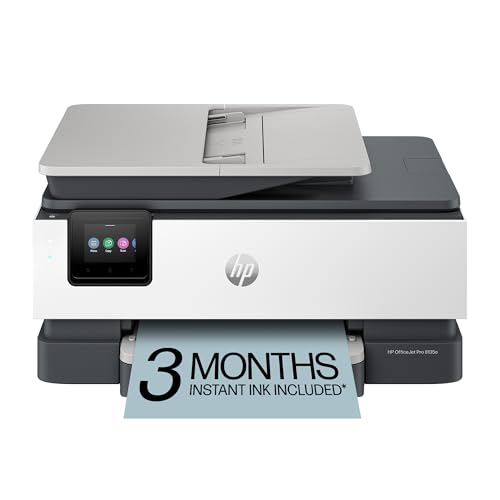
The HP OfficeJet Pro 8135e is the workhorse of this group for a home office that prints from an iPhone all week. Its 225-sheet input tray holds far more paper than the compact models here, and the flatbed scanner pairs with a one-sided automatic document feeder for multi-page jobs. Automatic two-sided printing, fax, and a 2.7-inch touchscreen round out a machine built for batches rather than single pages. Dual-band Wi-Fi removes the 2.4 GHz-only setup worry, and the HP app handles printing, scanning, copying, and fax from a smartphone.
Specs
- Wireless all-in-one color inkjet printer with print, scan, copy, and fax
- 225-sheet paper capacity
- Flatbed scanner with one-sided automatic document feeder
- Automatic two-sided printing
- Dual-band Wi-Fi, plus Ethernet and USB
- Maximum color print resolution up to 4800 x 1200 dpi on HP Advanced Photo Paper
- 2.7-inch touchscreen
- Uses HP 923 cartridges
- Works with the HP app from a smartphone
Best for: a busy home office that prints, scans, and faxes from an iPhone and needs a large paper tray.
Watch out for: it takes more desk space than the compact printers in this guide, so measure the spot before ordering.
Brother MFC-J1010DW

The Brother MFC-J1010DW is the compact pick for a small desk where duplex printing still matters. It prints up to 17 ppm in black and 9.5 ppm in color, according to its Amazon listing, and pairs that speed with automatic duplex printing and a 20-page automatic document feeder. An iPhone connects through AirPrint or the Brother Mobile Connect app, and Wi-Fi Direct offers a direct link when the shared network is awkward. The 1.8-inch color display keeps the footprint small, and cloud printing and scanning let you send jobs without opening a laptop first.
Specs
- Wireless color inkjet all-in-one printer with print, copy, scan, and fax
- Mobile device compatibility with AirPrint and Mopria
- Brother Mobile Connect app for printing and managing the printer from a phone
- Print speeds up to 17 ppm in black and 9.5 ppm in color
- Automatic duplex printing
- 20-page automatic document feeder
- Built-in wireless, Wi-Fi Direct, and USB 2.0
- 1.8-inch color display
Best for: iPhone users with limited desk space who want fast two-sided printing and multi-page scanning.
Watch out for: the small display makes on-printer menus harder to read than the larger touchscreen on the HP OfficeJet Pro 8135e.
Which One Fits Your Situation
You print a few pages a week at home
Choose the HP DeskJet 2855e. Its 60-sheet tray, flatbed scanner, and HP app setup cover permission slips, recipes, and occasional documents without taking over a room. AirPrint handles the quick jobs from an iPhone, so you rarely need to open the app at all. Just confirm your router offers a 2.4 GHz network before buying, since this model cannot join a 5 GHz-only network.
You run a home office with fax and scanning
Choose the Canon PIXMA TR4720 if you need fax, or the HP OfficeJet Pro 8135e if you print in larger batches. The Canon covers fax, two-sided printing, and a 20-sheet feeder in a smaller body, while the HP adds a 225-sheet tray, a touchscreen, and dual-band Wi-Fi. Both print from an iPhone through AirPrint, so the deciding factor is whether paper capacity and screen size matter more than a smaller footprint.
You print every day and dislike cartridges
Choose the Epson EcoTank ET-2800 White. Its refillable tanks and included 522 ink bottles suit daily homework, worksheets, and color documents far better than a cartridge model that needs frequent swaps. AirPrint and the Epson Smart Panel app both work from an iPhone, and dual-band Wi-Fi keeps setup simple. Accept manual two-sided printing as the trade-off for the tank design.
You have a small desk but print double-sided often
Choose the Brother MFC-J1010DW. Its compact body, automatic duplex printing, and 20-page feeder fit a tight desk while still handling multi-page documents well. AirPrint and the Brother Mobile Connect app cover iPhone printing, and Wi-Fi Direct helps when the shared network is unreliable. The small display is the main compromise, so use the app for most settings.
Common Mistakes
- Buying a wireless printer without checking AirPrint or iOS app support, then discovering every job needs a computer.
- Choosing a 2.4 GHz-only printer for a home where the router hides that band behind a merged network name.
- Picking a photo-focused printer for heavy document printing, or a document printer for frequent photo printing.
- Ignoring the cartridge or ink bottle type on the listing and learning the running cost only after the starter supply runs out.
- Placing the printer too far from the router, then blaming the iPhone when wireless jobs stall or disappear.
Frequently Asked Questions
Can I print from an iPhone without installing an app?
Yes, if the printer supports AirPrint. Open the document or photo on your iPhone, tap Share, choose Print, and select the AirPrint printer on the same Wi-Fi network. Every printer in this guide supports AirPrint, so a basic print job needs no extra software. Install the brand app only when you want scanning, ink checks, or remote printing.
Do I need the printer and iPhone on the same Wi-Fi network?
Yes, for AirPrint in most homes. Both devices must share the same Wi-Fi network so the iPhone can find the printer. Some models also offer Wi-Fi Direct, which creates a direct link without the shared network, and brand apps can add remote printing over the internet. Check the listing for Wi-Fi Direct if your home network is unreliable.
Why does my iPhone not find a Wi-Fi printer?
The usual cause is a network mismatch. A 2.4 GHz-only printer cannot appear on a 5 GHz-only network, so confirm the printer joined the right band and the iPhone uses the same network name. Restarting the printer and the router often clears a stale connection. If the problem repeats, move the printer closer to the router or use the brand app to check the connection status.
Is a tank printer better than a cartridge printer for iPhone users?
It depends on volume, not on the iPhone connection. A tank printer such as the Epson EcoTank ET-2800 suits households that print daily, because refills come from ink bottles rather than cartridges. A cartridge printer suits light printing, where the lower upfront size and simpler setup matter more. Both types print from an iPhone through AirPrint, so choose by how much you print.
More from Amazon
Programs that pair well with the guide above. Offers and eligibility are set by Amazon and may change.
Free shipping on eligible items, Prime Video and more. Eligible new members can start with a free trial.
Start a Prime free trialAd-free music streaming. Eligible new subscribers can start with a free trial.
Try Music Unlimited freeA Prime membership for ages 18-24 with a trial period. Eligibility is set by Amazon.
See Prime for Young AdultsAudiobooks and podcasts to listen to on the go. Eligible new members can start with a free trial.
Try Audible freeAs an Amazon Associate we earn from qualifying purchases.
Write Your Review
No reviews yet. Be the first to share your experience!