
Our Short List of 3
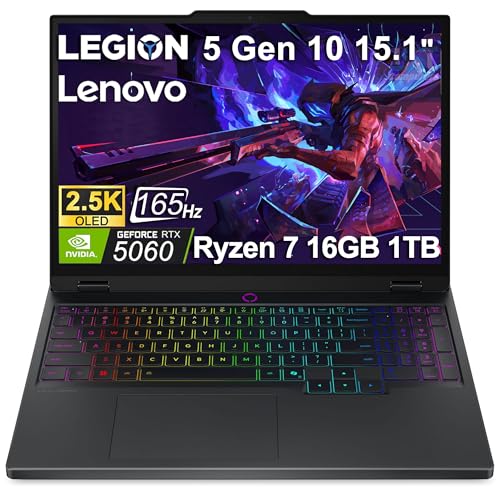
- Processor: AMD Ryzen 7 260, 8 cores / 16 threads, 3.8 GHz base, up to 5.1 GHz boost
- Graphics: NVIDIA GeForce RTX 5060, 8GB GDDR7, 115W TGP
- Display: 15.1-inch OLED, 2560 × 1600, 165Hz, G-SYNC
- Memory: 16GB DDR5

- Processor: Intel Core Ultra 7 255HX, 20 cores / 20 threads, P-cores up to 5.2 GHz
- Graphics: NVIDIA GeForce RTX 5060, 8GB GDDR7, 115W
- Display: 16-inch OLED, 2560 × 1600, 165Hz, G-SYNC
- Memory: 32GB DDR5
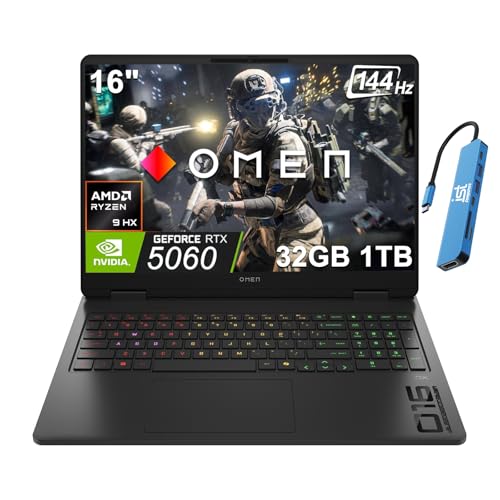
- Processor: AMD Ryzen 9 8940HX, 16 cores / 32 threads, up to 5.3 GHz
- Graphics: NVIDIA GeForce RTX 5060, 8GB GDDR7
- Display: 16-inch, 1920 × 1200, 144Hz
- Memory: 32GB DDR5
All 4 Picks at a Glance
| Product | Specs | Action |
|---|---|---|
| 1. Lenovo Legion 5 Gen 10 (15AHP10) — OLED Display and a 115W RTX 5060 |
| Check price on Amazon |
| 2. Lenovo Legion Pro 5i Gen 10 — 20 Cores and 32GB for Virtual Machines |
| Check price on Amazon |
| 3. HP OMEN 16 Slim — 16-Core Ryzen 9 HX Processor and 32GB of Memory |
| Check price on Amazon |
 4. Apple MacBook Pro 14 (M4) — The Battery-First Route Through the Degree |
| Check price on Amazon |
Key takeaways
- Compare five laptops for computer engineering students, with multi-core processors, generous memory and discrete graphics for compiling, VMs and CAD work.
Computer engineering sits between two worlds. One semester is programming, operating systems and embedded development; the next is circuit analysis, digital logic and computer architecture. The laptop that carries a student through that mix has to do more than open documents and a browser. It has to compile code quickly, hold a virtual machine open beside an editor and a stack of datasheets, and — in the courses that lean toward hardware design — drive CAD and simulation tools that benefit from a discrete graphics processor.
The five machines in this roundup were picked against that workload rather than against general student use. Every one publishes a multi-core processor, at least 16GB of memory and fast solid-state storage in its maker specifications. Four carry discrete NVIDIA graphics for the design and simulation side of the degree, and the fifth takes a different route with a high-efficiency chip and a long list of published battery figures for students who live away from a desk. Screen sizes run from 14 inches to 16, so there is a genuine choice between a machine that disappears into a backpack and one that gives schematics and code side-by-side room to breathe.
Disclosure: As an Amazon Associate, we earn from qualifying purchases made through links on this page, at no extra cost to you.
What Computer Engineering Coursework Asks of a Laptop
Compiling rewards cores and memory. Programming courses start with small exercises, but junior and senior projects grow into large codebases, and build times scale with thread count. A processor with more performance cores shortens the wait between writing code and running it, and it does so dozens of times a day. Memory matters just as much: an integrated development environment, a browser full of documentation, a PDF reader and a chat client are all open at once during lab work, and 16GB is the practical floor for that stack.
Virtual machines and containers double the load. Operating systems and networking courses routinely ask students to run one or more virtual machines, and each guest system needs its own slice of memory and storage on top of the host. This is where 32GB configurations earn their place — they let a student keep a Linux guest, a development environment and reference material open together without the machine swapping to disk.
Simulation and CAD lean on the graphics processor. Circuit simulation, signal processing and 3D modelling tools used in electrical and computer engineering courses can hand work to a discrete GPU, and a machine with one handles large models and long simulation runs more comfortably than integrated graphics alone. Not every course needs it — a student headed toward software-heavy electives may never miss a discrete GPU — but hardware-focused tracks benefit directly.
Storage fills faster than expected. Development toolchains, virtual machine images, simulation libraries and project archives are all large. A 1TB solid-state drive is the comfortable starting point for a four-year degree; 512GB works only with disciplined use of external or network storage for old projects.
Ports and battery shape daily life. Embedded and digital logic labs connect the laptop to development boards, programmers and instruments, usually over USB, and a wired Ethernet port still appears in lab benches and dorm rooms. Battery life decides whether the machine survives a full day of lectures, and weight decides whether it gets carried at all.
How to Choose
Start with the processor and memory, in that order. A current multi-core chip with 16GB of memory covers the core degree; step up to 32GB if virtual machines feature heavily in the programme or the laptop must last the full course without an upgrade path. Four of the five machines below publish memory in removable or higher-capacity configurations, and checking whether memory can be expanded later is worthwhile on any model.
Decide whether discrete graphics are on your syllabus. Students whose courses include CAD, 3D modelling or GPU-accelerated simulation should take one of the four NVIDIA-equipped machines. Students on a software and systems path can trade the GPU for battery life and lower weight, which is exactly the exchange the MacBook Pro in this list makes.
Match screen size to how the laptop travels. A 14-inch machine suits a daily commute between lectures and labs. A 15- or 16-inch display shows a schematic and a code window side by side without constant zooming, in exchange for a heavier bag. Every display in this roundup is at least 1920 × 1200, and four of the five go well beyond that, which matters when reading dense datasheets.
Check the exact configuration before ordering. Makers sell the same model name with different processors, memory sizes and storage. The listings below name one precise configuration each, and the specifications quoted are the ones published for that configuration.
The Best Laptops for Computer Engineering Students
1. Lenovo Legion 5 Gen 10 (15AHP10) — OLED Display and a 115W RTX 5060
- Processor: AMD Ryzen 7 260, 8 cores / 16 threads, 3.8 GHz base, up to 5.1 GHz boost
- Graphics: NVIDIA GeForce RTX 5060, 8GB GDDR7, 115W TGP
- Display: 15.1-inch OLED, 2560 × 1600, 165Hz, G-SYNC
- Memory: 16GB DDR5
The Legion 5 Gen 10 pairs an AMD Ryzen 7 260 processor — eight cores and sixteen threads, published at 3.8 GHz base and up to 5.1 GHz boost — with an NVIDIA GeForce RTX 5060 laptop GPU running at a 115W total graphics power, the full-power version of that chip rather than a thinned-down variant. That combination is aimed squarely at the mixed workload of the degree: parallel threads for builds, and a properly fed discrete GPU for the CAD and simulation courses.
The display is the other headline. The 15.1-inch OLED panel runs at 2560 × 1600 with a 165Hz refresh rate and G-SYNC support, so schematics, waveforms and code all sit on a sharp, high-contrast screen. Around it, Lenovo publishes 16GB of DDR5 memory, a 1TB solid-state drive, Wi-Fi 7, a 5MP webcam, a 24-zone RGB keyboard and an RJ45 Ethernet port — the last of these still genuinely useful on lab benches and in dorm rooms. It is the most complete all-round package in this list for a student who does a bit of everything.
2. Lenovo Legion Pro 5i Gen 10 — 20 Cores and 32GB for Virtual Machines
- Processor: Intel Core Ultra 7 255HX, 20 cores / 20 threads, P-cores up to 5.2 GHz
- Graphics: NVIDIA GeForce RTX 5060, 8GB GDDR7, 115W
- Display: 16-inch OLED, 2560 × 1600, 165Hz, G-SYNC
- Memory: 32GB DDR5
The Legion Pro 5i Gen 10 is the pick for students whose courses lean on virtualisation. Its Intel Core Ultra 7 255HX publishes twenty cores and twenty threads, with performance cores reaching 5.2 GHz, and the configuration listed here carries 32GB of DDR5 memory — the headroom that lets a host system, a Linux guest, an editor and course documentation all stay open at once without contention.
Graphics match the tier below it in name only: the RTX 5060 here also runs with 8GB of GDDR7 memory at 115W, and the 16-inch OLED display matches the Legion 5’s 2560 × 1600 resolution and 165Hz refresh rate in a larger panel. Wi-Fi 7, a 5MP webcam and Windows 11 Home round out the published specification, and the whole machine weighs 5.36 pounds — substantial, but reasonable for a 16-inch laptop with this cooling class. Choose it when the degree involves operating systems, networking or security labs built on virtual machines.
3. HP OMEN 16 Slim — 16-Core Ryzen 9 HX Processor and 32GB of Memory
- Processor: AMD Ryzen 9 8940HX, 16 cores / 32 threads, up to 5.3 GHz
- Graphics: NVIDIA GeForce RTX 5060, 8GB GDDR7
- Display: 16-inch, 1920 × 1200, 144Hz
- Memory: 32GB DDR5
The OMEN 16 Slim takes a different approach to processing power. Its AMD Ryzen 9 8940HX is a desktop-class HX chip with sixteen cores and thirty-two threads, published at up to 5.3 GHz — the highest thread count in this roundup, and a direct benefit for large parallel builds and for running several virtual machines at once. The listed configuration pairs it with 32GB of DDR5 memory and a 1TB solid-state drive.
Graphics come from an NVIDIA GeForce RTX 5060 with 8GB of GDDR7 memory, and the 16-inch display runs at 1920 × 1200 with a 144Hz refresh rate — a step down in resolution from the two Lenovo machines, traded for the stronger processor at this tier. An infrared webcam supports face sign-in, the keyboard offers four-zone RGB backlighting, and the chassis weighs 5.4 pounds. It suits the student whose heaviest work is compiling and virtualisation rather than high-resolution design work.
4. Apple MacBook Pro 14 (M4) — The Battery-First Route Through the Degree
- Processor: Apple M4, 10-core CPU
- Graphics: 10-core GPU, integrated
- Display: 14.2-inch Liquid Retina XDR
- Memory: 16GB unified memory
The MacBook Pro takes the opposite trade from the three machines above. There is no discrete graphics card; instead, Apple’s M4 chip integrates a 10-core CPU and a 10-core GPU on one package, paired with 16GB of unified memory and a 512GB solid-state drive in the configuration listed here. For the programming, systems and embedded-tool side of computer engineering — much of which runs in a Unix-style environment — that specification covers the work, and it does so in a 14.2-inch chassis built for daily carrying.
The 14.2-inch Liquid Retina XDR display is the finest panel in this roundup for reading dense material, and the published battery figures are the reason this machine earns its place: students who move between lectures, labs and the library all day get the longest unplugged working time of the five. Two cautions belong with it. Storage at 512GB fills quickly with virtual machine images, so external storage becomes part of the setup, and any course built around Windows-only engineering software needs a plan — a lab machine, a remote desktop, or a different pick from this list. The model listed is the Space Black M4 configuration, Apple model MW2U3LL/A.
5. ASUS ROG Zephyrus G14 — Discrete Graphics at 3.31 Pounds
The Zephyrus G14 answers the portability problem directly. At 3.31 pounds it is by far the lightest machine in this roundup, yet the configuration listed here still publishes a discrete NVIDIA GeForce RTX 5060 with 8GB of GDDR7 memory — the combination a hardware-focused student needs for CAD and simulation courses, in a laptop that can be carried to every lecture without a second thought.
The processor is an AMD Ryzen 9 270 with eight cores and sixteen threads reaching up to 5.2 GHz, memory is 16GB of LPDDR5X-7500, and storage is a 1TB PCIe 4.0 solid-state drive. The 14-inch OLED display runs at 2880 × 1800 with a 120Hz refresh rate and a published 500-nit brightness, the sharpest small screen here, and the 73Wh battery is large for the class. The trade is memory: 16GB is soldered, so virtual-machine-heavy students should weigh the 32GB configurations above. For everyone else, it is the easiest machine in the list to live with daily.
Specs
- Processor: AMD Ryzen 9 270, 8 cores / 16 threads, up to 5.2 GHz
- Graphics: NVIDIA GeForce RTX 5060, 8GB GDDR7
- Display: 14-inch OLED, 2880 × 1800, 120Hz, 500 nits
- Memory: 16GB LPDDR5X-7500
- Storage: 1TB PCIe 4.0 SSD
- Battery: 73Wh
- Weight: 3.31 lb
- Colour: Platinum White
Which One Fits Your Degree?
The honest split in this list is between memory and mobility. If the programme is heavy on virtual machines, operating systems labs or large parallel builds, the two 32GB machines — the Legion Pro 5i and the OMEN 16 Slim — remove the ceiling that 16GB imposes, and the OMEN’s sixteen-core HX processor is the strongest compiling hardware here. If the degree mixes everything and the laptop will spend its life on one desk, the Legion 5 Gen 10 balances display, graphics power and ports most evenly.
If the laptop travels all day, the choice narrows to the two 14-inch machines. The Zephyrus G14 keeps discrete graphics for design coursework at the lowest weight in the list, while the MacBook Pro trades the discrete GPU and storage capacity for the longest published battery life and a Unix-style environment that suits programming-led study. None of the five is a wrong answer for computer engineering; the right one is the one whose strengths line up with the electives on the degree plan.
Frequently Asked Questions
How much memory does a computer engineering student need?
Sixteen gigabytes is the working minimum and covers programming, circuit simulation and ordinary coursework with room to spare. Students whose courses run virtual machines regularly — operating systems, networking and security labs are the usual cases — should take a 32GB configuration, because each guest system reserves its own share of memory on top of everything else that is open.
Is a discrete graphics card necessary for computer engineering?
Not for every student. Programming, embedded development and systems courses run well on integrated graphics, and the MacBook Pro in this list is built on exactly that basis. A discrete GPU earns its place when the degree includes CAD, 3D modelling or GPU-accelerated simulation work, which is why four of the five machines here publish one.
Should a computer engineering student choose Windows or macOS?
Most engineering faculties teach across both, and the core tools for programming and embedded work exist in Unix-style environments as well as on Windows. The deciding factor is specific course software: if a programme names Windows-only tools for its labs, a Windows machine — or reliable access to a lab computer or remote desktop — is the safer plan. Check the course pages for the first year before deciding.
How long should the laptop last, and what should be checked before buying?
A machine bought for a four-year degree should start with a 1TB drive and as much memory as the degree plan justifies, because storage fills with toolchains and virtual machine images and memory is soldered in place on many current models. Before ordering, confirm the exact configuration on the listing — processor model, memory size and storage — since makers sell the same model name in several specifications.
More from Amazon
Programs that pair well with the guide above. Offers and eligibility are set by Amazon and may change.
Free shipping on eligible items, Prime Video and more. Eligible new members can start with a free trial.
Start a Prime free trialAd-free music streaming. Eligible new subscribers can start with a free trial.
Try Music Unlimited freeA Prime membership for ages 18-24 with a trial period. Eligibility is set by Amazon.
See Prime for Young AdultsAudiobooks and podcasts to listen to on the go. Eligible new members can start with a free trial.
Try Audible freeAs an Amazon Associate we earn from qualifying purchases.










Write Your Review
No reviews yet. Be the first to share your experience!