

Our Short List of 3
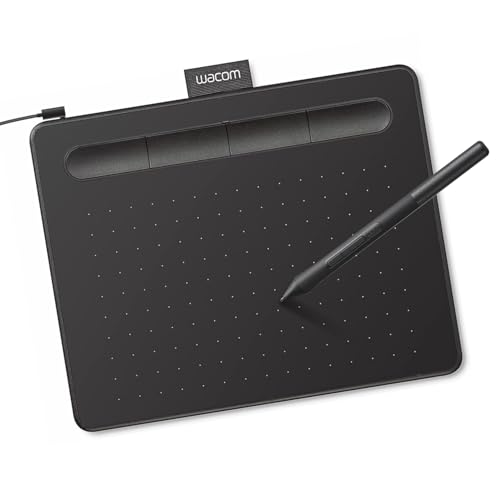
- Best for: First-time buyers who want the established beginner tablet, a battery-free pen and Chromebook support for school or home use.
- Type: non-display pen tablet (draw on the pad, watch the computer screen)
- Active area: 152.0 x 95.0 mm (6.0 x 3.7 in), Small size (specifications document)
- Pressure levels: 4,096 (features field and specifications document agree)
- Pen: Wacom Pen 4K (LP-1100K), pressure-sensitive, cordless, battery-free

- Best for: Beginners who want more shortcut keys and a higher stated pressure figure than the Wacom, plus a phone mode for drawing on Android.
- Type: non-display pen tablet
- Active area: 160 x 100 mm (6.3 x 3.9 in) in PC mode; 100 x 62.5 mm in phone mode (listing comparison table)
- Pressure levels: 8,192 (title, features field and comparison table agree)
- Pen: PW100, battery-free electromagnetic resonance; pen resolution 5080 LPI; sensing height 10 mm

- Best for: Beginners with desk space who want the largest drawing area and the highest stated pressure figure without paying for a screen.
- Type: non-display pen tablet
- Active area: 10 x 6.25 inches (listing bullet; the title shortens this to 10×6)
- Pressure levels: 16,384 (title and bullet agree); tilt support up to 60 degrees (bullet)
- Pen: battery-free stylus (title and bullet); 8 hotkeys; 8 mm thin (bullet)
All 5 Picks at a Glance
| Product | Specs | Action |
|---|---|---|
| Wacom Intuos Small (CTL4100) |
| Check price on Amazon |
| HUION Inspiroy H640P |
| Check price on Amazon |
| XPPen Deco 01 V3 |
| Check price on Amazon |
 HUION Kamvas 13 (Gen 3) |
| Check price on Amazon |
 Wacom One Creative Pen Display (Gen 1, 2019) |
| Check price on Amazon |
Key takeaways
- Five beginner pen tablets and pen displays compared on active area, pressure levels, battery-free pens and connectivity, with listing conflicts flagged.
Beginner drawing tablets come in two formats that feel nothing alike, and listings rarely explain the difference. The first three picks are pen tablets: you draw on a plain pad while watching your computer screen. The last two are pen displays: you draw directly on a screen, and every one of them must stay connected to a computer to work. This guide admitted only products whose listing states the specs a beginner actually chooses on, an active area, a pressure level, the pen type and the connection.
Pressure figures in these listings run from 4,096 to 16,384 levels, active areas from a pocketable six inches to a full ten, and one title claims a feature its own comparison table denies, which is flagged in its entry rather than repeated. Read the format split first and the numbers second, because a bigger pressure figure on the wrong format will not make your first month of drawing any easier.
Quick Picks
As an Amazon Associate we earn from qualifying purchases.
| Product | Best for | Key spec from title |
|---|---|---|
| Wacom Intuos Small (CTL4100) | First-time buyers who want the established beginner tablet, a battery-free pen and Chromebook support for school or home use. | 6.0 x 3.7 in active area, 4,096 levels, battery-free pen |
| HUION Inspiroy H640P | Beginners who want more shortcut keys and a higher stated pressure figure than the Wacom, plus a phone mode for drawing on Android. | 8192 levels, 6 shortcut keys, battery-free pen |
| XPPen Deco 01 V3 | Beginners with desk space who want the largest drawing area and the highest stated pressure figure without paying for a screen. | 10 x 6.25 in active area, 16,384 levels |
| HUION Kamvas 13 (Gen 3) | Beginners committed to drawing directly on a display, who want dials for brush size and a colour specification stated in the listing. | 13.3 in pen display, 16,384 levels, dual dials |
| Wacom One Creative Pen Display (Gen 1, 2019) | Beginners who want a Wacom pen display and are content with the older generation’s specification in exchange for its simpler HDMI setup. | 13.3 in pen display, 4,096 levels, HDMI |
How to Choose
Decide the format before the figures
A pen tablet asks your hand and eyes to work in different places, a skill most beginners pick up within days, and in exchange it is cheaper to replace, easier to store and kinder to your posture. A pen display puts the line under the pen, which feels natural immediately, but ties you to a computer, a cable and a bigger desk footprint. Every pick here is labelled with its format, and two of the five are displays; choose the working style first, because no pressure figure compensates for hating the format.
Measure the active area against your drawing style
The pads here span 6.0 by 3.7 inches to 10 by 6.25 inches, and the displays state their own active areas in millimetres or inches. A small area maps your whole screen onto a few inches, which makes long lines twitchy but keeps your arm still; a large area gives sweeping strokes room and demands desk space and shoulder movement. Note the phone-mode trap: one pad’s area shrinks substantially on Android, which its comparison table states plainly.
Treat pressure levels as a stated figure, not a verdict
Listings here claim 4,096, 8,192 and 16,384 levels, and the honest reading is that all three exceed what a beginner’s hand can consciously separate. Line quality at this level depends more on the pen’s activation force, stated for one display at 2 grams, and on tilt support where it genuinely exists. Which brings up the discipline point: one title in this set claims tilt that its own comparison table denies, so verify features in the table, not the title.
Check the connection and the operating system list
The pads split between plain USB and USB-C with adapters, and the displays between a 3-in-1 cable and HDMI, and those differences decide whether the tablet works with your machine out of the box. Operating system support is equally specific: Chromebook and Linux appear on some listings and not others, one pad excludes iPhones and iPads outright, and one display asks for a particular Android USB standard. Read the exact list for the exact code before buying.
The 5 Best Options
Wacom Intuos Small (CTL4100)
- Best for: First-time buyers who want the established beginner tablet, a battery-free pen and Chromebook support for school or home use.
- Type: non-display pen tablet (draw on the pad, watch the computer screen)
- Active area: 152.0 x 95.0 mm (6.0 x 3.7 in), Small size (specifications document)
- Pressure levels: 4,096 (features field and specifications document agree)
- Pen: Wacom Pen 4K (LP-1100K), pressure-sensitive, cordless, battery-free
First-time buyers who want the established beginner tablet, a battery-free pen and Chromebook support for school or home use.
A Bluetooth version of this tablet exists under a different code; this pick is the wired USB-only model, so do not expect wireless. The listing’s 7-inch screen-size field is a size-class field, not a display, and a stray battery-life line in some captures belongs to the Bluetooth models only.
The Intuos Small is the conservative first tablet: a non-display pad with a 6.0 by 3.7 inch active area, 4,096 pressure levels and the Wacom Pen 4K, which the listing’s specifications describe as pressure-sensitive, cordless and battery-free. Four customisable ExpressKeys sit on the pad, the pen resolution is stated at 2540 lpi with a 133 pps reading speed, and compatibility covers Chromebook, Mac, Android and Windows. The listing’s own description frames it for people getting started with drawing, painting or photo editing, which is exactly this guide’s reader.
Watch out for: A Bluetooth version of this tablet exists under a different code; this pick is the wired USB-only model, so do not expect wireless. The listing’s 7-inch screen-size field is a size-class field, not a display, and a stray battery-life line in some captures belongs to the Bluetooth models only.
HUION Inspiroy H640P
- Best for: Beginners who want more shortcut keys and a higher stated pressure figure than the Wacom, plus a phone mode for drawing on Android.
- Type: non-display pen tablet
- Active area: 160 x 100 mm (6.3 x 3.9 in) in PC mode; 100 x 62.5 mm in phone mode (listing comparison table)
- Pressure levels: 8,192 (title, features field and comparison table agree)
- Pen: PW100, battery-free electromagnetic resonance; pen resolution 5080 LPI; sensing height 10 mm
Beginners who want more shortcut keys and a higher stated pressure figure than the Wacom, plus a phone mode for drawing on Android.
Do not buy this tablet for tilt. Its title claims a tilt function, but the listing’s own comparison table marks tilt as unsupported for this model, and the table governs. The description also states it is not suitable for iPhone or iPad, so Apple mobile users should look at the pen displays or the Wacom instead.
The H640P doubles the Wacom’s stated pressure figure to 8,192 levels and adds six customised press keys, on a slightly larger 6.3 by 3.9 inch active area in PC mode that shrinks to 100 by 62.5 mm in phone mode. Its PW100 pen is battery-free electromagnetic resonance technology with a stated 5080 LPI resolution and a 10 mm sensing height, and the box contents in the title include a glove and eighteen spare nibs, a generous starter kit. Connection is by USB with a micro-USB cable, and support covers Windows, macOS and Android phones and tablets.
Watch out for: Do not buy this tablet for tilt. Its title claims a tilt function, but the listing’s own comparison table marks tilt as unsupported for this model, and the table governs. The description also states it is not suitable for iPhone or iPad, so Apple mobile users should look at the pen displays or the Wacom instead.
XPPen Deco 01 V3
- Best for: Beginners with desk space who want the largest drawing area and the highest stated pressure figure without paying for a screen.
- Type: non-display pen tablet
- Active area: 10 x 6.25 inches (listing bullet; the title shortens this to 10×6)
- Pressure levels: 16,384 (title and bullet agree); tilt support up to 60 degrees (bullet)
- Pen: battery-free stylus (title and bullet); 8 hotkeys; 8 mm thin (bullet)
Beginners with desk space who want the largest drawing area and the highest stated pressure figure without paying for a screen.
This code was verified through mirror copies of the listing, so confirm it on the live page before ordering. Those copies carry legacy fields naming the older V2 in places, and one mirror table contradicts the pressure figure; the title and bullet figure of 16,384 is the one this guide prints, and the older V2 is a different product.
The Deco 01 V3 is the big-pad option for beginners who draw from the shoulder rather than the wrist: a 10 by 6.25 inch active area in an 8 mm thin body, with eight hotkeys along the side. Its title and bullets agree on 16,384 pressure levels, the highest figure in this guide, and the bullet states the battery-free stylus supports up to sixty degrees of tilt. Connection is modern, USB-C to USB-C with adapters in the box, and the compatibility list is the widest here, spanning Windows, Android, macOS, Chrome OS and Linux.
Watch out for: This code was verified through mirror copies of the listing, so confirm it on the live page before ordering. Those copies carry legacy fields naming the older V2 in places, and one mirror table contradicts the pressure figure; the title and bullet figure of 16,384 is the one this guide prints, and the older V2 is a different product.
HUION Kamvas 13 (Gen 3)
- Best for: Beginners committed to drawing directly on a display, who want dials for brush size and a colour specification stated in the listing.
- Type: pen display (draw directly on the screen; must be connected to a computer)
- Display: 13.3 inches, full-laminated, Canvas Glass 2.0 anti-glare; resolution 1920 x 1080, LCD
- Active area: 293.8 x 165.2 mm (features field)
- Pressure levels: 16,384 (title, features field and bullet agree); PenTech 4.0 pen; 2g initial activation force
Beginners committed to drawing directly on a display, who want dials for brush size and a colour specification stated in the listing.
No weight is printed here because the listing contradicts itself, a bullet claiming 865 g against a spec field of 1.89 kg. The captured fields also never call the pen battery-free, so confirm that on the live listing if it matters, and do not confuse this model with the separate Gen 3 SE listing.
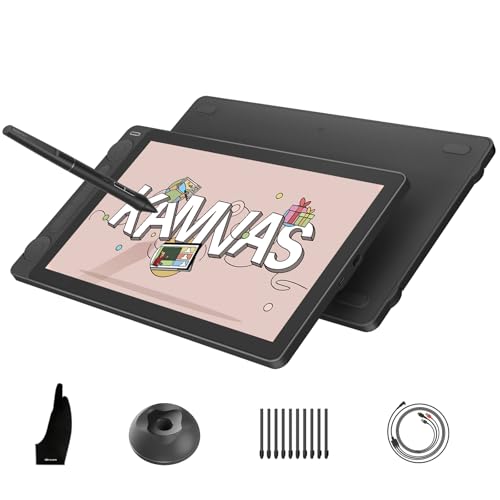
The Kamvas 13 Gen 3 is the pen display for beginners who know they want to draw on the screen itself: a 13.3-inch full-laminated panel at 1920 x 1080 with anti-sparkle canvas glass, an active area of 293.8 by 165.2 mm and colour stated at 99% sRGB with factory calibration. The PenTech 4.0 pen delivers a stated 16,384 pressure levels with a 2 gram initial activation force, and five press keys plus two dial controllers handle shortcuts without a keyboard. Its first bullet is blunt that this is not a standalone product: it must connect to a computer, by its 3-in-1 cable or a full-featured USB-C lead.
Watch out for: No weight is printed here because the listing contradicts itself, a bullet claiming 865 g against a spec field of 1.89 kg. The captured fields also never call the pen battery-free, so confirm that on the live listing if it matters, and do not confuse this model with the separate Gen 3 SE listing.
Wacom One Creative Pen Display (Gen 1, 2019)
- Best for: Beginners who want a Wacom pen display and are content with the older generation’s specification in exchange for its simpler HDMI setup.
- Type: pen display (draw directly on the screen; connects to a computer)
- Display: 13.3 inches; resolution 1920 x 1080, LCD; full lamination (features fields)
- Active area: 11.60 x 6.50 inches (Amazon features field governs)
- Pressure levels: 4,096 (features field)
Beginners who want a Wacom pen display and are content with the older generation’s specification in exchange for its simpler HDMI setup.
This is a 2019-generation product, not the current Wacom One 13 touch, whose specification and codes are different, so confirm a live offer before ordering. Mirror copies of this listing conflict on the active area and connectivity; the Amazon fields printed here govern, and no weight is stated because the sources disagree wildly.
The Wacom One is the older-generation route onto a screen: its own title says Old Gen (2019), and this guide frames it that way rather than dressing it as current. The stated specification is a 13.3-inch 1920 x 1080 full-laminated display with an 11.60 by 6.50 inch active area and 4,096 pressure levels, the joint-lowest figure here, delivered by the Wacom One Pen, which the listing description states needs no batteries or charging. The Amazon field gives the connection as HDMI, and compatibility covers Mac, Windows PC, Chromebook and Android smartphones for drawing, editing and education.
Watch out for: This is a 2019-generation product, not the current Wacom One 13 touch, whose specification and codes are different, so confirm a live offer before ordering. Mirror copies of this listing conflict on the active area and connectivity; the Amazon fields printed here govern, and no weight is stated because the sources disagree wildly.
Which One Fits Your Situation
Your first tablet ever, on a school laptop
Take the Wacom Intuos Small: a battery-free pen, four shortcut keys and stated Chromebook support, in a pad small enough for any desk or bag. Its stated compatibility list is the widest of the pads for school machines, and its keys cover the shortcuts a beginner learns first.
You draw big and want room to move
Take the XPPen Deco 01 V3 for its 10 by 6.25 inch area and eight hotkeys, after confirming its code on the live page as its entry advises. The trade is desk footprint and a tethered cable, and its pen needs no charging between sessions.
You know you want to draw on the screen
Take the Kamvas 13 Gen 3 for its laminated 13.3-inch display, dual dials and stated colour coverage, provided a computer sits within cable reach. The dual dials spare you a keyboard for brush size and zoom, and the stated colour coverage suits illustration and photo work alike.
You want a display and trust the older name
Take the Wacom One Gen 1, accepting its 2019 specification and 4,096 levels in exchange for a simple HDMI connection and a battery-free pen. Confirm a live offer first, because a 2019 listing is exactly where stale stock and dead offers hide.
Common Mistakes
- Reading a non-display tablet’s size-class field as a screen, when the pad has no display at all and your drawing appears on the computer monitor.
- Trusting a title’s tilt claim without checking the model’s own comparison table, which in one listing here marks tilt as unsupported for the very model being sold.
- Ordering the wireless variant of a tablet by mistake, when the verified pick is the wired code and the Bluetooth version carries a different code entirely.
- Expecting a pen display to work by itself, when its own first bullet states it is not a standalone product and must connect to a computer or laptop.
- Blending two generations of the same product line, such as a Gen 3 and its SE sibling, whose pens, codes and availability all differ.
Frequently Asked Questions
Do the two pen displays work without a computer?
No. The Kamvas 13 Gen 3 states it in its first bullet: it is not a standalone product and must be connected to a computer or laptop to work. The Wacom One is the same class of device, an HDMI pen display for a Mac, PC or Chromebook. Neither has its own processor or storage for drawing independently.
Which tablet has the largest active area?
Among the pads, the XPPen Deco 01 V3 at 10 by 6.25 inches per its listing bullet. The Kamvas 13 Gen 3 display states 293.8 by 165.2 mm, which is larger still, but it is a screen you draw on directly rather than a pad, so the two are not like-for-like purchases.
Does the HUION H640P support tilt?
According to the listing’s own comparison table, no: the tilt row for this model is marked as unsupported, whatever the title wording suggests, and tilt appears in that table only for sibling models. Its pen is battery-free with 8,192 stated pressure levels, which are the figures to buy it on.
Which pens need charging or batteries?
None of the pad pens: the Wacom Pen 4K, the HUION PW100 and the XPPen stylus are all stated battery-free, as is the Wacom One Pen in its listing description. The Kamvas pen’s captured fields never use the battery-free wording, so check its live listing if that detail matters to you.
More from Amazon
Programs that pair well with the guide above. Offers and eligibility are set by Amazon and may change.
Free shipping on eligible items, Prime Video and more. Eligible new members can start with a free trial.
Start a Prime free trialAd-free music streaming. Eligible new subscribers can start with a free trial.
Try Music Unlimited freeA Prime membership for ages 18-24 with a trial period. Eligibility is set by Amazon.
See Prime for Young AdultsAudiobooks and podcasts to listen to on the go. Eligible new members can start with a free trial.
Try Audible freeAs an Amazon Associate we earn from qualifying purchases.
Write Your Review
No reviews yet. Be the first to share your experience!