

Key takeaways
- Who it suits: slim desktops, home theater PCs and compact office towers that gain a gaming option.
- Pros: half-height bracket, 8-pin power, DLSS 4, wide availability.
- Cons: 8GB capacity, louder small fans, and a power supply that must have an 8-pin connector.
The best GPU for a small form factor build in 2026 is the GeForce RTX 5070 Founders Edition if your case takes a 242mm dual-slot card, and the Gigabyte RTX 5060 OC Low Profile if your case needs a half-height bracket. Length, thickness, power connector and cooler type decide whether a card works in a compact case far more than raw speed does, so measure the case before you compare benchmarks.
SFF builds fall into two groups. Mini-ITX cases that accept full-height cards give you a choice of compact two-slot designs from NVIDIA and several board partners. Slim desktops and ultra-compact cases accept only low-profile cards with a half-height bracket, and the choice there is narrower. The seven picks below cover both groups, with specifications taken from manufacturer pages and reputable roundups such as Tom’s Hardware, Puget Systems and the SFF Network’s graphics card guide.
Our top picks


As an Amazon Associate we earn from qualifying purchases at no extra cost to you.
Quick comparison of the seven picks
| Pick | Best for | Length | Slots | Board power | Memory |
|---|---|---|---|---|---|
| Gigabyte RTX 5060 OC Low Profile | Best low-profile gaming card | 182mm | 2 | 145W | 8GB GDDR7 |
| ASUS RTX 5060 LP BRK | Shortest low-profile 5060 | 176mm | 2 | about 145W | 8GB GDDR7 |
| Gigabyte RTX 5050 OC Low Profile 8G | Budget low-profile card | 182mm | 2 | 130W | 8GB GDDR6 |
| NVIDIA RTX PRO 4000 Blackwell SFF Edition | Pro and AI work in tiny cases | about 168mm | 2 | 70W | 24GB GDDR7 ECC |
| GeForce RTX 5070 Founders Edition | Best compact 1440p card | 242mm | 2 | 250W | 12GB GDDR7 |
| Compact Radeon RX 9060 XT 16GB or RX 9070 designs | Value and 16GB in ITX | about 200mm to 280mm, varies | 2 to 2.5 | 160W to 220W | 16GB GDDR6 |
| GeForce RTX 5080 Founders Edition | High-end 4K in a compact case | about 304mm | 2 | 360W | 16GB GDDR7 |
Know your three clearance numbers first
Most SFF mistakes come from three numbers: the maximum card length, the maximum card thickness, and the maximum card height. Case makers list them in the specification sheet, and the card makers list their own. If the card exceeds any of the three, it will not fit, however good the review was.
A worked clearance example
Suppose a mini-ITX case lists 305mm of maximum card length, 2.5 slots of thickness and a 140mm height limit. The RTX 5080 Founders Edition is about 304mm long, which clears by only a single millimeter and leaves no room for the power cable, so it fails the practical test even though it passes the arithmetic one. The RTX 5070 Founders Edition at 242mm leaves roughly 63mm of spare length for cable bends and airflow, which is comfortable. Always keep at least 15mm to 20mm of spare length for connectors.
Thickness works the same way. Two-slot cards are about 40mm thick, while many large partner cards use three slots at 60mm or more. In a case with a 50mm limit, a three-slot card will not close the side panel. Check the number, not the slot label, because manufacturers define slot widths loosely.
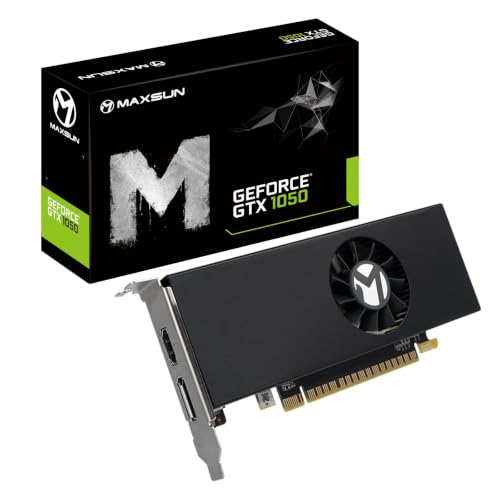
Best low-profile gaming card: Gigabyte RTX 5060 OC Low Profile
Listings show the Gigabyte RTX 5060 OC Low Profile at 182mm long, 69mm tall and 36mm thick, with two slots and a single 8-pin power connector. It carries the standard RTX 5060 specification of 3,840 CUDA cores, 8GB of GDDR7 and a 145W board power, and Gigabyte asks for a 550W power supply. Reviewers regard it as the most powerful low-profile card you can buy and one of the most widely available.
It handles 1080p at high settings and a good range of 1440p games with DLSS 4. The trade-off is that 8GB of memory limits very demanding titles at high texture settings, and a half-height cooler runs louder than a full-size one at the same power.
- Who it suits: slim desktops, home theater PCs and compact office towers that gain a gaming option.
- Pros: half-height bracket, 8-pin power, DLSS 4, wide availability.
- Cons: 8GB capacity, louder small fans, and a power supply that must have an 8-pin connector.
Best for the tightest cases: ASUS RTX 5060 LP BRK
The ASUS RTX 5060 LP BRK is described as the shortest low-profile card of this power class, at 176mm, though it is slightly thicker than the Gigabyte model. It offers the same RTX 5060 silicon and a similar 145W target.
Those 6mm of saved length decide the outcome in some slim cases that allow 180mm or less. The card is also generally the most expensive of the low-profile 5060 models, so it is a fit-driven choice, not a value one.
- Who it suits: very short slim cases and prebuilt upgrades with a 180mm limit.
- Pros: shortest in class, same 5060 performance, quality build.
- Cons: higher cost, slightly thicker, same 8GB limit.
Best budget low-profile card: Gigabyte RTX 5050 OC Low Profile 8G
Tom’s Hardware reported on the Gigabyte low-profile RTX 5050, which is a dual-slot, 182mm card with a half-height bracket, a 130W rating and one 8-pin connector. It uses the RTX 5050’s 2,560 CUDA cores and 8GB of GDDR6.
It targets small systems and aging gaming rigs, and its lower power makes it a sound choice when the power supply is modest. A 450W unit with an 8-pin connector can run it. Expect solid 1080p performance at medium to high settings in most titles.
- Who it suits: older slim PCs, entry-level gaming and upgrade projects with small power supplies.
- Pros: 130W, half-height, simple installation, DLSS support.
- Cons: GDDR6 memory, limited 1440p performance.
Best professional low-profile card: NVIDIA RTX PRO 4000 Blackwell SFF Edition
NVIDIA lists the RTX PRO 4000 Blackwell SFF Edition with 8,960 CUDA cores, 24GB of GDDR7 ECC memory, a 192-bit bus and a 70W maximum. It is a half-height, half-length dual-slot card of about 6.6 inches, powered entirely by the slot, and it provides four mini DisplayPort 2.1 outputs.
It is not a gaming-first card. Puget Systems notes that its low power puts real-world speed nearer to the RTX PRO 2000 than to the full-size model. Its value is the combination of 24GB of memory, ECC and zero cable clutter in a tiny case, which suits AI development, CAD and video work.
- Who it suits: compact workstations, local AI experiments and creators who need memory in a small box.
- Pros: 70W, no power cable, 24GB ECC, small size.
- Cons: professional cost, modest gaming speed, limited retail stock.
Best compact 1440p card: GeForce RTX 5070 Founders Edition
The RTX 5070 Founders Edition is a 242mm, dual-slot card with 6,144 CUDA cores, 12GB of GDDR7 on a 192-bit bus and a 250W rating. Its length fits many mini-ITX cases that list 250mm or more, and its two-slot thickness suits cases with a 50mm limit.
It runs 1440p at high settings in most current games with DLSS 4. The Founders Edition uses a dual-fan layout that exhausts some heat into the case, so a case with mesh panels and an exhaust fan keeps it cool. A 650W SFX or SFX-L power supply covers it.
- Who it suits: ITX gamers at 1440p who want compact NVIDIA features.
- Pros: 242mm, two slots, DLSS 4, 250W.
- Cons: 12GB limits future headroom, and availability of the Founders Edition varies by region.
Best value with 16GB: compact Radeon RX 9060 XT and RX 9070 designs
Several partners make dual-fan, two-slot or 2.5-slot RX 9060 XT 16GB and RX 9070 cards that fit ITX cases. The RX 9060 XT 16GB uses 32 compute units, 16GB of GDDR6 and about 160W, while the RX 9070 uses 56 compute units, 16GB and 220W. Exact dimensions vary by model, so use the maker’s specification sheet and not the generic name.
PC Gamer names the RX 9070 as its best graphics card for 2026 and the RX 9060 XT 16GB as its value pick, which makes this group attractive for SFF builders who want more memory than the RTX 5070 offers. Choose a model with a short, dual-fan cooler and a reasonable power connector.
- Who it suits: ITX builders who want 16GB and strong value.
- Pros: 16GB, efficient 160W to 220W options, competitive pricing.
- Cons: dimensions vary widely, and some partner models are too large for ITX.
Best high-end option: GeForce RTX 5080 Founders Edition
The RTX 5080 Founders Edition carries 10,752 CUDA cores, 16GB of GDDR7 and a 360W board power in a two-slot cooler of about 304mm. It is one of the few high-end cards that fits dual-slot ITX cases built for large GPUs, and it supports 4K at high settings with DLSS 4.
It demands the most from the build. You need a case with at least 310mm of card length, strong intake and exhaust airflow, and an SFX-L or high-wattage SFX power supply of 850W or more. The 12V-2×6 connector needs careful routing in a tight space.
- Who it suits: enthusiasts building compact 4K machines.
- Pros: top-tier performance in two slots, DLSS 4, efficient design for its speed.
- Cons: 360W of heat in a small case, cable routing, steep cost.
Decision matrix by case type
| Case type | Typical limit | Best match |
|---|---|---|
| Slim desktop with half-height slots | Low-profile only, 180mm | ASUS RTX 5060 LP BRK or RTX 5050 LP |
| Slim desktop with 185mm to 200mm | Low-profile | Gigabyte RTX 5060 OC Low Profile |
| Small ITX, 250mm and 2 slots | Full-height compact | RTX 5070 Founders Edition |
| ITX with 16GB priority | Varies, 2 to 2.5 slots | Compact RX 9060 XT 16GB or RX 9070 |
| Large ITX, 310mm and 2 slots | High-end | RTX 5080 Founders Edition |
| Tiny pro workstation | Low-profile, slot power | RTX PRO 4000 Blackwell SFF |
Power supply, cooling and cables in a tight build
SFX and SFX-L power supplies are physically small and available in higher wattages than many expect, though the top capacities cost more. A simple calculation guides the choice. Add the card’s board power, the processor’s peak power and about 75W for the rest of the system. A 250W RTX 5070 with a 142W Ryzen 7 7700X gives about 467W, so a 650W unit sits near 72 percent load. A 360W RTX 5080 with the same processor gives about 577W, and an 850W unit leaves comfortable headroom for transient spikes.
Heat is the second limit. Every watt the system draws ends up as heat in a small volume. Cards with blower-style or flow-through coolers vent heat directly out of the case, while open dual-fan cards need exhaust fans. If you plan to use a riser cable to mount the card vertically, use a PCIe 4.0-rated riser at least, because poorly shielded cables cause crashes at higher link speeds.
Tips to keep a compact card quiet
- Undervolt slightly. Lowering the power limit by 10 to 15 percent often cuts noise with only a few percent loss in speed.
- Use a fan curve. Set the fan to ramp gradually so it does not spike on short loads.
- Give the card air. A gap of at least 10mm between the card’s fans and the side panel prevents starvation.
- Clean dust filters. Small cases clog quickly, and blocked intake raises temperature.
- Cap frame rates. A limit near the monitor refresh rate reduces power draw in lighter games.
Thermals compared: what happens to 130W, 250W and 360W in a small box
The same card behaves very differently depending on how much volume the case offers. A useful way to compare is watts per liter of internal space. A 10-liter case that holds a 250W card and a 142W processor has to move nearly 400W of heat out of a very small volume, while a 20-liter case with the same parts has twice the air to work with. This is why a low-profile 130W card runs without drama in nearly any slim chassis, while a 360W flagship needs a case designed around it.
| Card power class | Example | Heat from GPU alone | Practical case guidance |
|---|---|---|---|
| Up to 75W | RTX PRO 4000 Blackwell SFF | 70W | Works in nearly any slim case with a single intake fan |
| Up to 150W | RTX 5060 and RTX 5050 low-profile cards | 130W to 145W | Needs a vented side panel or a front intake |
| Up to 250W | RTX 5070, RX 9070 | 220W to 250W | Needs mesh panels and at least one exhaust fan |
| Up to 360W | RTX 5080 | 360W | Needs a purpose-built ITX case with strong airflow |
Fan speed is the visible cost of heat. A card that must run its fans near maximum to stay under its temperature limit is audible from across a room, and the problem is worst in small cases where the sound has fewer places to dissipate. Choosing a card one tier lower than the case could theoretically hold is often the smartest SFF decision, since a 220W card running quietly beats a 360W card running loudly at only a modest cost in frame rates.
How to pick if you are undecided
Begin with the case, because it is the least flexible part. Write down the maximum length, thickness and height, then eliminate every card that exceeds them with a margin of at least 15mm. Next, take the power supply into account: if you already own an SFX unit of 600W or less, stay at or below the RTX 5070 and RX 9070 class. Finally, choose memory. For 1080p, 8GB is workable with sensible texture settings, for 1440p 12GB is a comfortable floor, and for anyone who keeps cards for many years or works with large textures, 16GB is the safer target. Following that order avoids the common mistake of falling for a card first and discovering the case cannot take it later.
Durability and ownership
Small coolers spin faster than large ones, so fan bearings in low-profile cards wear sooner. Keep the warranty paperwork and choose a brand with straightforward service. Thermal paste on compact cards can dry out after several years in a hot case, and a repaste then restores temperatures. If you plan to resell a card, a Founders Edition or a recognizable brand tends to hold interest better.
Frequently Asked Questions
What does low profile mean for a graphics card?
A low-profile card has a half-height bracket and a shorter board designed for slim cases. Many include a full-height bracket as well, so you can switch between case types.
Can I use a normal graphics card in an ITX case?
Yes, if it fits the case’s length, thickness and height limits. Many ITX cases accept dual-slot cards up to 300mm or more, and cases built for large GPUs accept thicker models.
Is the RTX 5060 low profile fast enough for gaming?
Yes. It uses the full RTX 5060 chip with a 145W budget, so it handles 1080p at high settings and many 1440p games with DLSS 4, though its 8GB of memory limits the most demanding titles.
Do I need an SFX power supply for an SFF build?
Only if the case requires it. Many ITX cases use SFX or SFX-L units, while some accept standard ATX units. Check the case manual for the supported formats.
Will a compact card run hot?
It can, because small coolers have less surface area. Good case airflow, a modest power limit and clean filters keep temperatures reasonable.
Is a riser cable a good idea?
It can work for vertical mounting, but only with a high-quality shielded cable rated for the link speed. Cheap risers are a common cause of crashes and dropped link speeds.



Write Your Review
No reviews yet. Be the first to share your experience!