
Our Short List of 3

- Best for: A bright desk where a white curved screen should match light furniture and a wide layout.
- 30-inch curved ultrawide screen, 2560 x 1080 resolution
- Up to 200Hz refresh rate, 1ms response time
- AMD FreeSync Premium and wide sRGB color coverage
- Picture by Picture mode for two sources at once

- Best for: Fast games on a wide screen where a dark metal black finish fits the rest of the setup.
- 30-inch curved screen, 2560 x 1080 resolution, 21:9 aspect ratio
- Up to 200Hz refresh rate over DisplayPort, up to 120Hz over HDMI 2.0
- 5ms GTG response time, 3000:1 contrast ratio
- AMD FreeSync, anti-glare panel with 3H hard coating
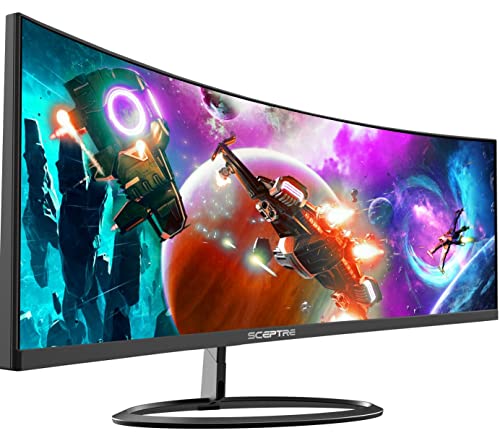
- Best for: Mixed work and casual play where a calm refresh rate and a blue accent suit the room.
- 30-inch curved screen, 2560 x 1080 resolution, 21:9 aspect ratio
- Up to 85Hz refresh rate, 1ms MPRT response time
- AdaptiveSync, 3000:1 contrast ratio, 250 cd/m² brightness
- 178-degree viewing angle, Blue Light Shift mode
All 5 Picks at a Glance
| Product | Specs | Action |
|---|---|---|
| Sceptre 30-inch Curved Gaming Monitor C305B-FUN200W White |
| Check price on Amazon |
| Sceptre 30-inch Curved Gaming Monitor C305B-200UN1 |
| Check price on Amazon |
| Sceptre 30-inch Curved Gaming Monitor C305W-2560UN Machine Blue |
| Check price on Amazon |
 CRUA 30 Inch Curved Ultrawide Monitor CR300HD 200Hz |
| Check price on Amazon |
 CRUA 30 Inch Ultrawide Monitor 100Hz |
| Check price on Amazon |
Key takeaways
- Compare five 30-inch monitors for work, study, and play, with wide screens, sharp panels, smooth motion, and curved displays for everyday desk setups.
A 30-inch monitor gives a desk more room than a standard 27-inch screen without demanding the depth and width of a 32-inch or 34-inch panel. The extra width suits side-by-side windows, long timelines, and wide spreadsheets, while the height stays comfortable for reading and writing. The real decision is shape: a 21:9 ultrawide spreads work sideways, a taller 16:10 panel stacks more lines, and a gentle curve pulls the edges closer on a deep desk. Refresh rate, ports, and speakers matter too, since a monitor that fits the desk should also fit the daily routine.
This guide covers five 30-inch monitors picked from Amazon listings for home offices, study desks, and casual play. Three Sceptre models bring curved ultrawide screens at different refresh rates, and two CRUA models add wide 21:9 panels for work and games. Each pick below lists its panel size, resolution, refresh rate, and ports, so the choice comes down to how the screen will be used each day.
Quick Picks
As an Amazon Associate we earn from qualifying purchases
| Product | Best for | Key spec from title |
|---|---|---|
| Sceptre 30-inch Curved Gaming Monitor C305B-FUN200W White | Bright desk setups that need a white curved screen | 200Hz refresh rate |
| Sceptre 30-inch Curved Gaming Monitor C305B-200UN1 | Fast play on a wide curved screen | 200Hz refresh rate |
| Sceptre 30-inch Curved Gaming Monitor C305W-2560UN Machine Blue | Mixed work and play on a calm 85Hz screen | 85Hz refresh rate |
| CRUA 30 Inch Curved Ultrawide Monitor CR300HD 200Hz | Smooth motion for games and video | 200Hz refresh rate |
| CRUA 30 Inch Ultrawide Monitor 100Hz | Everyday work on a wide curved screen | 100Hz refresh rate |
How to Choose
Match the shape to the work
A 21:9 ultrawide screen spreads windows sideways, so two documents or a timeline and a chat window sit side by side without overlap. That shape suits editing, coding, and spreadsheets, where horizontal room saves constant switching between windows. A taller panel shows more lines at once, which suits long reading and writing. Before choosing, think about the main daily task: wide work favors the ultrawide layout, while deep reading favors height. Either way, a 30-inch screen needs a desk at least wide enough for the stand and a comfortable viewing distance of an arm’s length or more.
Pick a refresh rate for motion
Refresh rate sets how often the image redraws each second, and the difference shows up in games and fast video. An 85Hz panel moves smoothly for office work, study, and casual games, while 100Hz adds a small step up for video and light play. A 200Hz panel redraws far more often, which keeps fast motion clean and easy to follow in competitive games. Higher refresh rates need a DisplayPort link on most of these monitors, since HDMI may cap the rate lower. Match the rate to the main use: office work runs well at 85Hz, mixed use suits 100Hz, and fast games call for 200Hz.
Check the ports before buying
Ports decide what can plug in and how the monitor connects to a laptop or desktop. DisplayPort unlocks the full refresh rate on the 200Hz models here, while HDMI handles consoles, laptops, and media players with ease. Count the ports on each model: three HDMI ports plus one DisplayPort gives room for a PC, a console, and a streaming box at once. Built-in speakers save desk space and suit video calls and casual viewing, though a separate soundbar or headphones will sound fuller for music and films. Check the cable in the box too, since a missing DisplayPort cable means a separate trip to the shop.
Measure the desk and the curve
A curved 30-inch screen needs more desk depth than a flat panel, since the curve and the stand push the screen toward the viewer. Measure the desk from the wall to the front edge and leave room for a keyboard, a mouse, and a notebook in front of the stand. A 1500R curve wraps gently around the viewer, while an 1800R curve bends less and suits a shallower desk. If the desk runs short on depth, a VESA arm can lift the monitor off the surface and free the space below. Wall mounting works too, where the wall behind the desk can hold the mount and the cables stay tidy.
The 5 Best Options
Sceptre 30-inch Curved Gaming Monitor C305B-FUN200W White
- Best for: A bright desk where a white curved screen should match light furniture and a wide layout.
- 30-inch curved ultrawide screen, 2560 x 1080 resolution
- Up to 200Hz refresh rate, 1ms response time
- AMD FreeSync Premium and wide sRGB color coverage
- Picture by Picture mode for two sources at once
A bright desk where a white curved screen should match light furniture and a wide layout.
The white finish shows dust and marks more easily than a dark finish, so wipe the frame often.
Sceptre 30-inch Curved Gaming Monitor C305B-FUN200W White brings a wide curved screen in a white finish that suits bright desks and light-colored rooms. The 30-inch panel shows a 2560 x 1080 image across a 21:9 layout, so two windows sit side by side with room to spare. A refresh rate of up to 200Hz keeps motion fluid in games, while AMD FreeSync Premium matches the panel to the graphics card to cut tearing. Picture by Picture mode shows two sources at once, and built-in speakers keep the desk free of extra boxes.
Watch out for: The white finish shows dust and marks more easily than a dark finish, so wipe the frame often.
Sceptre 30-inch Curved Gaming Monitor C305B-200UN1
- Best for: Fast games on a wide screen where a dark metal black finish fits the rest of the setup.
- 30-inch curved screen, 2560 x 1080 resolution, 21:9 aspect ratio
- Up to 200Hz refresh rate over DisplayPort, up to 120Hz over HDMI 2.0
- 5ms GTG response time, 3000:1 contrast ratio
- AMD FreeSync, anti-glare panel with 3H hard coating
Fast games on a wide screen where a dark metal black finish fits the rest of the setup.
HDMI caps the refresh rate at 120Hz, so use DisplayPort for the full 200Hz.
Sceptre 30-inch Curved Gaming Monitor C305B-200UN1 is the metal black twin of the white model above, with the same wide 21:9 layout and a refresh rate of up to 200Hz over DisplayPort. The 2560 x 1080 panel covers a 30-inch curve that pulls the edges into view, which suits long sessions in front of the screen. AMD FreeSync keeps frames in step with the graphics card, and the 3000:1 contrast ratio gives dark scenes depth without washing out bright areas. Three HDMI ports and a DisplayPort link leave room for a PC and a console side by side.
Watch out for: HDMI caps the refresh rate at 120Hz, so use DisplayPort for the full 200Hz.
Sceptre 30-inch Curved Gaming Monitor C305W-2560UN Machine Blue
- Best for: Mixed work and casual play where a calm refresh rate and a blue accent suit the room.
- 30-inch curved screen, 2560 x 1080 resolution, 21:9 aspect ratio
- Up to 85Hz refresh rate, 1ms MPRT response time
- AdaptiveSync, 3000:1 contrast ratio, 250 cd/m² brightness
- 178-degree viewing angle, Blue Light Shift mode
Mixed work and casual play where a calm refresh rate and a blue accent suit the room.
The included stand adjusts tilt only, so add a VESA arm for height changes.
Sceptre 30-inch Curved Gaming Monitor C305W-2560UN Machine Blue takes a calmer path, with an 85Hz refresh rate that suits office work, study, and casual games. The 30-inch curved panel shows 2560 x 1080 across a 21:9 layout, and the 1ms MPRT response keeps moving images clean. AdaptiveSync smooths frames from the graphics card, while Blue Light Shift eases eye fatigue during long evenings at the desk. The machine blue finish adds a quiet accent to the room, and the edgeless design keeps the frame slim on a small desk.
Watch out for: The included stand adjusts tilt only, so add a VESA arm for height changes.
CRUA 30 Inch Curved Ultrawide Monitor CR300HD 200Hz
- Best for: Games and video where a fast refresh rate and a deep curve matter most.
- 30-inch curved ultrawide screen, 2560 x 1080 resolution
- 200Hz refresh rate, 1500R curvature
- FreeSync support for smooth motion
- HDMI and DisplayPort inputs
Games and video where a fast refresh rate and a deep curve matter most.
The curve needs a deep desk, so measure the space before setting the stand down.
CRUA 30 Inch Curved Ultrawide Monitor CR300HD 200Hz pairs a 200Hz refresh rate with a 1500R curve that wraps the screen around the viewer. The 30-inch panel shows 2560 x 1080 across a 21:9 layout, so games and video fill the wide frame without black bars at the sides. FreeSync keeps the picture in step with the graphics card, and the curved shape pulls the edges closer for a deeper sense of immersion. HDMI and DisplayPort links cover a PC and a console, and the slim frame suits a desk that needs a wide screen without a bulky stand.
Watch out for: The curve needs a deep desk, so measure the space before setting the stand down.
CRUA 30 Inch Ultrawide Monitor 100Hz
- Best for: Everyday work and study on a wide curved screen at a calm refresh rate.
- 30-inch curved ultrawide screen, 2560 x 1080 resolution, 21:9 aspect ratio
- 100Hz refresh rate, VA panel, 1500R curvature
- 3000:1 contrast ratio, 300 cd/m² brightness
- FreeSync support, 178-degree viewing angle
Everyday work and study on a wide curved screen at a calm refresh rate.
The stand adjusts tilt only, so a VESA arm is needed for height changes.
CRUA 30 Inch Ultrawide Monitor 100Hz is the quiet workhorse of this set, with a 100Hz refresh rate that suits office work, study, and video without chasing the highest speeds. The 30-inch VA panel shows 2560 x 1080 across a 21:9 layout, and the 1500R curve keeps the edges in easy view. A 3000:1 contrast ratio gives dark scenes depth, while 300 cd/m² brightness keeps the image clear in a lit room. FreeSync smooths video playback, and the tilt stand plus VESA mount leave room to set the screen at a comfortable angle.
Watch out for: The stand adjusts tilt only, so a VESA arm is needed for height changes.
Which One Fits Your Situation
A home office with two windows open all day
Two windows open all day call for a wide 21:9 layout and a calm refresh rate. The CRUA 100Hz model covers documents and video calls with a curved screen that keeps both windows in view, while the Sceptre C305W-2560UN adds built-in speakers for calls without extra boxes. Either pick leaves the desk tidy, and the 100Hz or 85Hz panel runs smoothly for office software and browsing.
A study desk shared with a laptop
A study desk shared with a laptop needs ports for a quick plug-in and a screen that shows notes beside a lecture video. The Sceptre C305B-FUN200W White brings three HDMI ports and a DisplayPort link, so a laptop and a second device can stay plugged in at once. The white finish suits a bright study room, and the 200Hz panel keeps video smooth when study gives way to a game.
A gaming corner after work
A gaming corner after work needs speed and a curve that pulls the player into the scene. The Sceptre C305B-200UN1 runs at up to 200Hz over DisplayPort, with FreeSync keeping frames in step and a metal black finish that fits a dark room. The CRUA CR300HD 200Hz offers the same fast refresh with a deeper 1500R curve. Use DisplayPort on either model to reach the full refresh rate.
A small desk that needs one wide screen
A small desk needs one screen that does the work of two, without a stand that eats the whole surface. Any of these five 30-inch models replaces a pair of smaller screens, and the curved shape keeps the edges within easy view. Pick the Sceptre C305W-2560UN for a slim frame and a calm refresh rate, then add a VESA arm later if the desk needs more free space underneath.
Common Mistakes
- Buying a 200Hz monitor and linking it over HDMI, which caps the refresh rate below the panel’s full speed on these models.
- Choosing a curved screen for a shallow desk, then finding the stand leaves no room for a keyboard.
- Ignoring the ports and ending up with a laptop that has no matching link for the monitor.
- Sitting too close to a 30-inch ultrawide, so the edges fall outside a comfortable view.
- Forgetting the stand limits, since most of these models adjust tilt only and need a VESA arm for height changes.
Frequently Asked Questions
Is a 30-inch monitor big enough for two windows side by side?
Yes. A 30-inch 21:9 panel shows two windows side by side with room for text, a timeline, or a chat window in each half. The ultrawide layout suits documents, spreadsheets, and editing, though a taller panel shows more lines at once for long reading. Measure the desk first, since the wide frame and the stand need more room than a standard screen.
Do I need DisplayPort for 200Hz?
Yes, on the 200Hz models here. DisplayPort unlocks the full 200Hz refresh rate, while HDMI caps the rate lower on the Sceptre C305B-200UN1. Check the cable in the box and the ports on the laptop or desktop before buying, so the link matches the panel. A DisplayPort cable is a small add-on that makes the full speed possible.
Is a curved 30-inch monitor good for office work?
Yes, for wide work. The curve pulls the edges closer, so a spreadsheet or a timeline stays in view without turning the head. The 100Hz and 85Hz models here suit office software, video calls, and reading, with built-in speakers for calls. A flat panel may suit shared desks better, since a curve looks best from directly in front.
Can a 30-inch monitor replace two screens?
In most cases, yes. One 30-inch ultrawide holds two windows side by side and removes the gap between two panels, along with the extra cables and stands. The 21:9 layout suits editing and multitasking, though two separate screens still win for a wall of small windows. A VESA arm helps on a small desk by lifting the single screen off the surface.
More from Amazon
Programs that pair well with the guide above. Offers and eligibility are set by Amazon and may change.
Free shipping on eligible items, Prime Video and more. Eligible new members can start with a free trial.
Start a Prime free trialAd-free music streaming. Eligible new subscribers can start with a free trial.
Try Music Unlimited freeA Prime membership for ages 18-24 with a trial period. Eligibility is set by Amazon.
See Prime for Young AdultsAudiobooks and podcasts to listen to on the go. Eligible new members can start with a free trial.
Try Audible freeAs an Amazon Associate we earn from qualifying purchases.










Write Your Review
No reviews yet. Be the first to share your experience!