
Our Short List of 3

- Best for: gamers who want OLED contrast and speed in one 34-inch screen.
- Screen size: 34 inches, curved
- Panel: QD-OLED
- Resolution: 3440 x 1440 (Ultra-WQHD), 21:9
- Refresh rate: 175Hz

- Best for: desktop gamers who want 180Hz and a deep curve without paying for OLED.
- Screen size: 34 inches
- Resolution: 3440 x 1440 (QHD Ultra Wide), 21:9
- Curve: 1500R
- Refresh rate: 180Hz
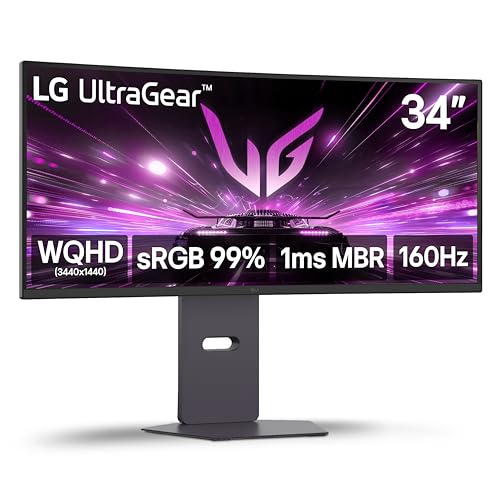
- Best for: gamers who want sound and a full ergonomic stand without extra desk hardware.
- Screen size: 34 inches, curved
- Model: 34G600A-B
- Resolution: 3440 x 1440 (WQHD), 21:9
- Refresh rate: 160Hz
All 5 Picks at a Glance
| Product | Specs | Action |
|---|---|---|
| Samsung Odyssey OLED G8 (G85SD) |
| Check price on Amazon |
| ASUS TUF Gaming VG34VQL3A |
| Check price on Amazon |
| LG UltraGear 34G600A-B |
| Check price on Amazon |
 Samsung ViewFinity S65TC |
| Check price on Amazon |
 Dell UltraSharp U3425WE |
| Check price on Amazon |
Key takeaways
- Five 34-inch ultrawide monitors that still sell new, from a QD-OLED gaming flagship to Thunderbolt docking models, with the panel, curve and port checks to run first.
Choosing a 34-inch monitor is not really a size decision, because nearly every model in this class shares the same 3440 x 1440 ultrawide canvas. The real decision is what kind of panel draws that canvas and what the screen plugs into: an OLED built for fast games behaves nothing like a VA panel with deep blacks for mixed use, and a Thunderbolt docking monitor answers a completely different desk problem than a pure gaming display with two HDMI ports and no hub at all.
This roundup is for three kinds of buyers: gamers replacing a 27-inch screen with something more immersive, laptop owners who want one cable to drive the display and charge the machine, and home-office workers who need two documents side by side without a bezel down the middle. Every pick below was chosen from its Amazon listing title and specification fields, and each one is a true 34-inch-class model rather than a 32-inch or 38-inch screen wearing a similar name.
Quick Picks
As an Amazon Associate we earn from qualifying purchases.
| Product | Best for | Key spec from title |
|---|---|---|
| Samsung Odyssey OLED G8 (G85SD) | OLED gaming with true blacks | QD-OLED, 175Hz, 0.03ms |
| ASUS TUF Gaming VG34VQL3A | Fast curved gaming on a VA panel | 180Hz, 1500R curve, DisplayHDR 400 |
| LG UltraGear 34G600A-B | Gaming with built-in speakers | 160Hz, HDR10, HDMI 2.1 |
| Samsung ViewFinity S65TC | Laptop desks that need a dock | Thunderbolt 4, 100Hz, 1000R curve |
| Dell UltraSharp U3425WE | Serious multitasking with a full hub | IPS Black, 120Hz, Thunderbolt 4 hub |
How to Choose
Start With the Panel, Not the Refresh Rate
Panel technology decides how a 34-inch screen actually looks once it is on your desk. QD-OLED delivers per-pixel light control, so dark game scenes show genuine black instead of the grey wash of an LCD, and its response times are effectively instant. VA panels sit in the middle: their native contrast is far stronger than IPS, which keeps movies and dark games looking rich, but pixel transitions in dark shades can smear during fast movement. IPS Black narrows that contrast gap for office buyers while keeping the wide viewing angles and calm colour behaviour that long document work rewards. Pick the panel that matches your dominant use, because no setting fixes the wrong one.
Match Refresh Rate and Sync to Your Graphics Card
Every monitor here runs at 100Hz or above, but the headline number only matters if your graphics card can feed it and your cable can carry it. A card that holds 70 frames per second in your games gains little from a 180Hz panel, while a strong card wasted on a 100Hz screen leaves smoothness on the table. Adaptive sync matters just as much: FreeSync Premium and FreeSync Premium Pro cover AMD cards and most modern GeForce cards over DisplayPort, and the Samsung OLED adds formal G-Sync compatibility. Check which input carries full refresh on the exact model, since HDMI sometimes caps lower than DisplayPort.
Take the Curve Radius Seriously
All five picks are curved, but the radius printed in the title changes how the screen feels. A tight 1000R or 1500R wrap pulls the edges of a 34-inch panel noticeably closer, which suits gaming and single-viewer desks where you sit centred. An 1800R curve is gentler and keeps straight spreadsheet lines looking straighter, which matters for CAD, timelines and anyone sharing the screen with a second person. Desk depth plays a part too: a 34-inch ultrawide is roughly 32 inches wide, and a deep factory stand can push the panel closer than your eyes prefer, so measure before assuming it fits.
Decide Whether the Monitor Is Also Your Dock
The biggest practical split in this class is connectivity. Gaming models such as the ASUS and LG offer HDMI and DisplayPort inputs and little else, which is fine for a desktop PC that never moves. The Samsung ViewFinity and Dell UltraSharp instead carry Thunderbolt 4 with power delivery, USB hubs and, on the Dell, wired Ethernet and a KVM switch, so one cable connects a laptop to the screen, its peripherals and the network. If you dock a laptop daily, that hub is worth more than an extra 60Hz. If you never do, paying for it buys ports that sit empty.
The 5 Best Options
Samsung Odyssey OLED G8 (G85SD)
- Best for: gamers who want OLED contrast and speed in one 34-inch screen.
- Screen size: 34 inches, curved
- Panel: QD-OLED
- Resolution: 3440 x 1440 (Ultra-WQHD), 21:9
- Refresh rate: 175Hz
gamers who want OLED contrast and speed in one 34-inch screen.
OLED panels reward varied content; a static desktop left at full brightness all day is the use case this technology likes least, so use the built-in pixel-care features.
The G85SD is the pick for buyers who want the 34-inch format without LCD compromises. Its QD-OLED panel pairs the shared 3440 x 1440 resolution with a 175Hz refresh rate and a 0.03ms response time, so motion stays clean while dark scenes keep the depth that only self-lit pixels produce. Samsung’s Glare Free finish addresses the bright-room weakness that usually follows OLED into a home office, and the listing’s three-year warranty is longer than the cover most gaming monitors carry. It suits players who also watch a lot of film and series on the same screen.
ASUS TUF Gaming VG34VQL3A
- Best for: desktop gamers who want 180Hz and a deep curve without paying for OLED.
- Screen size: 34 inches
- Resolution: 3440 x 1440 (QHD Ultra Wide), 21:9
- Curve: 1500R
- Refresh rate: 180Hz
desktop gamers who want 180Hz and a deep curve without paying for OLED.
full refresh is a DisplayPort story on most monitors of this type; confirm the rate your chosen input carries before assuming HDMI gives the same result.
The VG34VQL3A is the straightforward fast-gaming option in this class. A tight 1500R curve wraps the 3440 x 1440 panel closer than most rivals, the 180Hz refresh rate is the highest here alongside the OLED, and ASUS adds Extreme Low Motion Blur for players who prefer backlight strobing over raw overdrive. DisplayHDR 400 support and 125 percent sRGB coverage give it more colour range than a basic gaming VA panel, and the height-adjustable stand plus three-year warranty round out a listing aimed at people who will keep it for years. It asks nothing of your desk beyond two video cables.
LG UltraGear 34G600A-B
- Best for: gamers who want sound and a full ergonomic stand without extra desk hardware.
- Screen size: 34 inches, curved
- Model: 34G600A-B
- Resolution: 3440 x 1440 (WQHD), 21:9
- Refresh rate: 160Hz
gamers who want sound and a full ergonomic stand without extra desk hardware.
built-in speakers are for convenience, not cinema; if you already own good desktop speakers or a headset, that feature earns you nothing.
The 34G600A-B covers the buyer who games at a desk that has no room, or no budget line, for separate speakers. Its listing leads with a built-in speaker system, which is rare in this class, alongside a 160Hz refresh rate, HDR10 and AMD FreeSync Premium. The stand adjusts for tilt, height and swivel, so the screen can be squared to your chair rather than the other way round, and an HDMI 2.1 input keeps the door open to a current console next to the PC. It is the most self-contained package here: screen, sound and stand in one box.
Samsung ViewFinity S65TC
- Best for: laptop owners who want the monitor to replace a separate docking station.
- Screen size: 34 inches, curved
- Model: LS34C650TANXGO
- Resolution: Ultra-WQHD 3440 x 1440, 21:9
- Curve: 1000R
laptop owners who want the monitor to replace a separate docking station.
the 100Hz ceiling is a work-first specification; players chasing high frame rates should take the ASUS, LG or OLED G8 instead.
The S65TC is built for the laptop-first desk. Thunderbolt 4 connectivity lets one cable carry the picture to the 34-inch curved panel while the monitor’s hub takes over the peripherals, and the built-in speakers and height-adjustable stand complete a setup that needs no separate dock. The 1000R curve is the tightest here, wrapping the Ultra-WQHD canvas close for a single centred viewer, and 100Hz keeps scrolling and casual play smoother than a basic office screen. HDR10 and AMD FreeSync round out a listing that treats gaming as a side job rather than the main event.
Dell UltraSharp U3425WE
- Best for: two-computer desks and laptop users who want networking and KVM built into the screen.
- Screen size: 34 inches class (34.1-inch panel per listing), curved
- Panel: IPS Black
- Resolution: 3440 x 1440 (UWQHD), 21:9
- Refresh rate: 120Hz
two-computer desks and laptop users who want networking and KVM built into the screen.
confirm the exact listing variant before ordering, because Dell sells closely related UltraSharp 34 models and the port mix is the whole point of this one.
The U3425WE is the heaviest-duty desk hub in this roundup. Its IPS Black panel runs at 120Hz, a step above ordinary office ultrawides, and the Thunderbolt 4 hub behind it offers up to 90W of power delivery, a downstream Thunderbolt port for daisy-chaining, USB-A and USB-C ports, and 2.5GbE networking through an RJ45 socket. A built-in KVM switch lets two computers share the screen and one set of peripherals, which makes it the natural centre of a work-plus-personal desk. Where the gaming models spend their budget on speed, this one spends it on making everything else on the desk connect through a single panel.
Which One Fits Your Situation
You Game Every Night and Watch Films on the Same Screen
Take the Samsung Odyssey OLED G8 (G85SD). The QD-OLED panel is the only one here that renders a dark game scene or a night-time film scene with true black, and its 175Hz refresh with 0.03ms response keeps fast play as clean as the panel allows. The Glare Free finish makes it usable in a lit room, and the three-year warranty softens the usual OLED ownership worry.
One Laptop Runs Your Whole Desk
Choose between the Samsung ViewFinity S65TC and the Dell UltraSharp U3425WE. Both dock a laptop over Thunderbolt 4 and carry built-in speakers. The Samsung wraps tighter at 1000R and suits a single screen-centred workflow, while the Dell adds 120Hz, Ethernet and a KVM for anyone who also keeps a desktop PC or a second laptop in rotation.
You Split the Day Between Spreadsheets and Evening Games
The LG UltraGear 34G600A-B balances both halves. Its 160Hz refresh and FreeSync Premium are proper gaming specifications, the tilt, height and swivel stand keeps posture honest through a workday, and the built-in speakers clear the desk of one more box. It lacks a USB-C docking hub, so this pick assumes a desktop PC or a laptop that already has its own dock.
You Want the Widest Screen Your Desk Can Honestly Hold
Start with the ASUS TUF Gaming VG34VQL3A if the desk is a gaming desk: 180Hz, a deep 1500R curve and a three-year warranty make it the durable fast option. Measure first, though. Every screen here is about 32 inches wide, and if the factory stand’s depth pushes the panel too close, a monitor arm changes the geometry more than any specification on this page.
Common Mistakes
- Buying by diagonal alone: 34-inch models share a size but split into OLED, VA and IPS Black panels with very different contrast and motion behaviour.
- Assuming every input carries the full refresh rate, then connecting over the cable that caps it lower.
- Ignoring stand depth on a shallow desk, which pushes a wide curved panel uncomfortably close.
- Paying for a Thunderbolt docking hub when the monitor will only ever serve one desktop PC, or skipping the hub and buying a separate dock later for more.
- Choosing the tightest curve for shared or line-sensitive work, where a gentler radius keeps text and timelines looking straighter.
Frequently Asked Questions
Is 3440 x 1440 enough at 34 inches, or should I look at 4K?
At 34 inches, 3440 x 1440 gives roughly the same pixel density as a 27-inch 1440p monitor, which most people find sharp at a normal desk distance for text, games and video. A 4K ultrawide would push more pixels than most graphics cards can drive quickly in games, so this resolution is the practical ceiling for the size.
Can one of these monitors replace two smaller screens?
For most desk work, yes. The 21:9 canvas holds two full windows side by side without a centre bezel, and the Dell and Samsung ViewFinity models add picture-by-picture modes and KVM switching for two computers. The trade-off is window management: a single panel cannot angle one half toward you the way two separate monitors can.
Does the curve bother some people?
It can, especially on the tightest 1000R and 1500R models, where straight lines near the edges bend slightly until your eyes adapt. Most users adjust within days, and gamers usually prefer the wrap. If you do precision line work all day, a gentler 1800R curve or a flat panel is the safer temperament match.
What should I check before connecting a laptop to one of these?
Confirm the laptop’s USB-C or Thunderbolt port carries DisplayPort Alt Mode video, and check the power delivery figure on the monitor’s listing against what the laptop expects. The ViewFinity and UltraSharp here deliver enough wattage for most thin laptops, but a gaming laptop with a large power brick may still need its own charger.
More from Amazon
Programs that pair well with the guide above. Offers and eligibility are set by Amazon and may change.
Free shipping on eligible items, Prime Video and more. Eligible new members can start with a free trial.
Start a Prime free trialAd-free music streaming. Eligible new subscribers can start with a free trial.
Try Music Unlimited freeA Prime membership for ages 18-24 with a trial period. Eligibility is set by Amazon.
See Prime for Young AdultsAudiobooks and podcasts to listen to on the go. Eligible new members can start with a free trial.
Try Audible freeAs an Amazon Associate we earn from qualifying purchases.










Write Your Review
No reviews yet. Be the first to share your experience!