
Key takeaways
- Find the best laptops for media with bright, colour-accurate displays, strong speakers and long battery life. Compare top picks for streaming and editing.
Finding the best laptops for media starts with one simple question: how will you actually use the screen in front of you? Some people want a laptop that makes films and television look rich and cinematic on the sofa. Others want a machine that can organise a photo library, trim a short video, stream music all day, and still feel fast when twenty browser tabs are open. A good media laptop has to do both jobs well, and the models that succeed share the same strengths: a bright, colour-accurate display, clear speakers, enough memory and storage for large files, and battery life that does not force you to sit beside a power outlet.


Media use is broader than gaming or office work, so the usual buying advice does not quite fit. A laptop built only for spreadsheets may have a dim panel that makes films look flat, while a gaming laptop may be heavy and loud. The sweet spot is a portable machine with a high-resolution display, wide colour coverage, and a processor that handles editing apps without stuttering. This guide explains what to look for, then compares four strong options for different budgets, screen sizes, and operating systems.
How to Choose a Laptop for Media
Start with the display
The display matters more for media than any other single part, because it is the thing you look at for hours at a time. Resolution is a good starting point: a Full HD panel is acceptable for everyday streaming, while a higher-resolution panel, such as Quad HD or 3K, shows finer detail in photographs and video and makes text sharper when you are browsing or reading. Just as important is brightness. A panel rated around 300 nits is usable indoors, while 400 nits or more stays readable near a bright window or outdoors. Colour coverage matters too. Wide colour support, often described as wide colour gamut or P3 coverage, produces richer reds, greens, and blues, which makes films, photographs, and artwork look closer to the way their creators intended.
Panel technology also changes the experience. OLED panels give deep blacks, strong contrast, and vivid colour, because each pixel produces its own light, so dark scenes look genuinely dark instead of grey. IPS LCD panels are also excellent, especially with good brightness and colour accuracy, and they are often more affordable. A taller 16:10 aspect ratio is worth considering as well, because it shows more of a web page or a photo-editing interface without scrolling as often.
Think about sound, not just picture
Media is only half visual. Built-in speakers vary enormously between laptops, so look for multiple speakers and sound described as full rather than thin and tinny. A headphone jack is still valuable for late-night viewing or editing with wired headphones, and support for modern wireless audio helps if you prefer wireless earbuds. If you plan to connect the laptop to a television or a soundbar, an HDMI port makes that simple, while USB-C with video output can do the same job with the right cable.
Processor, memory, and storage for large files
Media files are large, and media apps are demanding. A modern multi-core processor from Apple, AMD, Intel, or Qualcomm will handle streaming, photo editing, and light to moderate video editing smoothly. For most buyers, 16 GB of memory is the sensible minimum in 2026, because it keeps a browser, a music app, and an editing app running at the same time without slowdowns. If you edit long videos, work with large photo libraries, or keep many apps open at once, 32 GB gives useful headroom.
Storage deserves the same attention. A 512 GB solid-state drive is a practical starting point, since a growing library of photos, videos, and downloaded shows fills a smaller drive quickly. A 1 TB drive is better if you keep a large local media collection or edit video regularly. A fast SSD also makes the whole machine feel responsive, because apps open quickly and large files copy in seconds rather than minutes. A microSD card slot or a fast USB port is a handy bonus for moving photos from a camera or expanding storage later.
Battery life and portability
A media laptop should be easy to carry from room to room, to a cafe, or onto a flight, and it should last through a film or two without charging. Battery claims vary, so look for efficient processors and large batteries, and remember that a brighter screen and louder speakers drain the battery faster. Weight matters too: a laptop under about 1.5 kilograms feels noticeably lighter in a bag than one approaching 2 kilograms, and a slim design is easier to use on a train seat or an aeroplane tray table.
Ports, connectivity, and the operating system
Before you buy, check the ports. At least one USB-C port, one or two USB-A ports, an HDMI port, and a headphone jack cover most media setups, from an external hard drive to a television. Fast Wi-Fi is important for streaming in high quality, and Bluetooth is useful for wireless headphones and speakers. A good webcam and microphone matter if you also use the laptop for video calls, and a fingerprint reader or facial recognition makes signing in quicker.
The operating system is largely a matter of preference and of the apps you already use. macOS suits people invested in Apple services who value long battery life and a polished media experience. Windows offers the widest choice of hardware, software, and price points, and works well with most cameras, audio interfaces, and external displays. Either system can be an excellent media machine, so choose the one whose apps and cloud services you already know and trust.
Top Picks
1. Apple MacBook Air 13-inch with M4 Chip — Best Overall for Media
The Apple MacBook Air 13-inch with the M4 chip is an easy recommendation for most media buyers, because it combines a beautiful display, silent fanless operation, and very long battery life in a slim, light body. The 13.6-inch Liquid Retina display offers a sharp 2560 by 1664 resolution, 500 nits of brightness, support for one billion colours, and wide colour coverage, so films, photographs, and web pages all look crisp and vivid. The M4 chip handles streaming, photo editing, and short video projects smoothly, and its dedicated media engine accelerates common video formats, which helps when you are exporting a clip or scrubbing through a timeline.
With 16 GB of unified memory and 256 GB of SSD storage in the configuration featured here, this MacBook Air suits everyday media use, streaming, and light editing. The four-speaker sound system is unusually good for a laptop this thin, producing clear dialogue and a fuller sound than many Windows rivals. Battery life is another strength, with up to 18 hours of video streaming claimed by Apple. Two Thunderbolt 4 ports, a MagSafe charging port, Wi-Fi 6E, Bluetooth 5.3, and a 12-megapixel Center Stage camera round out a polished package. The main limitation is storage: 256 GB fills quickly if you keep a large offline media library, so cloud storage or an external drive is worth planning for.
View the Apple MacBook Air 13-inch with M4 Chip on Amazon
2. ASUS Vivobook S 15 OLED — Best Display for Films and Photos
If the display is your top priority, the ASUS Vivobook S 15 with its OLED panel is hard to beat. The 15.6-inch 3K OLED display, with a resolution of 2880 by 1620 pixels, delivers the deep blacks, high contrast, and rich colour that make films and photographs look striking. Dark scenes keep their detail, bright highlights stay clean, and colours look saturated without looking unnatural. That makes this laptop a strong choice for evening viewing, photo sorting, and anyone who simply enjoys a beautiful screen.
Inside, a Qualcomm Snapdragon X Plus processor with ten cores, 16 GB of memory, and a 512 GB SSD provide smooth everyday performance and efficient battery use, while Windows 11 adds modern conveniences for organising files and working with media. The laptop weighs about 3.13 pounds and measures under 0.6 inches thick, so it is easy to carry despite its larger screen. One thing to check before buying is software compatibility: most popular streaming, browsing, and editing apps run well on this platform, but a few specialised older programs may behave differently than on a traditional Intel or AMD machine, so confirm that any niche app you rely on is supported.
View the ASUS Vivobook S 15 OLED on Amazon
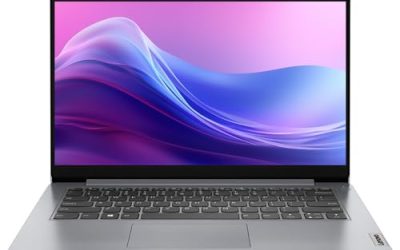
3. Lenovo IdeaPad Slim 5 — Best Large-Screen Windows Pick
The Lenovo IdeaPad Slim 5 is a strong choice if you want a larger screen without carrying a heavy machine. Its 16-inch WUXGA touchscreen display, with a resolution of 1920 by 1200 pixels and a taller 16:10 aspect ratio, gives you more room for a video timeline, a photo grid, or a streaming window beside a chat app. The IPS touchscreen is bright and comfortable for everyday viewing, and touch input is handy for scrolling through photos or tapping playback controls.
Power comes from an AMD Ryzen AI 7 350 processor, paired with 16 GB of DDR5 memory and a 512 GB SSD, which is a capable combination for streaming, multitasking, and light creative work. The laptop also offers modern connectivity, including Wi-Fi 7, USB-C ports with DisplayPort output, HDMI 2.1 for connecting to a television or monitor at up to 4K and 60 Hz, a microSD card reader for camera photos, and a full HD infrared camera with a privacy shutter. At around 4 pounds, it is heavier than the ultraportable picks here, but the larger display and full-size keyboard with a numeric keypad make it a comfortable all-day machine for a desk, a sofa, or a home office.
View the Lenovo IdeaPad Slim 5 on Amazon
4. ASUS Vivobook 16 — Best Everyday Value for Media
The ASUS Vivobook 16 is a practical, well-rounded pick for everyday media use. Its 16-inch Full HD Plus display, with a resolution of 1920 by 1200 pixels, a 16:10 aspect ratio, and 300 nits of brightness, is roomy and comfortable for streaming, browsing, and working with documents. The anti-glare finish helps in bright rooms, and the larger screen makes split-screen viewing and light editing easier than on a smaller laptop.
An AMD Ryzen AI 5 330 processor with a dedicated AI engine, 16 GB of DDR5 memory, and a 512 GB SSD keep everyday tasks responsive, from opening a large photo folder to switching between a streaming service and a music app. Battery life of up to 10 hours is enough for a working day or a long viewing session, and the laptop is slim at about 0.7 inches thick and light for its size at around 4.14 pounds. Connectivity is generous, with two USB-A ports, two USB-C ports, an HDMI port, and an audio jack, so connecting an external drive, a television, or wired headphones is straightforward. This is the pick to choose when you want a capable, comfortable media laptop with a big screen and no fuss.
View the ASUS Vivobook 16 on Amazon
Comparison Table
| Laptop | Display | Processor | Memory | Storage | Best For |
|---|---|---|---|---|---|
| Apple MacBook Air 13-inch with M4 Chip | 13.6-inch Liquid Retina, 2560 by 1664, 500 nits | Apple M4 | 16 GB | 256 GB SSD | Overall media use, portability, battery life |
| ASUS Vivobook S 15 OLED | 15.6-inch 3K OLED, 2880 by 1620 | Qualcomm Snapdragon X Plus | 16 GB | 512 GB SSD | Films, photos, best display quality |
| Lenovo IdeaPad Slim 5 | 16-inch WUXGA touchscreen, 1920 by 1200 | AMD Ryzen AI 7 350 | 16 GB DDR5 | 512 GB SSD | Large-screen Windows use, connectivity |
| ASUS Vivobook 16 | 16-inch Full HD Plus, 1920 by 1200, 300 nits | AMD Ryzen AI 5 330 | 16 GB DDR5 | 512 GB SSD | Everyday value, big screen, simple setup |
Which Laptop Suits Your Media Habits?
The right choice depends on how you spend most of your screen time. If you watch films and television most evenings and want the most cinematic picture, the OLED panel on the ASUS Vivobook S 15 is the standout, because its contrast and colour make every scene look richer. If you travel, commute, or carry your laptop everywhere, the MacBook Air is the easiest to live with, thanks to its light weight, silent design, and long battery life. If you prefer Windows and want a larger screen for multitasking, the Lenovo IdeaPad Slim 5 offers a comfortable 16-inch touchscreen and strong connectivity, including HDMI for a television. If you want a straightforward, affordable-feeling machine with a big screen for everyday streaming and browsing, the ASUS Vivobook 16 covers the essentials well.
Also consider where your media lives. If most of your films, music, and photos are in a cloud service, a smaller SSD is less of a problem. If you keep a large local library, download shows for offline viewing, or edit video, prioritise 512 GB or more of storage and 16 GB or more of memory. If you edit photos seriously, colour accuracy matters more than raw resolution, so look for wide colour coverage. And if you share the laptop with family, a larger screen and good speakers make group viewing far more enjoyable.
Frequently Asked Questions
What makes a laptop good for media?
A good media laptop combines a bright, colour-accurate, high-resolution display with clear speakers, a modern processor, at least 16 GB of memory, and a fast SSD with enough room for your files. Long battery life and a comfortable keyboard matter too, because media use often means hours of viewing, listening, and browsing in one sitting.
Is an OLED laptop better for watching films?
For most viewers, yes. OLED panels produce deep blacks and strong contrast because each pixel emits its own light, which makes dark scenes look more detailed and colours look more vivid. A good IPS panel can still look excellent, especially at higher brightness, so OLED is a strong advantage rather than a strict requirement.
How much memory and storage do I need for media?
For most people, 16 GB of memory and a 512 GB SSD are a sensible starting point. That combination handles streaming, photo editing, and light video work comfortably, with room for a moderate media library. If you edit long videos or keep a very large local collection, 32 GB of memory and 1 TB of storage give useful extra headroom.
Can these laptops handle video editing as well as streaming?
Yes, for light to moderate editing. All four picks here can trim clips, edit photos, and export short videos without difficulty. For long, high-resolution projects with many effects, a laptop with a dedicated graphics card and more memory would be faster, but for the everyday editing most people do, these machines are more than capable.
Should I choose macOS or Windows for media?
Both are excellent. macOS suits people who already use Apple services and value long battery life and a polished, quiet machine. Windows offers a wider choice of hardware and software, works with more accessories, and makes it easy to connect to a television or external display. Choose the system whose apps and services you already know best.
Conclusion
The best laptops for media are the ones that make watching, listening, and creating feel effortless, and the four picks in this guide do that in different ways. The Apple MacBook Air 13-inch with the M4 chip is the best all-rounder, with a superb display, excellent speakers, and outstanding battery life in a light, silent body. The ASUS Vivobook S 15 OLED offers the most cinematic picture, making it the pick for film lovers and photographers. The Lenovo IdeaPad Slim 5 pairs a large touchscreen with strong connectivity for Windows users who want room to work. The ASUS Vivobook 16 is the straightforward, everyday choice, with a big, comfortable screen and everything you need for streaming and browsing.
Before you decide, think about your screen size, your operating system, and how much storage your media library needs, then choose the laptop that fits those habits best. Any of these four will make your films look sharper and your everyday media time more enjoyable.
Disclosure: As an Amazon Associate, we earn from qualifying purchases.
More from Amazon
Programs that pair well with the guide above. Offers and eligibility are set by Amazon and may change.
Free shipping on eligible items, Prime Video and more. Eligible new members can start with a free trial.
Start a Prime free trialAd-free music streaming. Eligible new subscribers can start with a free trial.
Try Music Unlimited freeA Prime membership for ages 18-24 with a trial period. Eligibility is set by Amazon.
See Prime for Young AdultsAudiobooks and podcasts to listen to on the go. Eligible new members can start with a free trial.
Try Audible freeAs an Amazon Associate we earn from qualifying purchases.









Write Your Review
No reviews yet. Be the first to share your experience!