
Our Short List of 3

- Specs:
- Apple M4 chip with 10-core CPU
- 13.6-inch Liquid Retina Display, 2560-by-1664 resolution, 500 nits brightness, wide color (P3), True Tone
- 16GB Unified Memory

- Specs:
- Intel Core i5-1334U processor
- 15.6-inch Full HD Touch-Screen display
- 16GB Memory

- Specs:
- Intel Core i5-13420H processor
- 15.6-inch FHD 1920×1080 IPS Touch display
- Intel UHD Graphics
All 4 Picks at a Glance
| Product | Specs | Action |
|---|---|---|
| Apple MacBook Air 13-inch Laptop with M4 chip |
| Check price on Amazon |
| HP 15.6-inch Touchscreen Laptop |
| Check price on Amazon |
| Acer Aspire 5 15 Slim Laptop |
| Check price on Amazon |
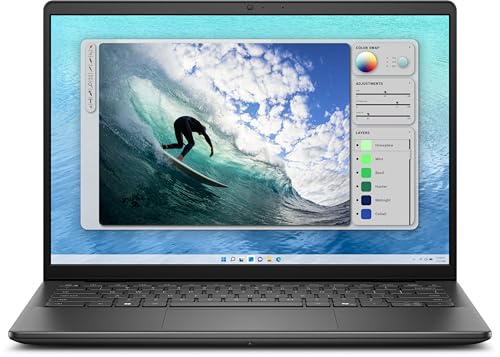 Dell Inspiron 14 i5440 Business Laptop |
| Check price on Amazon |
Key takeaways
- Five well-rounded laptops for work, study and everyday use, compared by chip, memory, display and portability so you can pick the right one.
The real decision behind an overall laptop is not which machine wins a benchmark chart. It is which one stays comfortable through a full day of mixed work: documents and video calls in the morning, a dozen browser tabs and a spreadsheet after lunch, then streaming or light photo edits in the evening without the fan turning into background noise. A good all-rounder has to handle all of that without forcing you to carry a charger everywhere or squint at a washed-out screen.
This guide is for students, office workers, home users and anyone who wants one laptop that covers most jobs instead of a specialist machine. The five picks below were chosen from the processor, memory, storage and display details listed on their Amazon product pages, balancing everyday speed, screen quality, weight and battery life for the widest range of buyers.
Quick Picks
As an Amazon Associate we earn from qualifying purchases
| Product | Best for | Key spec from title |
|---|---|---|
| Apple MacBook Air 13-inch (M4) | Everyday carry and long battery life | Apple M4 chip, 13.6-inch Liquid Retina Display, 16GB Unified Memory, 256GB SSD Storage |
| Lenovo IdeaPad Slim 3 | A light 15.6-inch laptop for study and home use | AMD Ryzen 3 7320U, 15.6-inch FHD, 8GB Memory, 256GB Storage |
| HP 15.6-inch Touchscreen Laptop | Touch input and a large screen for desk work | Intel Core i5-1334U, 15.6-inch Full HD Touch-Screen, 16GB Memory, 512GB SSD |
| Acer Aspire 5 15 Slim | Multitasking with a touchscreen and fast storage | Intel Core i5-13420H, 15.6-inch FHD IPS Touch, 16GB LPDDR5, 512GB Gen 4 SSD |
| Dell Inspiron 14 i5440 | A compact 14-inch laptop for business and travel | Intel i5-1334U 10-Core, 14-inch WUXGA IPS, 16GB DDR5, 512GB SSD, Windows 11 Pro |
How to Choose
Start with the processor and memory together
A laptop feels fast or slow based on the combination of its chip and memory, not either one alone. For general use, a current mid-range processor with 16GB of memory keeps browsers, office apps and video calls smooth at the same time, while 8GB still works for lighter routines but leaves less headroom when tabs pile up. Check the exact chip model in the listing rather than the brand name alone, because two laptops sold under the same series can carry very different processors. If your days involve big spreadsheets, photo work or running several apps side by side, treat 16GB as the sensible baseline.
Pick a screen size you can live with daily
Screen size shapes how a laptop feels far more than most buyers expect. A 14-inch display keeps the machine easy to carry and fits small desks and crowded lecture halls, while a 15.6-inch panel gives documents and web pages more breathing room and usually comes with a full keyboard. Resolution matters too: a Full HD panel looks crisp for text and video, and a brighter, higher-resolution display such as the MacBook Air’s Liquid Retina screen stays readable in bright rooms. Decide where the laptop will spend most of its time before choosing between portability and screen space.
Check storage size and type before you buy
Storage determines how many apps, photos and files fit on the machine, and how quickly they open. A solid-state drive is the baseline for any overall laptop today, since it makes booting and launching apps far quicker than an older spinning drive ever could. For most buyers, 512GB is the comfortable middle ground, holding a large app library and years of documents without constant cleanup. A 256GB drive works if most of your files live in cloud storage, but it fills up faster than people expect once apps, updates and offline media accumulate.
Weigh battery life and weight against power
An all-rounder earns its keep away from a wall outlet, so battery life and weight deserve the same attention as raw speed. A lighter machine with efficient silicon lasts longer through a workday and is simply more pleasant to carry between rooms, meetings and classrooms. Heavier 15.6-inch models trade some of that freedom for a bigger screen and keyboard, which suits a mostly desk-bound routine. Before buying, confirm the listed weight and the battery claims on the product page, and think honestly about how often the laptop leaves your desk.
The 5 Best Options
Apple MacBook Air 13-inch Laptop with M4 chip
- Specs:
- Apple M4 chip with 10-core CPU
- 13.6-inch Liquid Retina Display, 2560-by-1664 resolution, 500 nits brightness, wide color (P3), True Tone
- 16GB Unified Memory
The MacBook Air is the easiest overall pick for buyers who want a light, quiet laptop that stays fast through ordinary work. Its M4 chip handles browsing, office apps, video calls and photo edits without drama, and the 13.6-inch Liquid Retina display renders text and images with the kind of clarity that makes long reading sessions easier on the eyes. At 2.73 pounds and 0.44 inch thin, it slips into a bag without a second thought, and the fanless design means it stays silent in quiet rooms.
Lenovo IdeaPad Slim 3
The IdeaPad Slim 3 suits buyers who want a straightforward 15.6-inch laptop for study, home office work and streaming. Its AMD Ryzen 3 7320U processor covers everyday tasks such as writing, spreadsheets, video calls and web browsing, while the Full HD display gives documents and video plenty of room. The slim Arctic Grey body keeps a large-screen laptop from feeling like a burden, and Windows 11 means the software you already know is ready from the first boot.
- Specs:
- AMD Ryzen 3 7320U processor
- 15.6-inch FHD display
- 8GB Memory
- 256GB Storage
- Windows 11
- Arctic Grey
- Best for: Students and home users who want an affordable-feeling large-screen laptop for everyday tasks.
- Watch out for: 8GB of memory limits heavy multitasking, and this listing is weak-grade — confirm it is still sold before buying.
HP 15.6-inch Touchscreen Laptop
- Specs:
- Intel Core i5-1334U processor
- 15.6-inch Full HD Touch-Screen display
- 16GB Memory
The HP 15.6-inch touchscreen laptop is a practical desk-first choice, pairing a large touch display with a capable mid-range Intel processor. Touch input makes scrolling, tapping and pinch-zooming natural, which helps when browsing, presenting or working with documents on screen. With 16GB of memory and a 512GB SSD, it has the headroom to juggle office apps, browser tabs and media without the slowdowns that smaller configurations show. The full-size screen and keyboard make it a comfortable daily driver at a desk.
Acer Aspire 5 15 Slim Laptop
- Specs:
- Intel Core i5-13420H processor
- 15.6-inch FHD 1920×1080 IPS Touch display
- Intel UHD Graphics
The Acer Aspire 5 stands out in this group for pairing a stronger processor with a fast touchscreen and generous memory. Its Intel Core i5-13420H handles demanding multitasking better than the entry-level chips in this lineup, and the 15.6-inch Full HD IPS touch display keeps colors and viewing angles consistent when you share the screen. The 16GB of LPDDR5 memory and 512GB Gen 4 SSD give apps and files quick access, and the backlit keyboard helps in dim rooms. A protective sleeve is included in the listing.
Dell Inspiron 14 i5440 Business Laptop
- Specs:
- Intel i5-1334U 10-Core processor, up to 4.6 GHz with Intel Turbo Boost Technology
- 14-inch WUXGA IPS display, 1920 x 1200
- Intel Iris Xe Graphics
The Dell Inspiron 14 is the compact Windows pick here, fitting a 14-inch display into a body that travels better than the 15.6-inch models. Its Intel i5-1334U processor with ten cores covers office work, browsing and video calls, while 16GB of DDR5 memory and a 512GB NVMe SSD keep the machine responsive. The 14-inch WUXGA IPS display uses a taller 16:10 shape that shows more of a document at once, and Windows 11 Pro adds business-friendly features. A backlit keyboard, Wi-Fi 6 and a card reader round out a well-equipped travel companion.
Which One Fits Your Situation
You carry your laptop everywhere
Pick the MacBook Air. At 2.73 pounds with a silent, fanless design and a sharp 13.6-inch display, it is the easiest machine in this group to live with on the move. The Dell Inspiron 14 is the closest Windows alternative when a 14-inch body and Windows 11 Pro matter more.
You mostly work at one desk
Pick the HP 15.6-inch touchscreen or the Acer Aspire 5. Both give you a large Full HD display, 16GB of memory and 512GB of storage, with touch input for scrolling and presenting. Choose the Acer when heavier multitasking is part of your day, and the HP when a simpler daily routine is enough.
You need the most headroom for multitasking
Pick the Acer Aspire 5. Its i5-13420H processor, 16GB of LPDDR5 memory and Gen 4 SSD are the strongest combination in this lineup for running many apps at once. The Dell Inspiron 14 is the backup when that power needs to fit in a smaller bag. Both stay quiet enough for a shared room while you work.
You want the simplest laptop for study and home
Pick the Lenovo IdeaPad Slim 3. Its 15.6-inch Full HD screen, Ryzen 3 processor and Windows 11 setup cover writing, classes, video calls and streaming without complexity. The large screen keeps long reading sessions comfortable. Just keep an eye on the 8GB memory and 256GB storage if your workload grows.
Common Mistakes
- Choosing by screen size alone and ignoring the processor and memory combination that decides how the laptop actually feels day to day.
- Buying a 256GB drive when most of your files, apps and offline media live on the machine instead of in cloud storage.
- Assuming every laptop in the same series has the same chip — always match the exact model number in the listing to the configuration you want.
- Forgetting to check the weight and battery life, then discovering the laptop rarely leaves the desk because it is too heavy to carry.
- Picking a gaming-focused machine for general use and ending up with a heavier, louder laptop than an everyday routine needs.
Frequently Asked Questions
How much memory does an overall laptop need?
For most buyers, 16GB is the comfortable baseline, because it keeps browsers, office apps and video calls smooth at the same time. An 8GB machine still handles lighter routines such as writing, streaming and single-app work, but it shows its limits sooner when tabs and apps pile up. Choose 16GB when the laptop is your main machine for work or study.
Is a 14-inch or 15.6-inch laptop better for everyday use?
A 14-inch laptop is better when portability matters, since it is lighter and fits smaller bags and desks, while a 15.6-inch laptop suits desk work with its larger display and usually fuller keyboard. The right one depends on whether the laptop travels daily or mostly stays in one place. Try to picture your typical day before deciding.
Do I need a touchscreen on a general-use laptop?
A touchscreen is a nice extra rather than a requirement for most buyers. It makes scrolling, tapping and pinch-zooming feel natural, and it helps when presenting or browsing, but a good trackpad covers the same tasks. Treat touch as a tie-breaker between two otherwise similar laptops instead of the main reason to choose one.
Should I choose a MacBook or a Windows laptop?
Choose the MacBook Air when you value a light, silent machine with a sharp display and long battery life. Choose a Windows laptop when you need specific Windows software, Windows 11 Pro features, touch input, or a larger screen at a lower tier. Both cover everyday work well, so match the system to your software and habits.
More from Amazon
Programs that pair well with the guide above. Offers and eligibility are set by Amazon and may change.
Free shipping on eligible items, Prime Video and more. Eligible new members can start with a free trial.
Start a Prime free trialAd-free music streaming. Eligible new subscribers can start with a free trial.
Try Music Unlimited freeA Prime membership for ages 18-24 with a trial period. Eligibility is set by Amazon.
See Prime for Young AdultsAudiobooks and podcasts to listen to on the go. Eligible new members can start with a free trial.
Try Audible freeAs an Amazon Associate we earn from qualifying purchases.










Write Your Review
No reviews yet. Be the first to share your experience!