
Our Short List of 3

- Best for: A dedicated craft-table machine for simple designs, where the laptop’s only job is the design program and a browser.
- Display: 14.0-inch HD (1366 x 768) TN anti-glare non-touch per listing
- Brightness and colour: 220 nits, 45% NTSC per listing
- Processor: Intel Celeron N4020, 2 cores, up to 2.8 GHz per listing
- Memory and storage: not stated in the captured listing fields for this ASIN

- Best for: Crafters who want the IdeaPad 1’s size with a quad-core processor and fully stated memory and storage.
- Display: 14.0-inch HD LED anti-glare non-touch per listing
- Processor: Intel Pentium Silver N5030 quad-core, 1.10 GHz, 3.10 GHz burst per listing
- Graphics: Intel UHD Graphics 605 per listing
- Memory: 4 GB onboard DDR4 per listing
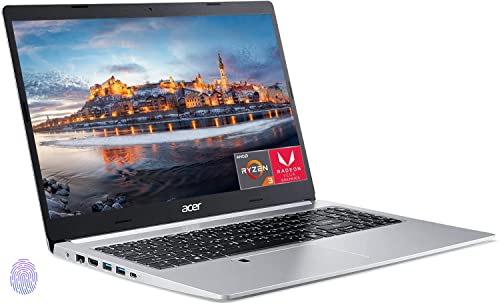
- Best for: Designers who work on detailed layouts and want a 15.6-inch Full HD IPS canvas above all else.
- Display: 15.6-inch Full HD (1920 x 1080) widescreen LED-backlit IPS non-touch per listing
- Design: 82.58% screen-to-body ratio, narrow bezels per listing bullet
- Line: Aspire 5, Acer’s entry-mainstream line per the listing’s positioning
- Processor, memory and storage: not fully captured for this ASIN in the listing record
All 3 Picks at a Glance
| Product | Specs | Action |
|---|---|---|
| Lenovo IdeaPad 1 14″ (Celeron N4020) |
| Check price on Amazon |
| Lenovo IdeaPad 1 14.0 (Pentium Silver N5030) |
| Check price on Amazon |
| Acer Aspire 5 15″ (Ryzen 5 class) |
| Check price on Amazon |
Key takeaways
- Four mainstream laptops for cutting-machine design work, compared on the processor, memory and screen facts their own Amazon listings actually state.
Choosing a laptop for a cutting machine is a decision about a light but fussy workload: design software that lays out cuts on a canvas, a browser beside it, and files moving back and forth all afternoon. The processor and memory figures decide whether that stays smooth, and the screen decides whether the design work is comfortable or squinted at.
No listing below names Cricut or its design software, and this guide will not pretend otherwise. The four laptops were chosen because their Amazon listings state the processor, memory and display facts that this workload class turns on, and the fit is argued from those stated facts only. Where a listing does not state a figure, the entry says so instead of borrowing one from a sibling model.
Quick Picks
As an Amazon Associate we earn from qualifying purchases.
| Product | Best for | Key spec from title |
|---|---|---|
| Lenovo IdeaPad 1 14″ (Celeron N4020) | A dedicated craft-table machine for simple designs, where the laptop’s only job is the design program and a browser. | 14.0″ HD TN anti-glare display, Celeron N4020 |
| Lenovo IdeaPad 1 14.0 (Pentium Silver N5030) | Crafters who want the IdeaPad 1’s size with a quad-core processor and fully stated memory and storage. | 14.0″ HD LED display, 4 GB RAM, 128 GB SSD |
| Acer Aspire 5 15″ (Ryzen 5 class) | Designers who work on detailed layouts and want a 15.6-inch Full HD IPS canvas above all else. | 15.6″ Full HD IPS display, narrow bezels |
| HP 15.6″ Full HD Laptop (Celeron N4120) | Buyers who want a big Full HD screen and every processor, memory and storage figure stated on the listing. | 15.6″ FHD anti-glare display, 4 GB RAM, 128 GB SSD |
How to Choose
Canvas size and resolution shape design work
Design software is a canvas with toolbars around it, and the stated screens here split into two camps: 14.0-inch HD panels at 1366 x 768 and 15.6-inch Full HD panels at 1920 x 1080. The Full HD pair shows more of a design at once and keeps fine cut lines legible; the smaller HD pair suits simpler work and a tighter desk. Both HP and Acer state IPS or LED-backlit anti-glare panels in their own wording, which is the level of display fact worth comparing.
Processor cores are the stated headroom
The processors named in these listings run from a dual-core Celeron N4020 to quad-core Pentium Silver N5030 and Celeron N4120 chips, with burst speeds stated up to 2.8 or 3.10 GHz. Design applications of this class are light, but they share the machine with browsers, file managers and printer or cutter drivers. The quad-core listings state more headroom for that multitasking; the dual-core entry is a single-purpose machine and should be bought as one.
Stated figures beat borrowed figures
Two of these listings state their memory and storage outright: 4 GB of DDR4 and a 128 GB NVMe SSD in both cases. The other two records do not state those figures for their own codes, and sibling listings of the same model names carry different configurations, so borrowing numbers across listings is how buyers end up with the wrong machine. Treat an unstated figure as a live-page check, not as a detail to assume from a same-named laptop.
The S Mode wording deserves one careful minute
Two listings state Windows in S Mode as their operating system. That wording is part of the product being sold, and it governs how software gets installed on the machine. Before choosing either of those picks, check on the live listing and in your own plans how S Mode treats the desktop design software you intend to run, so the laptop’s stated system and your software’s stated requirements agree before the box arrives.
The 4 Best Options
Lenovo IdeaPad 1 14″ (Celeron N4020)
- Best for: A dedicated craft-table machine for simple designs, where the laptop’s only job is the design program and a browser.
- Display: 14.0-inch HD (1366 x 768) TN anti-glare non-touch per listing
- Brightness and colour: 220 nits, 45% NTSC per listing
- Processor: Intel Celeron N4020, 2 cores, up to 2.8 GHz per listing
- Memory and storage: not stated in the captured listing fields for this ASIN
A dedicated craft-table machine for simple designs, where the laptop’s only job is the design program and a browser.
Memory and storage were not captured for this listing: confirm both figures on the live page before ordering, and do not borrow them from other IdeaPad 1 listings.
This IdeaPad 1 is the lightest-stated machine in the group. Its listing states a 14.0-inch HD display at 1366 x 768 on a TN anti-glare non-touch panel, with 220 nits brightness and 45% NTSC colour, and an Intel Celeron N4020 processor with 2 cores running up to 2.8 GHz. That is the entry rung of Lenovo’s IdeaPad 1 line, and it fits the simplest version of this workload: one design program, modest files, a machine that lives beside the craft table. Its listing record does not state memory or storage, which the entry below treats honestly.
Watch out for: Memory and storage were not captured for this listing: confirm both figures on the live page before ordering, and do not borrow them from other IdeaPad 1 listings.
Lenovo IdeaPad 1 14.0 (Pentium Silver N5030)
- Best for: Crafters who want the IdeaPad 1’s size with a quad-core processor and fully stated memory and storage.
- Display: 14.0-inch HD LED anti-glare non-touch per listing
- Processor: Intel Pentium Silver N5030 quad-core, 1.10 GHz, 3.10 GHz burst per listing
- Graphics: Intel UHD Graphics 605 per listing
- Memory: 4 GB onboard DDR4 per listing
Crafters who want the IdeaPad 1’s size with a quad-core processor and fully stated memory and storage.
One summary of this machine mislabels it a Chromebook: the listing states Windows 10 in S Mode, and that stated system is what governs. Check how S Mode fits the desktop software you plan to install.
The second IdeaPad 1 is a different configuration under a different code, and the two must not be merged. This listing states an Intel Pentium Silver N5030 quad-core processor at 1.10 GHz with a 3.10 GHz burst, Intel UHD Graphics 605, 4 GB of onboard DDR4 memory and a 128 GB M.2 NVMe SSD, behind a 14.0-inch HD LED anti-glare non-touch display. Windows 10 in S Mode is the stated operating system, and the listing description claims up to 8 hours of battery. Against its sibling, the quad-core chip and the stated storage are the step up.
Watch out for: One summary of this machine mislabels it a Chromebook: the listing states Windows 10 in S Mode, and that stated system is what governs. Check how S Mode fits the desktop software you plan to install.
Acer Aspire 5 15″ (Ryzen 5 class)
- Best for: Designers who work on detailed layouts and want a 15.6-inch Full HD IPS canvas above all else.
- Display: 15.6-inch Full HD (1920 x 1080) widescreen LED-backlit IPS non-touch per listing
- Design: 82.58% screen-to-body ratio, narrow bezels per listing bullet
- Line: Aspire 5, Acer’s entry-mainstream line per the listing’s positioning
- Processor, memory and storage: not fully captured for this ASIN in the listing record
Designers who work on detailed layouts and want a 15.6-inch Full HD IPS canvas above all else.
Confirm the processor, memory and storage on the live listing before ordering, and be careful at checkout: a near-identical Aspire 5 description circulates under a different code.
The Aspire 5 is the screen-first pick. Its listing states a 15.6-inch Full HD display at 1920 x 1080 on a widescreen LED-backlit IPS non-touch panel, with an 82.58% screen-to-body ratio and narrow bezels, the largest and sharpest canvas in this group for laying out designs. The configuration sits in Acer’s entry-mainstream Aspire 5 line in a Ryzen 5 class. The captured record for this code does not fully state the processor, memory and storage figures, so this entry rests on the display facts and says so plainly.
Watch out for: Confirm the processor, memory and storage on the live listing before ordering, and be careful at checkout: a near-identical Aspire 5 description circulates under a different code.
HP 15.6″ Full HD Laptop (Celeron N4120)
The HP pairs the group’s joint-largest screen with a fully stated specification. Its listing describes a 15.6-inch Full HD anti-glare LED-backlit non-touch display with narrow borders, an Intel Celeron N4120 quad-core processor with 4MB cache running up to 2.8 GHz, 4 GB of DDR4 memory, a 128 GB M.2 PCIe NVMe SSD and Intel UHD Graphics, running Windows 11 in S Mode. For a buyer who wants every core figure on the page before paying, this and the second IdeaPad are the two entries that provide them.
Specs
- Display: 15.6-inch FHD (1920 x 1080) anti-glare LED-backlit non-touch, narrow border per listing
- Processor: Intel Celeron Quad Core N4120, 4MB cache, up to 2.8 GHz per listing
- Memory: 4 GB DDR4 per listing
- Storage: 128 GB M.2 PCIe NVMe SSD per listing
- Graphics: Intel UHD Graphics per listing
- Operating system: Windows 11 in S Mode per listing
Best for: Buyers who want a big Full HD screen and every processor, memory and storage figure stated on the listing.
Watch out for: The listing’s fields contradict each other on keyboard backlighting, so this guide prints no backlight claim for this machine: settle that detail on the live page if it matters to you.
Which One Fits Your Situation
Detailed layouts on the biggest canvas here
Take the Acer Aspire 5: its stated 15.6-inch Full HD IPS panel with narrow bezels and an 82.58% screen-to-body ratio is the largest, sharpest design surface in this group. Fine cut lines stay legible, toolbars stop crowding the canvas, and the wider view means less zooming in and out while a layout is being checked before it is sent to be cut.
A fully stated specification on a craft-room budget line
Take the HP 15.6-inch: its listing states the quad-core processor, 4 GB of memory, the 128 GB SSD and the Full HD anti-glare screen in one place, so nothing about the core specification has to be guessed or borrowed from a sibling. For a buyer who wants the figures on the page before paying, this and the second IdeaPad are the honest entries.
Long unplugged sessions away from a desk
Take the Pentium Silver IdeaPad 1, the only listing here whose description states a battery figure: up to 8 hours. Its quad-core processor and stated memory and storage cover the design workload, and the 14.0-inch size travels between craft table, kitchen counter and club room without the bulk of the 15.6-inch machines, which suits makers who work wherever the project is.
A spare machine that only runs the design program
Take the Celeron N4020 IdeaPad 1, the lightest-stated configuration here, and confirm its memory and storage on the live page before ordering. As a second machine dedicated to one program, its dual-core processor and HD screen are a deliberate economy rather than a compromise, provided the unstated figures check out at the level your design files actually need day to day.
Common Mistakes
- Expecting any laptop listing to name a cutting-machine brand, when the compatibility case rests on stated processor, memory and screen facts instead.
- Merging the two IdeaPad 1 configurations into one machine in your head, when they are separate listings with different processors under different codes.
- Assuming memory and storage figures for the listings that do not state them, borrowing numbers from same-named siblings with different configurations.
- Ignoring the S Mode wording on two of these listings until the machine arrives and the software installation becomes a surprise.
- Ordering the near-identical Aspire 5 listing that circulates under a different code, then finding its configuration is not the one described here.
Frequently Asked Questions
Does any of these listings mention Cricut or its software?
None of them. No captured listing field for any pick names the brand or its design program. The case for each laptop rests on the facts its listing does state (processor, memory where given, and screen) matched against the light desktop design workload this kind of software represents. Judge the fit on those stated facts.
Which laptops state their memory and storage outright?
Two of the four. The Pentium Silver IdeaPad 1 and the HP 15.6-inch each state 4 GB of DDR4 memory and a 128 GB NVMe SSD in their listing fields. The Celeron N4020 IdeaPad 1 and the Aspire 5 records do not fully state those figures for their codes, so confirm them live.
Which screen is best for detailed design work?
The 15.6-inch Full HD panels, on the stated facts: the Acer Aspire 5’s IPS display at 1920 x 1080 with an 82.58% screen-to-body ratio, and the HP’s anti-glare Full HD display. The two 14.0-inch HD panels show less of a design at once and suit simpler layouts.
What does the S Mode wording on two listings mean for me?
It means the operating system, as the listing states it, restricts how software is installed, and it is part of what you are buying. Both the Pentium Silver IdeaPad 1 and the HP state Windows in S Mode. Check that wording against the installation requirements of the design software you plan to use before ordering.
More from Amazon
Programs that pair well with the guide above. Offers and eligibility are set by Amazon and may change.
Free shipping on eligible items, Prime Video and more. Eligible new members can start with a free trial.
Start a Prime free trialAd-free music streaming. Eligible new subscribers can start with a free trial.
Try Music Unlimited freeA Prime membership for ages 18-24 with a trial period. Eligibility is set by Amazon.
See Prime for Young AdultsAudiobooks and podcasts to listen to on the go. Eligible new members can start with a free trial.
Try Audible freeAs an Amazon Associate we earn from qualifying purchases.










Write Your Review
No reviews yet. Be the first to share your experience!