

Key takeaways
- Excellent thermal performance, often several degrees cooler than rivals at equal noise
- VRM fan cools the motherboard power stages, a useful extra
- Offset-friendly mounting, contact frame and a 6-year warranty on Arctic’s spec sheet
The best liquid cooler for a CPU in 2026 is the Arctic Liquid Freezer III Pro 360 for most builders, the DeepCool LT720 when you want a slim 27 mm radiator that fits more cases, and the Thermalright Aqua Elite 360 V3 when you want 360mm cooling for the lowest outlay. For a premium look with a built-in screen, the NZXT Kraken Elite 360 and Corsair iCUE Link Titan 360 RX LCD lead the field. All of them are all-in-one (AIO) units, sealed loops you mount in the case without any plumbing.
Choosing a liquid cooler is less about brand and more about radiator size, thickness, fan quality and case fit. A good 360mm AIO removes heat far more effectively than a mid-range tower air cooler once a processor passes about 200 W, but it also costs more, adds pump noise and brings a small risk of failure that air coolers do not share. This guide explains how to size a loop to your processor, compares seven current models using manufacturer specifications and published reviewer measurements, and lists the ownership realities most buying guides skip.
Our top picks


As an Amazon Associate we earn from qualifying purchases at no extra cost to you.
Quick comparison of the seven picks
| Pick | Best for | Radiator (L x W x thickness) | Fans | Standout spec | Price tier |
|---|---|---|---|---|---|
| Arctic Liquid Freezer III Pro 360 | Best overall | 398 x 120 x 38 mm | 3 x P12 Pro, up to 3000 RPM | Thick radiator, VRM fan, 6-year warranty | Mid-range |
| Arctic Liquid Freezer III Pro 280 | 280mm cases and quiet builds | 317 x 138 x 38 mm | 2 x P14 Pro, 400 to 2500 RPM | 110 CFM fans, VRM fan | Mid-range |
| DeepCool LT720 | Slim radiator, high output | 402 x 120 x 27 mm | 3 x FK120, 500 to 2250 RPM | 3100 RPM pump, about 315 W measured | Mid-range |
| Lian Li Galahad II Trinity Performance 360 | Maximum airflow | 396 x 130 x 32 mm | 3 x 120mm, up to 3000 RPM | 108 CFM, 4200 RPM pump | Upper mid-range |
| NZXT Kraken Elite 360 (2024) | Display and design | 401 x 120 x 27 mm | 3 x 120mm, up to 2400 RPM | 2.72 inch IPS screen, 6-year warranty | Premium |
| Corsair iCUE Link Titan 360 RX LCD | Clean cabling and screen | 360mm class | 3 x 120mm iCUE Link | 2.1 inch 480 x 480 IPS screen | Premium |
| Thermalright Aqua Elite 360 V3 | Budget 360mm | 396 x 120 x 27 mm | 3 x 120mm, up to 1500 RPM | 66 CFM fans, simple design | Budget |
How to choose a liquid cooler for your CPU
Match the radiator size to your processor’s power
Heat output, not model name, sets the radiator you need. A processor drawing up to roughly 125 W is comfortable on a 240mm radiator, and many mid-range chips are even fine on a good air cooler. Between 125 W and 200 W, a 280mm or 360mm radiator keeps temperatures and noise under control. Above 200 W, such as flagship Intel Core chips that reach 250 W or more, a 360mm radiator is the sensible baseline. Reviewers who measure maximum sustainable heat report figures from about 250 W up to about 315 W for the best 360mm units, so a 360mm AIO has headroom for nearly any current desktop processor.
Radiator thickness changes the case-fit math
Most AIOs use a 27 mm radiator, and a few performance-focused models go to 32 mm or 38 mm. Thicker radiators transfer more heat but grow the combined thickness with fans to around 63 mm or more. Many cases support only a 55 mm combined stack at the front, and top mounts often clash with memory or motherboard heatsinks. Look up your case’s radiator clearance in its specification sheet before buying a thick unit.
Fans and pump decide the noise
Fan quality and the pump’s behavior at low load decide how noisy a loop is. Higher airflow fans cool better at full speed but may be loud, while good bearings and a gentle fan curve keep idle noise low. Pumps can add a faint whine at full speed, and the best coolers let you lower pump speed in the BIOS or software. The trade-off with budget coolers is usually the fans: they work well at moderate speeds but cannot match the airflow of premium fans.
Socket and board compatibility
All seven models listed here support the current Intel LGA 1851 and LGA 1700 sockets and AMD AM5, according to the manufacturers’ specification sheets; AM4 support is common but varies by kit, so confirm it if you are on an older Ryzen platform. If you use an older Intel socket, check the mounting kit, because some budget coolers include only recent brackets. Offset mounting kits, which place the pump block over the hotter part of newer AMD chips, are a worthwhile feature if you run an AM5 processor.
Screen, RGB and software
Premium coolers add LCD screens that display temperatures, animations or images. These look striking, but they add cost and require software to run, which some users prefer to avoid. If you do not need a screen, a non-display cooler with addressable lighting or no lighting at all gives the same cooling for less money. Remember that any RGB or display feature needs a header on your motherboard or a bundled controller.
Air cooler or liquid cooler
A top-tier dual-tower air cooler matches a 240mm AIO in many situations, makes no pump noise, and has fewer parts that can fail. Choose liquid when you have a high-power processor, a case with restricted airflow around the socket, or a desire to keep the area around the memory slots clear. Pick air when you want the simplest and most reliable setup.
Best overall: Arctic Liquid Freezer III Pro 360
The Arctic Liquid Freezer III Pro 360 pairs a 398 x 120 x 38 mm radiator with three P12 Pro fans that spin up to 3000 RPM, plus a dedicated fan that cools the motherboard’s power stages. Arctic launched it in September 2025, and the pump runs between 800 and 2800 RPM with 450 mm tubes. Most 2026 roundups pick it as the top 360mm AIO, and Tom’s Hardware reports it handled more than 265 W on a Core i7-14700K and a Ryzen 9 9950X3D.
Who it suits: Anyone who wants the best cooling for the money, particularly owners of high-power Intel Core or Ryzen 9 processors who care about temperatures more than looks.
Pros:
- Excellent thermal performance, often several degrees cooler than rivals at equal noise
- VRM fan cools the motherboard power stages, a useful extra
- Offset-friendly mounting, contact frame and a 6-year warranty on Arctic’s spec sheet
Cons:
- The 38 mm radiator is thick and may not fit smaller cases
- No screen, and the pump can sound louder than some users like at full speed
Best 280mm option: Arctic Liquid Freezer III Pro 280
The 280mm version uses a 317 x 138 x 38 mm radiator and two P14 Pro fans rated at 400 to 2500 RPM, with about 110 CFM of airflow and 5.2 mmH2O of static pressure. It ships with MX-6 thermal paste, supports Intel LGA 1851 and LGA 1700 as well as AMD AM5 and AM4, and weighs about 1.9 kg.
Who it suits: Builders with a case that supports 280mm radiators but not 360mm, and people who prefer the quieter, larger fans of a 140mm design.
Pros:
- Large 140mm fans move plenty of air at lower noise
- Strong cooling for mid-range and many high-end chips
- Same VRM fan and pump quality as the 360mm model
Cons:
- Less headroom than a 360mm unit for the most power-hungry processors
- Thick radiator again tightens case fit
Best slim high-output cooler: DeepCool LT720
The DeepCool LT720 uses a 402 x 120 x 27 mm aluminum radiator, a pump that runs at 3100 RPM, and three FK120 fans rated at 500 to 2250 RPM and 85.85 CFM. DeepCool lists the pump at 19 dB(A), and Tom’s Hardware measured a maximum sustained heat of about 315 W, one of the highest figures among current 360mm coolers. It carries a 5-year warranty.
Who it suits: Builders who want top-tier cooling in a standard-thickness radiator that fits most cases, including tight front mounts.
Pros:
- High thermal capacity in a slim 27 mm radiator
- Strong airflow from the included fans
- Mirror-finish block with addressable lighting
Cons:
- Pump noise can be audible at high speed
- Block design and lighting are a matter of taste
Best for airflow: Lian Li Galahad II Trinity Performance 360
The Lian Li Galahad II Trinity Performance 360 uses a 396 x 130 x 32 mm aluminum radiator with a dense 19 fins-per-inch design. Its three 120mm fans reach 3000 RPM in performance mode, with airflow near 108 CFM and static pressure close to 7 mmH2O, and the pump spins at 4200 RPM. Tom’s Hardware reports a maximum sustained heat above 250 W on a Core i7-13700K, and Lian Li provides a 5-year warranty.
Who it suits: Gamers and overclockers who want strong airflow and a clean, cable-tidy design, and who have a case with room for a 32 mm radiator.
Pros:
- Very high airflow from the included fans
- Daisy-chained fan cabling reduces clutter
- Low-noise mode keeps fans at 2300 RPM for quieter operation
Cons:
- Higher cost than the Arctic and Thermalright options
- Fans become loud at full speed
Best for design and display: NZXT Kraken Elite 360
The NZXT Kraken Elite 360 in its 2024 form combines a 401 x 120 x 27 mm radiator with a Turbine pump running 1,200 to 2,800 RPM, a 2.72 inch 640 x 640 IPS screen, and fans reaching 2400 RPM and 75 CFM. NZXT backs it with a 6-year warranty. Tom’s Hardware measured about 270 W of sustained heat with a Core i7-14700K.
Who it suits: Builders who treat the cooler as a visible centerpiece and want a bright, flexible screen to show temperatures or custom images.
Pros:
- Large, sharp screen with software customization
- Strong cooling for high-power chips
- Long warranty coverage
Cons:
- Costs far more than equally capable plain coolers
- Relies on NZXT software to unlock all features
Best for tidy cabling: Corsair iCUE Link Titan 360 RX LCD
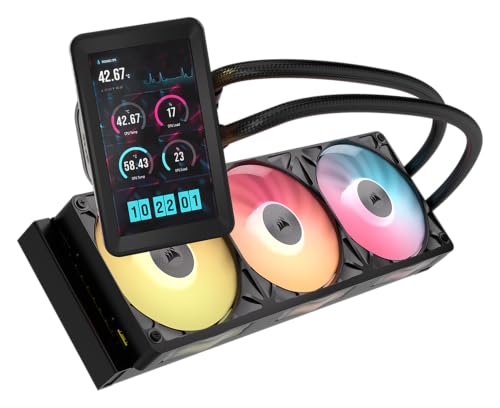
The Corsair iCUE Link Titan 360 RX LCD pairs a 2.1 inch 480 x 480 IPS screen with three 120mm fans on the iCUE Link system, which daisy-chains power and control through a single hub and cuts the cable count behind the board from many wires to one. It supports Intel LGA 1851 and LGA 1700, plus AMD AM5 and AM4, and its pump carries a 6-year warranty.
Who it suits: Owners of Corsair cases and fans who want a unified ecosystem and the cleanest possible cable management.
Pros:
- Single-cable daisy chain simplifies the build
- Bright screen and detailed lighting control
- Well-supported software and long pump warranty
Cons:
- Premium cost and dependence on Corsair’s software
- Benefits are smaller if the rest of the build is not Corsair
Best budget 360mm: Thermalright Aqua Elite 360 V3
The Thermalright Aqua Elite 360 V3 has a 396 x 120 x 27 mm radiator, three 120mm fans that reach 1500 RPM with about 66 CFM, and a pump rated near 3300 RPM at up to 23 dBA. It is the value pick, with addressable lighting and broad socket support including older Intel sockets. Warranty terms vary by seller, so confirm them before buying.
Who it suits: Buyers who want 360mm cooling for a mid-range processor at the lowest possible spend, and who do not need a screen or premium fans.
Pros:
- Lowest cost for a 360mm loop
- Standard 27 mm radiator fits most cases
- Supports a wide range of sockets
Cons:
- Fans move less air than premium models, which limits peak cooling
- Pump and fan noise is more noticeable under heavy load
Decision matrix: which liquid cooler fits your build
| Your situation | Choose | Why |
|---|---|---|
| High-power CPU, case has room | Arctic Liquid Freezer III Pro 360 | Best temperatures per unit of cost |
| Case supports 280mm only | Arctic Liquid Freezer III Pro 280 | Big 140mm fans, strong cooling |
| Tight case, needs 27 mm radiator | DeepCool LT720 | High heat capacity in a slim radiator |
| Wants the most airflow | Lian Li Galahad II Trinity Performance 360 | Fast fans and pump |
| Wants a display and strong design | NZXT Kraken Elite 360 | 2.72 inch screen, 6-year warranty |
| Corsair ecosystem | Corsair iCUE Link Titan 360 RX LCD | Single-cable system |
| Tight budget | Thermalright Aqua Elite 360 V3 | 360mm cooling at low cost |
A worked sizing example
Suppose your processor draws 200 W under a long render, and you want the die temperature to stay at least 20 degrees Celsius below the throttle point. A cooler’s performance is often summarized as thermal resistance, the temperature rise per watt. If an AIO achieves 0.2 degrees per watt at moderate fan speed, then 200 W produces a 40 degree rise above the coolant and room temperature. With a 25 degree room, that puts the die near 65 degrees, which is comfortably below throttling. A cooler with 0.3 degrees per watt would reach 85 degrees under the same load. This is why the best AIO is the one with the lowest thermal resistance at a noise level you can tolerate, not simply the one with the highest peak number on its box.
Ownership realities: lifespan, maintenance and failure
- Pumps and permeation: Sealed loops slowly lose coolant through the tubing over years. Most coolers last five to seven years before performance drops, which is why warranty length of five or six years is a good sign.
- Dust on the radiator: Clear dust from the radiator fins and fan blades every few months using a soft brush or compressed air.
- Mounting orientation: Keep the pump block lower than the top of the radiator when possible, so air collects in the radiator rather than the pump. A top-mounted radiator with tubes at the top is a common compromise that can cause gurgling.
- Thermal paste: Pre-applied paste works well for a first installation. When you remove the block, clean it and apply fresh paste.
- Software dependence: Screen and lighting features need background software. If you dislike that, choose a cooler with a motherboard header only.
- Leak risk: Modern AIOs rarely leak, but a failure can damage components. A reputable brand and a long warranty reduce the risk.
Common mistakes to avoid
The most frequent mistake is buying a large radiator without checking case clearance, which forces a return. Another is plugging the pump into a case-fan header that lowers its voltage or speed, causing poor cooling. A third is mounting the radiator with the pump at the highest point, which traps air and makes the pump noisy. Finally, many owners forget to remove the plastic film from the cold plate before installation, which blocks heat transfer completely. Check the block, apply the mounting pressure evenly, and monitor temperatures during the first stress test.
Frequently Asked Questions
Is a liquid cooler better than an air cooler?
A liquid cooler offers more headroom for processors that draw over 200 W, but a high-end dual-tower air cooler matches a 240mm AIO in many cases and has fewer parts that can fail. Choose liquid for high-power chips or tight socket areas, and air for simplicity and reliability.
What size AIO do I need for my CPU?
Use 240mm for chips up to about 125 W, 280mm or 360mm for 125 to 200 W, and 360mm for anything above. Larger radiators can run fans slower, which lowers noise at the same temperature.
How long does an AIO cooler last?
Most last five to seven years, though the pump and coolant level age differently in each design. Warranty length of five or six years, as offered by Arctic, NZXT and Corsair, reflects the manufacturers’ confidence.
Where should I mount the radiator?
A front mount with the tubes at the side or bottom keeps air out of the pump, and it feeds the radiator cool air. A top mount works well too, provided the pump is not the highest component in the loop.
Do I need a thick radiator?
Not necessarily. A 38 mm radiator, such as Arctic’s, improves cooling but needs more case clearance. A slim 27 mm unit like the DeepCool LT720 reaches very high heat capacity and fits more cases.
Is an AIO with an LCD screen worth it?
The screen does not improve cooling, so it is purely a cosmetic and monitoring feature. If you enjoy a customized build and see the cooler through a glass panel, it can be worth the extra cost. Otherwise a plain cooler gives the same cooling for less.





Write Your Review
No reviews yet. Be the first to share your experience!